Dynamic Config Adapter
Overview
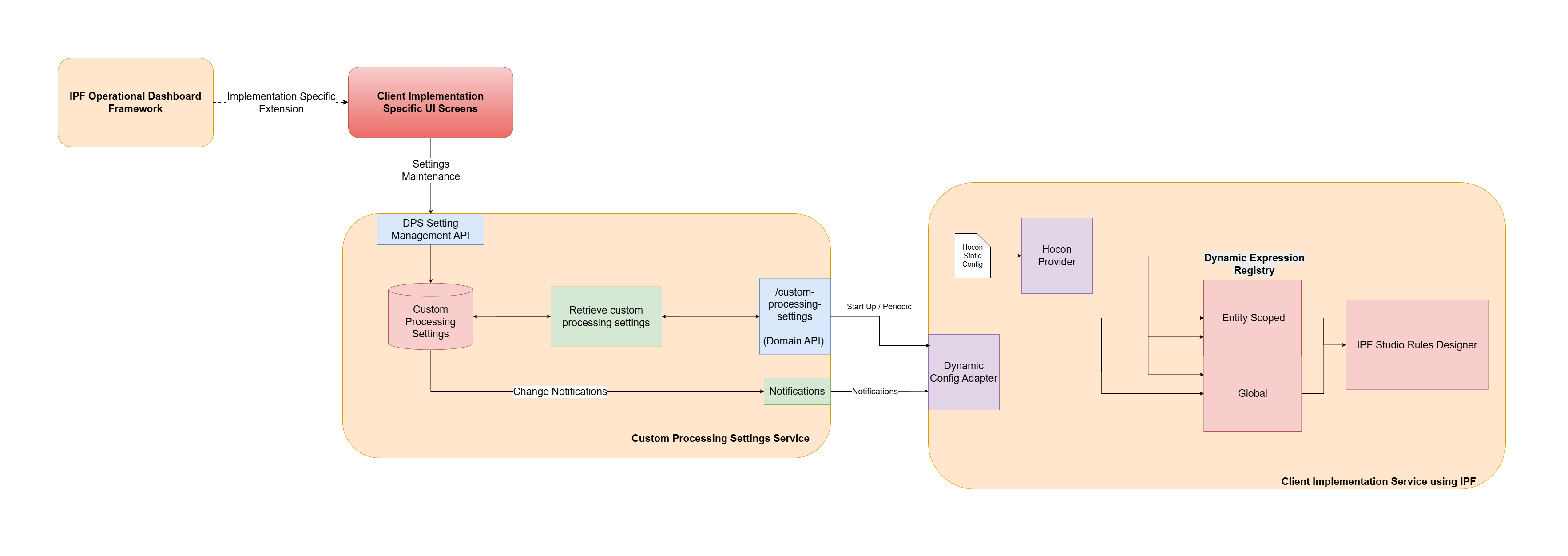
IPF Dynamic config adapter is an IPF library that allows dynamic values to be sourced from a source of dynamic configurations and provide these values to be used during run time by IPF studio dynamic expression registry. Refer to Rules Framework - Dynamic Expressions for more details.
Client implementations can use the `Dynamic config adapter' on an IPF service where they have implemented rules using IPF studio rules designer and wish to manage the variable values dynamically.
- Note
-
-
The dynamic config adapter supports sourcing of the dynamic values from a
Custom Processing Settingsservice only. -
Dynamic config adapter supports simple key value pairs (not complex object values). For data types supported, refer to Custom Processing Settings.
-
Dynamic config adapter is one of the possible sources of values for dynamic variables on the rules designer. Another source is Hocon provider
-
A precedence model is defined that defines which sources take precedence when a variable gets values from more than one sources. Values provided by dynamic config adapter take precedence over values provided by hocon provider. Refer
Default Precedence Levelson Hocon provider.
-
Client implementations must make sure they don’t configure the source of a dynamic variable from multiple providers (e.g. a variable fxEnabled configured on both hocon provider and custom processing settings). The precedence model allows the value from custom processing setting to be used if such values are configured. However, if the custom processing setting value is deleted, the hocon provider value will not be used as fallback during runtime until the service is restarted. Until then, the default value declared on the Dynamic Variable Library is used as fallback value. This is a known issue and will be fixed in future product iterations.
|
To start using IPF Dynamic Config Adapter in your project, see the Getting Started guide for setup instructions and configuration details.
Deployment
To see how to properly configure IPF Dynamic Config Adapter in deployment, please visit DPS Adapter Deployment guide for instructions.