Multiple Applications, One Database
It might be likely that you have to deploy multiple IPF applications which all use the same MongoDB database. This means
that all applications will have the same serviceName despite the fact that they are not supposed to be in a
cluster together. This will result in one mega-cluster being formed which is probably not what you want.
In order to distinguish between types of IPF applications that should join a cluster together, use the service-name
configuration property.
The problem
IPF uses the same base platform for all runtime applications, which are all bootstrapped the same way:
-
Same
ActorSystemnamedipf-flow -
Same Spring
ApplicationContext -
Same configuration override hierarchy
When multiple applications are run in the same environment, all using Akka Cluster Bootstrap with MongoDB as the service
discovery mechanism, they will all end up forming one mega-cluster because they have no service name, and hence
will use the default service name, which is the ActorSystem 's name, which in this case will be ipf-flow universally:
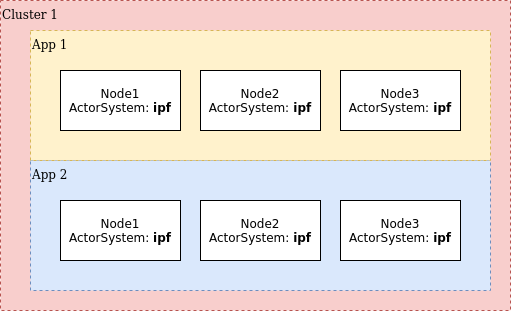
In the image above, all nodes of all apps have joined the same mega-cluster which is not the desired behaviour. What we want is each app to create its own cluster without this crosstalk.
A service name is Akka Cluster Bootstrap’s way of solving this issue, where there are multiple nodes belonging to different clusters and yet sharing the same discovery backend.
To specify a service name, set this configuration to be the same value on all nodes of a specific type. The configuration
key is akka.management.cluster.bootstrap.contact-point-discovery.service-name.
So on all nodes of App 1 we might specify:
akka.management.cluster.bootstrap.contact-point-discovery.service-name = app-1And on App 2 we specify:
akka.management.cluster.bootstrap.contact-point-discovery.service-name = app-2Which will result in this topology:
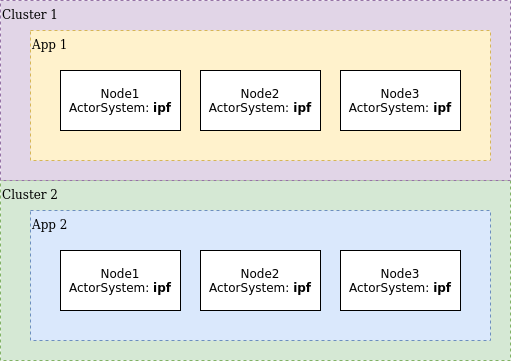
Verify this by going to the Akka Management Cluster HTTP Management’s /cluster/members URL to observe the correct
setup of the clusters.