Data Table
Data tables can be used for storing structured data to be used in other functions. They are similar to a key-value store.
Overview
Data tables can have arbitrary amount of rows and columns. Each row has a unique key. Each column is named and typed.
In the following image is an example of a basic data table:
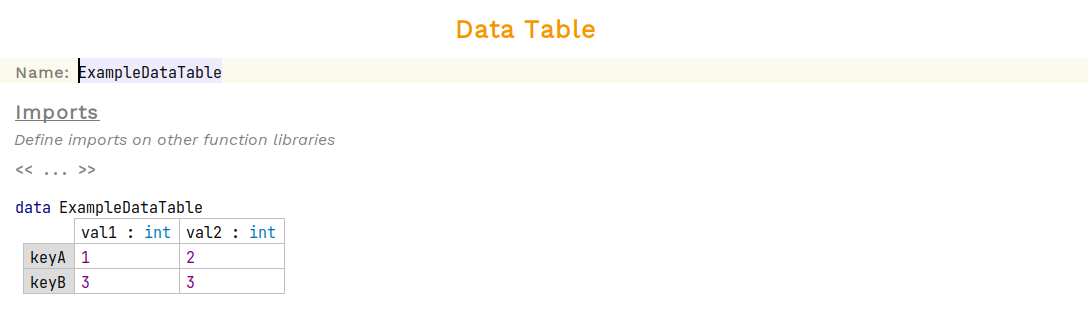
The table stores two columns of data that can store integers, val1 and val2, respectively. Each row has a unique key.
Find by Key
Values stored in each cell of a data table can be accessed by referencing the uniquely named keys defined on the left hand side of the table. The column data can be extracted by referencing the column name.
Below is an example of such an expression:
val result : int = ExampleDataTable.keyA.val2The value of result would be 2.
Find by Lookup
Data tables have an additional feature that allows a user to select a row by matching on the data stored in the table in a specified column.
| If two rows have the same value stored then the first one will be matched when performing a lookup. It is advisable to ensure values are unique in columns used for lookups. |
The image below shows the same data table defined above with lookups enabled:
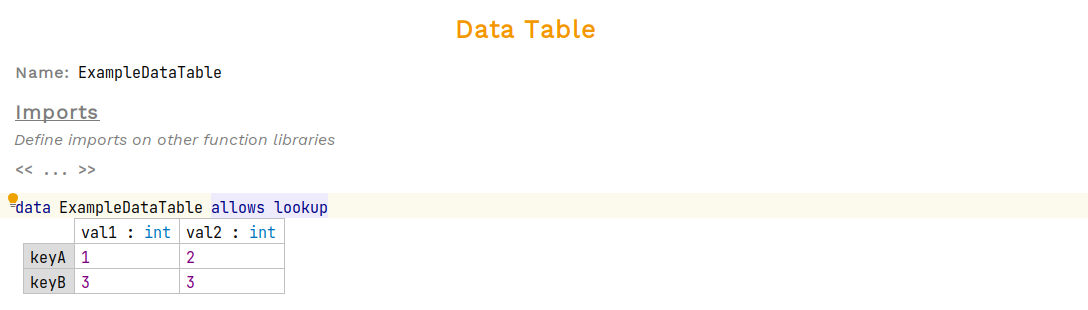
The code snippet below demonstrates how a lookup can be performed on the data table:
val result : int = (ExampleDataTable.lookupBy<val1>(3) ?: ExampleDataTable.keyA).val2This looks more complex than the "Find by Key" example. The reason why is that lookupBy returns an optional of type ExampleDataTable (a row of the table). If the optional is empty, then it defaults to the keyA row.
The above could be rewritten as:
val result : int = (ExampleDataTable.lookupBy<val1>(3)!.val2The ! forces away the optional typing. However, this may result in a null pointer exception when attempting to look up a value that doesn’t exist.