Flo Starter Proyectos
Módulos
ipf-common-starter
Este es el módulo base que proporciona estas capacidades fundamentales. Es utilizado por los otros proyectos iniciales.
-
Sistema de actores Akka y otros subsistemas (por ejemplo, fragmentación de clúster, persistencia)
-
Inicializador de configuración HOCON y Spring. Ver Configuración de la Aplicación IPF. Contribuidores de Spring info para mostrar propiedades de la aplicación en /actuator/info
ipf-write-starter
Proporciona capacidades de escritura para persistir eventos en el tipo de persistencia seleccionado. Además, esto proporciona:
-
BehaviourRetriesSupportpara enviar comandos a Akka Event Comportamiento obtenido de manera confiable -
Grabadores de métricas que proporcionan métricas para Prometheus
-
TransactionCacheServicepara la detección de duplicados funcionales y técnicos. Ver Transacción Caching
ipf-journal-processor-starter
Proporciona capacidades para crear sus propios procesadores de diarios, que son componentes que leen continuamente eventos persistidos y delegan el procesamiento de esos eventos a un configurado.EventProcessor.
Actualmente, solo se admiten dos tecnologías de persistencia por los iniciadores del procesador de registros:
-
Mongo (
ipf-journal-processor-starter-mongo) -
Cassandra (
ipf-journal-processor-starter-cassandra)
Así es como funcionan:
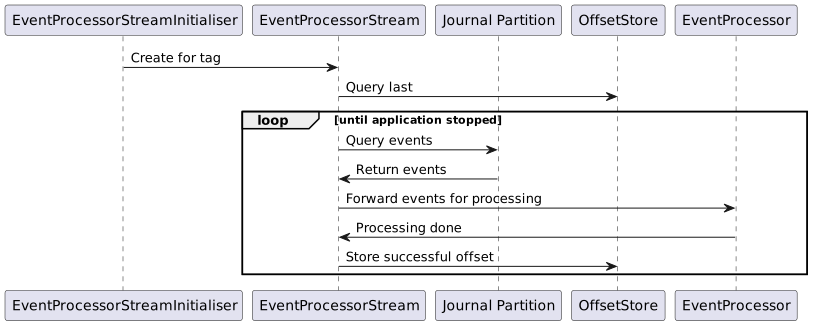
Particionamiento Events
-
Por defecto,domain events producido por el código generado por Flo Lang será etiquetado con un
tag-iyflow-name-itags, donde elirepresenta la partición lógica a la que se ha asignado el flujo. El número de particiones es definido por elipf.behaviour.event-processor.parallelismen el lado de escritura, con un correspondienteevent-processor.number-of-partitionspropiedad de configuración en el lado del procesador de diario.
El número de particiones configurado en el lado de escritura y en el lado del procesador de registros debe coincidir siempre.
El número de configuraciones de particiones nunca debe disminuir en valor, ya que puede llevar a la pérdida de datos y a eventos fuera de orden. Si usted tiene la intención de aumentarlo desde su valor predeterminado, sea conservador en sus modificaciones y asegúrese de que sus servidores de base de datos puedan manejar la carga adicional de consultas. |
-
Puede elegir cómo transmitir sus eventos:
-
por una etiqueta global (por ejemplo,
tag-i), que incluye eventos de todos los flujos; habilitado al configurarevent-streaming-typetoEVENT_STREAM_PER_TAG -
por una etiqueta basada en flujo (por ejemplo,
flow-name-i), que incluye solo eventos que pertenecen a un flujo específico; habilitado al configurarevent-streaming-typetoEVENT_STREAM_PER_FLOW
-
| El streaming mediante una etiqueta global (la predeterminada) utiliza menos recursos, pero no admite implementaciones con actualizaciones continuas. |
Transmisión Events
-
Un procesador de diarios proporciona un
EventProcessorStreamInitialiser, que es un fragmentado Akka actor se utilizaba para iniciar unEventProcessorStreaminstancia por cada partición lógica conocida, representada por una etiqueta de evento. -
An
EventProcessorStreames un componente que utiliza un Registro de lectura de persistencia de Akka para suscribirse y transmitir domain events perteneciente a una etiqueta específica. -
Los eventos se transmiten a un
EventProcessorpara el procesamiento.
Gestión de Compensaciones
-
Antes de que se inicie, un
EventProcessorStreamutiliza unOffsetServicepara determinar la posición — llamada desplazamiento — desde la cual debe comenzar a transmitir eventos. -
start-stream-fromLa propiedad de configuración le permite elegir dónde comenzar cuando no se encuentran desplazamientos por elOffsetService:-
EARLIEST, el valor predeterminado, comenzará a transmitir eventos desde el inicio del diario, recogiendo el evento más antiguo para cada etiqueta. -
LATEST, disponible solo en los complementos de persistencia que soportanTimestampOffset, comienza a transmitir eventos creados después de que se inició el procesador de diarios, ignorando completamente los eventos históricos.
-
-
Una vez procesados, los desplazamientos de eventos se almacenan en búfer y se persisten periódicamente en el
OffsetServicepara que el flujo pueda reanudar el procesamiento desde el último evento conocido que se procesó con éxito en caso de fallo. -
Ver Modelo de Datos de Desplazamiento de Mongo para obtener detalles sobre cómo se almacenan los desplazamientos.
Event Procesadores
-
EventProcessorsson componentes creados por los usuarios deipf-journal-processor-startermódulo que proporciona lógica de negocio para el manejo de eventos.
Para permitir un alto rendimiento en el procesamiento de eventos, los desplazamientos de los eventos procesados con éxito no se almacenan para cada evento, sino que se almacenan en búfer y se persisten periódicamente; por lo tanto, en caso de un fallo en un nodo, los eventos pueden ser reprocesados. Como consecuencia, el `EventProcessor` que usted cree debe estar redactado de tal manera que sea capaz de manejar eventos duplicados. Además, al transmitir eventos por flujo, los eventos que pertenecen a diferentes flujos pero a un solo |
Manejo de Errores
En el caso de que EventProcessor la implementación falla-Configuraciones de resiliencia están en su lugar para manejar la recuperación de mensajes del flujo de eventos. Opcionalmente, se puede implementar una estrategia de carta muerta en caso de fallos en los reintentos.
Appender de cartas muertas
El DeadletterAppender es una interfaz funcional que se llama siempre que un mensaje falla durante el procesamiento del flujo de eventos después de que se han agotado todos los reintentos.
@FunctionalInterface
public interface DeadletterAppender {
    /**
     * Appends the {@link EventProcessorException} to the deadletter queue.
     *
     * @param eventProcessorException contains the failed {@link EventEnvelope message}, {@link PersistenceId id} and the cause of failure
     * @return a {@link CompletableFuture}
     */
    CompletableFuture<Void> append(EventProcessorException eventProcessorException);
}
Proporcionando un DeadletterAppender La implementación es opcional y, si no se proporciona una, el procesador de revistas utilizará la implementación predeterminada. El comportamiento predeterminado es simplemente registrar tanto el mensaje fallido como la excepción que causó el error.
Todos los mensajes fallidos se proporcionarán como una excepción que extiende EventProcessorException. EventProcessorExceptionenvuelve la excepción original como la causa junto con el evento recibido.
ipf-read-starter
Proporciona capacidades para procesar los eventos que fueron leídos de ipf-journal-processor-starter para construir un agregado de dominio.
Ver ReadSideEventProcessor como un ejemplo de un EventProcessor implementación.
Se proporciona un archivo estático /index.html de forma predeterminada para una vista simple de los agregados leídos que han sido procesados con éxito.
Configuración Predeterminada
ipf-common-starter
-
ipf.conf
# Default IPF configuration to allow bootstrapped execution of applications that depend on ipf-common-starter and provide
# core functionalities such metrics, health, ports and cluster set-up.

# Name of the actor system that is required by Akka. There will only be a single actor system per application
actor-system-name = ipf-flow

# The name to be used as a unique identifier of the source of IPF system events
ipf.system-events.source = 0.0.0.0
ipf.system-events.source = ${?akka.remote.artery.canonical.hostname}

ipf.application.name = ${actor-system-name}
spring.application.name = ${ipf.application.name}

# The duration after which the connector event processor will
# check connector health and perform the startup logic
connector.event-processor.keep-alive-interval = 5s

# Default cinnamon to allow for monitoring
cinnamon {
  prometheus.exporters += "http-server"
}

# Exposing Spring management endpoints for further metrics
management {
  endpoint.metrics.enabled = true
  endpoints.web.exposure.include = "health,info,metrics,prometheus"
  endpoint.health.probes.enabled=true
  health.livenessState.enabled=true
  health.readinessState.enabled=true
  endpoint.prometheus.enabled = true
  endpoint.health.show-details = always
  metrics.export.prometheus.enabled = true
}
ipf-journal-processor-starter
-
ipf.conf
# Default IPF journal processor configuration
event-processor {
  # The ID used to create the key for the Entity Type of events.
  # The KeepAlive cluster singleton is also created with the name keepAlive-[id]
  id = EventProcessor

  # Whether to start the processor or not
  enabled = true

  # Cluster role to use to instantiate this event processor
  cluster-role = read-model
  # Maintain backward compatibility with the old configuration
  cluster-role = ${?stream.processor.cluster-role}

  # The interval at which the KeepAlive actor probes itself with a Probe.INSTANCE
  keep-alive-interval = 2 seconds

  # Determines which offset to use if no offsets are found in the offset store:
  # * `EARLIEST` will start from the earliest offset found in the journal
  # * `LATEST` will start from the latest
  start-stream-from = EARLIEST

  # Determines how events are streamed:
  # * `EVENT_STREAM_PER_TAG` will create an event stream per each tag found in the `tag-prefix` list;
  #    domain events belonging to multiple flows can be streamed per tag
  # * `EVENT_STREAM_PER_FLOW` will create an event stream per each flow found in `flows` list
  #    (populated from `ipf.behaviour.event-processor.flows` by default);
  #    only domain events belonging to a single flow will be streamed
  event-streaming-type = EVENT_STREAM_PER_TAG

  # The tag prefix for events generated by the write side.
  # This value must match the `ipf.behaviour.event-processor.tag-prefix` setting
  # used by the write side or else the processor will not be consuming all events.
  tag-prefix = ["tag"]

  # Ensure configurations match if journal processor is running on the write side
  tag-prefix = ${?ipf.behaviour.event-processor.tag-prefix}

  # The flows to use when `event-streaming-type` is set to `EVENT_STREAM_PER_FLOW`.
  # Should not be overridden by users, a warning will be printed by `akka-diagnostics`
  # if the users try to provide their own lists.
  flows = []
  flows = ${?ipf.behaviour.event-processor.flows}

  # The number of partitions configured for our event journal.
  # Each partition will be processed in parallel by a dedicated Akka stream.
  # This value must match the `ipf.behaviour.event-processor.parallelism` setting
  # used by the write side - in case the value is lower than `parallelism` the processor
  # will not be consuming all events, and if the value is higher, the processor will
  # not balance the work between the nodes equally.
  number-of-partitions = 4

  # Maintaining backward compatibility with previous configuration setting.
  number-of-partitions = ${?event-processor.parallelism}

  # Ensure configurations match if journal processor is running on the write side
  number-of-partitions = ${?ipf.behaviour.event-processor.parallelism}

  # The number of events to demand per partition from upstream, and process in parallel
  processing-parallelism = 1

  # Backward compatibility for the deprecated upstream-event-demand config.
  processing-parallelism = ${?event-processor.upstream-event-demand}

  # How many events belonging to a particular entity to process in parallel.
  # Should only be set to a value higher than 1 if the configured EventProcessor
  # can safely handle out of order events.
  processing-parallelism-per-entity = 1

  restart-settings {
    # The starting backoff interval to use when restarting event processor streams.
    min-backoff = 500 millis

    # The starting backoff interval to use when restarting event processor streams.
    max-backoff = 20 seconds

    # Maintaining backward compatibility with previous configuration.
    max-backoff = ${?event-processor.backoff}

    # The amount of restarts is capped within a timeframe of max-restarts-within.
    max-restarts = 86400000

    # The amount of restarts is capped to max-restarts within a timeframe of within.
    max-restarts-within = 1 days

    # The starting backoff interval to use when restarting event processor streams.
    jitter = 0.1
  }

  # To improve throughput, offsets of successfully processed events are
  # not checkpointed for each event but are grouped together in
  # size and time based windows and the last event offset in a window
  # is used as a checkpoint.
  # The window is considered complete when either it is filled by `size`
  # offsets or the `timeout` interval has elapsed.
  commit-offset-window {
    # The size of the window.
    size = 1000

    # The amount of time to wait for `size` events to complete.
    timeout = 1 minute
  }

  # Requests to EventProcessor implementations will be retried on exception based on the below config
  # Once retries have been exhausted the event will get sent to a dead letter appender
  resiliency-settings {
    # Max number of attempts to retry EventProcessor in case of failure
    max-attempts = 3
    # Retry wait period between retries
    initial-retry-wait-duration = 1s
    # Backoff multiplier between retires
    backoff-multiplier = 2
    # Thread pool size for retries executor service
    retry-scheduler-thread-pool-size = 1
    # In the case of the dead letter itself failing we have more recovery options to try:
    # * COMMIT - Commit the offset
    # * NO_COMMIT - Do not commit the offset and retry the event
    deadletter-failure-strategy = NO_COMMIT
  }
}
ipf-write-starter
-
ipf.conf
# Default IPF write side configuration

# Toggles model validation of generated ModelOperations
ipf.validators.model.enabled = true

# Declaring ipf_version_selection context key as propagated to ensure it is added
# to the current propagated context if encountered as a transport header
ipf.context-propagation.propagated-supporting-context-keys += ipf_version_selection

# The configuration block related to version selection in IPF flows
ipf.behaviour.version-selection {

  # Toggles the IPF-default version selection support
  enabled = true

  # Determines which of the two IPF-default types of route store is to be used for version selection=
  # * hocon, which is easy to set up but cannot be changed through the API
  # * ddata, which requires a persistent volume to be mounted in order not to lose data between full cluster restarts
  # Defaults to hocon store type
  route-store-type = hocon

  # The global flow routing configuration to use when DData store is disabled or empty
  global-rules = [{
    # The defaults use the propagated `ipf_version_selection` key to drive version selection
    key-name = ipf_version_selection
    version-rules = [{
      active-from = "1970-01-01T00:00:00.00Z"
      # The default rules only allow you to pick the oldest or latest versions of flows
      values-to-versions {
        OLDEST = OLDEST
        LATEST = LATEST
        STABLE = OLDEST
        CANARY = LATEST
      }
    }]
  }]

  # The per-flow routing configuration to use when DData store is disabled or empty
  per-flow-rules {
    # Example structure your per-flow rule configuration should take:
    #"Flow" = {
    #  key-name = ipf_version_selection
    #  version-rules = [{
    #   active-from = "1970-01-01T00:00:00.00Z"
    #    # The default rules only allow you to pick the oldest or latest versions of flows
    #    values-to-versions {
    #      VALUE1 = V1
    #      VALUE2 = V2
    #    }
    #  }]
    #}
  }

  # Configures DData-specific settings
  ddata {
    # How long to wait for DData read and write operations to propagate to other nodes
    replicator-timeout = 3s

    # Retry settings used by the rules store when communicating with the replicator actor
    retry-settings {
      initial-timeout = 5s
      backoff-factor = 2
      jitter-factor = 0.2
      max-attempts = 3
    }
  }
}

# cluster settings
akka.cluster {
  # Routing rules used by DDataFlowRouteReplicator will be durable by default
  #
  distributed-data.durable.keys += "flow-routing-rules"

  # Identifies that this node is on the write side when the cluster endpoint is invoked.
  roles += write-model

  seed-nodes = ["akka://"${actor-system-name}"@0.0.0.0:"${akka.remote.artery.canonical.port}]

  # sharding settings
  sharding {
    remember-entities = on
    remember-entities-store = eventsourced

    handoff-timeout = 8s
    least-shard-allocation-strategy.rebalance-absolute-limit = 20
    rebalance-interval = 2s
  }
}

# Providing cinnamon metrics by default for all persistent entities
cinnamon {
  akka.persistence.entities {
    "sharded:?" {
      report-by = group
      command-type = on
      event-type = on
    }
  }
}