Flo Starter Projects
Modules
ipf-common-starter
This is the base module that provides these foundational capabilities. It is used by the other starter projects.
-
Akka actor system and other sub-systems (e.g. cluster sharding, persistence)
-
HOCON and Spring configuration initialiser. See IPF Application Configuration. Spring info contributors to display application properties on /actuator/info
ipf-write-starter
Provides write capabilities for persisting events to the selected persistence type. Additionally, this provides:
-
BehaviourRetriesSupportfor sending commands to Akka Event Sourced Behaviour in a reliable way -
Metrics recorders that provide metrics for Prometheus
-
TransactionCacheServicefor detecting functional and technical duplicate checking. See Transaction Caching
ipf-journal-processor-starter
Provides capabilities for creating your own journal processors, which are components that continuously read persisted events and delegate the processing of those events to a configured EventProcessor.
Currently, only two persistence technologies are supported by journal processor starters:
-
Mongo (
ipf-journal-processor-starter-mongo) -
Cassandra (
ipf-journal-processor-starter-cassandra)
Here’s how they work:
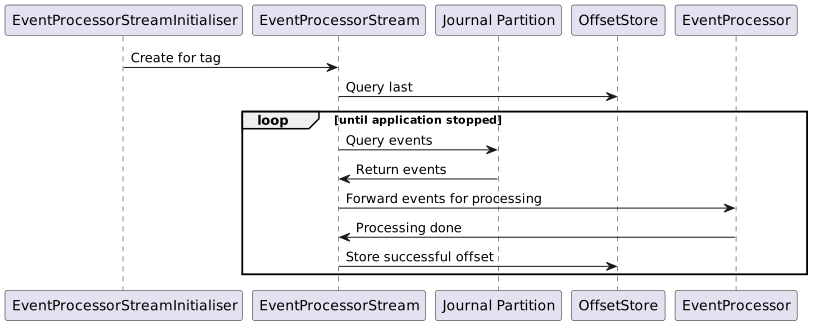
Partitioning Events
-
By default, domain events produced by Flo Lang-generated code will be tagged with a
tag-iandflow-name-itags, where theirepresents the logical partition that the flow has been assigned to. The number of partitions is defined by theipf.behaviour.event-processor.parallelismon the write side, with a correspondingevent-processor.number-of-partitionsconfiguration property on the journal processor side.
|
The number of partitions setting on the write side and journal processor side should always match.
The number of partitions setting should also never decrease in value as it can lead to data loss and out of order events. If you intend to increase it from its default value, be conservative in your modifications and ensure your database servers can handle the additional query load. |
-
You can choose how to stream your events:
-
by a global tag (e.g.
tag-i), which includes events from all the flows; enabled by settingevent-streaming-typetoEVENT_STREAM_PER_TAG -
by a flow-based tag (e.g.
flow-name-i), which includes only events belonging to a specific flow; enabled by settingevent-streaming-typetoEVENT_STREAM_PER_FLOW
-
| Streaming by a global tag (the default) uses fewer resources but does not support deployments with rolling upgrades. |
Streaming Events
-
A journal processor provides an
EventProcessorStreamInitialiser, which is a sharded Akka actor used to start anEventProcessorStreaminstance per each known logical partition, represented by an event tag. -
An
EventProcessorStreamis a component that uses an Akka persistence read journal to subscribe and stream domain events belonging to a specific tag. -
The events are passed along to an
EventProcessorfor processing.
Offset Management
-
Before it is started, an
EventProcessorStreamuses anOffsetServiceto determine the position — called offset — from which to start streaming events. -
start-stream-fromconfiguration property lets you choose where to start when no offsets are found by theOffsetService:-
EARLIEST, the default, will start streaming events from the beginning of the journal, picking up the earliest event for each tag. -
LATEST, available only on persistence plugins which supportTimestampOffset, starts streaming events created after the journal processor was started, completely ignoring historical events.
-
-
Once processed, the event offsets are buffered and periodically persisted into the
OffsetServiceso that the stream can resume processing from the last known successfully processed event in case of failure. -
See Mongo Offset Data Model for details on how the offsets are stored.
Event Processors
-
EventProcessorsare components created by the users ofipf-journal-processor-startermodule that provide event-handling business logic.
|
To allow for a high event processing throughput, offsets of successfully processed events aren’t stored for every event but are buffered and persisted periodically, therefore in case of a node crash events may be reprocessed. As a consequence, the Additionally, when streaming events per flow, events belonging to different flows but to a single |
Error Handling
In the case the EventProcessor implementation fails - Resiliency Settings are in place to handle recovery of messages from the event stream. Optionally a dead letter strategy can be implemented in the case of retry failures.
Deadletter Appender
The DeadletterAppender is a functional interface which is called whenever a message fails during processing of the event stream after all retries have been exhausted.
@FunctionalInterface
public interface DeadletterAppender {
    /**
     * Appends the {@link EventProcessorException} to the deadletter queue.
     *
     * @param eventProcessorException contains the failed {@link EventEnvelope message}, {@link PersistenceId id} and the cause of failure
     * @return a {@link CompletableFuture}
     */
    CompletableFuture<Void> append(EventProcessorException eventProcessorException);
}
Providing a DeadletterAppender implementation is optional and if one is not provided the journal processor will use the default implementation. The default behaviour is to simply log both the failed message and the exception that caused the error.
All failed messages will be provided as an exception that extends EventProcessorException. EventProcessorException wraps the original exception as the cause alongside the received event.
ipf-read-starter
Provides capabilities to process the events that were read from ipf-journal-processor-starter to construct a domain aggregate.
See ReadSideEventProcessor as an example of an EventProcessor implementation.
A static /index.html is provided out of the box for a simple view of the read aggregates that have been successfully processed.
Default Configuration
ipf-common-starter
# Default IPF configuration to allow bootstrapped execution of applications that depend on ipf-common-starter and provide
# core functionalities such metrics, health, ports and cluster set-up.

# Name of the actor system that is required by Akka. There will only be a single actor system per application
actor-system-name = ipf-flow

# The name to be used as a unique identifier of the source of IPF system events
ipf.system-events.source = 0.0.0.0
ipf.system-events.source = ${?akka.remote.artery.canonical.hostname}

ipf.application.name = ${actor-system-name}
spring.application.name = ${ipf.application.name}

# The duration after which the connector event processor will
# check connector health and perform the startup logic
connector.event-processor.keep-alive-interval = 5s

# Default cinnamon to allow for monitoring
cinnamon {
  prometheus.exporters += "http-server"
}

# Exposing Spring management endpoints for further metrics
management {
  endpoint.metrics.enabled = true
  endpoints.web.exposure.include = "health,info,metrics,prometheus"
  endpoint.health.probes.enabled=true
  health.livenessState.enabled=true
  health.readinessState.enabled=true
  endpoint.prometheus.enabled = true
  endpoint.health.show-details = always
  metrics.export.prometheus.enabled = true
}
ipf-journal-processor-starter
# Default IPF journal processor configuration
event-processor {
  # The ID used to create the key for the Entity Type of events.
  # The KeepAlive cluster singleton is also created with the name keepAlive-[id]
  id = EventProcessor

  # Whether to start the processor or not
  enabled = true

  # Cluster role to use to instantiate this event processor
  cluster-role = read-model
  # Maintain backward compatibility with the old configuration
  cluster-role = ${?stream.processor.cluster-role}

  # The interval at which the KeepAlive actor probes itself with a Probe.INSTANCE
  keep-alive-interval = 2 seconds

  # Determines which offset to use if no offsets are found in the offset store:
  # * `EARLIEST` will start from the earliest offset found in the journal
  # * `LATEST` will start from the latest
  start-stream-from = EARLIEST

  # Determines how events are streamed:
  # * `EVENT_STREAM_PER_TAG` will create an event stream per each tag found in the `tag-prefix` list;
  #    domain events belonging to multiple flows can be streamed per tag
  # * `EVENT_STREAM_PER_FLOW` will create an event stream per each flow found in `flows` list
  #    (populated from `ipf.behaviour.event-processor.flows` by default);
  #    only domain events belonging to a single flow will be streamed
  event-streaming-type = EVENT_STREAM_PER_TAG

  # The tag prefix for events generated by the write side.
  # This value must match the `ipf.behaviour.event-processor.tag-prefix` setting
  # used by the write side or else the processor will not be consuming all events.
  tag-prefix = ["tag"]

  # Ensure configurations match if journal processor is running on the write side
  tag-prefix = ${?ipf.behaviour.event-processor.tag-prefix}

  # The flows to use when `event-streaming-type` is set to `EVENT_STREAM_PER_FLOW`.
  # Should not be overridden by users, a warning will be printed by `akka-diagnostics`
  # if the users try to provide their own lists.
  flows = []
  flows = ${?ipf.behaviour.event-processor.flows}

  # The number of partitions configured for our event journal.
  # Each partition will be processed in parallel by a dedicated Akka stream.
  # This value must match the `ipf.behaviour.event-processor.parallelism` setting
  # used by the write side - in case the value is lower than `parallelism` the processor
  # will not be consuming all events, and if the value is higher, the processor will
  # not balance the work between the nodes equally.
  number-of-partitions = 4

  # Maintaining backward compatibility with previous configuration setting.
  number-of-partitions = ${?event-processor.parallelism}

  # Ensure configurations match if journal processor is running on the write side
  number-of-partitions = ${?ipf.behaviour.event-processor.parallelism}

  # The number of events to demand per partition from upstream, and process in parallel
  processing-parallelism = 1

  # Backward compatibility for the deprecated upstream-event-demand config.
  processing-parallelism = ${?event-processor.upstream-event-demand}

  # How many events belonging to a particular entity to process in parallel.
  # Should only be set to a value higher than 1 if the configured EventProcessor
  # can safely handle out of order events.
  processing-parallelism-per-entity = 1

  restart-settings {
    # The starting backoff interval to use when restarting event processor streams.
    min-backoff = 500 millis

    # The starting backoff interval to use when restarting event processor streams.
    max-backoff = 20 seconds

    # Maintaining backward compatibility with previous configuration.
    max-backoff = ${?event-processor.backoff}

    # The amount of restarts is capped within a timeframe of max-restarts-within.
    max-restarts = 86400000

    # The amount of restarts is capped to max-restarts within a timeframe of within.
    max-restarts-within = 1 days

    # The starting backoff interval to use when restarting event processor streams.
    jitter = 0.1
  }

  # To improve throughput, offsets of successfully processed events are
  # not checkpointed for each event but are grouped together in
  # size and time based windows and the last event offset in a window
  # is used as a checkpoint.
  # The window is considered complete when either it is filled by `size`
  # offsets or the `timeout` interval has elapsed.
  commit-offset-window {
    # The size of the window.
    size = 1000

    # The amount of time to wait for `size` events to complete.
    timeout = 1 minute
  }

  # Requests to EventProcessor implementations will be retried on exception based on the below config
  # Once retries have been exhausted the event will get sent to a dead letter appender
  resiliency-settings {
    # Max number of attempts to retry EventProcessor in case of failure
    max-attempts = 3
    # Retry wait period between retries
    initial-retry-wait-duration = 1s
    # Backoff multiplier between retires
    backoff-multiplier = 2
    # Thread pool size for retries executor service
    retry-scheduler-thread-pool-size = 1
    # In the case of the dead letter itself failing we have more recovery options to try:
    # * COMMIT - Commit the offset
    # * NO_COMMIT - Do not commit the offset and retry the event
    deadletter-failure-strategy = NO_COMMIT
  }
}
ipf-write-starter
# Default IPF write side configuration

# Toggles model validation of generated ModelOperations
ipf.validators.model.enabled = true

# Declaring ipf_version_selection context key as propagated to ensure it is added
# to the current propagated context if encountered as a transport header
ipf.context-propagation.propagated-supporting-context-keys += ipf_version_selection

# The configuration block related to version selection in IPF flows
ipf.behaviour.version-selection {

  # Toggles the IPF-default version selection support
  enabled = true

  # Determines which of the two IPF-default types of route store is to be used for version selection=
  # * hocon, which is easy to set up but cannot be changed through the API
  # * ddata, which requires a persistent volume to be mounted in order not to lose data between full cluster restarts
  # Defaults to hocon store type
  route-store-type = hocon

  # The global flow routing configuration to use when DData store is disabled or empty
  global-rules = [{
    # The defaults use the propagated `ipf_version_selection` key to drive version selection
    key-name = ipf_version_selection
    version-rules = [{
      active-from = "1970-01-01T00:00:00.00Z"
      # The default rules only allow you to pick the oldest or latest versions of flows
      values-to-versions {
        OLDEST = OLDEST
        LATEST = LATEST
        STABLE = OLDEST
        CANARY = LATEST
      }
    }]
  }]

  # The per-flow routing configuration to use when DData store is disabled or empty
  per-flow-rules {
    # Example structure your per-flow rule configuration should take:
    #"Flow" = {
    #  key-name = ipf_version_selection
    #  version-rules = [{
    #   active-from = "1970-01-01T00:00:00.00Z"
    #    # The default rules only allow you to pick the oldest or latest versions of flows
    #    values-to-versions {
    #      VALUE1 = V1
    #      VALUE2 = V2
    #    }
    #  }]
    #}
  }

  # Configures DData-specific settings
  ddata {
    # How long to wait for DData read and write operations to propagate to other nodes
    replicator-timeout = 3s

    # Retry settings used by the rules store when communicating with the replicator actor
    retry-settings {
      initial-timeout = 5s
      backoff-factor = 2
      jitter-factor = 0.2
      max-attempts = 3
    }
  }
}

# cluster settings
akka.cluster {
  # Routing rules used by DDataFlowRouteReplicator will be durable by default
  #
  distributed-data.durable.keys += "flow-routing-rules"

  # Identifies that this node is on the write side when the cluster endpoint is invoked.
  roles += write-model

  seed-nodes = ["akka://"${actor-system-name}"@0.0.0.0:"${akka.remote.artery.canonical.port}]

  # sharding settings
  sharding {
    remember-entities = on
    remember-entities-store = eventsourced

    handoff-timeout = 8s
    least-shard-allocation-strategy.rebalance-absolute-limit = 20
    rebalance-interval = 2s
  }
}

# Providing cinnamon metrics by default for all persistent entities
cinnamon {
  akka.persistence.entities {
    "sharded:?" {
      report-by = group
      command-type = on
      event-type = on
    }
  }
}