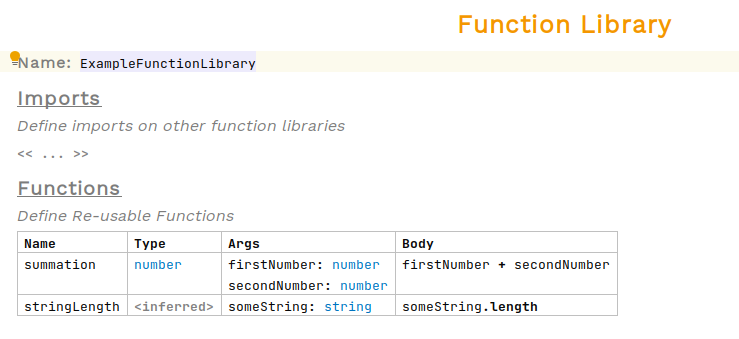
Creando una Biblioteca de Funciones
La siguiente guía de cómo hacerlo le guiará a través de los pasos necesarios para crear una biblioteca de funciones utilizando el Diseñador de Reglas en el Lenguaje Simple. El ejemplo mostrado es bastante trivial; sin embargo, se pueden definir funciones mucho más complicadas de manera muy similar.
Requisitos previos
-
MPS (versión 2022.3.1)
-
Un modelo que utiliza el
com.iconsolutions.simple.devkit, o un kit de desarrollo que lo utilice (por ejemplo,v2Flo.devkit)
Pasos
1. Crear Nodo de Biblioteca de Funciones
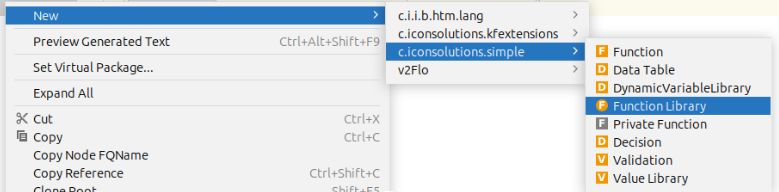
Para agregar una función a un modelo, diríjase a la Logical View ventana en el lado izquierdo de MPS y haga clic derecho en el modelo donde se requiere la biblioteca de funciones. Luego navegue a New > com.iconsolutions.simple > Function Library.
Debería verse como la imagen a continuación:
2. Nombre de la Biblioteca de Funciones
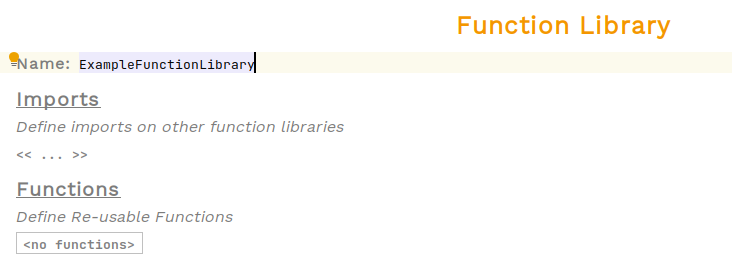
Se debe haber creado ahora una biblioteca de funciones no implementada. Todas las bibliotecas de funciones necesitan un nombre para que puedan ser referenciadas en otros lugares. Coloque el cursor en la celda roja que dice <no name> a la derecha de Name: y escriba el nombre de la función.
En el ejemplo a continuación, el nombre se establece en ExampleFunctionLibrary:
3. Defina Funciones
Se puede definir cualquier número de funciones dentro de una biblioteca. Para agregar una nueva función, seleccione la casilla o el nombre de una función existente y presione enter.
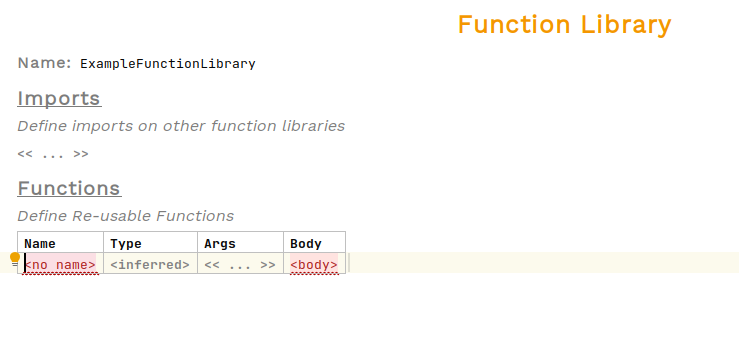
Las funciones definidas en esta tabla son muy similares a funciones privadas.
La columna de tipo es para el tipo del resultado de la función. Esto puede inferirse dejándola en blanco, aunque se recomienda indicar explícitamente el tipo.
La columna args contiene las entradas de la función. Para agregar más argumentos, presione enter mientras esté dentro de la celda. Cada argumento tiene un nombre y un tipo. Primero escriba el nombre de la entrada, luego presione : seguido por enter. Ahora para elegir un tipo de prensa Ctrl+Space para ver la lista de opciones.
La columna del cuerpo contiene una expresión que representa la función.