RD 1 - Create a Validation
What is a Validation?
In the rules designer a validation is a process that checks a specific piece of business data meets a set of criteria. You can consider them to be a specialised Domain Function for validating a message. More details about rules designer validations can be found here
Objective
We want to validate a canonical Pacs008 against a set of rules, accepting if it is valid, and rejecting otherwise.
DSL Set Up
|
To see a completed example of this step, open the |
Creating the Validation
First, let’s create a new Validation node in our model. Right-click on the model, then select
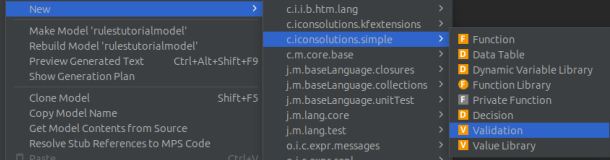
Give the Validation a name, in this example we use "ValidatePacs008"
Fill in the validation’s input with a name and class, for the Pacs008 this is FIToFiCustomerCreditTransferV08.
|
Notice how an import was added at the top and a set of nodes were created under the _links package. These are links between the Java and the KernelF records and will enable type safety within the simple language. |
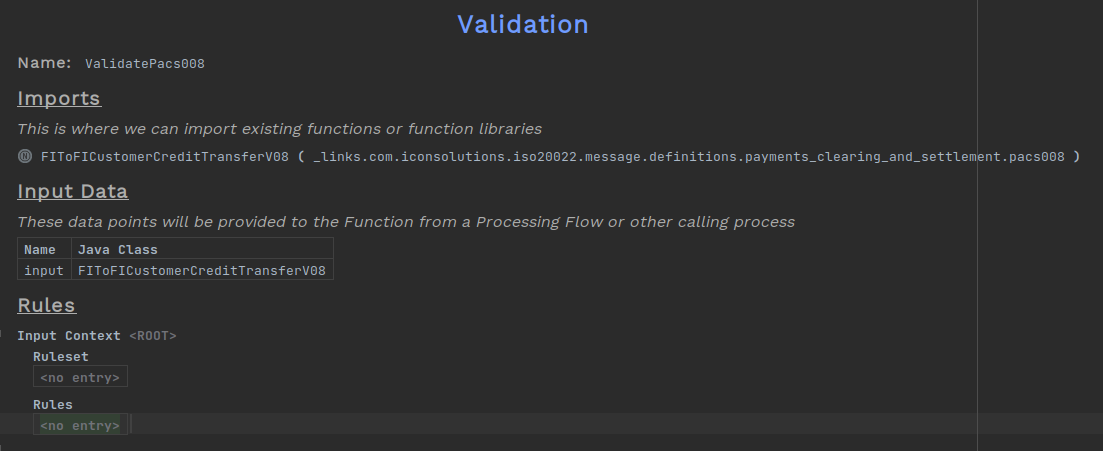
Now we need to define the validation’s body. Under "Rules" add an entry for each rule. Rules are made up of two parts; A condition and the rule body. The condition determines when the rule will be applied and can be:
-
An expression
-
Conditional on a previous rule
-
The value
<always>if left blank.
Here we have defined three rules:
-
If the group header contains an instructed agent, then the body shouldn’t also contain one.
-
The number of transactions in the group header should always be "1"
-
If the second rule holds, then there should be only one transaction
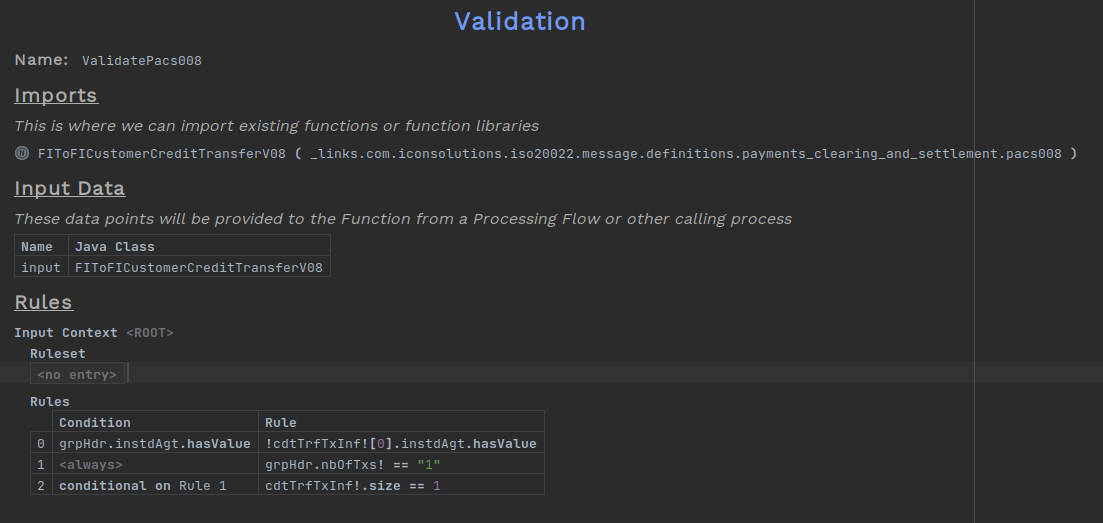
The rules are written as KernelF expressions, for more information about using expressions click here
Now that the validation has been created, we need to add it to the flow.
Set Up Business Data
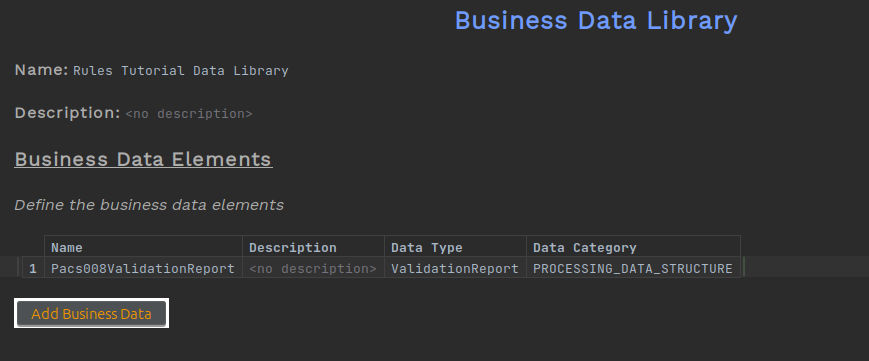
To start, we will need a new business data object to hold the result of the validation. Create a business data library and add a new entry for the validation report.
Choose a name and set the Data Type to ValidationReport and Data Category as PROCESSING_DATA_STRUCTURE (PDS).
|
If the class 
|
Adding to the Flow
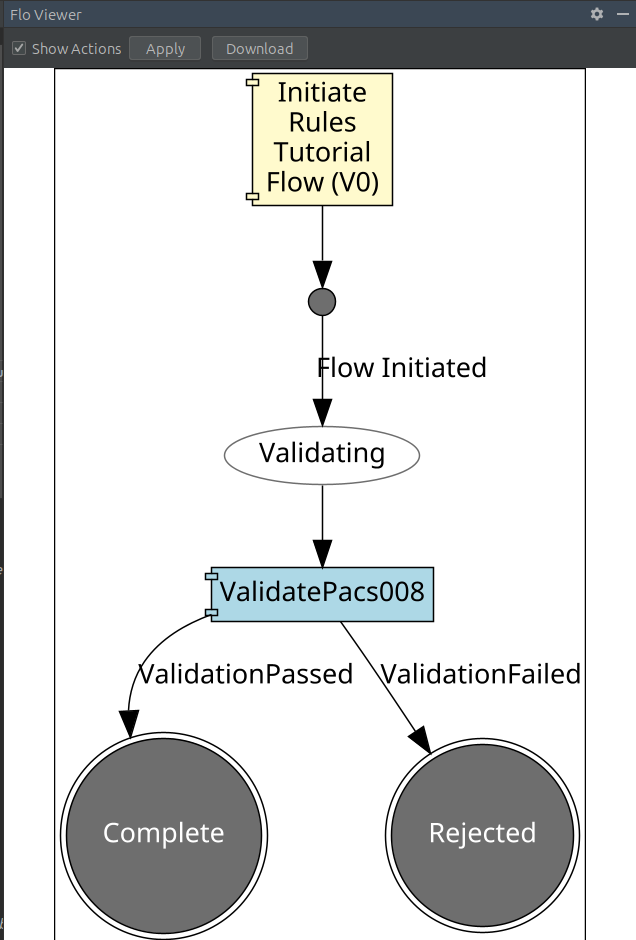
Now we can make the required changes within the flow. Make three states Validating, Complete and Rejected.
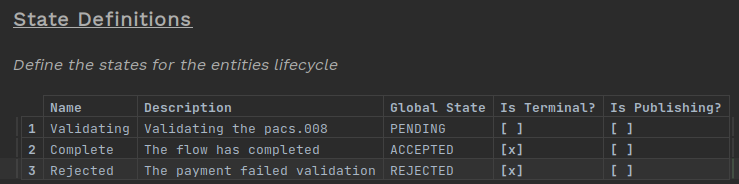
Create two events; one for if the validation passes and another for if it fails. Each with the validation report as business data.
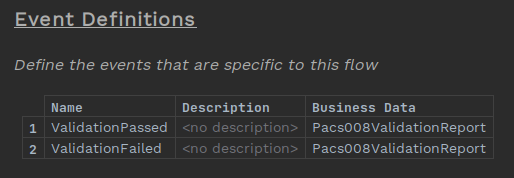
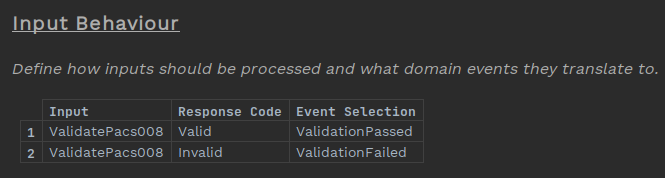
Now add two input behaviours to link the validation response to the events.
Finally, we set the behaviours. Within the "Perform" cell, choose "Perform Action" and select the validation.
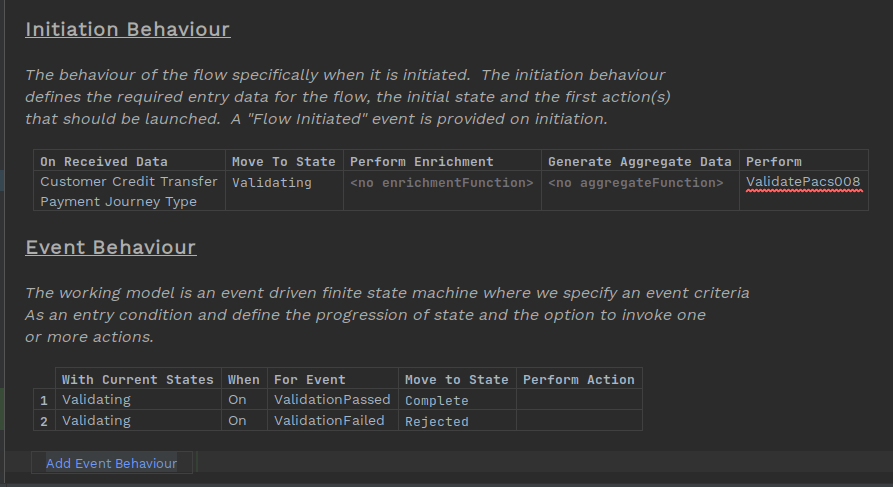
The validation will require input and output business data which must be added through the inspector.
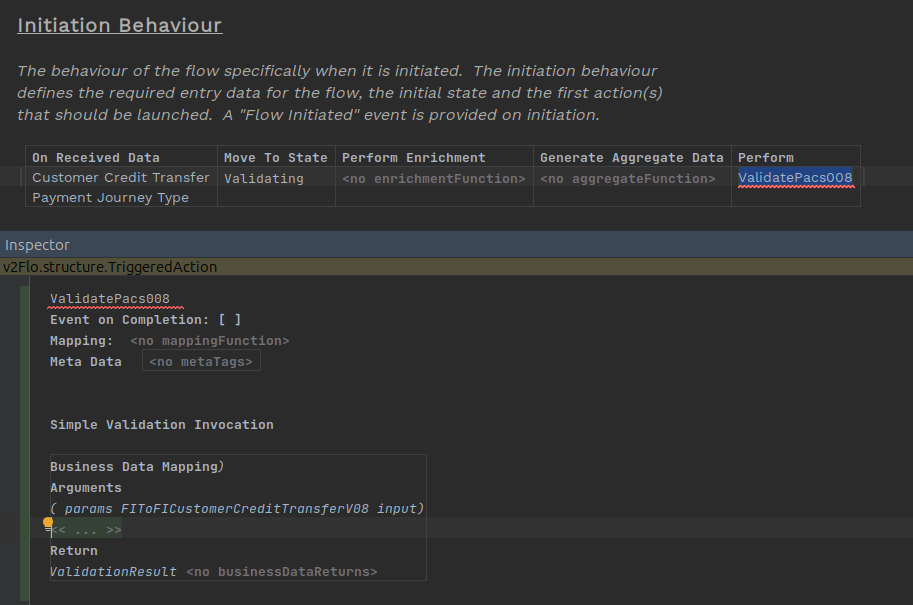
|
The inspector can provide further details and options for components of a flow. To open the inspector press |
Fill in the business data of the input and output of the validation. In this case the input is "Customer Credit Transfer" and the output is the validation report.
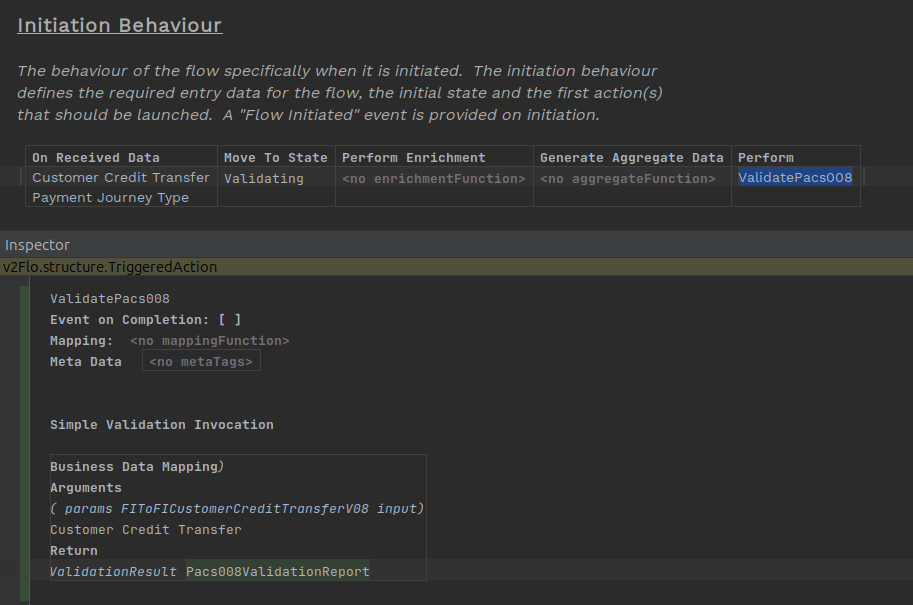
The flow should now be ready, open the flow viewer (Tools > Open Flow Viewer) to see the new diagram.
Testing
We will also show the application working with the changes made for each step. These sections are targeted towards engineers and won’t be relevant for all users. To go directly to the next step RD 2 - Create a Decision.
The application should be ready to build, so switch back to Intellij and run the command:
mvn clean installAs with the DSL, the generated code will be under
/rules-designer-tutorial-domain/domain/target. However, unlike with regular DSL components, nothing extra needs to be implemented within the model domain and the application is ready to be run.
Once everything is running, send the commands below and look within the developer app to see the results of the validation.
curl -d '{"requestId":"ValidRequest","pacs008":{"grpHdr": {"msgId": "ExampleMessageId", "creDtTm": "2025-10-27T17:27:29.886889529Z", "nbOfTxs": "1", "intrBkSttlmDt": "2025-10-27", "sttlmInf": {"sttlmMtd": "CLRG", "clrSys": {"prtry": "EBA"}}}, "cdtTrfTxInf": [{"pmtId": {"endToEndId": "VIVNxmihFItoyyjAPLTqnwqOpoaWUgFHcFr", "txId": "TugAtCCIQtcUYcFfGVGAHFNfdUjeCokipAn"}, "intrBkSttlmAmt": {"value": 6000, "ccy": "EUR"}, "accptncDtTm": "2025-10-27T17:27:29.878336788Z", "chrgBr": "SLEV", "dbtr": {"nm": "James Allen", "pstlAdr": {"adrLine": ["213 South Street"]}, "id": {"orgId": {"anyBIC": "PRXYITMM"}}}, "dbtrAcct": {"id": {"iban": "GB38UVCRXEHFCFLMQNBTWFSWXISKIW"}, "ccy": "EUR", "nm": "Chloe Williams"}, "dbtrAgt": {"finInstnId": {"bicfi": "ICONGBA1", "clrSysMmbId": {"mmbId": "191919"}, "pstlAdr": {"adrLine": ["897 North Street"]}}}, "cdtrAgt": {"finInstnId": {"bicfi": "ICONGBA0", "clrSysMmbId": {"mmbId": "400302"}, "nm": "Chloe Hughes", "pstlAdr": {"adrLine": ["465 Main Street"]}}, "brnchId": {"id": "iWULDmNwqrZLcrNNmxlELmWDrQGgGdeOavf"}}, "cdtr": {"nm": "Sophia Phillips", "pstlAdr": {"adrLine": ["293 Kingsway"]}, "id": {"orgId": {"lei": "12345678901234567888", "anyBIC": "KJFISESS"}}}, "cdtrAcct": {"id": {"iban": "CZ6508000000192000145399"}}}]}}' -H 'Content-Type: application/json' http://localhost:8080/submitcurl -d '{"requestId":"InvalidRequest","pacs008":{"grpHdr": {"msgId": "ExampleMessageId", "creDtTm": "2025-10-27T17:27:29.886889529Z", "nbOfTxs": "2", "intrBkSttlmDt": "2025-10-27", "sttlmInf": {"sttlmMtd": "CLRG", "clrSys": {"prtry": "EBA"}}}, "cdtTrfTxInf": [{"pmtId": {"endToEndId": "VIVNxmihFItoyyjAPLTqnwqOpoaWUgFHcFr", "txId": "TugAtCCIQtcUYcFfGVGAHFNfdUjeCokipAn"}, "intrBkSttlmAmt": {"value": 6000, "ccy": "EUR"}, "accptncDtTm": "2025-10-27T17:27:29.878336788Z", "chrgBr": "SLEV", "dbtr": {"nm": "James Allen", "pstlAdr": {"adrLine": ["213 South Street"]}, "id": {"orgId": {"anyBIC": "PRXYITMM"}}}, "dbtrAcct": {"id": {"iban": "GB38UVCRXEHFCFLMQNBTWFSWXISKIW"}, "ccy": "EUR", "nm": "Chloe Williams"}, "dbtrAgt": {"finInstnId": {"bicfi": "ICONGBA1", "clrSysMmbId": {"mmbId": "191919"}, "pstlAdr": {"adrLine": ["897 North Street"]}}}, "cdtrAgt": {"finInstnId": {"bicfi": "ICONGBA0", "clrSysMmbId": {"mmbId": "400302"}, "nm": "Chloe Hughes", "pstlAdr": {"adrLine": ["465 Main Street"]}}, "brnchId": {"id": "iWULDmNwqrZLcrNNmxlELmWDrQGgGdeOavf"}}, "cdtr": {"nm": "Sophia Phillips", "pstlAdr": {"adrLine": ["293 Kingsway"]}, "id": {"orgId": {"lei": "12345678901234567888", "anyBIC": "KJFISESS"}}}, "cdtrAcct": {"id": {"iban": "CZ6508000000192000145399"}}}]}}' -H 'Content-Type: application/json' http://localhost:8080/submit