Notification Sender
The Notification Sender is called when the Payment Status Notification Settings Query has returned a matching settings.
The following diagram illustrates the process from the notification envelope arriving at the Notification Sender until it is published using a Send Connector.
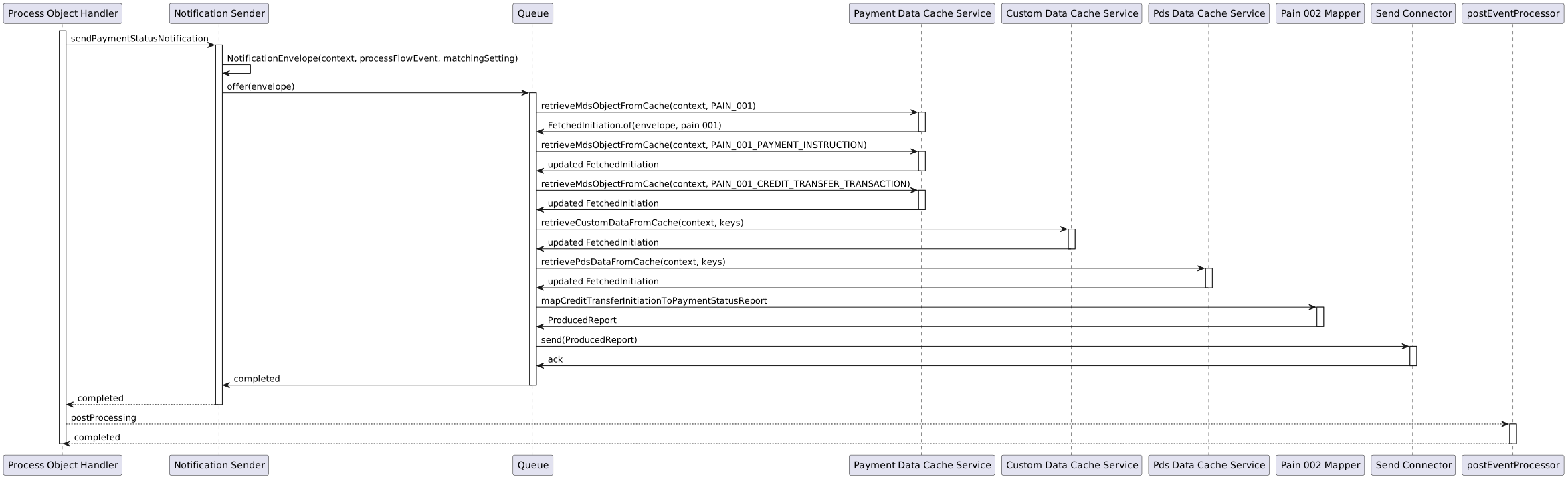
The Notification Service send connectors feature the following settings:
| Config key | Description | Default value |
|---|---|---|
|
The topic that the service will use to publish payment status notifications |
|
|
Kafka producer settings for the response topic consumer, such as:
|
(Kafka defaults) |
Which are overridden in ipf-impl.conf:
payment-status-notification {
  kafka {
    producer {
      topic = PAYMENT_STATUS_NOTIFICATION
      restart-settings = ${flow-restart-settings}
      kafka-clients {
        client.id = payment-status-notification-client
      }
    }
  }
  resequencer {
    # The type of storage to use with our resequencer. Available options are:
    # * `none` - a no-op storage, which loses the state on JVM shutdown;
    # suitable for latency-critical workloads where a late notification is worthless
    # * `cache` - which uses our cache adapters to store the data; depending on the cache type and mode used,
    # offers a balance between performance and reliability - async caches can be lossy but will only slow the service down during JVM start;
    # sync caches are more reliable but may slow down the notification send rate;
    # unless Infinispan is configured to store cache data on disk, a full cluster restart will result in complete state loss
    storage-type = cache

    # The type of strategy used by resequencer. Available options are:
    # * `FULL_PAIN001` - stash all the data envelopes, regardless of their sequence until all pain.001 MDS objects (group header, instruction, transaction) have been encountered,
    # at which point we continue to pass the data envelopes through as they are incoming; While this kind of re-sequencing will not protect us from lost updates,
    # it should exhibit lower end to end latency than full sequence-based ordering
    # * `SEQUENCE` - full sequence-based ordering; with multiple flows executing concurrently,
    # we are ordering events both according to a global sequence and according to a local (internal) one
    # * `FULL_PAIN001_AND_CUSTOM_DATA` - Same as FULL_PAIN001 strategy with the addition of waiting for specific configurable custom objects (see payment-status-notification.resequencer.custom-data-keys)
    # * `FULL_PAIN001_AND_PDS_DATA` - Same as FULL_PAIN001 strategy with the addition of waiting for specific configurable pds objects (see payment-status-notification.resequencer.pds-data-keys)
    strategy = FULL_PAIN001

    # Only used for strategy FULL_PAIN001_AND_CUSTOM_DATA.
    # A list of keys used to extract data from CustomObjectContainers, which will be available in the produced report
    # for use in the target type mapper
    custom-data-keys = []

    # Only used for strategy FULL_PAIN001_AND_PDS_DATA.
    # A list of keys used to extract data from PdsObjectContainer, which will be available in the produced report
    # for use in the target type mapper
    pds-data-keys = []

    # The amount of time to wait for the Resequencer to
    # process a single DataEnvelope message
    processing-timeout = 3s

    # The number of times to attempt sending a single DataEnvelope to the Resequencer
    max-attempts = 3

    # The delay multiplier to use on subsequent send attempts
    backoff-factor = 2

    # The max amount of time the Resequencer can spend
    # idling before it terminates itself
    idle-timeout = 30s

    # The percentage of randomness to use when retrying domain event handling.
    jitter-factor = 0.2
  }
  send-connector {
    request-queue-size = 1000
    max-concurrent-offers = 50000
    parallelism = 2000
    # Supported strategies are:
    # * `WITH_BACK_PRESSURE` - on a full send queue, will slow down the rate at which messages are consumed from Kafka
    # * `WITH_LOAD_SHEDDING_DROP_HEAD` - on a full send queue, will drop the oldest element to make room for the new one
    # * `WITH_LOAD_SHEDDING_DROP_BUFFER` - on a full send queue, will drop the whole queue
    # * `WITH_LOAD_SHEDDING_DROP_NEW` - on a full send queue, will drop the request attempting to be put onto the queue
    # * `WITH_LOAD_SHEDDING_DROP_TAIL` - on a full send queue, will drop the newest element to make room for the new one
    sending-strategy = WITH_BACK_PRESSURE
  }

  custom-data {
    # Either fail (true) or do not fail (false) sending notitifications if custom data keys (payment-status-notification.resequencer.custom-data-keys)
    # cannot be extracted from the cache
    fail-on-missing = false
  }

  pds-data {
    # Either fail (true) or do not fail (false) sending notitifications if pds data keys (payment-status-notification.resequencer.pds-data-keys)
    # cannot be extracted from the cache
    fail-on-missing = false
  }
}
Custom Objects
Custom objects have special handling as they can be blocking or non-blocking. If custom data keys are configured but no data can be found in the cache then you can either choose to send or not send the notification. This is enable/disabled by the following property:
payment-status-notification.custom-data.fail-on-missing = falsePds Objects
Pds objects have special handling as they can be blocking or non-blocking. If pds data keys are configured but no data can be found in the cache then you can either choose to send or not send the notification. This is enable/disabled by the following property:
payment-status-notification.pds-data.fail-on-missing = falseProduced Report Versioning
|
The V1 Notification Service API is now deprecated and will be removed as part of the 2026.4.0 IPF release. If you are using the Payment Notification service, you must migrate to the V2 API before then. Visit the V2 migration guide for more information. |
By default, the Notification Sender publishes a notification to the SendConnector(s) using the V2 com.iconsolutions.ipf.product.notification.api.model.v2.ProducedReport API.
- IMPORTANT
-
If you want to publish a notification using the V1
com.iconsolutions.ipf.product.notification.api.model.ProducedReportAPI, the application must be configured usingpayment-status-notification.schema-version = 1.
A V2 migration guide is available if you are looking to migrate from the V1 ProducedReport API to the V2 ProducedReport API.
Extension Points
There are a number of extension points that can be overridden to apply customisations to the default Notification Sender.
Duplicate Notifications
It is possible that the notification service can send duplicate notifications under certain conditions.
When a node goes down in the cluster this kicks off a Kafka rebalance. If the node that is shutting down is currently sending notifications and has not had a chance to ack back to Kafka or update the commit counter, these transactions will be replayed on the newly assigned node. This would result in duplicate notifications being sent across multiple nodes in the cluster. This should only occur for a short duration as the node is going down and will result in a few duplicate around that time.