Deployment & Configuration
The options for integrating with working days service from a client application are outlined below.
Standalone
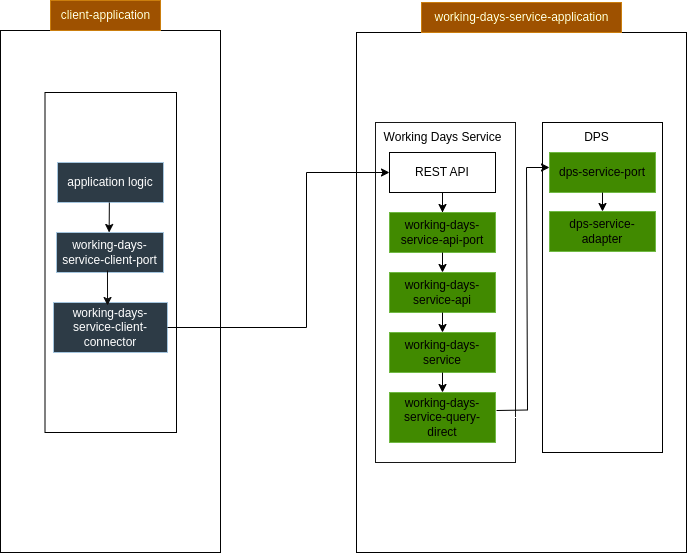
The working days service is deployed as a separate application and accessed via a REST interface. Client connectors are available to assist with invoking the working days service from a client application.
Add the following dependency to a client application to utilise the client connectors to access the working days service if it is deployed as a standalone application:
<dependency>
    <groupId>com.iconsolutions.ipf.csm.workingdays</groupId>
    <artifactId>working-days-service-client-connector</artifactId>
</dependency>
Configuration
| Property Name | Type | Comment | Default |
|---|---|---|---|
|
boolean |
Enable connectors for integrating with WDS |
|
|
String |
Hostname where working days service is deployed |
|
|
String |
HTTP port where WDS can be accessed |
|
|
String |
Path to access the service |
|
Property Name |
Type |
Comment |
Default |
|
boolean |
Enable calculation connector for integrating with WDS, currently used for calculating past business day. By default inheriting |
|
|
String |
Hostname where working days service is deployed. By default inheriting |
|
|
String |
HTTP port where WDS calculation operations can be accessed. By default inheriting |
|
|
String |
Path to access the working days service calculation features. By default inheriting |
|
As with all connectors, resiliency-settings can also be configured at the config path ipf.working-days-service.connector.resiliency-settings. Specific properties that can be configured are documented Resilience
Embedded
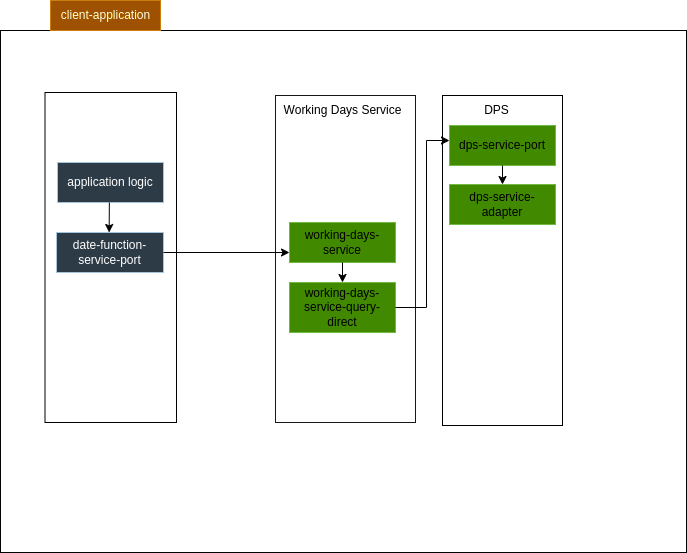
Alternatively, the working days service can be embedded into an existing application. Add the following dependency to an existing application to add working days service functionality to that application.
<dependency>
    <groupId>com.iconsolutions.ipf.csm.workingdays</groupId>
    <artifactId>working-days-service-starter-direct</artifactId>
</dependency>
Which can then be accessed using the client dependency below, this dependency provides convenience methods that allow for passing ProcessingContext with request and response message.
<dependency>
    <groupId>com.iconsolutions.ipf.csm.workingdays</groupId>
    <artifactId>working-days-service-client-direct</artifactId>
</dependency>
Configuration
| Property Name | Type | Comment | Default |
|---|---|---|---|
|
boolean |
Enable client access to WDS directly, used when WDS is embedded inside the client application |
|
With this option Working Days Service Functionality is added to an existing application and is accessible via the WorkingDaysServiceClientPort
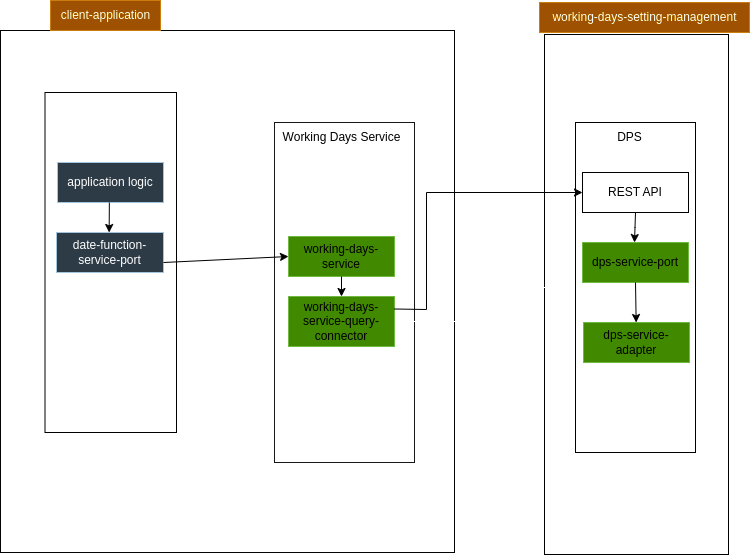
Embedded Working Days Service, DPS Setting Management Standalone*
*Not yet supported
Another option is to have the working days service embedded into an existing application, but to deploy DPS as a separate application. Add the following dependency to an existing application to add working days service functionality but call out to a DPS instance that is deployed as a separate application.
<dependency>
    <groupId>com.iconsolutions.ipf.csm.workingdays</groupId>
    <artifactId>working-days-service-starter-connector</artifactId>
</dependency>