Remitente de Notificaciones
El Enviador de Notificaciones se llama cuando el Consulta de Configuración de Notificación de Estado de Pago ha devuelto una configuración coincidente.
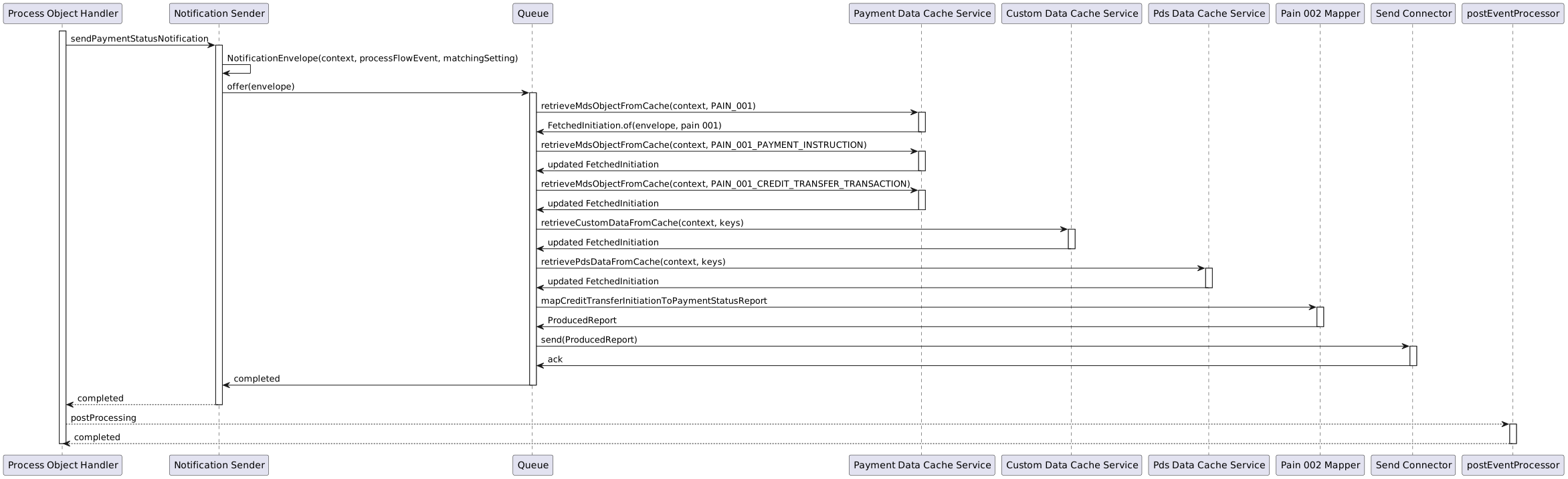
El siguiente diagrama ilustra el proceso desde la llegada del sobre de notificación al Remitente de Notificaciones hasta que se publica utilizando un Send Connector.
El Servicio de Notificación send connectors presenta la siguiente configuración:
| Clave de configuración | Descripción | Valor predeterminado |
|---|---|---|
|
El tema que el servicio utilizará para publicar notificaciones de estado de pago. |
|
|
docs.confluent.io/platform/current/installation/configuration/producer-configs.html Kafka[configuración del productor] para el tema de respuesta consumidor, como:
|
(Kafka defaults) |
Los cuales son anulados en ipf-impl.conf:
payment-status-notification {
  kafka {
    producer {
      topic = PAYMENT_STATUS_NOTIFICATION
      restart-settings = ${flow-restart-settings}
      kafka-clients {
        client.id = payment-status-notification-client
      }
    }
  }
  resequencer {
    # The type of storage to use with our resequencer. Available options are:
    # * `none` - a no-op storage, which loses the state on JVM shutdown;
    # suitable for latency-critical workloads where a late notification is worthless
    # * `cache` - which uses our cache adapters to store the data; depending on the cache type and mode used,
    # offers a balance between performance and reliability - async caches can be lossy but will only slow the service down during JVM start;
    # sync caches are more reliable but may slow down the notification send rate;
    # unless Infinispan is configured to store cache data on disk, a full cluster restart will result in complete state loss
    storage-type = cache

    # The type of strategy used by resequencer. Available options are:
    # * `FULL_PAIN001` - stash all the data envelopes, regardless of their sequence until all pain.001 MDS objects (group header, instruction, transaction) have been encountered,
    # at which point we continue to pass the data envelopes through as they are incoming; While this kind of re-sequencing will not protect us from lost updates,
    # it should exhibit lower end to end latency than full sequence-based ordering
    # * `SEQUENCE` - full sequence-based ordering; with multiple flows executing concurrently,
    # we are ordering events both according to a global sequence and according to a local (internal) one
    # * `FULL_PAIN001_AND_CUSTOM_DATA` - Same as FULL_PAIN001 strategy with the addition of waiting for specific configurable custom objects (see payment-status-notification.resequencer.custom-data-keys)
    # * `FULL_PAIN001_AND_PDS_DATA` - Same as FULL_PAIN001 strategy with the addition of waiting for specific configurable pds objects (see payment-status-notification.resequencer.pds-data-keys)
    strategy = FULL_PAIN001

    # Only used for strategy FULL_PAIN001_AND_CUSTOM_DATA.
    # A list of keys used to extract data from CustomObjectContainers, which will be available in the produced report
    # for use in the target type mapper
    custom-data-keys = []

    # Only used for strategy FULL_PAIN001_AND_PDS_DATA.
    # A list of keys used to extract data from PdsObjectContainer, which will be available in the produced report
    # for use in the target type mapper
    pds-data-keys = []

    # The amount of time to wait for the Resequencer to
    # process a single DataEnvelope message
    processing-timeout = 3s

    # The number of times to attempt sending a single DataEnvelope to the Resequencer
    max-attempts = 3

    # The delay multiplier to use on subsequent send attempts
    backoff-factor = 2

    # The max amount of time the Resequencer can spend
    # idling before it terminates itself
    idle-timeout = 30s

    # The percentage of randomness to use when retrying domain event handling.
    jitter-factor = 0.2
  }
  send-connector {
    request-queue-size = 1000
    max-concurrent-offers = 50000
    parallelism = 2000
    # Supported strategies are:
    # * `WITH_BACK_PRESSURE` - on a full send queue, will slow down the rate at which messages are consumed from Kafka
    # * `WITH_LOAD_SHEDDING_DROP_HEAD` - on a full send queue, will drop the oldest element to make room for the new one
    # * `WITH_LOAD_SHEDDING_DROP_BUFFER` - on a full send queue, will drop the whole queue
    # * `WITH_LOAD_SHEDDING_DROP_NEW` - on a full send queue, will drop the request attempting to be put onto the queue
    # * `WITH_LOAD_SHEDDING_DROP_TAIL` - on a full send queue, will drop the newest element to make room for the new one
    sending-strategy = WITH_BACK_PRESSURE
  }

  custom-data {
    # Either fail (true) or do not fail (false) sending notitifications if custom data keys (payment-status-notification.resequencer.custom-data-keys)
    # cannot be extracted from the cache
    fail-on-missing = false
  }

  pds-data {
    # Either fail (true) or do not fail (false) sending notitifications if pds data keys (payment-status-notification.resequencer.pds-data-keys)
    # cannot be extracted from the cache
    fail-on-missing = false
  }
}
Objetos Personalizados
Los objetos personalizados tienen un manejo especial, ya que pueden ser bloqueantes o no bloqueantes. Si custom las claves de datos están configuradas pero no se puede encontrar ningún dato en la caché, entonces puede elegir enviar o no enviar la notificación. Esto se habilita/deshabilita mediante la siguiente propiedad:
payment-status-notification.custom-data.fail-on-missing = falseObjetos Pds
Los objetos Pds tienen un manejo especial, ya que pueden ser bloqueantes o no bloqueantes. Si las claves de datos Pds están configuradas pero no se puede encontrar ningún dato en la caché, entonces usted puede elegir enviar o no enviar la notificación. Esto se habilita/deshabilita mediante la siguiente propiedad:
payment-status-notification.pds-data.fail-on-missing = falseInforme Producido Versioning
|
El Servicio de Notificación V1 API está ahora obsoleto y será eliminado como parte de la versión 2026.4.0 de IPF. Si está utilizando el servicio de Notificación de Pagos, debe migrar a la V2.API antes de entonces. Visite el Guía de migración V2 para más información. |
Por defecto, el Emisor de Notificaciones publica una notificación en el SendConnector(s) utilizando la V2 com.iconsolutions.ipf.product.notification.api.model.v2.ProducedReport API.
- IMPORTANTE
-
Si desea publicar una notificación utilizando la V1
com.iconsolutions.ipf.product.notification.api.model. ProducedReportAPI, la aplicación debe ser configurada utilizandopayment-status-notification.schema-version = 1.
A Guía de migración V2 está disponible si usted está buscando migrar de la V1 ProducedReport API a la V2 ProducedReport API.
Extension Puntos
Existen varios puntos de extensión que pueden ser anulados para aplicar customisations al remitente de notificaciones predeterminado.
Duplicar Notifications
Es posible que el servicio de notificación pueda enviar notificaciones duplicadas bajo ciertas condiciones.
Cuando un nodo falla en el clúster, esto inicia un Kafka rebalance. Si el nodo que se está apagando está enviando notificaciones actualmente y no ha tenido la oportunidad de confirmar de vuelta a Kafka o actualice el contador de confirmaciones, estas transacciones se reproducirán en el nodo recién asignado. Esto resultará en notificaciones duplicadas que se enviarán a través de múltiples nodos en el clúster. Esto solo debería ocurrir durante un corto período de tiempo mientras el nodo está fuera de servicio y resultará en algunas duplicaciones alrededor de ese momento.