Deployment
IPF Metrics Processor is fairly lightweight and can be deployed as a single instance, but may be scaled beyond a single instance if required. The number of instances should not exceed the number of partitions of the IPF Processing Data topic (IPF_PROCESSING_DATA).
Docker
IPF Metrics Processor is produced as a docker image, and can therefore run in containerised environments.
The following is a minimal example docker compose deployment, enough to get the IPF Metrics Processor up and running, however it’s missing several other required components: ODS Ingestion, which is required to ingest payment processing data for lookup in some scenarios; an IPF payment processing application to produce data to the IPF_PROCESSING_DATA topic; both Prometheus and Grafana; and possibly ODS Inquiry, depending on the configuration of the IPF Metrics Processor.
This example docker compose deployment could be used as a starting point for a Kubernetes deployment.
Docker Compose
services:
  ipf-metrics-processor:
    image: ${docker.registry}/ipf-metrics-processor:latest
    container_name: ipf-metrics-processor
    ports:
      - "8080:8080"
    volumes:
      - ./config/ipf-metrics-processor:/ipf-metrics-processor/conf
    healthcheck:
      test: [ "CMD", "curl", "-f", "http://localhost:8080/actuator/health" ]
      interval: 1s
      timeout: 1s
      retries: 3
      start_period: 30s

  mongo:
    image: ${docker.registry}/ipf-docker-mongodb:latest
    container_name: mongo
    healthcheck:
      test: echo 'db.runCommand("ping").ok' | mongo localhost:27017/test --quiet

  zookeeper:
    image: zookeeper
    container_name: zookeeper

  kafka:
    image: registry.ipf.iconsolutions.com/kafka-icon:2.13-2.7.1
    container_name: kafka
    environment:
      - KAFKA_BROKER_ID=0
      - KAFKA_AUTO_CREATE_TOPICS_ENABLE=false
      - KAFKA_ZOOKEEPER_CONNECT=zookeeper:2181
      - KAFKA_LOG_RETENTION_MINUTES=60
      - KAFKA_OFFSETS_TOPIC_REPLICATION_FACTOR=1
      - KAFKA_OFFSETS_TOPIC_NUM_PARTITIONS=1
      - KAFKA_LISTENERS=INTERNAL://:9092,EXTERNAL://:9093
      - KAFKA_ADVERTISED_LISTENERS=INTERNAL://kafka:9092,EXTERNAL://localhost:9093
      - KAFKA_LISTENER_SECURITY_PROTOCOL_MAP=INTERNAL:PLAINTEXT,EXTERNAL:PLAINTEXT
      - KAFKA_INTER_BROKER_LISTENER_NAME=INTERNAL
      - KAFKA_CREATE_TOPICS=IPF_PROCESSING_DATA:10:1
    depends_on:
      - zookeeper
Configuration
management.endpoints.web.exposure.include = "*"

ipf.mongodb.url = "mongodb://mongo:27017/ipf"

ipf.processing-data.ingress.kafka.consumer.kafka-clients.bootstrap.servers = "kafka:9092"
Requirements
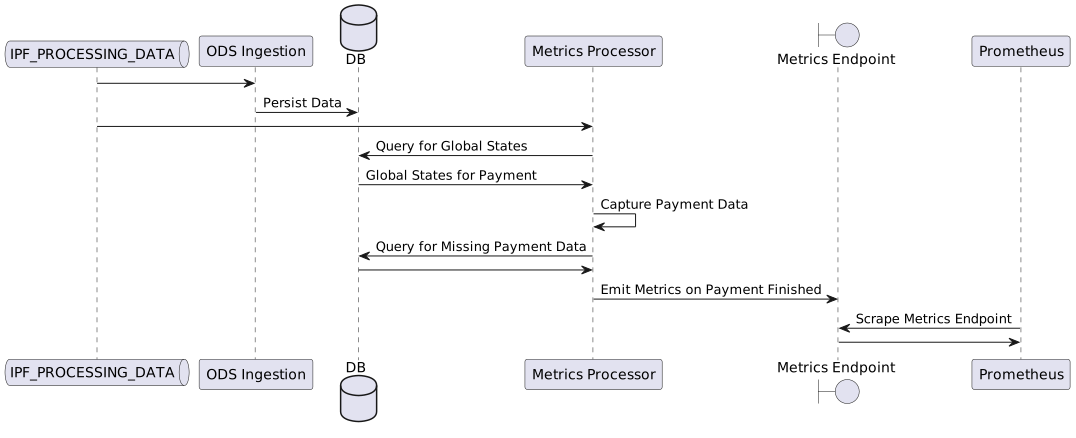
A connection to the ODS database is required so that payment flows can be resolved to determine the terminal state of a payment, and in some cases to fetch data that may be missing.
A connection to Kafka is required, so that it can consume IPF Processing Data.
ODS Ingestion should also be in operation. ODS is expected to persist process flow definitions, and all other payment related data that may be required to produce metrics.
Configuration
Infrastructure
IPF Metrics Processor is an IPF Processing Data Ingress, i.e. it uses the pre-defined Kafka receive connectors to consume data. See the IPF Processing Data documentation for configuration options.
IPF Metrics Processor must connect to the ODS MongoDB instance - the connection url is defined with ipf.mongodb.url, e.g. ipf.mongodb.url = "mongodb://ipf-mongo:27017/ipf"
To manage the size of the internal cache, the IPF Metrics Processor evicts all data for a payment from the cache after a configured time. The cache expires a payment after the specified duration has passed since the payment was last accessed by a read or a write.
This duration is defined with ipf.business-metrics-processor.cache.expire-after-access, which defaults to 10 minutes when not configured.
ODS Inquiry Configuration
The IPF Metrics Processor can be optionally configured to query ODS Inquiry instead of a direct connection to the ODS MongoDB instance. This requires an instance of ODS Inquiry to be deployed alongside the Metrics Processor, and the following configuration within the IPF Metrics Processor to instantiate the Inquiry client connectors:
ods.inquiry.client {
  // Only the process object and pds object connectors are required
  process-objects.enabled = true
  pds-objects.enabled = true

  // Replace with your deployed ODS Inquiry host and port
  http.client {
    host = "ods-inquiry-host"
    port = 8080
  }
}
Features
Some features of the produced metrics must be enabled and configured explicitly. The following is a basic example configuration.
Example Standard Notation Configuration
ipf.business-metrics-processor.payment-metrics {
  versioned-labels {
    direction {
      payment-type-mappings = [
        {
          label = "Outbound"
          payment-types = ["DebtorCT"]
        }
        {
          label = "Inbound"
          payment-types = ["CreditorCT"]
        }
        {
          label = "Internal"
          payment-types = ["Book Transfer"]
        }
      ]
    }

    currency = [
      {
      pds-type = SomeClientSpecificPdsType
      path = "/details/paymentAmount/currency"
    }
    ]

    local-instrument =[
      {
        pds-type = SomeClientSpecificPdsType
        path = "/details/localInstrument/instrument"
      }
    ]

    identity-comparison = [
      {
        pds-type = SomeClientSpecificPdsType
        path = "/details/comparison/result"
      }
    ]

    client-channel =[
      {
        pds-type = SomeClientSpecificPdsType
        path = "/details/clientChannel/channel"
      }
    ]
  }

  ######################################################################################################
  # The below configuration is not necessary out-of-the-box, and exists for backward-compatibility.
  # It is also deprecated and will be unsupported in future versions.
  ######################################################################################################

  # Optional if using a version of HTM that produces events with the `HTM` label, or when payment flows produce events
  # with labels indicating the payment went through HTM
  htm {
    events = ["Task Registration Successful", "Task Registration Failed"]
  }

  payment-duration {
    # Optional if the payment flows produce events with labels indicating the start and end of the critical path
    critical-path {
      critical-path-states-by-payment-type = [
        {
          payment-type = "Debtor CT"
          start-state = "Validating"
          end-state = "Instructing"
        }
      ]
    }

    # Optional if the payment flows produce events with labels indicating the which states are considered waiting states
    waiting {
      waiting-states-by-flow = [
        {
          flow-name = "PaymentExecutionFlowV1"
          states = ["Checking Bank System A", "Checking Bank System B"]
        }
        {
          flow-name = "PaymentExecutionFlowV2"
          states = ["Checking Bank System B", "Checking Bank System C"]
        }
      ]
    }
  }
}
Hocon dot notation is also supported
Example Dot Notation Configuration
ipf.business-metrics-processor.payment-metrics.labels.direction.payment-type-mappings.0.label = "Outbound"
ipf.business-metrics-processor.payment-metrics.labels.direction.payment-type-mappings.0.payment-types.0 = "DebtorCT"
ipf.business-metrics-processor.payment-metrics.labels.direction.payment-type-mappings.1.label = "Inbound"
ipf.business-metrics-processor.payment-metrics.labels.direction.payment-type-mappings.1.payment-types.0 = "CreditorCT"
ipf.business-metrics-processor.payment-metrics.labels.direction.payment-type-mappings.2.label = "Internal"
ipf.business-metrics-processor.payment-metrics.labels.direction.payment-type-mappings.2.payment-types.0 = "Book Transfer"

ipf.business-metrics-processor.payment-metrics.labels.currency.pds-type = SomeClientSpecificPdsType
ipf.business-metrics-processor.payment-metrics.labels.currency.path = "details.paymentAmount.currency"

ipf.business-metrics-processor.payment-metrics.labels.local-instrument.pds-type = SomeClientSpecificPdsType
ipf.business-metrics-processor.payment-metrics.labels.local-instrument.path = "details.localInstrument.instrument"

ipf.business-metrics-processor.payment-metrics.labels.identity-comparison.pds-type = SomeClientSpecificPdsType
ipf.business-metrics-processor.payment-metrics.labels.identity-comparison.path = "details.comparison.result"

ipf.business-metrics-processor.payment-metrics.labels.client-channel.pds-type = SomeClientSpecificPdsType
ipf.business-metrics-processor.payment-metrics.labels.client-channel.path = "details.clientChannel.channel"

######################################################################################################
# The below configuration is not necessary out-of-the-box, and exists for backward-compatibility.
# It is also deprecated and will be unsupported in future versions.
######################################################################################################

# Optional if using a version of HTM that produces events with the `HTM` label, or when payment flows produce events
# with labels indicating the payment went through HTM
ipf.business-metrics-processor.payment-metrics.labels.htm.events.0 = "Task Registration Successful"
ipf.business-metrics-processor.payment-metrics.labels.htm.events.1 = "Task Registration Failed"

# Optional if the payment flows produce events with labels indicating the start and end of the critical path
ipf.business-metrics-processor.payment-metrics.payment-duration.critical-path.critical-path-states-by-payment-type.0.payment-type = "Debtor CT"
ipf.business-metrics-processor.payment-metrics.payment-duration.critical-path.critical-path-states-by-payment-type.0.start-state = "Validating"
ipf.business-metrics-processor.payment-metrics.payment-duration.critical-path.critical-path-states-by-payment-type.0.end-state = "Instructing"

# Optional if the payment flows produce events with labels indicating the which states are considered waiting states
ipf.business-metrics-processor.payment-metrics.payment-duration.waiting.waiting-states-by-flow.0.flow-name = "PaymentExecutionFlowV1"
ipf.business-metrics-processor.payment-metrics.payment-duration.waiting.waiting-states-by-flow.0.states.0 = "Checking Bank System A"
ipf.business-metrics-processor.payment-metrics.payment-duration.waiting.waiting-states-by-flow.0.states.1 = "Checking Bank System B"
ipf.business-metrics-processor.payment-metrics.payment-duration.waiting.waiting-states-by-flow.1.flow-name = "PaymentExecutionFlowV2"
ipf.business-metrics-processor.payment-metrics.payment-duration.waiting.waiting-states-by-flow.1.states.0 = "Checking Bank System B"
ipf.business-metrics-processor.payment-metrics.payment-duration.waiting.waiting-states-by-flow.1.states.1 = "Checking Bank System C"