Recall and Return Process Flow
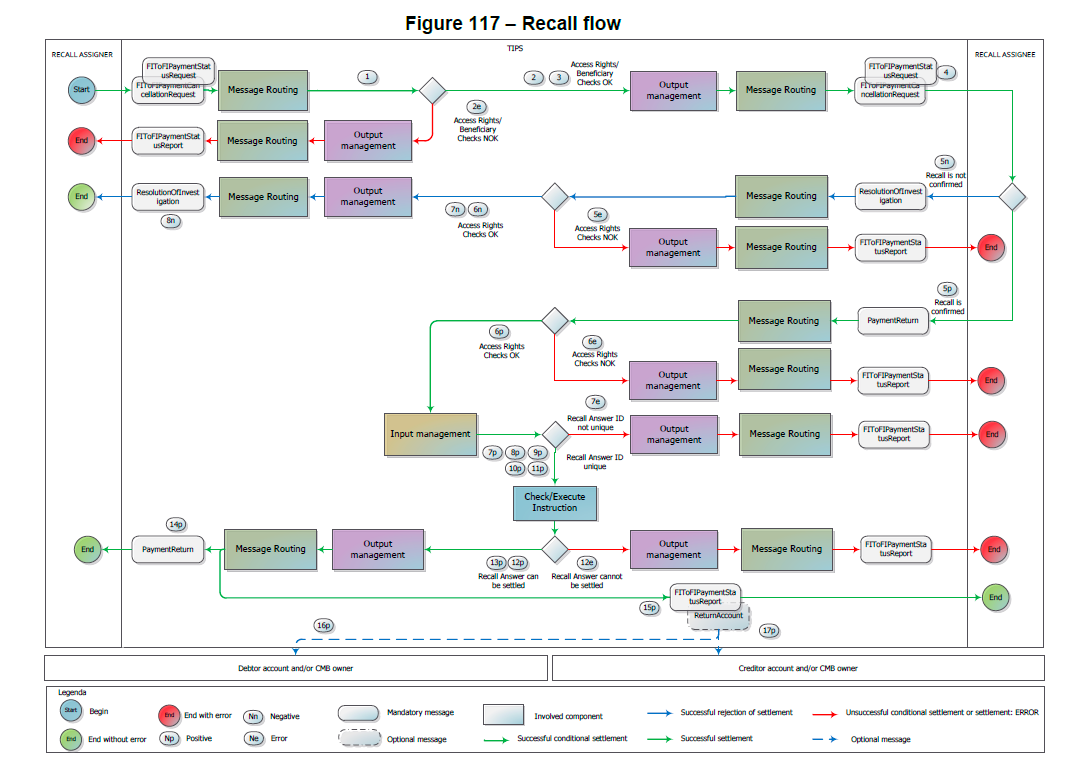
Step |
Involved Messages |
Involved Actors |
Description |
1 |
FIToFIPaymentCancellationRequest FIToFIPaymentStatusRequest |
Recall Assigner as sender TIPS as receiver |
TIPS receives an incoming Recall request (or a Request for Status Update on a Recall) from the Recall Assigner. Technical validation, check of mandatory fields and authentication checks have already been successfully executed by the ESMIG. |
2 |
TIPS receives an incoming Recall request (or a Request for Status Update on a Recall) from the Recall Assigner. Technical validation, check of mandatory fields and authentication checks have already been successfully executed by the ESMIG. |
TIPS successfully executes the following checks: - Access Rights check; - Instructing Party authorised; - Originator Account or CMB existence; - Beneficiary correctly configured. |
|
2e |
FIToFIPaymentStatusReport |
TIPS as sender Recall Assigner as receiver |
TIPS unsuccessfully executes one of the checks listed in step 2. At the first negative check the system stops and sends a message to the Recall Assigner – same DN of the Sender in step 1 – containing the proper error code. |
3 |
TIPS |
The DN of the Recall Assignee is identified in the "Outbound DN-BIC Routing” mapping table from the field Assignee (FIToFIPaymentCancellationRequest). |
|
4 |
FIToFIPaymentCancellationRequest FIToFIPaymentStatusRequest |
TIPS as sender Recall Assignee as receiver |
TIPS forwards the received Recall request (or a Request for Status Update on a Recall) to the Recall Assignee DN. |
5n |
ResolutionOfInvestigation |
Recall Assignee as sender TIPS as receiver |
The Recall Assignee sends a negative response and it is successfully delivered to TIPS. Technical validation, check of mandatory fields and authentication checks have already been successfully executed. |
6n |
TIPS |
TIPS successfully executes the checks: - Access Rights check; - Instructing Party authorised – creditor side. |
|
5e |
FIToFIPaymentStatusReport |
TIPS as sender Recall Assignee as receiver |
TIPS unsuccessfully executes the checks listed in step 6n. At the first negative check the system stops and sends a message to the Recall Assignee - same DN of the Sender – containing the proper error code. |
7n |
TIPS |
The DN of the Recall Assigner is identified in the "Outbound DN-BIC Routing" mapping table from the field Assignee (ResolutionOfInvestigation). |
|
8n |
ResolutionOfInvestigation |
TIPS as sender Recall Assigner as receiver |
TIPS forwards the negative response received to the Recall Assigner DN. |
5p |
PaymentReturn |
Recall Assignee as sender TIPS as receiver |
The Recall Assignee sends a positive response and it is successfully delivered to TIPS. Technical validation, check of mandatory fields and authentication checks have already been successfully executed. |
6p |
TIPS |
TIPS successfully executes the checks: - Access Rights check; - Instructing Party authorised – creditor side; - Originator Account or CMB existence; - Beneficiary Account or CMB existence; - Maximum Amount not exceeded for Returned Amount. |
|
6e |
FIToFIPaymentStatusReport |
TIPS as sender Recall Assignee as receiver |
TIPS unsuccessfully executes the checks listed in step 6p. At the first negative check the system stops and sends a message to the Recall Assignee - same DN of the Sender – containing the proper error code. The status of the positive Recall Response is set to “Failed”. In this case the Recall Assignee can submit a new Recall Response in order to close the Recall business case. The message validation will restart from the step 5p. |
7p |
TIPS |
TIPS successfully executes the check: - Duplicate check for positive Recall . |
|
7e |
FIToFIPaymentStatusReport |
TIPS as sender Recall Assignee as receiver |
TIPS unsuccessfully executes the check in step 7p. The system stops and sends a message to the Recall Assignee – same DN of the sender – containing the proper error code. The status of the positive Recall Response is set to “Failed”. In this case the Recall Assignee can submit a new positive Recall Response in order to close the Recall business case. The message validation will restart from the step 5p. |
8p |
TIPS |
TIPS combines the information embedded in the PaymentReturn message to determine a payment transaction dataset to send to the Check and Execute Instruction process. The status of the positive Recall Response is set to “Validated”. |
|
9p |
TIPS |
The Amount to be settled (AT046 – DS-06) is retrieved and saved as information related to the transaction dataset. From now on, this amount is referred to as "Settlement Amount”. The Settlement date for the positive Recall Response (R7 – DS-06) is retrieved and saved as information related to the transaction dataset. From now on, this date is referred to as "Settlement Date”. The Recall Reference of the PSP initiating the Recall (R6 – DS-06) is retrieved and saved as information related to the transaction dataset. From now on, this reference is referred to as “Transaction Identification” |
|
10p |
TIPS |
Given the fact that the original Beneficiary Participant (field AT-23 in DS-02, subset of DS-06) has to be interpreted as the new Originator Participant for the reversed cash flow, TIPS determines the account or CMB to be debited from the configured accounts information, the Beneficiary BIC and the currency within the PaymentReturn message. In details: - The system verifies that an account, of either type "TIPS Account" or “TIPS AS Technical Account”, exists and is linked to the Beneficiary Participant (field "Beneficiary BIC") as authorised user and has a currency equal to the one defined in the Returned Amount. - If no Account is linked to the Beneficiary Participant, the system looks for a CMB linked to the Beneficiary (field "Beneficiary BIC") as user; - The system selects the account linked to the CMB; the account related to the CMB must have a currency equal to the one defined in the Returned Amount. From now on, the account is referred to as "Originator Account" and the possible CMB as "Debiting CMB". |
|
11p |
TIPS |
Given the fact that the original Originator Participant (field AT-06 in DS-02, which is part of DS-06) has to be interpreted as the new Beneficiary Participant for the reversed cash, TIPS determines the account or CMB to be credited from the configured accounts information, the Originator BIC and the currency within the PaymentReturn message. In details: - The system verifies that an account, of either type "TIPS Account" or “TIPS AS Technical Account”, exists and is linked to the Originator Participant (field "Originator BIC") as authorised user and has a currency equal to the one defined in the Returned Amount. - If no Account is linked to the Originator Participant, the system looks for a CMB linked to the Originator (field "Originator BIC") as user; - The system selects the account linked to the CMB; the account related to the CMB must have a currency equal to the one defined in the Returned Amount. From now on, the account is referred to as "Beneficiary Account" and the possible CMB as "Crediting CMB". |
|
12p |
TIPS |
TIPS successfully executes the checks: - Originator Account/CMB not blocked; - Beneficiary Account/CMB not blocked; - Available amount not exceeded. |
|
12e |
FIToFIPaymentStatusReport |
TIPS as sender Recall Assignee as receiver |
TIPS unsuccessfully executes the checks listed in step 12p. At the first negative check the system stops and sends a message to the Recall Assignee (the new Originator DN) containing the proper error code. The status of the positive Recall Response is set to “Failed”. In this case the Recall Assignee can submit a new positive Recall Response in order to close the Recall business case. The message validation will restart from the step 5p. |
13p |
TIPS |
TIPS settles the full amount of the payment transaction, debiting the Originator Account and adding the same positive amount to the Beneficiary Account. If a Debiting/Crediting CMB is involved, the system decreases/increases its Headroom by the same amount. TIPS sets the positive Recall Response status to "Settled". |
|
14p |
PaymentReturn |
TIPS as sender Recall Assigner as receiver |
TIPS forwards the positive response received from the Recall Assignee to the Recall Assigner (the new Beneficiary DN). |
15p |
FIToFIPaymentStatusReport |
TIPS as sender Recall Assignee as receiver |
TIPS generates a positive Payment status report and send it to the Recall Assignee (the new Originator DN). |
16p |
ReturnAccount |
TIPS as sender Debited Account and/or CMB Owner |
TIPS checks the "Floor notification amount" configured for the involved Originator Account or Debiting CMB. If the account balance or the CMB headroom after settlement is confirmed is lower than the "floor notification amount", TIPS sends a ReturnAccount to the Account and/or CMB owners involved in the transaction. The message is sent to the default DN of the Account Owner and/or CMB Owner. The message contains the - Originator Account Number or the Debiting CMB Number. |
17p |
ReturnAccount |
TIPS as sender Credited Account and/or CMB Owner |
TIPS checks the "Ceiling notification amount" configured for the involved Beneficiary Account or Crediting CMB. If the account balance or the CMB headroom after the confirmed settlement is greater than the "ceiling notification amount", TIPS sends a ReturnAccount to the Account and/or CMB owners involved in the transaction. The message is sent to the default DN of the Account Owner and/or CMB Owner. The message contains the Beneficiary Account Number or the crediting CMB Number. |