ODS Housekeeping Tasks
Housekeeping tasks are recurrent background processes that aid in maintaining and organising data within ODS.
These tasks are powered by an Akka Cluster Singleton pattern, ensuring only one active instance per cluster at a time, avoiding conflicts of running the same task simultaneously across multiple nodes.
These tasks perform functions such as data enrichment, cleanup, and maintenance. Each housekeeping task operates independently but follows the same configuration and scheduling framework.
The available housekeeping tasks are:
Configuring Housekeeping Tasks
The configuration for a housekeeping task follows a generic structure. Replace <task-name> with the identifier of the task being configured:
ods.housekeeping {
  <task-name> {
    # Configure to true if the task functionality is required
    enabled = false

    # How long to wait once ODS has started before making the first execution of the task
    initial-delay = 1M

    # How often to execute the task
    frequency = 10s

    # The Restart Strategy settings for the task's Cluster Singleton
    restart-settings {
      # Minimum (initial) duration until the task child actor will be started again, if it is terminated
      min-backoff = 1s

      # The exponential back-off is capped to this duration
      max-backoff = 1s

      # After calculation of the exponential back-off an additional random delay based on this factor is added, e.g. 0.2 adds up to 20% delay. In order to skip this additional delay pass in 0.
      jitter-factor = 0.2
    }
  }
}| Unless otherwise stated within each task’s configuration documentation, the config values outlined above are the default values for a given task. |
Error Handling
Due to the nature of the recurrent task implementation, errors are retried naturally by the next recurrent execution.
Any errors thrown within a task’s execution are logged as a warning with no action taken. The task will be executed again shortly and functionality will continue in subsequent executions.
Housekeeping Tasks Overview and Monitoring
An overview of what housekeeping tasks have been enabled/disabled and their configurations is available at runtime.
Logging
The housekeeping overview is logged at startup.
Example housekeeping task overview log
2025-05-16T09:08:09.999Z  INFO 1 --- [           main] c.i.i.o.h.HousekeepingOverviewLogger       :
-------------------------------------------------------------------------------------
 Housekeeping Tasks
-------------------------------------------------------------------------------------
    ---------------------------------------------------------------------------------
     Enabled Tasks
    ---------------------------------------------------------------------------------
                               Task Name                     Task Scheduler Settings
    ---------------------------------------------------------------------------------
                  summary-csm-enrichment                             Frequency: PT1S
                                                                 Initial delay: PT0S
                                                                   Min backoff: PT1S
                                                                   Max backoff: PT1S
                                                                  Jitter factor: 0.2

             summary-identity-enrichment                            Frequency: PT10S
                                                                 Initial delay: PT1S
                                                                   Min backoff: PT2S
                                                                   Max backoff: PT1S
                                                                  Jitter factor: 0.5

    ---------------------------------------------------------------------------------
    ---------------------------------------------------------------------------------
     Disabled Tasks                                      housekeeping-example-task-2
                                                         housekeeping-example-task-3
    ---------------------------------------------------------------------------------
-------------------------------------------------------------------------------------
Actuator Endpoint
The housekeeping overview is available as a custom Spring Boot Actuator endpoint at /actuator/housekeeping-tasks. It’s not enabled by default.
Configure management.endpoints.web.exposure.include to include housekeeping-tasks, to enable the summary layout endpoint, or with * to enable all actuator endpoints.
e.g. management.endpoints.web.exposure.include = [health, info, prometheus, housekeeping-tasks].
Example housekeeping overview response
{
  "enabledTasks": {
    "summary-identity-enrichment": {
      "enabled": true,
      "frequency": "PT1S",
      "initialDelay": "PT0S",
      "restartSettings": {
        "minBackoff": "PT1S",
        "maxBackoff": "PT1S",
        "jitterFactor": 0.2
      }
    },
    "summary-csm-enrichment": {
      "enabled": true,
      "frequency": "PT10S",
      "initialDelay": "PT1M",
      "restartSettings": {
        "minBackoff": "PT2S",
        "maxBackoff": "PT1S",
        "jitterFactor": 0.5
      }
    }
  },
  "disabledTasks": [
    "pds-object-id-enrichment",
    "housekeeping-example-task"
  ]
}
Summary Identity Enrichment Housekeeping Task
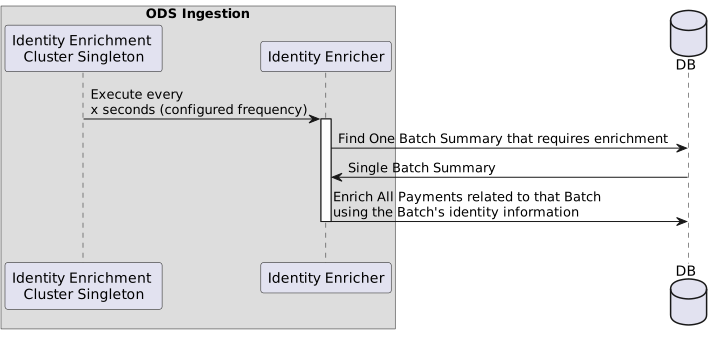
A housekeeping task that enriches Payment Summary identification fields (debtorAccount, debtorAgentBIC, creditorName, etc…) using the information present on the Payment’s related Batch Summary.
This enables ODS Inquiry to search for these Payments using the Batch identification information, which was previously not present on the Payment.
This functionality must be explicitly enabled through config, configuration options can be found below.
This job will only update Payments that are related to a Batch AND have identification information different to the related Batch.
|
The values present on the Batch Summary are considered as the source of truth for these identification fields. When this functionality is enabled, any existing identity field values on a Payment Summary will be overridden by the values from its related Batch Summary. This only applies to Payment Summaries that have a related Batch Summary, associated via the Payment’s persisted |
| This enrichment logic is designed for eventual consistency in ODS Inquiry API queries. As a result, the rest of the ODS Ingestion processing does not depend on its immediate completion. |
The targeted identification information fields are:
-
debtorAccount -
debtorName -
debtorBIC -
debtorAgentBIC -
creditorAccount -
creditorName -
creditorBIC -
creditorAgentBIC
The general high-level flow for this housekeeping task is:
Default Identity Enricher Configuration
The summary identity enricher can be configured using its identifier, summary-identity-enrichment. The full configuration path evaluates to ods.houskeeping.summary-identity-enrichment, consistent with the default task configuration structure. This task uses those default configuration values unless explicitly overridden.
|
For backwards compatibility, the identity enricher also supports the older configuration path: |
| Enricher Enabled? | Reasoning |
|---|---|
When enabled (true) |
|
When disabled (false) |
|
|
When enabled, the enricher identifies Batch Summaries requiring enrichment by checking the existence of the
|
Summary CSM Enrichment Housekeeping Task
A housekeeping task that enriches the Summary CSM search field for summaries persisted before IPF Release 2025.1.0.
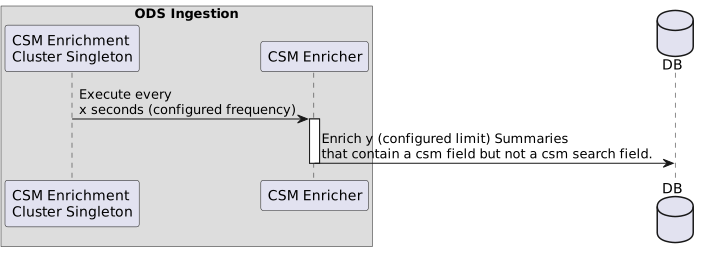
When enabled, legacy Summary database entries will be gradually migrated, allowing ODS Inquiry to search for them using their CSM value. This task applies to Summaries that have a value in the parent-level csm field but lack a value in searchFields.csm. The existing value from the csm field is converted to lowercase and used to populate the searchFields.csm field for each affected Summary.
This functionality must be explicitly enabled through config, configuration options can be found below.
The general high-level flow for this housekeeping task is:
Default CSM Enricher Configuration
The summary csm enricher can be configured using its identifier, summary-csm-enrichment. The full configuration path evaluates to ods.houskeeping.summary-csm-enrichment, consistent with the default task configuration structure.
This task uses those default configuration values unless explicitly overridden.
This task also contains an extra configuration option:
-
ods.housekeeping.summary-csm-enrichment.limit-
This controls the maximum number of Summaries that will be enriched in a single execution.
-
This defaults to 100.
-
| Enricher Enabled? | Reasoning |
|---|---|
true |
|
false |
|
PDS Object ID Enrichment Housekeeping Task
A housekeeping task that enriches the pdsObjectId field for PDS objects persisted before IPF Release 2025.2.0.
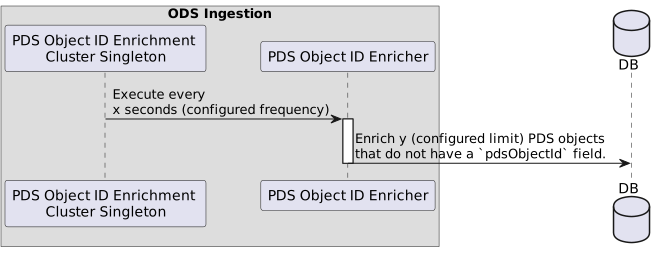
When enabled, legacy PDS database entries will be gradually migrated, allowing ODS Inquiry to search for them using their pdsObjectId value. This task applies to PDS objects that do not currently have a value for the pdsObjectId field.
This functionality must be explicitly enabled through config, configuration options can be found below.
The general high-level flow for this housekeeping task is:
Default PDS Object ID Enricher Configuration
The pdsObjectId enricher can be configured using its identifier, pds-object-id-enrichment. The full configuration path evaluates to ods.houskeeping.pds-object-id-enrichment, consistent with the default task configuration structure.
This task uses those default configuration values unless explicitly overridden.
This task also contains an extra configuration option:
-
ods.housekeeping.pds-object-id-enrichment.limit-
This controls the maximum number of PDS objects that will be enriched in a single execution.
-
This defaults to 1000.
-
| Enricher Enabled? | Reasoning |
|---|---|
true |
|
false |
|