Purging
Overview
The purpose of ODS Purging is to delete all persisted data (UnitOfWork, Summary, MdsObjects, PdsObjects, ProcessObjects, CustomObjects) associated with a given unit-of-work-id that is older than a configured period. ODS is not intended as a long term persistence solution, so data will need to be deleted after a certain point to avoid mass storage implications.
There are two purging modes, STANDARD that should be used when underlying database is mongo and TTL when underlying database is cosmos.
Choosing one of them is done by setting the following config value ods.purging.mode from the configuration.
STANDARD Purging
Key Concepts
The ODS purging implementation uses an Akka Cluster Singleton and an Akka Scheduler to frequently delete data in small batches. These frequent deletions will occur periodically throughout the day, with a PurgeReport being generated and updated as data is deleted. The aim is to delete all the necessary data without impacting ODS-Ingestion.
Retention Period
The retention period is a configurable date-based amount of time used to determine whether persisted data meets one of the criteria for purging. By default, this is set to 2 years, e.g. if the purge is being executed on 17/05/23, the retention period would be: 17/05/21 - 17/05/23.
The retention period lower bound is the purge execution date, e.g. 2023-05-17, minus the retention period, e.g. 2 years, and at the start of the day in UTC, resulting in 2021-05-17T00:00:00.000Z.
A unitOfWork is considered outside the retention period when its finishedAt field is before the retention period lower bound.
UnitOfWork fields: startedAt, finishedAt, archivedAt
The unitOfWork fields startedAt and finishedAt are populated with timestamps from certain ProcessFlowEvents that are ingested by ODS. startedAt is mapped from the first ProcessFlowEvent ingested for a unitOfWorkId. finishedAt is mapped from the ProcessFlowEvent ingested that indicates the unitOfWork has reached a terminal global status.
If the ipf-archiver-application is deployed, the unitOfWork archivedAt field will be populated when a unitOfWork and all its related ODS objects have been archived.
Purging Criteria
A unitOfWork will be purged if occurred outside the retention period, the datetime used to determine this depends upon the terminal-unit-of-works-only configuration.
-
The
terminal-unit-of-works-onlyconfiguration istrue-
The unitOfWork
finishedAtis before the retention period lower bound
-
-
The
terminal-unit-of-works-onlyconfiguration isfalse-
The unitOfWork
finishedAtis before the retention period lower bound -
IF The unitOfWork
finishedAtdoes not exist, then the unitOfWorkstartedAtis before the retention period lower bound
-
If the configured terminal-unit-of-works-only is false, the purge functionality includes non-terminal unitOfWorks.
|
Archived dependent journey types
The archived-dependent-journey-types config is used to define the unit of work Journey Types that must have been archived before they can become eligible for purging. For example, if set to ["PAYMENT"], unit of works with journeyType == PAYMENT must have been archived before they can be purged.
Journey types that are not defined in this list may be purged without being archived, following the other purging criteria defined above.
If no archived-dependent-journey-types are defined, all journey types will pass this criteria for purging.
|
The following examples assume an execution date of 2023-05-17 and a retention period of two years, with a lower bound of 2021-05-17.
| UnitOfWork | Configured terminalUnitOfWorksOnly | Configured archivedDependentJourneyTypes | Purged? | Notes |
|---|---|---|---|---|
started at: finished at: |
|
[] |
YES |
The unitOfWork finished before the retention period lower bound |
started at: finished at: |
|
[] |
NO |
The unitOfWork finished within the retention period lower bound |
started at: finished at: |
|
[] |
YES |
The unitOfWork has not finished and started before the retention period lower bound |
started at: finished at: |
|
[] |
YES |
The unitOfWork finished before the retention period lower bound |
started at: finished at: |
|
[] |
NO |
The unitOfWork finished within the retention period lower bound |
started at: finished at: |
|
[] |
NO |
The unitOfWork has not finished and started before the retention period lower bound |
started at: finished at: archivedAt: journeyType: |
|
["PAYMENT"] |
YES |
The unitOfWork finished before the retention period lower bound and has been archived |
started at: finished at: archivedAt: journeyType: |
|
["PAYMENT"] |
NO |
The unitOfWork finished before the retention period but has not been archived |
started at: finished at: archivedAt: journeyType: |
|
["PAYMENT"] |
YES |
The unitOfWork finished before the retention period lower bound. The RECALL journey type is not specified in config, therefore it does not matter if this payment has been archived or not |
Recurrent Execution
To best manage database load and exception handling, the purge execution is split into many smaller purges that occur periodically throughout the day. At the start of the day, a PurgeReport will be persisted to the database. Then, using a configured frequency, smaller recurrent purges of a configured size will occur. These smaller purges will continue to execute until all the necessary data has been deleted.
Purge Report
The details of a purge execution are persisted as a PurgeReport. Every day, a new PurgeReport will be created, and then it will be updated throughout the purge execution.
public final class PurgeReport {
    private LocalDate executionDate;
    private Period retentionPeriod;
    private Instant retentionPeriodLowerBound;
    private boolean terminalUnitOfWorksOnly;
    private List<String> archivedDependentJourneyTypes;
    private long summariesToDelete;
    private long summariesDeleted;
    private Instant startedAt;
    private Instant finishedAt;
    private Duration duration;
}| Field | Description | Example |
|---|---|---|
executionDate |
The date which this purge was executed. This will be unique for each PurgeReport |
2021-05-17T00:00:00.000Z |
retentionPeriod |
The configured |
P2Y |
retentionPeriodLowerBound |
The date-time lower bound for the retention period. A unit-of-work-id passes one of the criteria to be purged if its |
2021-05-17T00:00:00.000Z |
terminalUnitOfWorksOnly |
The configured |
false |
archivedDependentJourneyTypes |
The configured |
[PAYMENT, RECALL] |
unitOfWorksToDelete |
The number of Summary documents that have been identified as outside the retention period and should be deleted during this purge execution |
1234567 |
unitOfWorksDeleted |
The number of Summary documents that have actually been deleted. This value is incremented as the purge is ongoing |
1234567 |
startedAt |
The date-time at which purging began for this execution date (will nearly always be the start of the day) |
2023-05-17T00:00:02.170Z |
finishedAt |
The date-time at which all the data that should be deleted for a given execution date has been deleted |
2023-05-17T00:32:03.180Z |
duration |
The duration of time taken to complete a purge. Calculated by comparing the |
PT32M1.01S |
Usage
ODS purging is only performed within the ods-ingestion application, and is disabled by default.
To enable purging, set the following config value: ods.purging.enabled = true.
With this enabled, the Akka Cluster Singleton will be setup, and purge functionality will begin to execute periodically in accordance to the set configuration.
More information about other ODS Purging configuration can be found below.
Implementation
Ods Persistence Purging Port
Any purge implementation must provide a Spring Bean for the PurgingOperations interface defined in ods-persistence-purging-port. These are database methods that should query, update and delete data from whichever database type is utilised.
Purger
Any purge implementation must provide a Spring Bean for the Purger interface. By default, an instance of the DefaultPurger class is used.
DefaultPurger utilises the MongoPurgingOperations Bean and when the purge() method is triggered, it does the following:
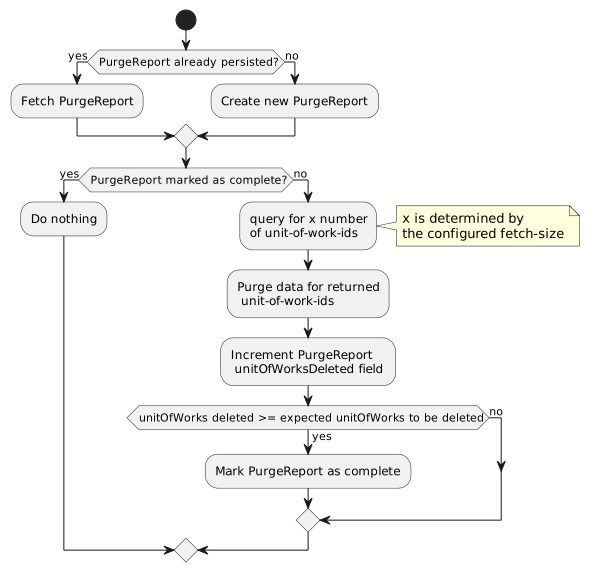
Purging a single unit-of-work-id
A single IPF-Flow will generate many ODS objects that are persisted into multiple collections. These objects will be: a single UnitOfWork, a single Summary, and multiple MdsObjects, PdsObjects, ProcessObjects, and CustomObjects, which are all linked by a unique IPF generated unit-of-work-id. For a unit-of-work-id to be considered successfully purged, all data relating to that unit-of-work-id should be deleted.
To ensure this occurs properly in ODS purging, the Summary, all the MdsObjects, PdsObjects, ProcessObjects, and CustomObjects for a given unit-of-work-id are deleted before deleting its UnitOfWork.
Error Handling
Due to the nature of the purging implementation, errors with deletion are retried naturally by the next recurrent execution. However, the persisted PurgeReport should be kept as up to date as possible. Therefore, retry-able writes have been implemented for any database operations that write to the purgeReports collection.
Any errors thrown within the purge execution are logged as a warning with no action taken. The purge will be executed again shortly and data that failed to purge previously will be picked up in subsequent executions.
Akka Cluster Singleton
A Cluster Singleton is used to execute the recurrent purge. The PurgingSchedulerSingleton class is registered as a Spring Bean upon startup. This sets up a Singleton Actor with an Akka Scheduler.
This Akka Scheduler takes an instance of the Purger interface and triggers a purge, by calling the Purger.purge() method, at a rate defined by the configured frequency. By default, this frequency is set to trigger every 1 second.
Deletion Throughput
The deletion throughput is defined by configuring the frequency, and fetch size. If the frequency is 1 second, and the fetch size is 500, then ODS will attempt to delete 500 unitOfWorks every second.
Deleting 500 unitOfWorks per second may not be achievable, depending on the database resources available, and on the ingestion load at the time of deletion. Deletion will also have an impact (sometimes significantly) on ingestion.
Each execution (every second) finds 500 candidate unitOfWorks, groups into batches of ~62 (assuming parallelism of 8), and performs 4 delete operations, passing each the list of 62 unit of work ids. Deleting the summary, process, MDS, PDS, and custom objects is done concurrently, and when those have finished, the unitOfWorks are deleted.
The overall delete latency is the sum of the greatest delete latency between summary, process, MDS, PDS, and custom, plus the delete latency for unitOfWorks.
Possible Approaches
There are a few different approaches, with different implications.
Delete as many candidate unitOfWorks as quickly as possible at the start of the day
The goal is to delete all candidate unitOfWorks before any ingestion load occurs.
Given a fetch size of 500, and a frequency of 1, ODS could theoretically delete 5.4 million candidate unitOfWorks between the hours of 12am - 3am, when ingestion load would be low to nil.
If there is any significant ingestion load during this period, the impact on ingestion throughput will also be significant, as will the impact on deletion throughput.
This approach is predicated on the delete operations having low enough latency, so that all data for the 500 unitOfWorks can be deleted within 1 second.
If the overall delete latency (the greatest delete latency between summary, process, MDS, PDS, and custom plus the latency to delete the unitOfWorks) exceeds 1 second, subsequent executions will queue up.
Deletion Throughput/s |
Time to delete 1 million units of work (h:m:s) |
100 |
2:46:40 |
200 |
1:23:20 |
500 |
0:33:20 |
Delete a small number of candidate unitOfWorks throughout the day
The goal is to delete slowly over the entire day, avoiding impact on ingestion throughput.
Given a fetch size of 40, and a frequency of 1, ODS could theoretically delete 3.4 million candidate unitOfWorks over the entire day.
ODS is always deleting (assuming there are candidates remaining), even when ingestion load is high.
These frequent but small deletions may still impact high throughput ingestion.
Deletion Throughput/s |
Deleted in 24 Hours |
15 |
1,296,000 |
20 |
1,728,000 |
40 |
3,456,000 |
Preferred Approach
The preferred, and currently default approach, is to delete small batches of candidate unitOfWorks frequently, over the entire day.
In testing against CosmosDB, high deletion throughput was not achievable with the current implementation, due to the high delete operation latency. Deleting at 40tps introduced ingestion lag at only 300tps ingestion throughput, and at 500tps, ingestion lag spiked and continued to climb. For CosmosDB deployments a much lower fetch size is recommended, something like 16.
In testing against MongoDB, a deletion throughput of about 1000tps was achievable, but to avoid any significant impact on ingestion, a deletion throughput of 500tps is recommended. Going with a smaller number, e.g. 40tps, is likely preferable, to spread the deletion load throughout the day.
Ultimately, it will depend on the database resources available, and the client requirement. Something in between the above approaches might be more suitable.
TTL Purging
Time-to-live (TTL) functionality allows the database to automatically expire data. TTL purging mode should be used when cosmos database is deployed.
Set time to live value for a collection
To enable TTL universally on a collection, a "TTL index" (time-to-live index) needs to be created. The TTL index is an index on the _ts field with an expireAfterSeconds value.
Once the index is created, the database will automatically delete any documents in that collection that have not been modified in the last expireAfterSeconds seconds.
Set time to live value for a document
Per-document TTL values are also supported. The document(s) must contain a root-level property "ttl" (lower-case), and a TTL index described above must have been created for that collection. TTL values set on a document will override the collection’s TTL value.
There are a few housekeeping features implemented on TTL purging mode and more information can be found here TTL Purging Housekeeping jobs.
Default Configuration
ods {
  purging {
    enabled = false
    mode = STANDARD
    retention-period = 2Y
    terminal-unit-of-works-only = false
    archived-dependent-journey-types = []

    frequency = 1s
    fetch-size = 16
    parallelism = 8
  }
}| Config Key | Description |
|---|---|
|
A flag to enable or disable ODS purging. Either |
|
Purging mode. Either |
|
The retention period for purge execution. A date-based amount of time, e.g. 1Y = 1 year, 1M = 1 month, 1W = 1 week |
|
A flag to enable the purger to only purge unitOfWorks that have reached a Terminal Global Status. Either |
|
A list used to define the unitOfWork journey types that must be archived before being eligible for purging. Journey type options are |
|
The frequency at which recurrent executions occur. A time-based amount of time, e.g. 2S = 2 seconds, 1M = 1 minute |
|
The number of unitOfWorks to be deleted in one execution |
|
The number of batches of unitOfWorks to delete concurrently. If the |
ods.purging.fetch-size and ods.purging.frequency are used together to determine the number of unitOfWorks to be deleted, and how frequently. If ods.purging.fetch-size = 1000, and ods.purging.frequency = 1s, ODS will attempt to delete 1000 unitOfWorks (and all related ODS objects) per second.