Calculate Past Working Day
The calculatePastWorkingDay API determines a working day in the past, that occurred exactly N working days ago(daysToSubtract). In the calculation, all non-working days are skipped. Annual calendar with specified calendarId(in the request) is used in the logic to determine non-working days. It is not responsibility of this service to determine which day is a non-working day. The user of this code(client) is responsible to provide valid data as a part of annual calendar, and keep it up to date. This API returns calculated working date in the past.
Sequence Diagram
Diagram below is a technical representation of calculation logic that occurs in the working day service.
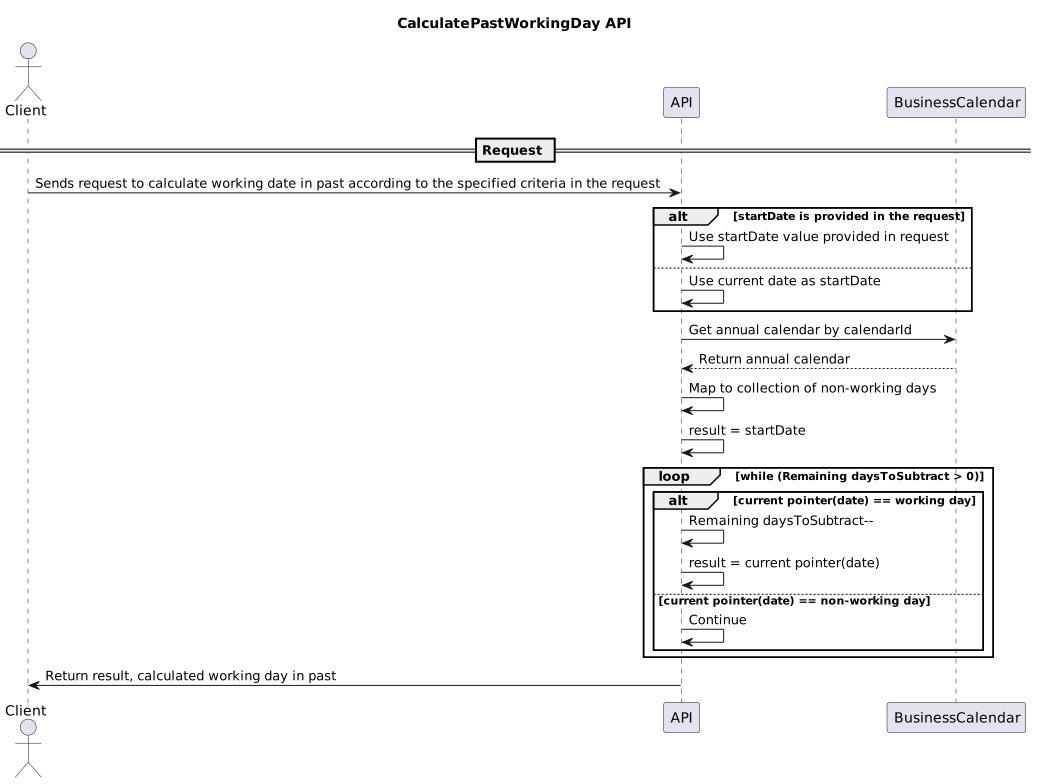
Usage
This section contains explanation of input request parameters, as well as realistic use case examples.
| Parameter | Optional | Description |
|---|---|---|
startDate |
Yes |
The date from which to subtract the specified number of business days to get a working day in the past. If not specified, the current date will be used. |
calendarId |
No |
Calendar with provided id to be used in calculation for determining non-working days. Must be a valid-configured calendar. |
daysToSubtract |
No |
The number of days to subtract from the |
Successful response returns the past working day according to the specified criteria in the request.
Examples
| Input Parameters | Result | Explanation |
|---|---|---|
startDate=2025-11-27, daysToSubtract=1, calendarId=UKDomestic |
2025-11-26 |
Result is one working day before |
startDate=2025-10-27, daysToSubtract=1, calendarId=UKDomestic |
2025-10-24 |
Weekend days 25th and 26th are non-working days according to the calendar so were skipped in the calculation. |
startDate=2026-01-05, daysToSubtract=1, calendarId=UKDomestic |
2025-12-31 |
Similar to above, 3rd and 4th of January are weekend, but 1st and 2nd are public holidays so also skipped according to the calendar |
startDate=2026-01-05, daysToSubtract=1, calendarId=SEPAStep2 |
2026-01-02 |
3rd and 4th of January are weekend, while 1st January is public holiday. Notice how selecting a different |
startDate=2025-11-30, daysToSubtract=1, calendarId=QADomestic |
2025-11-27 |
Due to a different country |
daysToSubtract=1, calendarId=UKDomestic |
2025-11-26 |
In this example |
startDate=2025-10-21, daysToSubtract=4, calendarId=UKDomestic |
2025-10-15 |
18th and 19th of October are weekend, so these days are skipped in the calculation. |
startDate=2026-01-01, daysToSubtract=1, calendarId=UKDomestic |
2025-12-31 |
When specified |
startDate=2025-10-10, daysToSubtract=20, calendarId=UKDomestic |
2025-09-12 |
Skip all non-working days(weekends) in calculation. |