Request Blocking
Overview
The Request Blocking feature provides protection against potential phishing attempts by blocking requests after a certain number of no match responses for a given IBAN or IBAN+BIC combination. This helps prevent attackers from using the Verification of Payee service to gather information about valid account details.
How it Works
The Request Blocking feature works as follows:
-
An incoming request is received with an IBAN and BIC.
-
The cache is checked, using the IBAN or IBAN+BIC, to see if the number of no matches is above the threshold. The message is rejected if it’s above the configured threshold.
-
The cache counters are incremented if the response outcome is no match.
Configuration
Configuration for request blocking is defined in 2 places due to the use of the IPF Cache. Firstly, to configure the ipf cache you can modify the below default values:
Property Grouping: ipf.caching.caffeine
| Key | Description | Default Value |
|---|---|---|
ipf.caching.caffeine.enabled |
Enable caching for VoP block requests |
|
ipf.caching.caffeine.settings.no-match-iban-and-bic.max-size |
Max number of items allowed in the cache |
|
ipf.caching.caffeine.settings.no-match-iban-and-bic.timeout |
Timeout value for when items will be removed from the cache |
|
ipf.caching.caffeine.settings.no-match-iban.max-size |
Max number of items allowed in the cache |
|
ipf.caching.caffeine.settings.no-match-iban.timeout |
Timeout value for when items will be removed from the cache |
|
To modify the corresponding max request limit allowed within the above timeout you can modify the below default values:
Property Grouping: ipf.verification-of-payee.responder.cache.no-match
| Key | Description | Default Value |
|---|---|---|
ipf.verification-of-payee.responder.cache.no-match.iban-and-bic-matching.max-requests |
The maximum number of no match responses allowed for a given IBAN and BIC before blocking requests |
|
ipf.verification-of-payee.responder.cache.no-match.iban-matching.max-requests |
The maximum number of no match responses allowed for a given IBAN before blocking requests |
|
Important Notes
-
The counters are reset when the cache entries expire.
-
The cache has a maximum size to prevent memory issues.
-
Request blocking is applied independently for IBAN and IBAN+BIC thresholds - if either threshold is exceeded, the request will be blocked.
-
The number of blocked requests is counted in metrics for monitoring purposes.
-
Cache counters are reset if the service goes down
-
Cache counters are not distributed across nodes
-
Checking of counters is eagerly checked (as soon as the request comes in), so this could mean some requests could not be flagged even if they are above the request limit. Once the counters have been updated above the request limit, requests should start being blocked.
Metrics
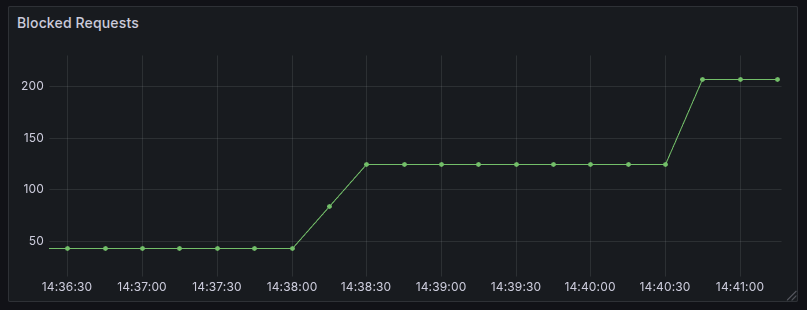
The Verification of Payee service also exposes a metric property that counts the number of blocked requests. The metric is a counter with key of verification-of-payee.responder.blocked-requests. This gets pushed to Prometheus and can be used to create a dashboard to monitor the number of Phishing attempts for all accounts over a certain period of time.
Example:
To investigate a blocked request, refer to the application logs for details on the specific cache and IBAN/IBAN+BIC combinations that led to the block.
Example:
2025-07-08T13:17:01.603+01:00 INFO 57496 --- [oundedElastic-1] c.i.i.p.v.s.p.CacheBackedPhishingService : Cache with key GB46BARC20040159395561 is above the threshold 5Error Handling
Runtime Errors
The following errors may occur at runtime. When an error occurs, the service responds with the corresponding HTTP error code, as outlined in the table below.
| Error | HTTP Return Code |
|---|---|
When too many no match responses have occurred for a particular IBAN or IBAN+BIC combination over a set time period or threshold. Error message: |
400 |