Despliegue
IPF Metrics Processor es bastante liviano y puede desplegarse como una única instancia, pero puede escalarse más allá de una instancia si es necesario. El número de instancias no debe exceder el número de particiones del tópico de IPF Processing Data (IPF_PROCESSING_DATA).
Docker
IPF Metrics Processor se entrega como una imagen de docker y, por tanto, puede ejecutarse en entornos containerizados.
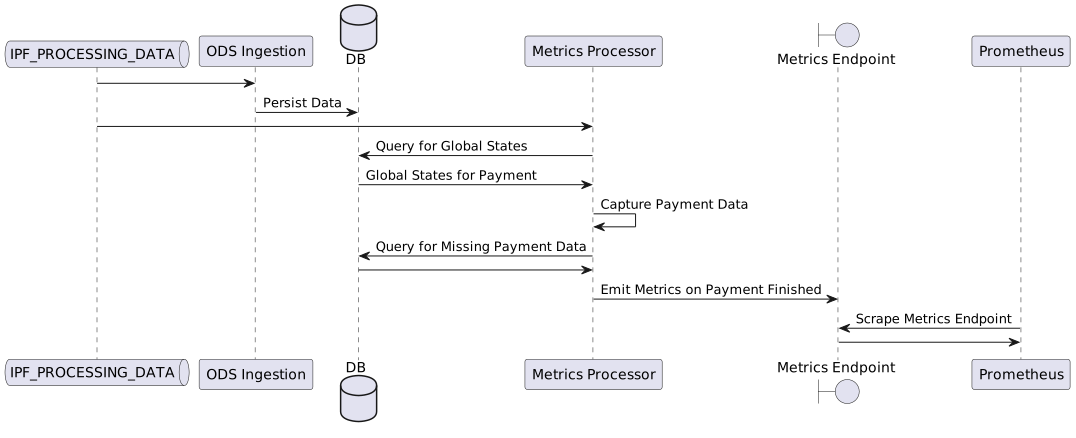
Lo siguiente es un ejemplo mínimo de despliegue con docker compose, suficiente para poner en marcha IPF Metrics Processor; sin embargo, faltan varios otros componentes necesarios: ODS Ingestion, que se requiere para ingerir datos de procesamiento de pagos para búsquedas en algunos escenarios; una aplicación de procesamiento de pagos de IPF para producir datos en el tópico IPF_PROCESSING_DATA; y tanto Prometheus como Grafana.
Este ejemplo de despliegue con docker compose podría utilizarse como punto de partida para un despliegue en Kubernetes.
Docker Compose
services:
  ipf-metrics-processor:
    image: ${docker.registry}/ipf-metrics-processor:latest
    container_name: ipf-metrics-processor
    ports:
      - "8080:8080"
    volumes:
      - ./config/ipf-metrics-processor:/ipf-metrics-processor/conf
    healthcheck:
      test: [ "CMD", "curl", "-f", "http://localhost:8080/actuator/health" ]
      interval: 1s
      timeout: 1s
      retries: 3
      start_period: 30s

  mongo:
    image: ${docker.registry}/ipf-docker-mongodb:latest
    container_name: mongo
    healthcheck:
      test: echo 'db.runCommand("ping").ok' | mongo localhost:27017/test --quiet

  zookeeper:
    image: zookeeper
    container_name: zookeeper

  kafka:
    image: registry.ipf.iconsolutions.com/kafka-icon:2.13-2.7.1
    container_name: kafka
    environment:
      - KAFKA_BROKER_ID=0
      - KAFKA_AUTO_CREATE_TOPICS_ENABLE=false
      - KAFKA_ZOOKEEPER_CONNECT=zookeeper:2181
      - KAFKA_LOG_RETENTION_MINUTES=60
      - KAFKA_OFFSETS_TOPIC_REPLICATION_FACTOR=1
      - KAFKA_OFFSETS_TOPIC_NUM_PARTITIONS=1
      - KAFKA_LISTENERS=INTERNAL://:9092,EXTERNAL://:9093
      - KAFKA_ADVERTISED_LISTENERS=INTERNAL://kafka:9092,EXTERNAL://localhost:9093
      - KAFKA_LISTENER_SECURITY_PROTOCOL_MAP=INTERNAL:PLAINTEXT,EXTERNAL:PLAINTEXT
      - KAFKA_INTER_BROKER_LISTENER_NAME=INTERNAL
      - KAFKA_CREATE_TOPICS=IPF_PROCESSING_DATA:10:1
    depends_on:
      - zookeeper
Configuración
management.endpoints.web.exposure.include = "*"

ipf.mongodb.url = "mongodb://mongo:27017/ipf"

ipf.processing-data.ingress.kafka.consumer.kafka-clients.bootstrap.servers = "kafka:9092"
Requisitos
Se requiere una conexión a la base de datos ODS para que se puedan resolver los payment flows y determinar el estado terminal de un pago y, en algunos casos, para obtener datos que puedan faltar.
Se requiere una conexión a Kafka, para poder consumir IPF Processing Data.
ODS Ingestion también debe estar en funcionamiento. Se espera que ODS persista definiciones de process flow y todos los demás datos relacionados con pagos que puedan ser necesarios para producir métricas.
Configuración
Infraestructura
IPF Metrics Processor es un IPF Processing Data Ingress, es decir, utiliza los conectores de recepción de Kafka predefinidos para consumir datos. Consulta la documentación de IPF Processing Data para opciones de configuración.
IPF Metrics Processor debe conectarse a la instancia de ODS MongoDB: la URL de conexión se define con ipf.mongodb.url, p. ej., ipf.mongodb.url = "mongodb://ipf-mongo:27017/ipf"
Para gestionar el tamaño de la caché interna, IPF Metrics Processor expulsa todos los datos de un pago de la caché después de un tiempo configurado. La caché expira un pago después de que haya transcurrido la duración especificada desde la última vez que el pago fue accedido por una lectura o una escritura.
Esta duración se define con ipf.business-metrics-processor.cache.expire-after-access, cuyo valor predeterminado es 10 minutos cuando no se configura.
Funcionalidades
Algunas funcionalidades de las métricas producidas deben habilitarse y configurarse explícitamente. La siguiente es una configuración básica de ejemplo.
Ejemplo de configuración en notación estándar
ipf.business-metrics-processor.payment-metrics {
  labels {
    direction {
      payment-type-mappings = [
        {
          label = "Outbound"
          payment-types = ["DebtorCT"]
        }
        {
          label = "Inbound"
          payment-types = ["CreditorCT"]
        }
        {
          label = "Internal"
          payment-types = ["Book Transfer"]
        }
      ]
    }

    currency {
      pds-type = SomeClientSpecificPdsType
      path = "/details/paymentAmount/currency"
    }

    local-instrument {
      pds-type = SomeClientSpecificPdsType
      path = "/details/localInstrument/instrument"
    }

    identity-comparison {
      pds-type = SomeClientSpecificPdsType
      path = "/details/comparison/result"
    }

    client-channel {
      pds-type = SomeClientSpecificPdsType
      path = "/details/clientChannel/channel"
    }
  }

  ######################################################################################################
  # The below configuration is not necessary out-of-the-box, and exists for backward-compatibility.
  # It is also deprecated and will be unsupported in future versions.
  ######################################################################################################

  # Optional if using a version of HTM that produces events with the `HTM` label, or when payment flows produce events
  # with labels indicating the payment went through HTM
  htm {
    events = ["Task Registration Successful", "Task Registration Failed"]
  }

  payment-duration {
    # Optional if the payment flows produce events with labels indicating the start and end of the critical path
    critical-path {
      critical-path-states-by-payment-type = [
        {
          payment-type = "Debtor CT"
          start-state = "Validating"
          end-state = "Instructing"
        }
      ]
    }

    # Optional if the payment flows produce events with labels indicating the which states are considered waiting states
    waiting {
      waiting-states-by-flow = [
        {
          flow-name = "PaymentExecutionFlowV1"
          states = ["Checking Bank System A", "Checking Bank System B"]
        }
        {
          flow-name = "PaymentExecutionFlowV2"
          states = ["Checking Bank System B", "Checking Bank System C"]
        }
      ]
    }
  }
}
Hocon dot notation también es compatible
Ejemplo de configuración en Dot Notation
ipf.business-metrics-processor.payment-metrics.labels.direction.payment-type-mappings.0.label = "Outbound"
ipf.business-metrics-processor.payment-metrics.labels.direction.payment-type-mappings.0.payment-types.0 = "DebtorCT"
ipf.business-metrics-processor.payment-metrics.labels.direction.payment-type-mappings.1.label = "Inbound"
ipf.business-metrics-processor.payment-metrics.labels.direction.payment-type-mappings.1.payment-types.0 = "CreditorCT"
ipf.business-metrics-processor.payment-metrics.labels.direction.payment-type-mappings.2.label = "Internal"
ipf.business-metrics-processor.payment-metrics.labels.direction.payment-type-mappings.2.payment-types.0 = "Book Transfer"

ipf.business-metrics-processor.payment-metrics.labels.currency.pds-type = SomeClientSpecificPdsType
ipf.business-metrics-processor.payment-metrics.labels.currency.path = "details.paymentAmount.currency"

ipf.business-metrics-processor.payment-metrics.labels.local-instrument.pds-type = SomeClientSpecificPdsType
ipf.business-metrics-processor.payment-metrics.labels.local-instrument.path = "details.localInstrument.instrument"

ipf.business-metrics-processor.payment-metrics.labels.identity-comparison.pds-type = SomeClientSpecificPdsType
ipf.business-metrics-processor.payment-metrics.labels.identity-comparison.path = "details.comparison.result"

ipf.business-metrics-processor.payment-metrics.labels.client-channel.pds-type = SomeClientSpecificPdsType
ipf.business-metrics-processor.payment-metrics.labels.client-channel.path = "details.clientChannel.channel"

######################################################################################################
# The below configuration is not necessary out-of-the-box, and exists for backward-compatibility.
# It is also deprecated and will be unsupported in future versions.
######################################################################################################

# Optional if using a version of HTM that produces events with the `HTM` label, or when payment flows produce events
# with labels indicating the payment went through HTM
ipf.business-metrics-processor.payment-metrics.labels.htm.events.0 = "Task Registration Successful"
ipf.business-metrics-processor.payment-metrics.labels.htm.events.1 = "Task Registration Failed"

# Optional if the payment flows produce events with labels indicating the start and end of the critical path
ipf.business-metrics-processor.payment-metrics.payment-duration.critical-path.critical-path-states-by-payment-type.0.payment-type = "Debtor CT"
ipf.business-metrics-processor.payment-metrics.payment-duration.critical-path.critical-path-states-by-payment-type.0.start-state = "Validating"
ipf.business-metrics-processor.payment-metrics.payment-duration.critical-path.critical-path-states-by-payment-type.0.end-state = "Instructing"

# Optional if the payment flows produce events with labels indicating the which states are considered waiting states
ipf.business-metrics-processor.payment-metrics.payment-duration.waiting.waiting-states-by-flow.0.flow-name = "PaymentExecutionFlowV1"
ipf.business-metrics-processor.payment-metrics.payment-duration.waiting.waiting-states-by-flow.0.states.0 = "Checking Bank System A"
ipf.business-metrics-processor.payment-metrics.payment-duration.waiting.waiting-states-by-flow.0.states.1 = "Checking Bank System B"
ipf.business-metrics-processor.payment-metrics.payment-duration.waiting.waiting-states-by-flow.1.flow-name = "PaymentExecutionFlowV2"
ipf.business-metrics-processor.payment-metrics.payment-duration.waiting.waiting-states-by-flow.1.states.0 = "Checking Bank System B"
ipf.business-metrics-processor.payment-metrics.payment-duration.waiting.waiting-states-by-flow.1.states.1 = "Checking Bank System C"