RD 2 - Create a Decision
What is a Decision
A decision within the rules designer is a function designed to act as a branching point within a flow. It takes in business data and returns a decision outcome that can be used in behaviours to orchestrate the flow without needing to define extra events or inputs.
This serves a similar function to decisions within Flo-Lang, but where the body of that is implemented via a Java interface, these are written entirely within IPF Studio.
More details on rules designer decisions can be found here
Objective
We want to determine which value bracket a transaction is within and process the payment accordingly.
DSL Set Up
|
To see a completed example of this step, open the |
Creating the Decision
To create a new Decision node in our model. Right-click on the model, then select
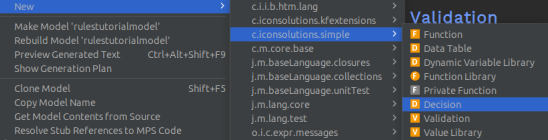
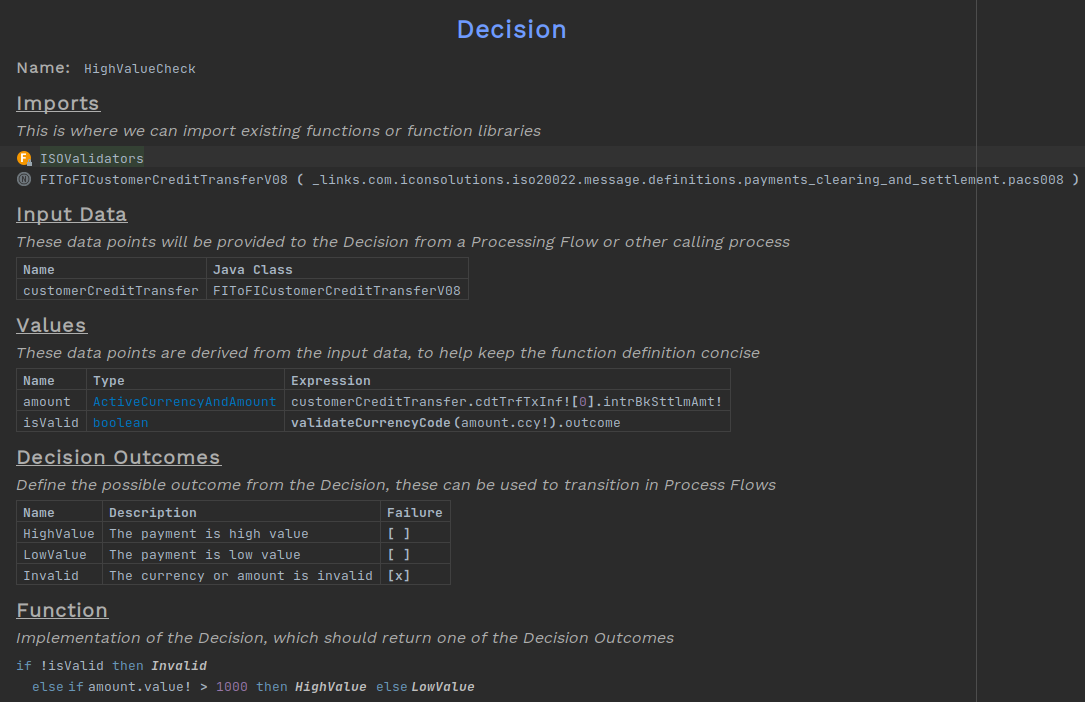
Give the Decision a name, here we will use "HighValueCheck".
A Decision can take multiple business data elements as input. Here we are again just using FIToFICustomerCreditTransferV08 but more can be added by pressing Enter on the end of a row.
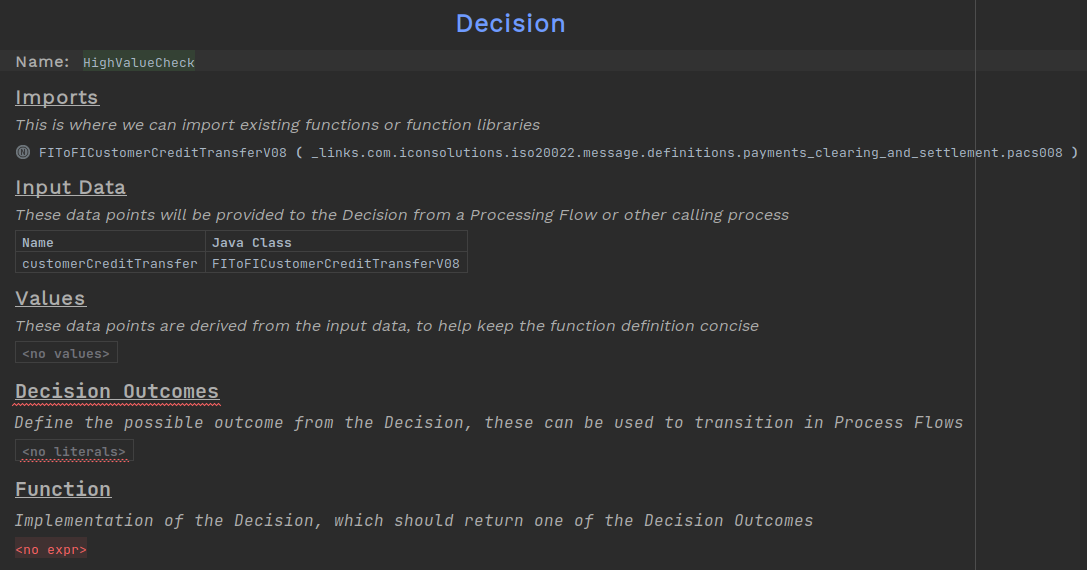
For the body of the decision we will first check the currency of the payment is valid. Then, if the value of the interbank settlement amount is over a given threshold, we will class it as high value; otherwise it is low value.
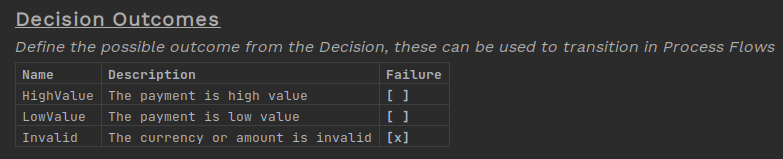
We define the outcomes of the decision, there can be as many outcomes as you want. In this example we will use three:
-
HighValue
-
LowValue
-
Invalid
Since the path to the amount is fairly long, we only want to write it out once. To do this, we can use the Values table to define a value to use in the body of the decision. This consists of a name for the constant, its type and the expression that defines it.

Using the Rules Library
The rules library is a set of predefined functions that can be imported for use within the rules designer. They are of use to us here as they contain a function for looking up active currency codes. The full list of functions can be found here
To import them into the project, select the imports block and press Ctrl+R twice. Now search for the function library, in this example we want the ISOValidators library. Then import the function into the file.


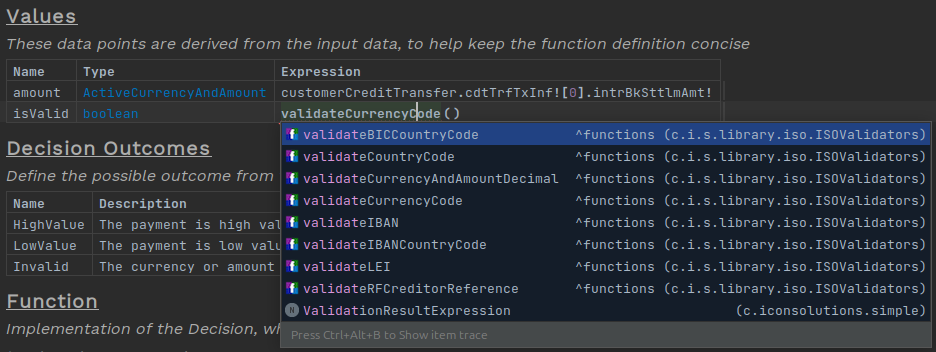
Now the functions from that library can be called within any expression. Here we add a new row to the value for the outcome of the function call.
Adding to the Flow
Now the decision has been created, we need to add it to the flow.
No event definitions or input behaviours are needed for decisions, so the only changes we need to make are to states and behaviours.
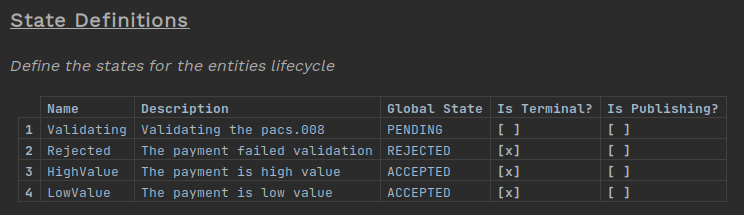
The Completed state can be removed and replaced with two new states for the outcomes of the decision.
Now we want to add the decision to occur after our validation. Our current behaviour is this:
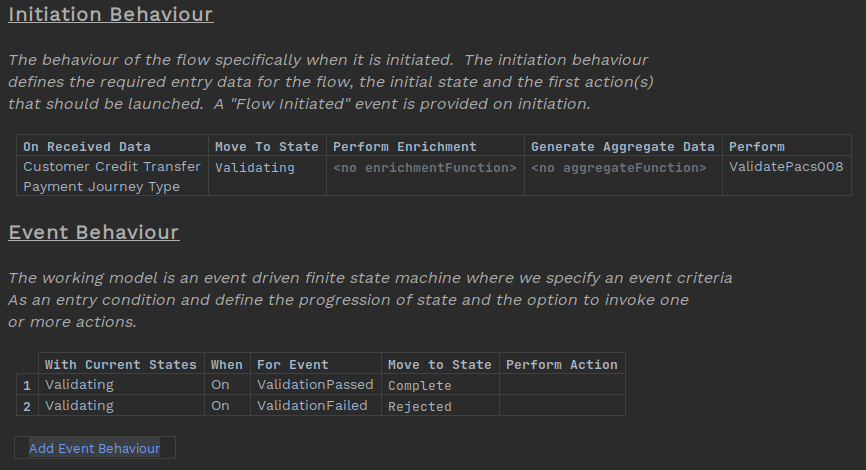
Now we will now instead transition to a pseudo decision state. Delete the old state, then pressing Ctrl+Space to see our options. Select "Create Decision State" and name this new state "CheckValue".
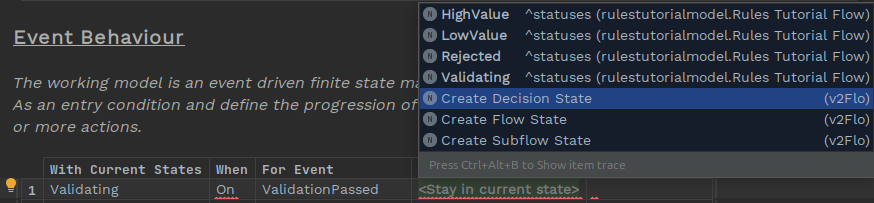
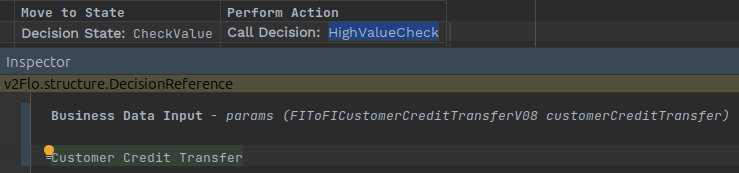
On the same behaviour we will want to call out to the decision. In the perform action box select the option Routing Decision and choose the Decision node
Now we need to pass in the inputs to the decision. Again this requires the use of the inspector, which can be open with either Alt+2, Ctrl+Alt+I or right clicking on the action and selecting Inspect Node. Add the input business data, here this is "Customer Credit Transfer"
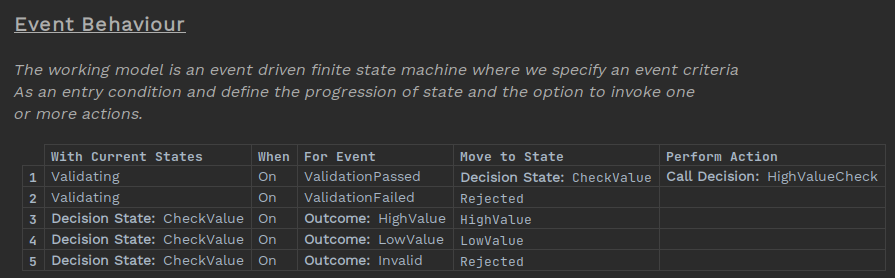
Now we need to add the behaviours for the outcomes of the decision, moving from the newly defined decision state to the state matching the decision outcome. In the for event cell select "Decision Outcome" and choose the outcome for that behaviour.
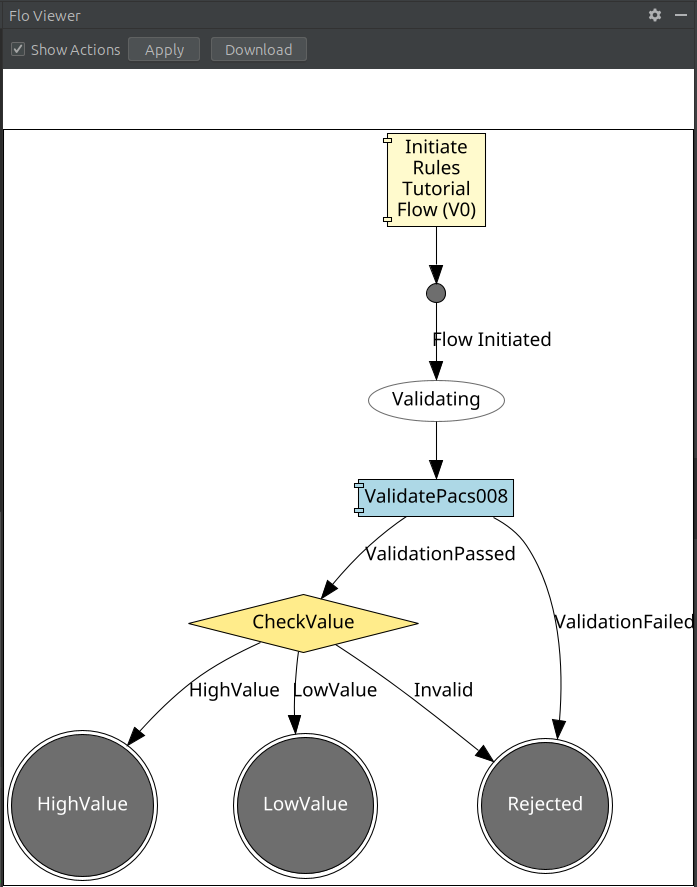
The flow should be ready now. Have a look at the updated graph using the flow viewer (Tools > Open Flow Viewer)
Testing
Next step: RD 3 - Use Dynamic Variables
As with the validation, no further Java implementations need to be made.
However, to use the rules library functions, this dependency needs to be added to the external dependencies pom within the domain module.
<dependency>
    <groupId>com.iconsolutions.dsl</groupId>
    <artifactId>icon-languages-runtime-dependencies</artifactId>
</dependency>
Build the project again with the command
mvn clean installThen run the application and the supporting apps.
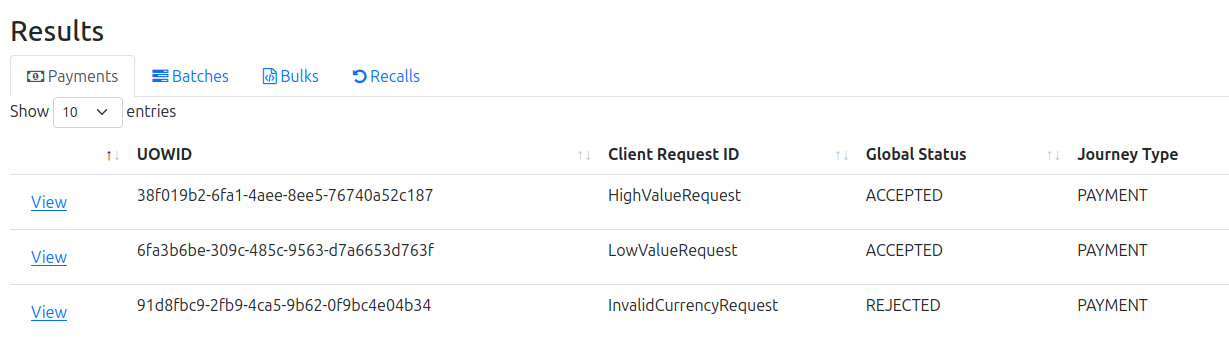
The three commands below will send in Pacs008s that match to the three decision outcomes we defined.
curl -d '{"requestId":"HighValueRequest","pacs008":{"grpHdr": {"msgId": "ExampleMessageId", "creDtTm": "2025-10-27T17:27:29.886889529Z", "nbOfTxs": "1", "intrBkSttlmDt": "2025-10-27", "sttlmInf": {"sttlmMtd": "CLRG", "clrSys": {"prtry": "EBA"}}}, "cdtTrfTxInf": [{"pmtId": {"endToEndId": "VIVNxmihFItoyyjAPLTqnwqOpoaWUgFHcFr", "txId": "TugAtCCIQtcUYcFfGVGAHFNfdUjeCokipAn"}, "intrBkSttlmAmt": {"value": 6000, "ccy": "EUR"}, "accptncDtTm": "2025-10-27T17:27:29.878336788Z", "chrgBr": "SLEV", "dbtr": {"nm": "James Allen", "pstlAdr": {"adrLine": ["213 South Street"]}, "id": {"orgId": {"anyBIC": "PRXYITMM"}}}, "dbtrAcct": {"id": {"iban": "GB38UVCRXEHFCFLMQNBTWFSWXISKIW"}, "ccy": "EUR", "nm": "Chloe Williams"}, "dbtrAgt": {"finInstnId": {"bicfi": "ICONGBA1", "clrSysMmbId": {"mmbId": "191919"}, "pstlAdr": {"adrLine": ["897 North Street"]}}}, "cdtrAgt": {"finInstnId": {"bicfi": "ICONGBA0", "clrSysMmbId": {"mmbId": "400302"}, "nm": "Chloe Hughes", "pstlAdr": {"adrLine": ["465 Main Street"]}}, "brnchId": {"id": "iWULDmNwqrZLcrNNmxlELmWDrQGgGdeOavf"}}, "cdtr": {"nm": "Sophia Phillips", "pstlAdr": {"adrLine": ["293 Kingsway"]}, "id": {"orgId": {"lei": "12345678901234567888", "anyBIC": "KJFISESS"}}}, "cdtrAcct": {"id": {"iban": "CZ6508000000192000145399"}}}]}}' -H 'Content-Type: application/json' http://localhost:8080/submit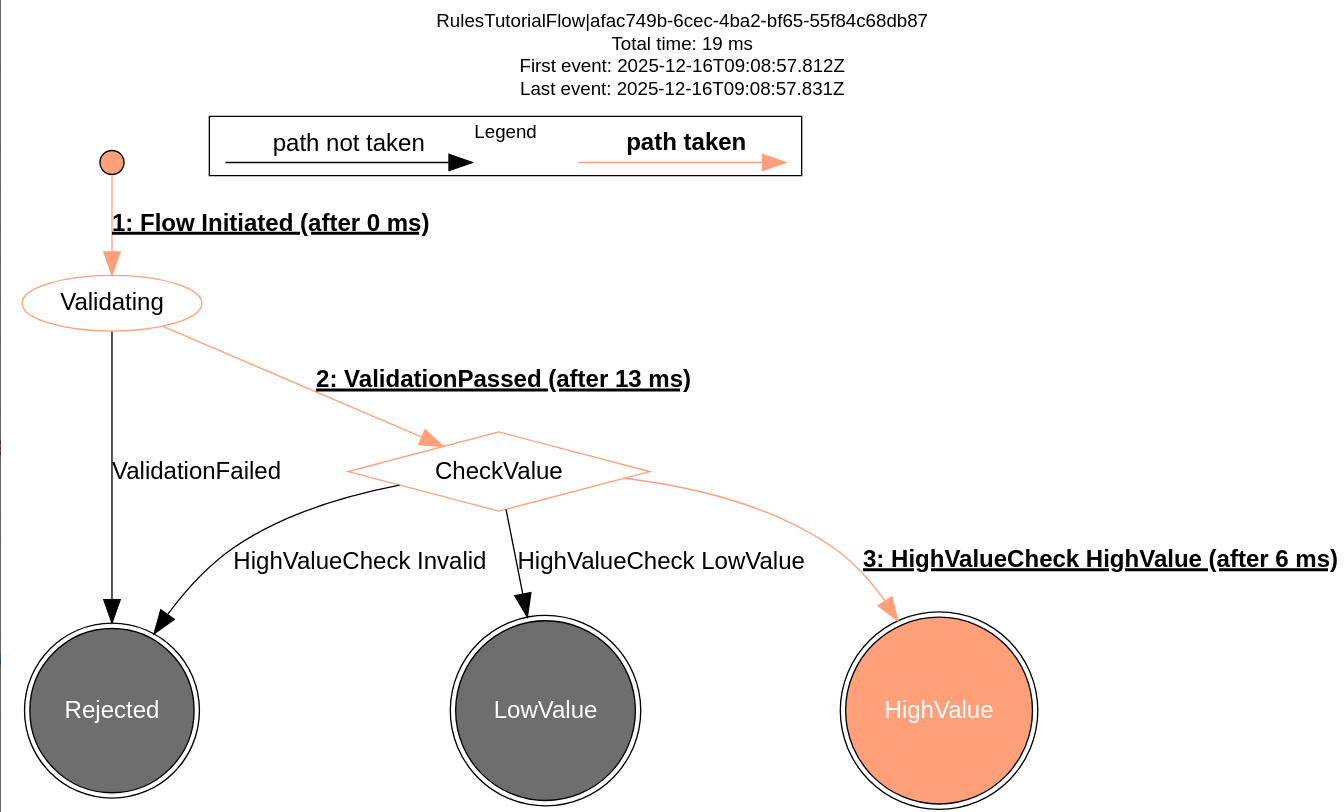
curl -d '{"requestId":"LowValueRequest","pacs008":{"grpHdr": {"msgId": "ExampleMessageId", "creDtTm": "2025-10-27T17:27:29.886889529Z", "nbOfTxs": "1", "intrBkSttlmDt": "2025-10-27", "sttlmInf": {"sttlmMtd": "CLRG", "clrSys": {"prtry": "EBA"}}}, "cdtTrfTxInf": [{"pmtId": {"endToEndId": "VIVNxmihFItoyyjAPLTqnwqOpoaWUgFHcFr", "txId": "TugAtCCIQtcUYcFfGVGAHFNfdUjeCokipAn"}, "intrBkSttlmAmt": {"value": 500, "ccy": "EUR"}, "accptncDtTm": "2025-10-27T17:27:29.878336788Z", "chrgBr": "SLEV", "dbtr": {"nm": "James Allen", "pstlAdr": {"adrLine": ["213 South Street"]}, "id": {"orgId": {"anyBIC": "PRXYITMM"}}}, "dbtrAcct": {"id": {"iban": "GB38UVCRXEHFCFLMQNBTWFSWXISKIW"}, "ccy": "EUR", "nm": "Chloe Williams"}, "dbtrAgt": {"finInstnId": {"bicfi": "ICONGBA1", "clrSysMmbId": {"mmbId": "191919"}, "pstlAdr": {"adrLine": ["897 North Street"]}}}, "cdtrAgt": {"finInstnId": {"bicfi": "ICONGBA0", "clrSysMmbId": {"mmbId": "400302"}, "nm": "Chloe Hughes", "pstlAdr": {"adrLine": ["465 Main Street"]}}, "brnchId": {"id": "iWULDmNwqrZLcrNNmxlELmWDrQGgGdeOavf"}}, "cdtr": {"nm": "Sophia Phillips", "pstlAdr": {"adrLine": ["293 Kingsway"]}, "id": {"orgId": {"lei": "12345678901234567888", "anyBIC": "KJFISESS"}}}, "cdtrAcct": {"id": {"iban": "CZ6508000000192000145399"}}}]}}' -H 'Content-Type: application/json' http://localhost:8080/submit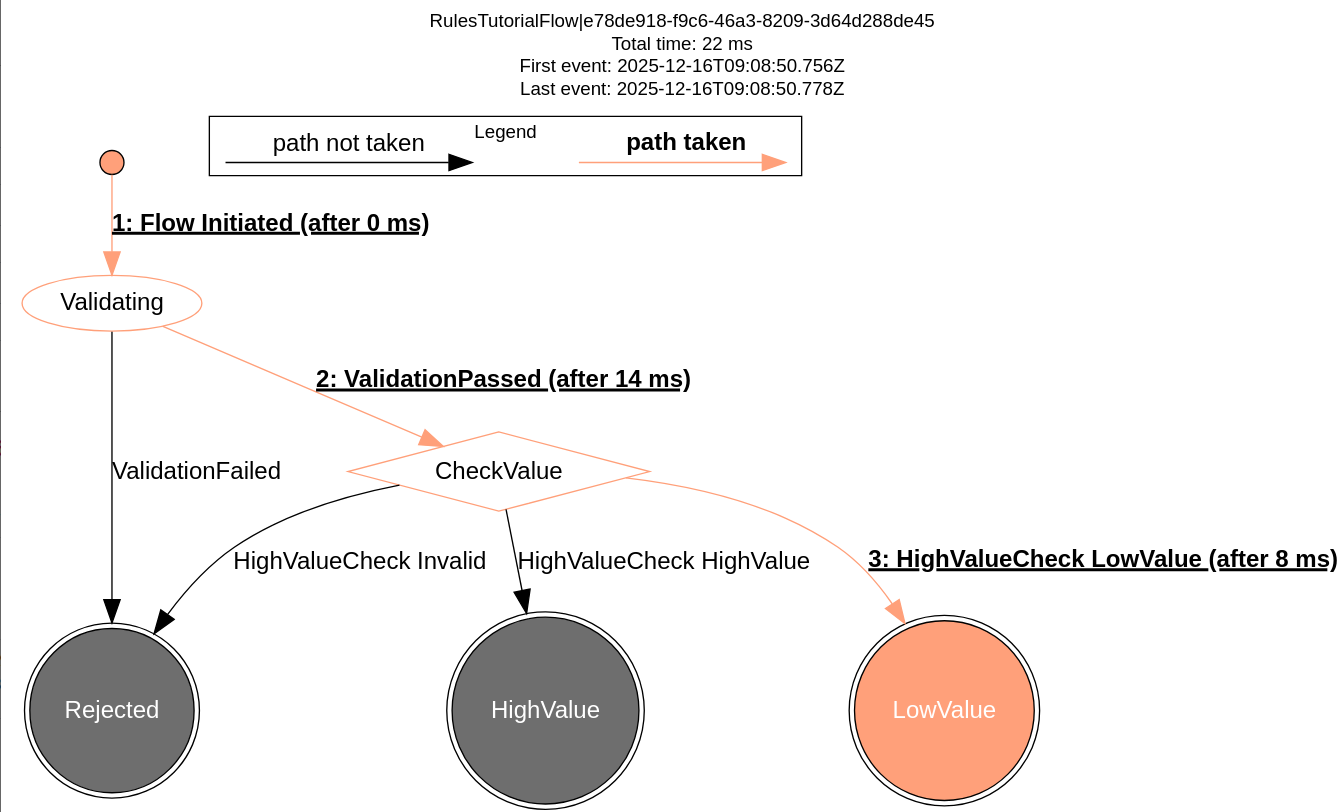
curl -d '{"requestId":"InvalidCurrencyRequest","pacs008":{"grpHdr": {"msgId": "ExampleMessageId", "creDtTm": "2025-10-27T17:27:29.886889529Z", "nbOfTxs": "1", "intrBkSttlmDt": "2025-10-27", "sttlmInf": {"sttlmMtd": "CLRG", "clrSys": {"prtry": "EBA"}}}, "cdtTrfTxInf": [{"pmtId": {"endToEndId": "VIVNxmihFItoyyjAPLTqnwqOpoaWUgFHcFr", "txId": "TugAtCCIQtcUYcFfGVGAHFNfdUjeCokipAn"}, "intrBkSttlmAmt": {"value": 6000, "ccy": "ZZZ"}, "accptncDtTm": "2025-10-27T17:27:29.878336788Z", "chrgBr": "SLEV", "dbtr": {"nm": "James Allen", "pstlAdr": {"adrLine": ["213 South Street"]}, "id": {"orgId": {"anyBIC": "PRXYITMM"}}}, "dbtrAcct": {"id": {"iban": "GB38UVCRXEHFCFLMQNBTWFSWXISKIW"}, "ccy": "EUR", "nm": "Chloe Williams"}, "dbtrAgt": {"finInstnId": {"bicfi": "ICONGBA1", "clrSysMmbId": {"mmbId": "191919"}, "pstlAdr": {"adrLine": ["897 North Street"]}}}, "cdtrAgt": {"finInstnId": {"bicfi": "ICONGBA0", "clrSysMmbId": {"mmbId": "400302"}, "nm": "Chloe Hughes", "pstlAdr": {"adrLine": ["465 Main Street"]}}, "brnchId": {"id": "iWULDmNwqrZLcrNNmxlELmWDrQGgGdeOavf"}}, "cdtr": {"nm": "Sophia Phillips", "pstlAdr": {"adrLine": ["293 Kingsway"]}, "id": {"orgId": {"lei": "12345678901234567888", "anyBIC": "KJFISESS"}}}, "cdtrAcct": {"id": {"iban": "CZ6508000000192000145399"}}}]}}' -H 'Content-Type: application/json' http://localhost:8080/submit