DSL 15 - Dynamic Error Text
|
Getting Started
The tutorial step uses the "shared_models_two" solution of the project as it’s starting point. If at any time you want to see the solution to this step, this can be found on the |
Purpose
In DSL 4 - Using an external domain, we introduced the concept of a reason code to be able to enrich our events with knowledge as to the underlying reason for the event being raised. At the time, we only used the name and description fields to describe the reason code. In this section, we’ll take this one step further and show how we can dynamically set up our reason code text based on the information in the flow. Therefore, instead of just having a generic error message that is used for all payments, we can make our error message unique to our particular payment and hence provide enriched information.
In our case, we’re going to create some reason codes for our fraud response and use them to start providing dynamic error messages. Let’s get on and see how this is done.
Using the DSL
Placeholders
The first thing we need to do is introduce a new concept, "placeholders". Placeholders are a way of extracting information out of any given piece of business data (or combination of business data!) into a simple string format that we can use in messaging. The placeholder has two properties:
-
The name of the placeholder
-
A list of business data.
You can think of a placeholder as a function that takes in a list of business data elements and returns a string. In the simplest case, the business data may just be a string itself but in more complex cases you may for example wish to extract a specific field on the pacs.008.
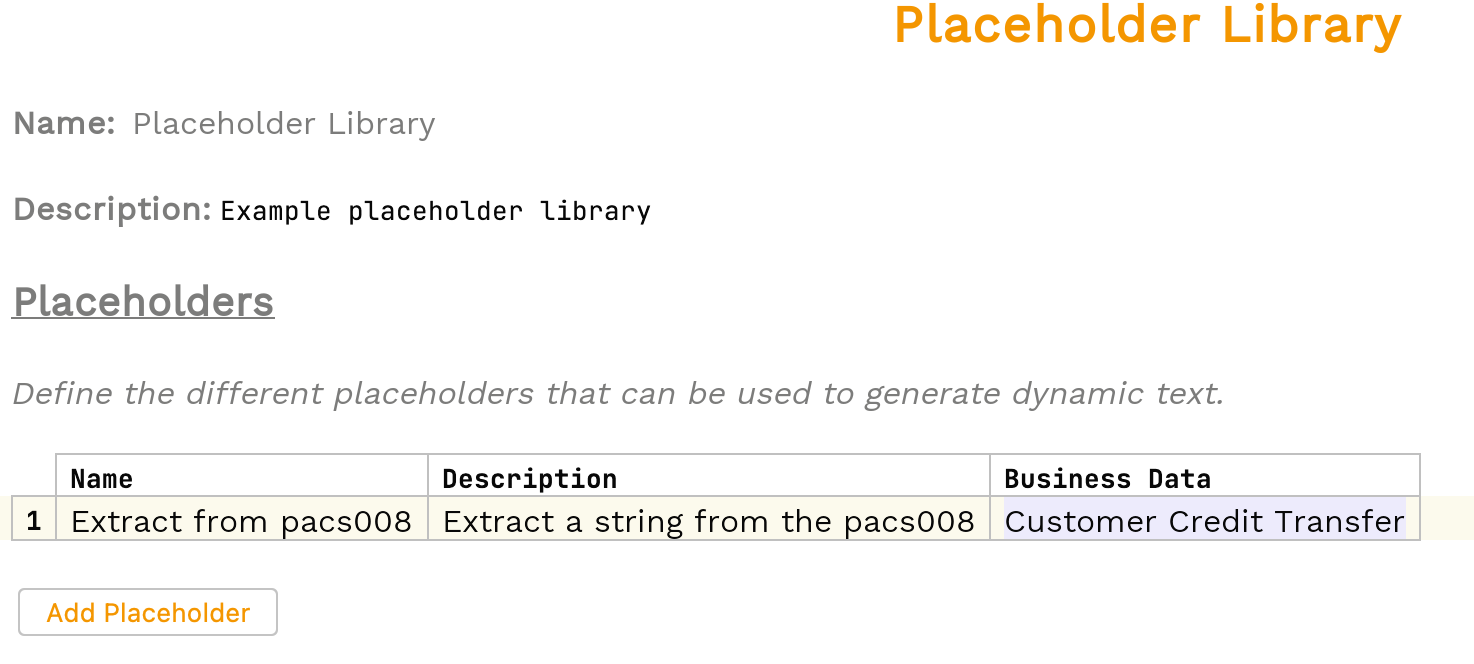
Let’s create a placeholder to pretend to extract some data from our pacs.008. So we start by adding a new placeholder library by right-clicking on our model and selecting
This will look and feel like all the other libraries, so lets start by clicking "Add placeholder" and then entering:
-
a name of "Extract from Pacs008"
-
a description of "Extract a string from the pacs008"
-
a business data element of "Customer Credit Transfer"
When complete, it should look like this:
Now let’s use our placeholder to create a dynamic text for our reason code.
Dynamic Text
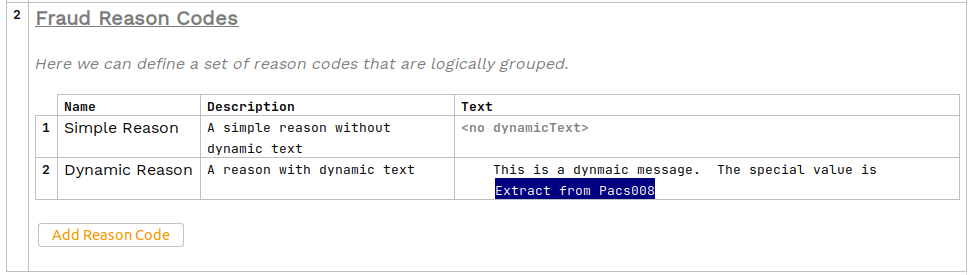
Let’s add a new "Reason code set" to our existing "Reason code library" for our fraud system. You’ll add two reason codes, the first will just use a standard description whilst the second will also include the dynamic text definition.
So let’s start by adding two reason codes:
-
One with a name "Simple Reason" and description "A simple reason without dynamic text"
-
One with a name "Dynamic Reason" and description "A reason with dynamic text".
For the dynamic reason, lets add a dynamic text message. We start by pressing Return (or CTRL+SPACE to bring up the available options and selecting DynamicText) in the text block. Now, we can type our message just like any normal text input. Let’s start by typing "This is a dynamic message. The special value is " into the box. We want to finish our text by grabbing the value of the "Extract from Pacs008" placeholder we set up. To do this, we simply press CTRL+SPACE and then select it from the dropdown of available options.
When complete, our reason code set and reason codes should look like:
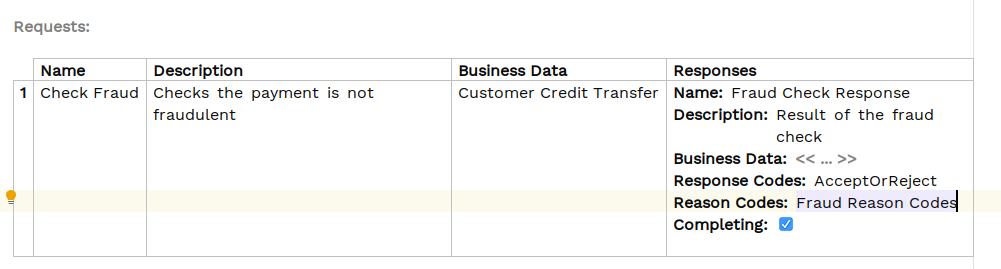
Finally, we need to add our new Fraud Reason codes into our response definition for our fraud check so that we can send back the reason code.
And that’s it from a DSL viewpoint, now lets turn to our implementation.
Java Implementation
Let’s now switch back to Intellij and look at how we plug this into our implementation code. As normal, we’ll start by running a build from a terminal window in the root directory of our project:
mvn clean installIn our DSL work we created a placeholder. We described this as a function that takes some business data and returns a string. That’s exactly what it is! Each placeholder will result in a method on the domain’s "Placeholder Port".
Let’s look at the generated code in /domain-root/domain/target, and we should now find the port for defining our placeholders like this:
package com.iconsolutions.ipf.tutorial;

import com.iconsolutions.iso20022.message.definitions.payments_clearing_and_settlement.pacs008.FIToFICustomerCreditTransferV08;

public interface IpftutorialmodelPlaceholderPort {

  String executeExtractFromPacs008(FIToFICustomerCreditTransferV08 customerCreditTransfer);

}
So here we can see that we have generated a function that takes our FIToFICustomerCreditTransferV08 and returns a String. This is what we’ll need to implement and define on our configuration set up as normal. For now, we’ll do this by implementing a very simple constant mapping that returns the string "Test Mapping". You’ll add this to the tutorial config as below:
public IpftutorialmodelDomain init(ActorSystem actorSystem, IsoMappingService mappingService, SchedulerPort schedulerAdapter) {
    // All adapters should be added to the domain model
    return new IpftutorialmodelDomain.Builder(actorSystem)
            .withTutorialDomainFunctionLibraryAdapter(input -> CompletableFuture.completedStage(new DuplicateCheckResponseInput.Builder(input.getId(), AcceptOrRejectCodes.Accepted).build()))
            .withAccountingSystemActionAdapter(new SampleAccountingSystemActionAdapter())
            .withFraudSystemActionAdapter(new FraudSystemActionAdapter())
            .withDecisionLibraryAdapter(input ->
                    input.getCustomerCreditTransfer().getCdtTrfTxInf().get(0).getIntrBkSttlmAmt().getValue().compareTo(BigDecimal.TEN)>0 ?
                            RunFraudCheckDecisionOutcomes.FRAUDREQUIRED : RunFraudCheckDecisionOutcomes.SKIPFRAUD)
            .withIpftutorialflowV1AggregateFunctionAdapter(input -> new ExtractCreditorAccountForFlowIpftutorialflowV1AggregateFunctionOutput(input.getCustomerCreditTransfer().getCdtTrfTxInf().get(0).getCdtrAcct()))
            .withIpftutorialflowV2AggregateFunctionAdapter(input -> new ExtractCreditorAccountForFlowIpftutorialflowV2AggregateFunctionOutput(input.getCustomerCreditTransfer().getCdtTrfTxInf().get(0).getCdtrAcct()))
            .withInitiationFlowAggregateFunctionAdapter(parameters -> new MapPain001ToPacs008ForFlowInitiationFlowAggregateFunctionOutput(mappingService.mapPain001toPacs008(parameters.getPaymentInitiation())))
            .withSchedulerAdapter(schedulerAdapter)
            .withCSMServiceActionAdapter(new SampleCSMServiceActionAdapter())
            .withSanctionsSystemActionAdapter(new SampleSanctionsSystemActionAdapter())
            .withPlaceholderAdapter(customerCreditTransfer -> "Test Mapping")
            .build();
}
The final thing we need to do is update our FraudCheckAdapter to provide the reason codes. To enable our testing we’ll set it up so that:
-
if the payment value > 40, we’ll reject with our dynamic reason code.
-
If the payment value > 30 (and below 40!), we’ll reject with our normal description.
Let’s look at the code for that:
@Slf4j
public class FraudSystemActionAdapter implements FraudSystemActionPort {

    @Override
    public CompletionStage<Void> execute(final CheckFraudAction action) {
        var id = action.getId();
        log.debug("Received an action of type {} for id {}", action.getActionName(), id);

        var intrBkSttlmAmt = action.getCustomerCreditTransfer().getCdtTrfTxInf().get(0).getIntrBkSttlmAmt().getValue();

        if (intrBkSttlmAmt.compareTo(new BigDecimal("50")) >= 0) {
            return CompletableFuture.runAsync(() -> log.debug("Pretending to timeout the fraud call for aggregate {}", action.getProcessingContext().getAssociationId()));
        } else if (intrBkSttlmAmt.compareTo(new BigDecimal("40")) >= 0) {
            return IpftutorialmodelDomain.fraudSystem().handle(
                            new FraudCheckResponseInput.Builder(id, AcceptOrRejectCodes.Rejected)
                                    .withReasonCode(FraudReasonCodes.DynamicReason)
                                    .build())
                    .thenAccept(done -> logResult(action, done));
        } else if (intrBkSttlmAmt.compareTo(new BigDecimal("30")) >= 0) {
            return IpftutorialmodelDomain.fraudSystem().handle(
                            new FraudCheckResponseInput.Builder(id, AcceptOrRejectCodes.Rejected)
                                    .withReasonCode(FraudReasonCodes.SimpleReason)
                                    .build())
                    .thenAccept(done -> logResult(action, done));
        } else {
            return fraudRequestReplySendConnector.send(action.getProcessingContext(), action.getCustomerCreditTransfer())
                    .thenCompose(response -> IpftutorialmodelDomain.fraudSystem()
                            .handle(new FraudCheckResponseInput.Builder(id, AcceptOrRejectCodes.Accepted).build())
                            .thenAccept(done -> logResult(action, done)));

        }
    }

    private static void logResult(CheckFraudAction action, Done done) {
        log.debug("Sent input of type {} for id {} with result {}", done.getCommandName(), action.getId(), done.getResult().name());
    }
}
Checking our solution
As normal let’s now check out solution works. Start up the application as previously (instructions are available in Reviewing the initial application if you need a refresher!)
Now let’s test our application. You’ll start by sending a payment through of 45 USD - this should give us our dynamic error text.
curl -X POST localhost:8080/submit -H 'Content-Type: application/json' -d '{"value": "45"}' | jqThen lets bring up the payment in the Developer GUI and look at the domain events (search by unit of work id, click view, click domain events) then we see:
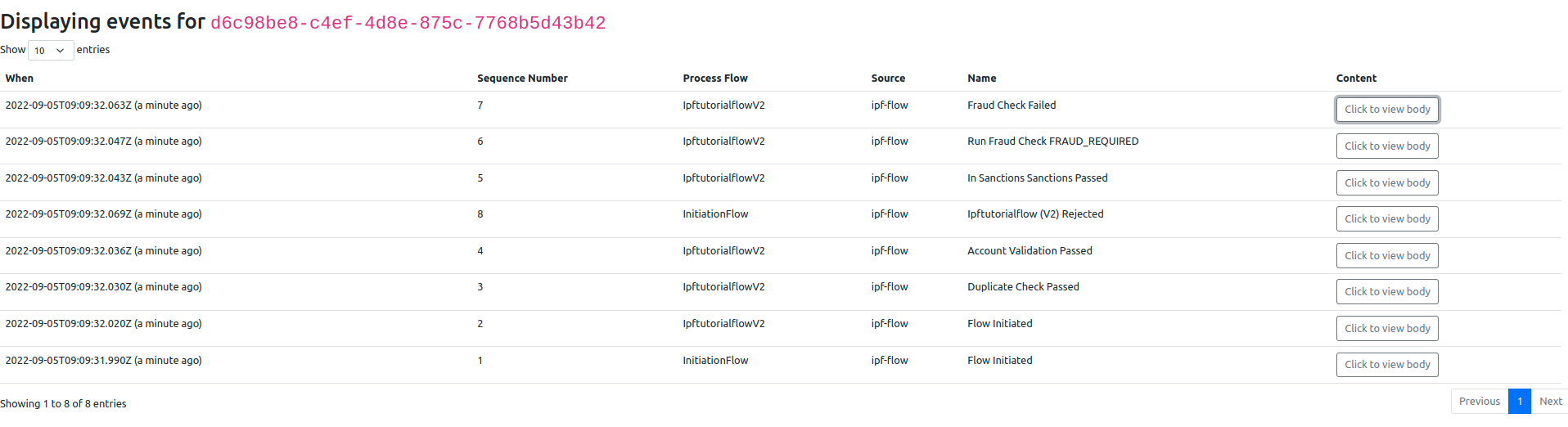
Now if we click to see the body of our Fraud Check Failed event, we’ll see:
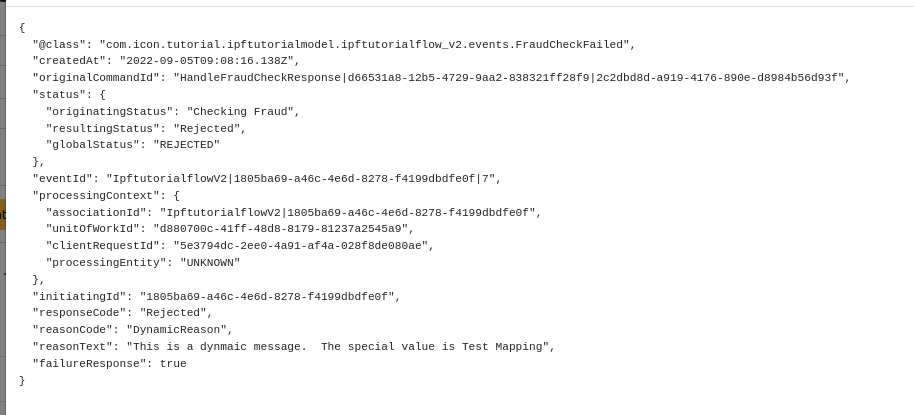
And we can see that our reason code has been generated, pulling in the value from our placeholder function.
However, if we repeat the process for a payment of say 35USD, instead of using the dynamic text we’ll revert to just using the description provided:
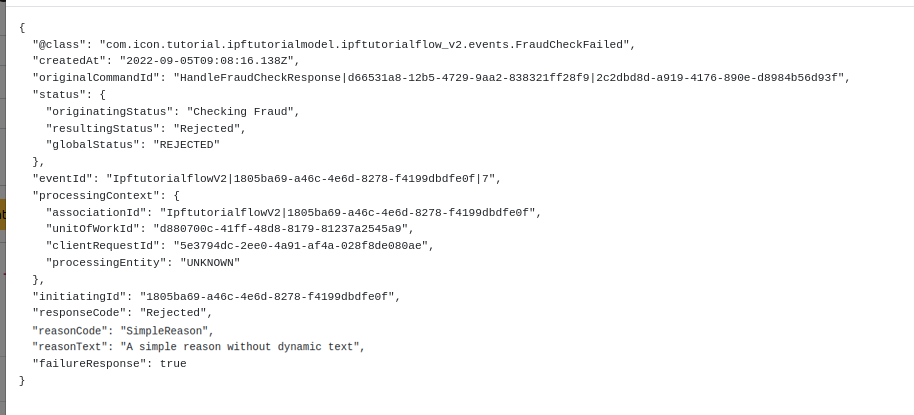
That’s everything working.
This is obviously a very simple implementation with some hardcoded text, but you can provide an implementation of the port (i.e. the IpftutorialmodelPlaceholderPort interface) which accesses any of the payment data;
public class PlaceHolderAdapter implements IpftutorialmodelPlaceholderPort {

    @Override
    public String executeExtractFromPacs008(FIToFICustomerCreditTransferV08 customerCreditTransfer) {
        return "failed for amount " + customerCreditTransfer.getCdtTrfTxInf().get(0).getIntrBkSttlmAmt().getValue().toString();
    }
}