Human Task Manager
Human Task Manager is an IPF component that allows clients to create and manage tasks that require human intervention using a single centralized system. It can be used for a wide variety of scenarios that require human input such as:
-
complying with regulations
-
resolving exceptions
-
handling complex instructions
-
data enrichment
For example you may need tasks for "Repair", "Investigation", "Enrich", "Retry" and "Verification" steps.
HTM provides a centralized system for orchestrating human tasks related to payment processing, simplifying task initiation, assignment, tracking, and monitoring, and ensuring that all tasks are completed in a predefined manner. This system helps to ensure that tasks are assigned to the right people based on entitlements, and that they are completed within defined timelines when needed. Additionally, HTM provides transparency into task status, allowing for progress monitoring and adjustment as needed.
HTM provides a way to seamlessly integrate human intervention into IPF flows, ensuring that tasks requiring human input are completed efficiently and effectively. The necessary input to resolve the issue can then be provided and the task routed back into the processing flow. This allows for a seamless and efficient handling of exceptions, reducing processing time and minimizing the risk of errors.
One of the key features of HTM is its end-to-end auditability. HTM systems provide comprehensive tracking and reporting capabilities that allow users to monitor the progress of tasks from initiation to completion, including any interactions with human operators. This provides an audit trail that can be used for compliance purposes and can help to identify and resolve issues quickly.
Overall, the main purpose of HTM is its ability to bridge the gap between automated processes and human intervention, providing a seamless way to manage tasks that require human input. By streamlining processes and improving decision-making, HTM can help businesses to reduce costs, improve efficiency, and enhance the customer experience.
Components
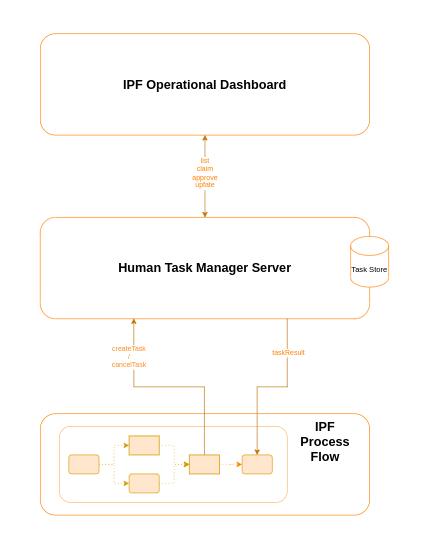
An IPF implementation that uses HTM will use the following components:
-
The 'HTM Server' - this is a deployable container holding all the logic for managing tasks.
-
The 'HTM Business Function' - the business function is used to communicate task creation and completion with the underlying IPF flow.
-
The 'Operational Dashboard' - this is used for interaction with the HTM Server from the user. Clients may choose to use the Human Task Manager GUI, which uses these services and workflow, or choose to integrate these IPF services into their own GUI.
|
Note that whilst the above definition is the default setup used for working with HTM, the HTM application itself exposes a rest API that allows full interaction with it, so there is no restriction on doing so. Also, the operational dashboard implementation is a basic generic implementation and it is expected that for more complicated cases this will be extended and customized. |
Typical HTM interaction flow
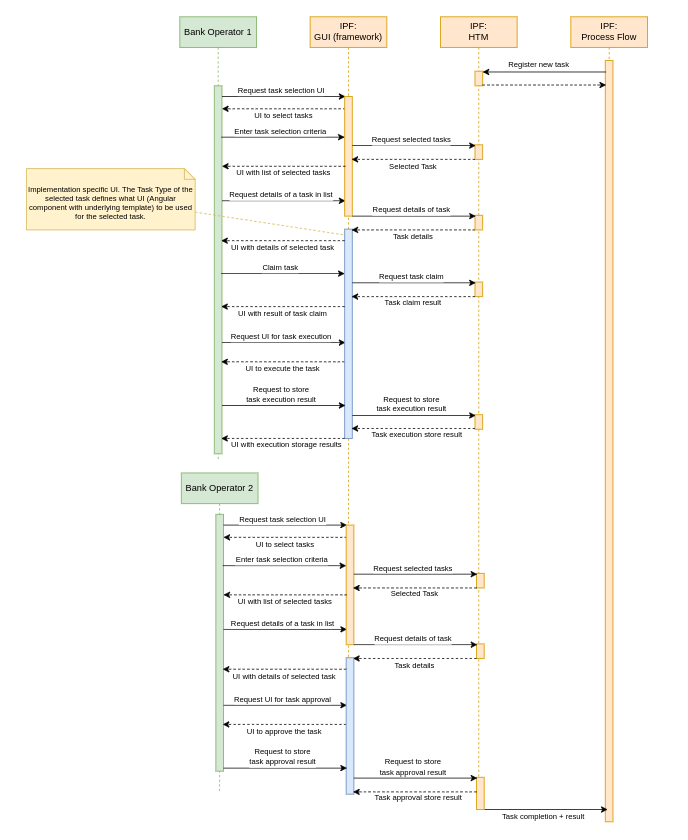
The sequence diagram below depicts the typical lifecycle of a task in Human Task Manager as well as the interactions with the task initiating flow and the IPF GUI. The parts in green represent the activities carried out by bank operators. The yellow parts represent the functionality that comes with the standard product. The blue parts represent the UIs that are developed as part of the implementation project (and therefore is not standard product). These UIs are built on basis of the IPF GUI framework which is based on the Angular UI framework. In Angular terminology those implementation specific UIs are Angular components that include templates on basis of which the HTML pages are generated.
DSL Integration
A business function is provided that supports the integration of HTM with an IPF flow. Further details of this are available here.