Synchronous Flow Execution
While IPF is primarily asynchronous and message-based, occasionally there may be a requirement to execute a flow synchronously. The flow might be:
-
Start an IPF flow using an HTTP request
-
Wait until the flow (or flows) complete(s)
-
Send an HTTP response when the flow either completes successfully, or there’s a failure.
This document explains some ways to implement this pattern.
|
Not safe for production!
This approach is good for testing or experimenting with IPF, but is not a production-ready solution, because it can only work with a single node. See Resiliency Considerations and Alternatives to This Approach. |
Concept
The idea is to implement a Request Tracker which references a list keyed by the unit of work ID and whose value is a
CompletionStage which completes when the flow terminates (successfully or not).
Request Tracker
Consider the following implementation of a Request Tracker:
public class RequestTracker<T> {

    private final Map<UnitOfWorkId, CompletionStage<T>> OUTSTANDING_REQUESTS = new ConcurrentHashMap<>();

    public CompletionStage<T> track(UnitOfWorkId unitOfWorkId) {
        CompletionStage<T> completionStage = new CompletableFuture<>();
        OUTSTANDING_REQUESTS.put(unitOfWorkId, completionStage);
        return completionStage;
    }

    public boolean complete(UnitOfWorkId unitOfWorkId, T result) {
        return OUTSTANDING_REQUESTS.remove(unitOfWorkId).toCompletableFuture().complete(result);
    }
}
When a flow is initiated, we can call track with the UnitOfWorkId, and when this flow completes (or fails) we call
complete. Note that complete calls Map#remove which
helps prevent build-up of completed futures and allows for garbage collection of completed requests.
Note that the value of the future to be returned is parameterised (T) which allows you to create multiple
RequestTrackers if need be, and not be tied to a specific framework.
If you don’t have a requirement for either of these things, then you can replace the parameterised argument with the concrete implementation you want to use.
Flow Setup
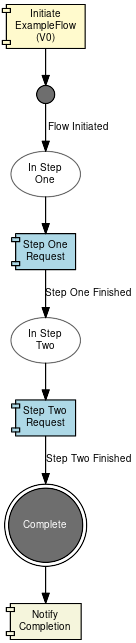
Write the flow as normal. The only changes are:
-
Add a final notification to complete the future (which is a hook to let us call the
RequestTracker#completemethod) -
Add a
FlowErrorExtensionsimplementation that also takesRequestTrackerwhich allows us to complete it with a failure response
Here is the example flow:
Code
Here are the code snippets for registering a UnitOfWorkId with the RequestTracker. The example below uses Spring
Framework and ResponseEntity, but this pattern can be adapted for any other framework.
Step 1: Register a Unit of Work ID
When we receive an HTTP request to initiate a flow, we register our execution like this:
public class MyController {

    private final RequestTracker<ResponseEntity<?>> requestTracker;

    @PostMapping("/submit")
    public CompletionStage<ResponseEntity<?>> submit(@RequestBody Body myBody) {
        var processingContext = ... (1)
        var future = requestTracker.track(processingContext.getUnitOfWorkId()); (2)
        return HttpflowmodelDomain.initiation().handle(
                        new InitiateExampleFlowInput.Builder()
                                .withProcessingContext(processingContext)
                                .withPaymentJourneyType("PAYMENT")
                                .withCustomerCreditTransfer(cct)
                                .build())
                .thenCompose(__ -> future); (3)
    }
}| 1 | Build the ProcessingContext as appropriate |
| 2 | Register the ProcessingContext’s Unit of Work ID with the RequestTracker |
| 3 | Return the (not-yet-completed) future to the caller |
Step 2: Complete the future when notified
The snippet below is the implementation of the "Notify Completion" notification from the flow above:
public class SampleActionAdapter implements SampleActionPort {

    private final RequestTracker<ResponseEntity<?>> requestTracker;

    public SampleActionAdapter(RequestTracker<ResponseEntity<?>> requestTracker) {
        this.requestTracker = requestTracker;
    }

    @Override
    public CompletionStage<Void> execute(NotifyCompletionAction action) {
        return CompletableFuture.runAsync(() -> requestTracker.complete(
                action.getProcessingContext().getUnitOfWorkId(), (1)
                ResponseEntity.ok(action.getPaymentStatusReport()) (2)
        ));
    }
}| 1 | The UnitOfWorkId supplied by the flow via NotifyCompletionAction |
| 2 | The completed result (in this case a pacs.002 Payment Status Report, but can be any other type) |
Step 3: Catch-all Error Handler
You can handle scenarios where an exception is thrown in a flow stage by providing a global error handler in your flow domain definition.
To do this, pass a custom FlowErrorExtensions implementation to your domain definition via the
withFallbackExtensionProvider method. In this example, we will implement an error handler that calls complete on the
RequestTracker with a relevant ProblemDetail explaining what went wrong.
We also have access to the Aggregate in the error handler so you could return partial information if required.
The example below simply returns a 500 Internal Server Error, along with the Throwable that caused the catch-all error
handler to be invoked:
@Configuration
public class MyConfig {
    @Bean
    public HttpflowmodelDomain httpflowmodelDomain(ActorSystem actorSystem, FlowErrorExtensions<Aggregate> flowErrorExtensions,
                                                   RequestTracker<ResponseEntity<?>> requestTracker) {
        // All adapters should be added to the domain model
        return new HttpflowmodelDomain.Builder(actorSystem)
                .withFallbackExtensionProvider(ExtensionProvider.builder().flowErrorExtensions(flowErrorExtensions).build())
                //...other adapters, mappers etc...
                .build();
    }

    @Bean
    FlowErrorExtensions<Aggregate> flowErrorExtensions(RequestTracker<ResponseEntity<?>> requestTracker) {
        return (aggregate, t) -> {
            var problemDetail = ProblemDetail.forStatus(500);
            problemDetail.setDetail(t.getMessage());
            requestTracker.complete(aggregate.getProcessingContext().getUnitOfWorkId(), ResponseEntity.of(problemDetail).build());
        };
    }
}
Example application
An example application has been provided that demonstrates the concepts discussed in this page. If invoked with no
arguments it will return a pacs.002 Payment Status Report. If invoked with an amount of 1 then one of the steps will
throw an exception, and it will return a 500 Internal Server Error from the FlowErrorExtensions.
Run the application’s Main Class using com.iconsolutions.example.httpflow.app.Application.
Example of normal invocation:
curl -X POST localhost:8080/submitExample of invocation that will return an error response:
curl -H "Content-Type: application/json" -d '{"value":"1"}' -X POST localhost:8080/submitResiliency Considerations
-
Do not execute long-running flows (more than a few seconds) like this, due to various HTTP timeouts on the client and server
-
The
RequestTrackeris local to a specific node, and if a node dies then its associated UoW-to-future map will disappear with it -
This approach can not be clustered: There is no guarantee that a flow will be launched on the node that received the HTTP request
-
In the (highly non-recommended) case you wish for the
RequestTrackerto be persistent, consider replacing the map with a persistent store like MongoDB to track the Unit of Work IDs and their futures
Alternatives to This Approach
A better solution to this problem would be have a stateless web service sitting in front of a queue or topic (e.g. JMS or Kafka):
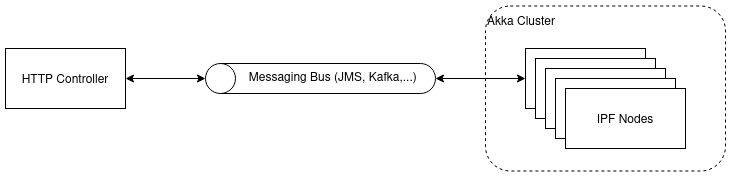
The RequestTracker can still be used in the HTTP Controller, but the addition of a messaging bus decouples IPF’s node
affinity requirement from the upstream client awaiting an HTTP response.
Example Code
An example implementation of this pattern can be found here: here. Please contact IPF Support if you cannot access this.