Multiple DC Active - Passive (Warm Stand-By), One Database
For resiliency purposes, you may want to deploy multiple instances of your application across multiple data centres (regions). In this scenario, you may have a "primary" data centre that is "active" and serving traffic, and a "secondary" data centre that is "passive" and on standby. If the primary data centre goes down, the secondary data centre will take over and start serving traffic. In this scenario, the "active/primary" data center will be serving traffic and the "passive/secondary" data center will be on standby. If the primary data center goes down, the secondary data center will take over and start serving traffic. The database must be shared between the two data centers.
Problem
The pattern described above requires that the secondary (passive) data centre has application instances running (on standby), but they must not be communicating with/trying to join the IPF cluster on the primary (active) data centre or serving any traffic/processing transactions. This can be achieved using the MongoDB Discovery Plugin, which enables discovery of application instances in both the primary and secondary data centres, while ensuring a cluster is only formed within the primary data centre.
Note: The plugin requires that the database is shared between the two data centres.
A guide on how to set up the plugin is provided below.
Step 0: Add dependency
Add the akka-discovery-mongodb-management dependency to the pom.xml, which contains plugin logic and some endpoints useful for managing the cluster.
<dependency>
    <groupId>com.iconsolutions.ipf.core.discovery</groupId>
    <artifactId>akka-discovery-mongodb-management</artifactId>
</dependency>
Step 1: Configure the plugin
All configuration described in this section Set up Cluster Bootstrap with MongoDB discovery should be added to the conf file, we will just list things that are different from the default configuration.
So on all nodes in DC 1 (Active) we should specify:
akka.discovery.akka-mongodb.enabled = true
akka.discovery.akka-mongodb.collection = "akka-discovery-mongodb-dc1"
And on all nodes in DC 2 (Passive) we should specify:
akka.discovery.akka-mongodb.enabled = false
akka.discovery.akka-mongodb.collection = "akka-discovery-mongodb-dc2"
The collection name must be different for each data centre, as the database is shared.
This will result in the below topology:
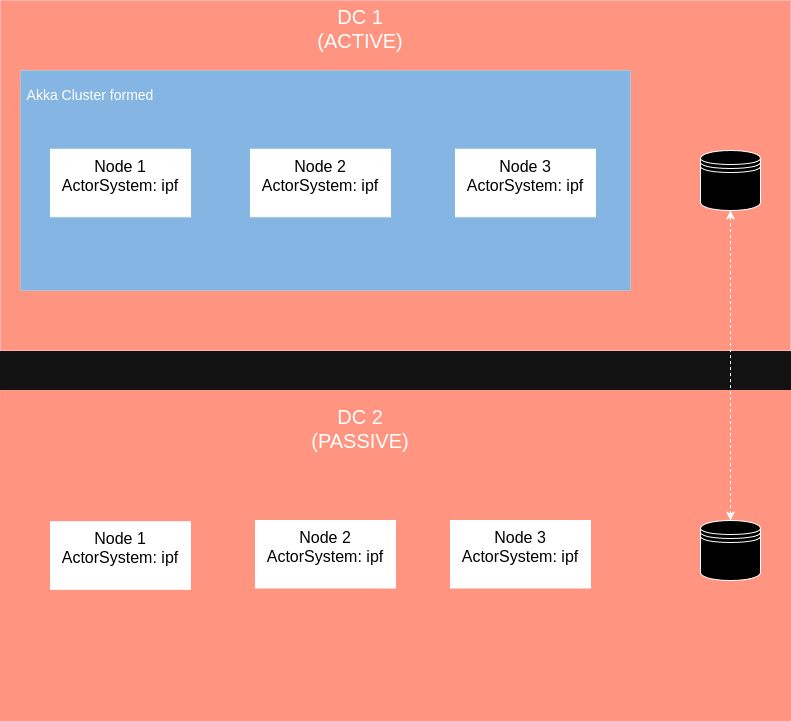
Verify this by hitting the Akka Management Cluster HTTP Management’s /cluster/members URL to observe the correct setup of the clusters in each DC.
Step 2: Deactivate nodes in active DC
| You must only have one active akka cluster at a time. If this is not the case, all active clusters will try to process the same transactions. This will result in unpredictable transaction outcomes. |
If the primary cluster is still active, but you want to switch processing over to the passive cluster, you must stop/passivate the active akka cluster before activating passive cluster.
This can be done in the following way:
Step 2.1: Mark nodes as not active
Mark the active akka nodes as inactive via the /discovery/cluster-status endpoint.
POST http://hostname:server_port/discovery/cluster-status
Accept: application/json

{
  "active": false
}
This marks active nodes as inactive, but it does not stop processing. This value is persisted and used as the configuration value for the property akka.discovery.akka-mongodb.enabled, if the application is restarted. On application startup, the application will try to get the persisted value. If the persisted value does not exist, the value from configuration file will be used.
Step 2.2: Stop transaction processing
To stop transaction processing, the nodes in the active cluster have to be gracefully shutdown or restarted. If they are restarted, they will form a passive cluster, because the configuration for the property akka.discovery.akka-mongodb.enabled was changed to false and persisted. After the node is restarted, it will read the new configuration value and will not form an active akka cluster.
Akka HTTP Management can be used to gracefully shutdown all nodes:
You can get a list of all akka nodes with
GET http://hostname:akka_management_port/cluster/membersFor all nodes retrieved from the previous request (reachable and unreachable), shutdown can be triggered with
DELETE http://akka_node_hostname:akka_management_port/cluster/members/<akka_node_address>More on Akka Http Management endpoints can be found here API Definition
Step 3: Activate nodes in passive DC
| The 'previously active cluster' must be disabled/shutdown/passivated before the passive cluster is enabled. |
When the primary DC goes down (or it has been shutdown/passivated), nodes in the secondary DC should be activated. This can be done via /discovery/cluster-status endpoint.
POST http://hostname:server_port/discovery/cluster-status
Accept: application/json

{
  "active": true
}
This activates the nodes in the passive DC, and they will start serving traffic. The configuration value, for property akka.discovery.akka-mongodb.enabled, is persisted and used if application is restarted. On application startup, the application will try to get the persisted value. If the persisted value does not exist, the value from configuration file is used.
Step 4: Kubernetes Health Check Setup
When the liveness probe is configured with /actuator/health/readiness or /actuator/health endpoints, the pods on the passive cluster - which is not currently processing work - will be restarted repeatedly as the selected liveness endpoint will never return a success.
This could result in the undesirable outcome of an incoming cluster activation request being sent when the nodes are restarting, causing the activation request to be missed.
This issue can be mitigated by setting up a startup probe. The startup probe can be configured to use the Akka Http Management
health check endpoint /health/ready.
This health check is only aware of Akka cluster status (and not aware of the IPF connectors status, MongoDB connection status, etc.)
This is what we need in this case. The startup probe will wait (for a configured period of time) for the Akka cluster to be formed.
When this is done it will hand over application monitoring to the readiness and liveness probes.
If the Akka cluster has not been formed (in the configured period of time), the application will be restarted and startup probe
will start monitoring the freshly started application from the start.
The startup probe was tested over periods ranging from 1h to 24h. The choice of an appropriate interval is left to the user based on their specific requirements.
An example of K8S health check probes setup is provided below:
  livenessProbe:
    failureThreshold: 6 # 30s
    httpGet:
      path: /actuator/health/readiness
      port: http
      scheme: HTTP
    periodSeconds: 5
    successThreshold: 1
    timeoutSeconds: 1
  readinessProbe:
    failureThreshold: 3 # 15s
    httpGet:
      path: /actuator/health/readiness
      port: http
      scheme: HTTP
    periodSeconds: 5
    successThreshold: 1
    timeoutSeconds: 2
  startupProbe:
    failureThreshold: 720 # 1h
    httpGet:
      path: /health/ready
      port: akka-management
      scheme: HTTP
    initialDelaySeconds: 15
    periodSeconds: 5
    successThreshold: 1
    timeoutSeconds: 2