How Do I Supply Missing Data for an Action?
A mapping function can be used as a method of creating missing data for an action. When used in this way, the mapping function will be invoked at the point of execution of the action call, but will not be persisted or update the behaviour of the flow itself in any way.
For example, suppose we are trying to call a function that requires a specific business data element to be present. When we first attempt to invoke the action we see:

To resolve this, we could just ensure that the flow is provided that data at some point earlier in it’s execution so it is available here. Alternatively, we can invoke a mapping function.
We do this by bringing up the detailed inspector view for the action by clicking on it and either processing CTRL + ALT + I or by right clicking and selecting inspect node.
This brings up the inspector:
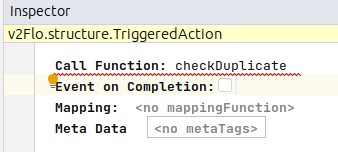
Here we can simply set the mapping function that we want to use.