Multiple DC Active - Passive (Warm Stand-By), One Database
For resiliency purposes, you may want to deploy multiple instances of your application across multiple data centres. In this scenario, you may have a "primary" data centre that is "active" and serving traffic, and a "secondary" data centre that is "passive" and on standby. If the primary data centre goes down, the secondary data centre will take over and start serving traffic. In this scenario, the "active/primary" data center will be serving traffic and the "passive/secondary" data center will be on standby. If the primary data center goes down, the secondary data center will take over and start serving traffic. The database must be shared between the two data centers.
Problem
The pattern described above requires that the secondary (passive) data centre has application instances running (on standby), but they must not be communicating with/trying to join the IPF cluster on the primary (active) data centre or serving any traffic/processing transactions. This can be achieved using the MongoDB Discovery Plugin, which enables discovery of application instances in both the primary and secondary data centres, while ensuring a cluster is only formed within the primary data centre.
Note: The plugin requires that the database is shared between the two data centres.
A guide on how to set up the plugin is provided below.
Step 0: Add dependency
Add the akka-discovery-mongodb-management dependency to the pom.xml, which contains plugin logic and some endpoints useful for managing the cluster.
<dependency>
    <groupId>com.iconsolutions.ipf.core.discovery</groupId>
    <artifactId>akka-discovery-mongodb-management</artifactId>
</dependency>
Step 1: Configure the plugin
All configuration described in this section Set up Cluster Bootstrap with MongoDB discovery should be added to the conf file, we will just list things that are different from the default configuration.
So on all nodes in DC 1 (Active) we should specify:
akka.discovery.akka-mongodb.enabled = true
akka.discovery.akka-mongodb.collection = "akka-discovery-mongodb-dc1"
And on all nodes in DC 2 (Passive) we should specify:
akka.discovery.akka-mongodb.enabled = false
akka.discovery.akka-mongodb.collection = "akka-discovery-mongodb-dc2"
The collection name must be different for each data centre, as the database is shared.
This will result in the below topology:
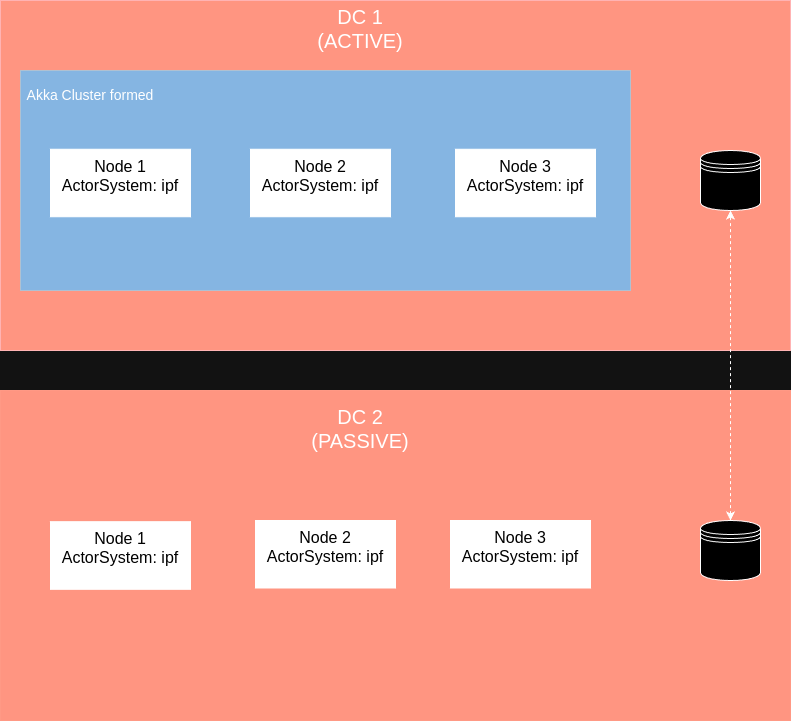
Verify this by hitting the Akka Management Cluster HTTP Management’s /cluster/members URL to observe the correct setup of the clusters in each DC.
Step 3: Activate nodes in passive DC
When the primary DC goes down, you will need to activate the nodes in the secondary DC. This can be done via /discovery/cluster-status endpoint.
POST /discovery/cluster-status
Accept: application/json
{
  "active": true
}
This will activate nodes in passive DC, and they will start serving the traffic.
It is important that the 'previously active cluster' must be disabled/shutdown before the passive cluster is enabled.