Bulk Task Actions
Bulk
If the same action should be executed on several tasks, it can be executed as a 'bulk' of tasks. In the HTM context, a bulk refers to a 'collection' of tasks. The bulk contains a list of task ids and a set of data required for a certain action type.
Supported actions
Supported bulk actions are:
Allocate and Execute Bulk Action
This bulk action combines two separate single task actions: Allocate and Execute. For each taskId provided in input data, task Allocate action is performed, then for each taskId task Execute action is performed.
For example, if input data contains task ids: [taskId1, taskId2], the following single task actions will be performed:
-
Task Allocate on task taskId1
-
Task Allocate on task taskId2
-
Task Execute on task taskId1
-
Task Execute on task taskId2
Triggering this bulk action is done via HTTP POST request /bulk-tasks/assign-and-execute. For more details check API section.
Besides validating the required request parameters, the following validations are implemented:
-
Maximum allowed bulk size - maximum number of tasks in a bulk is configurable via property ipf.htm.bulk.max-size and by default it is set to 1000 tasks per bulk. If the bulk contains more tasks than is allowed the following error will be returned:
{
    "code": "400",
    "message": "Maximum bulk size exceeded",
    "description": "Current bulk size 2000 exceeded maximum allowed bulk size 1000.",
    "instance": "/bulk-tasks/assign-and-execute"
}
-
No approvals required - only tasks with no required approvals can be processed in the bulk. If at least one of the tasks from the bulk has required approvals > 0, the bulk will not be processed and the following error will be returned:
{
    "code": "400",
    "message": "Required approvals are not allowed for bulk task action",
    "description": "Required approvals are not allowed for bulk task action, but the bulk contains 2 tasks with required approvals greater than 0.",
    "instance": "/bulk-tasks/assign-and-execute"
}
-
Same type - all tasks must have the same type. If there are tasks with different types, the bulk will not be processed and the following error will be returned:
{
    "code": "400",
    "message": "All tasks from the bulk have to be of the same type",
    "description": "All tasks from the bulk have to be of the same type, but this bulk has tasks of different types: [OTHER_PROCESSING, PAYMENT_PROCESSING].",
    "instance": "/bulk-tasks/assign-and-execute"
}
Get Bulk Action Report
This action returns information about the current status of the bulk action. Client can use this action to check whether the bulk action is still in processing, or it’s done, by checking if the status is Processing or Completed.
Getting the bulk action report is done via HTTP GET request /bulk-tasks/<bulk-id>. For more details check API section.
Information retrieved by the report is:
-
createdAt: the time when bulk is created (processing is started)
-
status: current status of the bulk action (Processing or Completed)
-
operatorId: the id of operator who started the bulk action
-
taskIds: list of task ids included in the bulk
-
errors: list of errors for single task action. Several single task actions can be performed on a task. This is why the list of errors can have multiple errors for a single task, but each error has information about single task action.
"errors": [
    {
        "taskId": "b3f34207-992e-4e76-918d-e371c50861be",
        "taskErrors": [
            {
                "action": "Allocate",
                "error": "400: Invalid State - Invalid state 'Cancelled'. Current operation can only be performed from one of [Registered, Allocated] states."
            },
            {
                "action": "Execute",
                "error": "400: Invalid State - Invalid state 'Cancelled'. Current operation can only be performed from the 'Allocated' state."
            }
        ]
    }
]
Implementation
Implementation is done by using an Akka Event Sourced Behaviour (ESB) and a dedicated Event Processor.
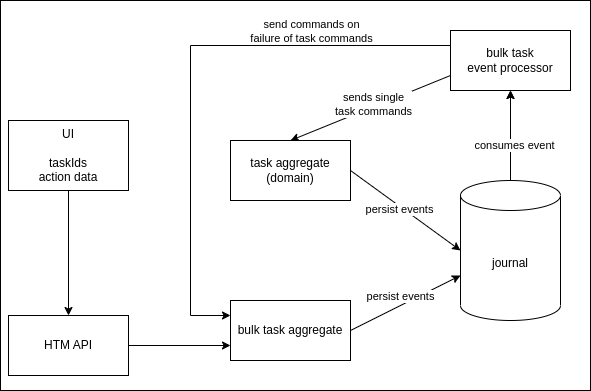
The bulk aggregate is implemented as a three state Event Sourced Behaviour (ESB):
-
Ready
-
Processing
-
Completed
When a new instance of a bulk ESB is created, it is initially in the state Ready, but it is switched to the Processing state right away. It stays in the Processing state until all the single task actions are done. Then it switches to the Completed state.
Sequence diagram:
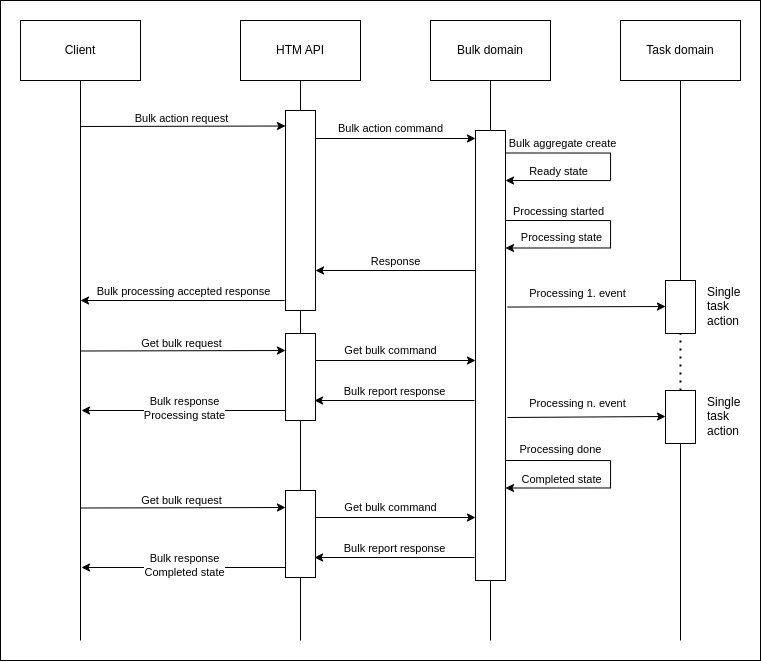
How bulk task action implementation works is explained here by using the "Allocate and Execute" bulk action as an example.
Processing Bulk Action Request
When bulk request is received from a client it is converted to a command, which is then sent to the bulk aggregate. In this example, Allocate and Execute request is received with list of two task ids: task 1 and task 2. It’s converted to AllocateAndExecuteBulk command and sent to the bulk aggregate.
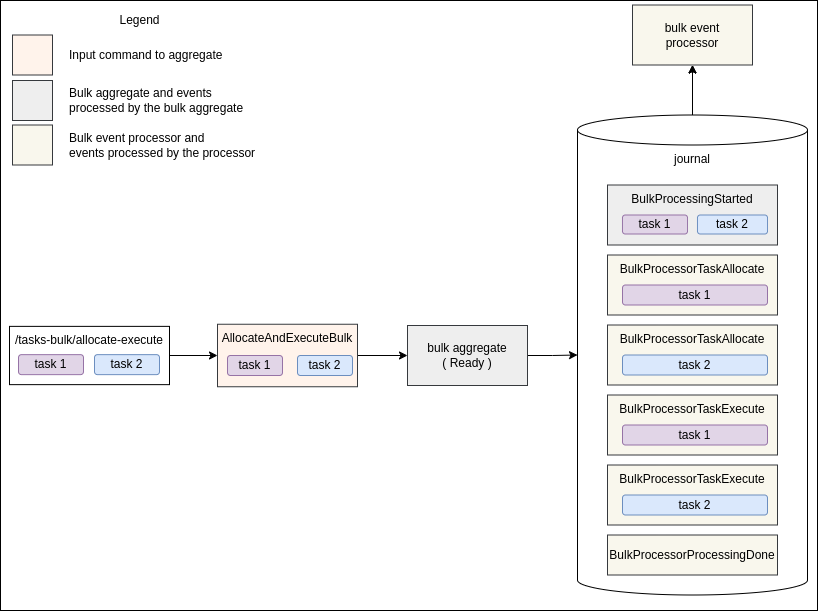
The bulk aggregate produces following events:
-
BulkProcessingStarted - represents the beginning of the bulk processing. The bulk aggregate will react to this event by switching state to Processing and storing all the input data to the state.
-
BulkProcessorTaskAllocate(task 1) - will be processed by the bulk event processor, by converting it to TaskAllocate command and sending it to the Task aggregate.
-
BulkProcessorTaskAllocate(task 2) - the same as for the previous event, just for task 2.
-
BulkProcessorTaskExecute(task 1) - will be processed by the bulk event processor, by converting it to TaskExecute command and sending it to the Task aggregate.
-
BulkProcessorTaskExecute(task 2) - the same as for the previous event, just for task 2.
-
BulkProcessorProcessingDone - will be processed by the bulk event processor, by sending ProcessingBulkDone command to the bulk aggregate. The bulk aggregate will react to this command by changing its state to Completed.
Events with name prefix BulkProcessor are processed by the bulk event processor, other events are processed by the bulk aggregate.
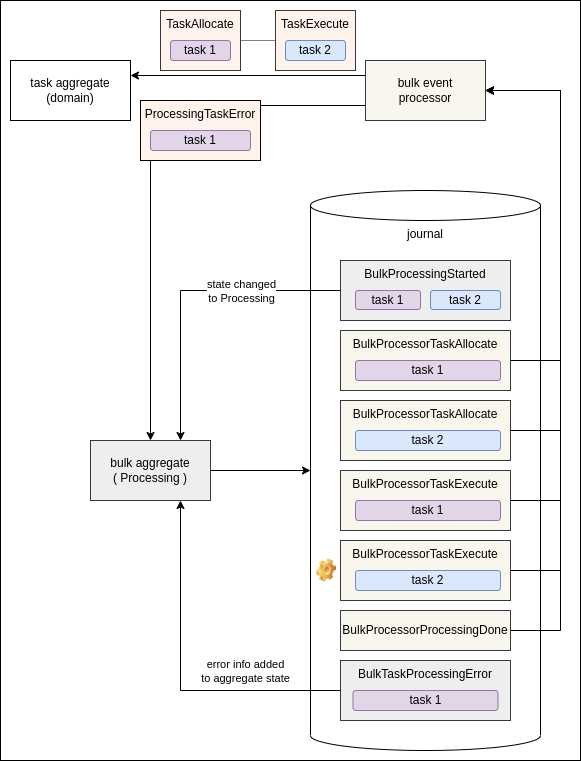
BulkProcessorTaskAllocate and BulkProcessorTaskExecute events are processed by the bulk event processor, by converting them to appropriate single Task commands and sending those commands to the Task aggregate. If an error is occurred during a single Task Action, the processor will collect error information and send ProcessingTaskError command to the bulk aggregate. The bulk aggregate stores BulkTaskProcessingError event and updates its state with error details.
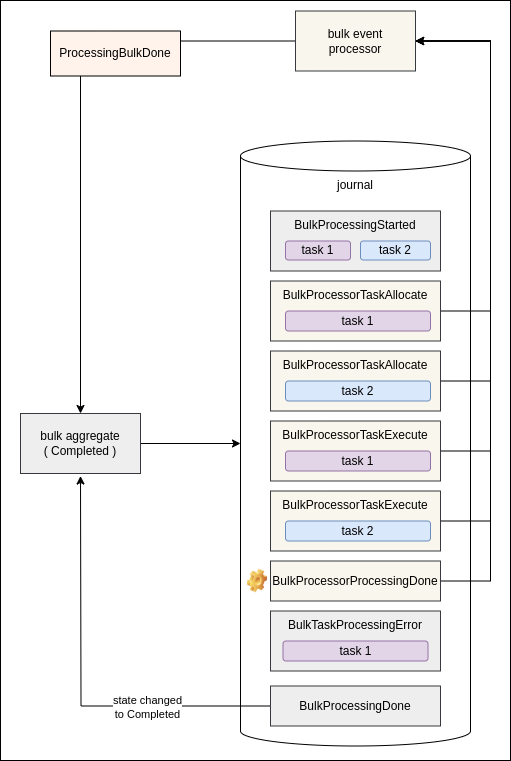
At the end, the bulk event processor consumes the last bulk event BulkProcessorProcessingDone by sending ProcessingBulkDone command to the bulk aggregate. The bulk aggregate stores a new event BulkProcessingDone and switches state to Completed.
This is the end of bulk processing lifecycle.
Guarantees
Bulk aggregate stores either all the events or nothing. This action is atomic and is guaranteed by Akka. It prevents the situation in which some bulk events are stored (and processed by the bulk event processor) and some are not.
If an unexpected/system/timeout error occurred while sending commands to bulk aggregate from bulk event processor, the event (the source of the command) will not be marked as processed (the bulk event processor’s offset will not be updated). The Bulk event processor will try to process the same event again.
Bulk event processor sends commands to the bulk aggregate using Akka ask pattern. It is possible that the bulk aggregate receives a command and as a result of the command processing it returns failure response. On a failure response, the bulk event processor logs the error and proceeds further. In the case of an error which is handled by the bulk aggregate, bulk processing is not stopped (event processing will not be retried).