Scheduling Status
The purpose of this page is to clarify the possible execution statuses for the two different types of jobs as well how these statuses should be handled in the context of rehydration as well as failure handling. Execution Statuses are stored in a separate collection which is keyed on JobId and Timestamp, with the JobId corresponding to a valid Job Specification in the Job Specification collection. Determining if a job is one time or recurrent, can be done looking at the schedulingSpecification (in Job Specification)
One Time Scheduled Job
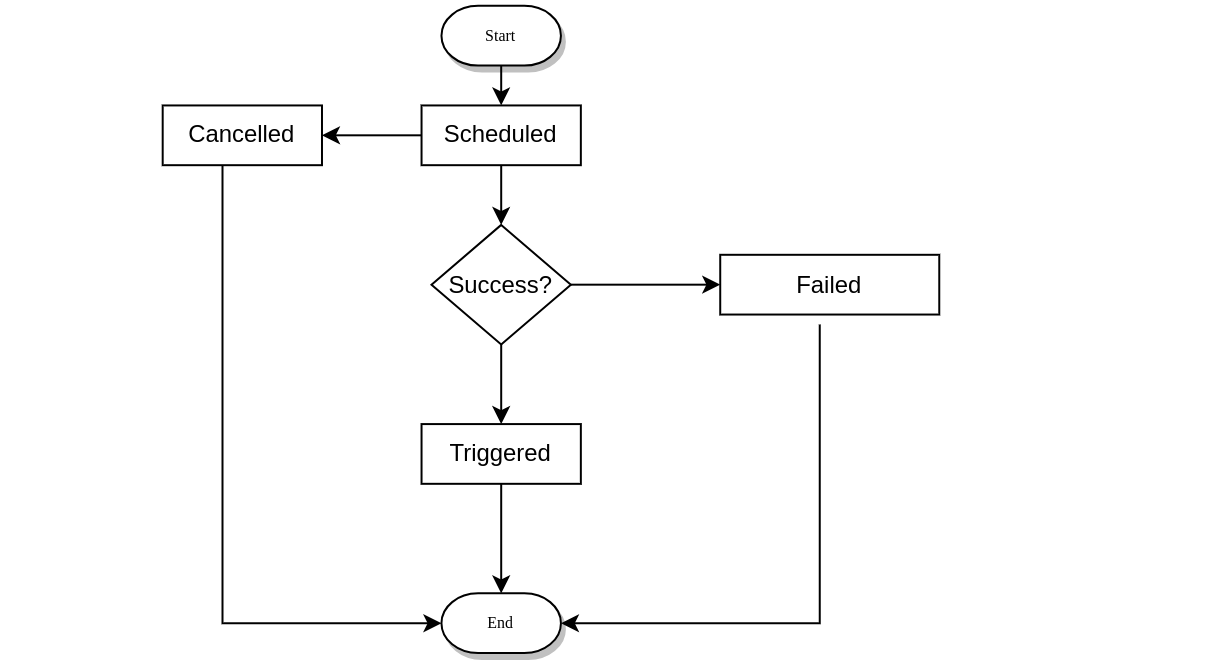
For a one time scheduled job, the following Execution Statuses apply for a one time scheduled job and the transition between the statuses is as follows:
Recurrent Scheduled Job
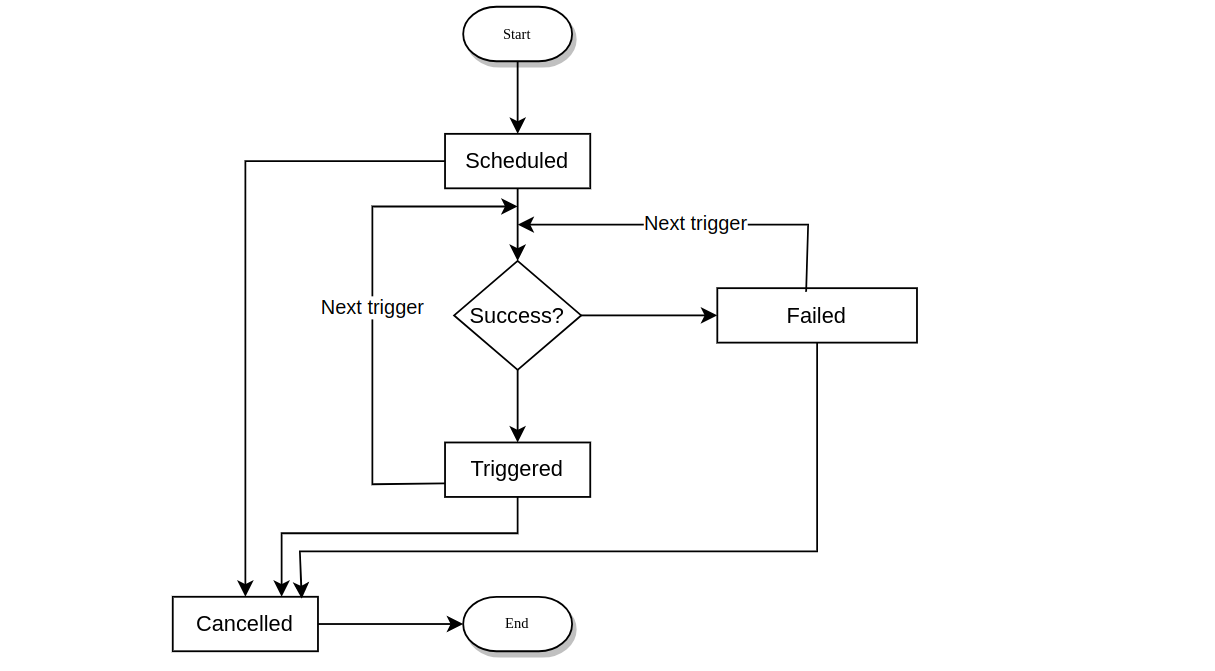
The following Execution Statuses apply for a recurrent scheduled job, the following Execution Statuses apply for a recurrent between the statuses is as follows:
Rehydration - for recurrent scheduled job
Rehydration occurs in the event of a failure which causes Quartz to restart. Since there is no persistence in Quartz, it needs to be rehydrated with jobs which have been persisted in the Job Repository.
Candidate statuses for rehydration would be :
-
SCHEDULED
-
TRIGGERED
-
FAILED
Job Failure Handling - for recurrent scheduled job
When determining if jobs have failed we would need to check for the following statuses:
-
SCHEDULED
-
TRIGGERED
And also the updatedTime from the JobExecutionStatus collection
In addition to considering the Execution Status we also need to consider the following from JobSpecification
-
latestUpdate
-
schedulingSpecification
The latestUpdate should be compared to the updatedTime in the JobExecutionStatus if latestUpdate > updatedTime then the
schedulingSpecification should be considered as pending execution, you can use the getNextValidTimeAfter using
latestUpdate comparing to see if this is consistent with the expected execution.
Otherwise, it should be considered as an existing job i.e. the updateTime should be compared to the cronExpression - getNextValidTimeAfter this in conjunction with specifying calling the method against the current time can be used to determine failed job execution by comparing the two dates.
For example:
//Successful job
  //Daily expression with last job run time of 2022-11-18T08:24:00
  // "Now": 2022-11-18T08:26:00
  @Test
  void shouldHaveAfterNowAndAfterLastJobRunResultSame() throws ParseException {
      String dailyExpressionString = "0 24 08 * * ? *";
      CronExpression dailyExpresssionJobRun = new CronExpression(dailyExpressionString);
      LocalDateTime jobLastRunTime = LocalDateTime.parse("2022-11-18T08:24:00");
      LocalDateTime nowTime = LocalDateTime.parse("2022-11-18T08:26:00");
      Date nowDate = Date.from(nowTime.atZone(ZoneId.systemDefault()).toInstant());
      Date nextValidTimeAfterNow = dailyExpresssionJobRun.getNextValidTimeAfter(nowDate);
      Date jobLastRunDate = Date.from(jobLastRunTime.atZone(ZoneId.systemDefault()).toInstant());
      Date nextValidTimeAfterJobRun = dailyExpresssionJobRun.getNextValidTimeAfter(jobLastRunDate);
      String nextValidTimeAfterJobRunString = nextValidTimeAfterJobRun.toString();
      System.out.println("next valid time after last run: " + nextValidTimeAfterJobRunString);

      String nextValidTimeAfterNowString = nextValidTimeAfterNow.toString();
      System.out.println("next valid time after now: " + nextValidTimeAfterNowString);
      assertThat(nextValidTimeAfterJobRunString, is(nextValidTimeAfterNowString));
      // next valid time after last run: Sat Nov 19 08:24:00 GMT 2022
      // next valid time after now: Sat Nov 19 08:24:00 GMT 2022
  }

  //Failed job
  //Daily expression with last job run time of 2022-11-17T08:24:00
  // "Now": 2022-11-18T08:26:00
  @Test
  void shouldHaveAfterNowAndAfterLastJobRunResultDifferent() throws ParseException {
      String dailyExpressionString = "0 24 08 * * ? *";
      CronExpression dailyExpresssionJobRun = new CronExpression(dailyExpressionString);
      LocalDateTime jobLastRunTime = LocalDateTime.parse("2022-11-17T08:24:00");
      LocalDateTime nowTime = LocalDateTime.parse("2022-11-18T08:26:00");
      Date nowDate = Date.from(nowTime.atZone(ZoneId.systemDefault()).toInstant());
      Date nextValidTimeAfterNow = dailyExpresssionJobRun.getNextValidTimeAfter(nowDate);
      Date jobLastRunDate = Date.from(jobLastRunTime.atZone(ZoneId.systemDefault()).toInstant());
      Date nextValidTimeAfterJobRun = dailyExpresssionJobRun.getNextValidTimeAfter(jobLastRunDate);
      String nextValidTimeAfterJobRunString = nextValidTimeAfterJobRun.toString();
      System.out.println("next valid time after last run: " + nextValidTimeAfterJobRunString);

      String nextValidTimeAfterNowString = nextValidTimeAfterNow.toString();
      System.out.println("next valid time after now: " + nextValidTimeAfterNowString);
      assertThat(nextValidTimeAfterJobRunString, not(is(nextValidTimeAfterNowString)));
      // next valid time after last run: Fri Nov 18 08:24:00 GMT 2022
      // next valid time after now: Sat Nov 19 08:24:00 GMT 2022
}