Concepts
Task Lifecycle
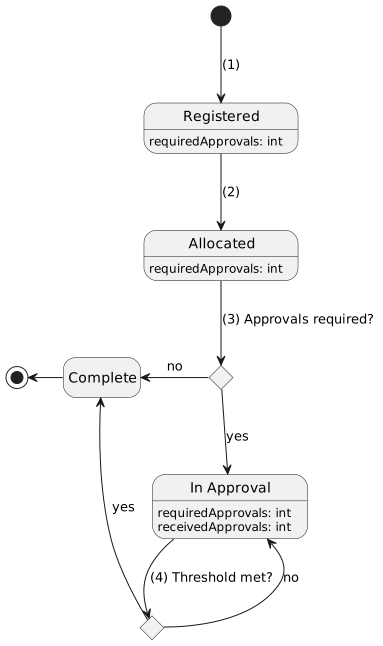
A simplified, happy-path, state diagram for the task lifecycle is shown below, with a brief explanation of the lifecycle.
Some aspects of the task lifecycle have been omitted or not fully elaborated from the diagram to keep it cleaner. For a deeper dive into these aspects, review the following sections: Task Creation, Task Allocation, Task Cancellation, Task Execution Review and Task Closed Notification.
-
When a task is created it is initialised with the "Registered" state. More about task creation can be seen in the Task Creation section.
-
Once the task has been allocated to an operator, it transitions to "Allocated". In the "Allocated" state, it is possible to transition back to "Registered". This is elaborated upon in the Task Allocation section.
-
After an operator has executed the task, the execution results are registered with the task manager. If the task was registered with
approvalsRequired > 0, then the task transitions to "In Approval", otherwise is transitions to the terminal state, "Complete". -
The task execution can either be approved or rejected. If the task has received fewer approvals than it requires, then the task remains in the "In Approval" state until it has met the threshold, otherwise it transitions to the terminal state, "Complete". This explained in further detail in the Task Execution Review section.
Task Creation
Task creation requires some input parameters which are defined in Human Task Manager API.
Task creation is idempotent, which means if the same task creation request is replayed several times, then a new task will only be created for the first request. On each subsequent request, the ID of the existing task will be returned. The request property which is used to determine repeated requests is idempotencyKey.
When creating a task, user can provide possible outcomes of that task.
Task Allocation
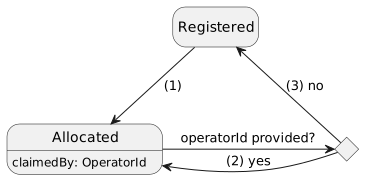
Tasks can only be executed by the operator who has claimed the task. Allocation is initially done by supplying an operator ID from the "Registered" state which transitions the task to "Allocated".
From the "Allocated" state, a task can either be reallocated to another operator or deallocated. To reallocate, a new operator ID is supplied and the task remains in the "Allocated" state, albeit with a new operator ID. To deallocate a task, a null operator ID can be supplied, and the task transitions back to "Registered".
The diagram below shows the possible state transitions for the allocation aspect.
-
An operator ID is supplied from the "Registered" state, the task transitions to "Allocated" with
claimedByequal to the operator ID. -
An operator ID is supplied from the "Allocated" state, the task remains in "Allocated" with
claimedByequal to the new operator ID. -
The task is allocated to a
nulloperator ID, the task transitions to "Registered".
Task Execution Review
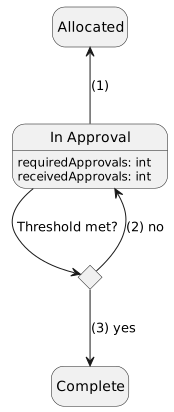
If a task is registered with requiredApprovals > 0, then it will transition to "In Approval" when the task is executed.The task must then receive the required amount of approvals to transition to complete.If a task is rejected then it is sent back to the "Allocated" state, where it can be re-executed.
Rejecting a task resets recievedApprovals.For example, if a task has requiredApprovals == 2.It receives one approval, then gets rejected.The receievedApprovals count is reset back to zero and when the task is re-executed it must receive two approvals before the task completes.
If the task possibleOutcomes is provided, then when executing a task, operator must select one of the provided outcomes.
If the possibleOutcomes is not provided, then the outcome of the execution must not be provided.
When the task is being executed, the operator can leave a note which - besides being appended to the task history - will also be provided on the task as an executionNote.
-
Task was rejected, the task transitions back to "Allocated" where it can be re-executed.
-
Task was approved,
receivedApprovalsis incremented andreceivedApprovals < requiredApprovals, the task remains in "In Approval". -
Task was approved,
receivedApprovalsis incremented andreceivedApprovals == requiredApprovals, the task transitions to "Complete".
Task Cancellation
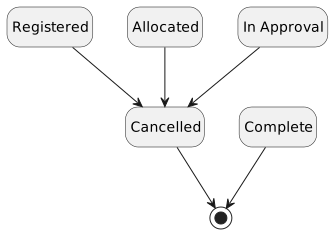
For every non-terminal state, a task can be cancelled. This transitions the task to the "Cancelled" state and closes the task.
Task Closed Notification
When the task reaches terminal state, "Cancelled" or "Completed", task closed notification is sent to the configured kafka topic (HTM_TASK_CLOSED_NOTIFICATION). If the task was "Cancelled", task closed notification contains information about the task ID and terminal state. If the task has reached "Completed" state, we also provide information about the outcome of the task and the result data.