Identity Resolution
Identity Resolution is an application that provides features for comparing user-supplied names and addresses to known name and addresses, and providing a response indicating whether the comparisons are a match or not.
Features
Comparison
Comparison is where we can take two values, an actual known value, and a user-submitted comparison value, and compare them. These values can be a persons name, or an address, and each comparison query can contain one or more comparisons of each type. A response is returned indicating if the query as a whole is a match, containing scores for each comparison of how well those two things match.
This comparison is achieved by calling out to a netowl product called Namematcher. Despite the name, this product is able to compare data types beyond peoples names, including addresses, organizational names, places, and more.
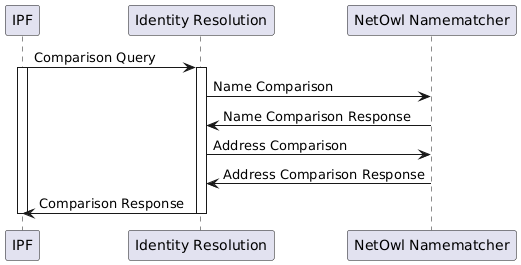
A single comparison query to Identity Resolution can contain many comparisons, and depending on the NetOwl product being used, this may be split into many NetOwl comparison requests.
The comparison queries from IPF to Identity Resolution would typically by done using the client library, but the transport is http based and could also be a custom approach provided the comparison query matches the api spec.
The comparison queries from Identity Resolution to NetOwl Namematcher are also http which talks the NetOwl API.
Core Functionality
Comparisons can be done on fields of different types, for example a persons name, or their address. A single comparison query may include any number of comparisons of each type.
The implementation for comparison is achieved using netowl namematcher, which will give a score (0..1) for each field being compared.
Thresholds for each field are expected along with the comparison query fields, and if any of the comparison scores for a single query is below the threshold, then the comparison match is false.
Table Based Comparisons
Netowl supports tables of data for performance as well as for adding things like aliases and custom matching rules. Identity resolution API supports both table based and non table based matching. This is enabled/disabled by either setting or not setting the "tableName" and "fieldName" fields as seen in the Open API documentation.
| Identity Resolution does not handle the creation or insertion of data into NetOwl tables, this should be handled by the client side implementation. |
NetOwl Implementation
NetOwl Namematcher allows us to compare a single field of a single type in a single request, and returns a score between 0 and 1 indicating how similar those values are, where 1 is an exact match, and 0 is no match.
Licensing Restrictions
The current licence restricts us to NetOwl Namematcher, which supports only a single field comparison at a time, per request, and also restricts us to Latin text comparisons.
Namematcher does support comparing a single value against more than one known actual value, which we do not currently make use of.This is potentially useful when supporting name comparisons for joint accounts where only a single name has been provided for the payment.
Client Library
The comparison client sends comparison queries via http to Identity Resolution, and receives comparison responses, handling marshalling/unmarshalling of the json payloads.
Clients could call the http endpoints directly, but should prefer using this client as it abstracts and simplifies a lot of the required setup.
The client library is configurable, and at a minimum needs to know how to reach Identity Resolution to make comparison queries.
identity-resolution.comparison.http.client {
    host = "localhost"
    port = 8080
}
TLS
One-way
If Java cacerts already exists, you may only need to apply the following comparison client configuration.
identity-resolution.comparison.http.client {
    host = null
    port = null
    endpoint-url = "https://host:port/identity/compare"
}
The host and port must be set to null, and the full comparison path /identity/compare must be set in endpoint-url
|
Alternatively, you’ll need a trust-store, and you won’t need to override endpoint-url.
identity-resolution.comparison.http.client {
    host = "localhost"
    port = 8443
    ssl {
        trust-store-location = "/absolute/path/to/trust-store.p12"
        trust-store-password = "password"
        trust-store-type = "PKCS12"
    }
}
Mutual
identity-resolution.comparison.http.client {
    host = "localhost"
    port = 8443
    ssl {
        trust-store-location = "/absolute/path/to/trust-store.p12"
        trust-store-password = "password"
        trust-store-type = "PKCS12"
        key-store-location = "/absolute/path/to/key-store.p12"
        key-store-password = "password"
        key-store-type = "PKCS12"
        key-password = "password"
    }
}| Identity Resolution, or its ingress must also be configured to accept Mutual TLS. |
Metrics
The following metrics are exposed for identity comparison.
| Key | Type | Description |
|---|---|---|
|
Counter |
A count of the number of comparison requests received via the api. It does not count the number of fields for comparison, so a comparison of a Name and Address is considered one request. |
|
Counter |
A count of the number of comparison request matches. A single request to compare both a Name and Address would have a single response indicating a match, or no match. |
These metrics are enabled on the back-end (identity-resolution), but in theory they could also work client-side, when the client is using the comparison-client for comparisons. Depend on com.iconsolutions.ipf.identityresolution:comparison-metrics alongside com.iconsolutions.ipf.identityresolution:comparison-client. The app using this client will also need to be a spring boot application, with micrometer, and aop enabled.
Licensing
The Identity Resolution Service is an Additional Optional Module (AOM) for which you require an additional license, please check your license agreement if in any doubt.
NetOwl
Comparison
NetOwl Namematcher is used to fulfil comparison functionality. The minimum configuration required for the connector is…
identity-resolution.comparison.netowl {
  default.http.client {
    host = "localhost"
    port = 8080
  }
  table.http.client {
    host = "localhost"
    port = 8080
  }
}
It is expected that NetOwl Namematcher would be deployed within the same pod as Identity Resolution, in which case the above configuration may not be required as it is also the default.
TLS
One-way
If Java cacerts already exists, you may only need to apply the following NetOwl comparison client configuration - using the default endpoint as an example.
identity-resolution.comparison.netowl.default.http.client {
    host = null
    port = null
    endpoint-url = "https://host:port/api/v2/_compare"
}
The host and port must be set to null, and the full comparison path /api/v2/_compare must be set in endpoint-url
|
Alternatively, you’ll need a trust-store, and you won’t need to override endpoint-url.
identity-resolution.comparison.netowl.default.http.client {
    host = "localhost"
    port = 8443
    ssl {
        trust-store-location = "/absolute/path/to/trust-store.p12"
        trust-store-password = "password"
        trust-store-type = "PKCS12"
    }
}
Mutual
identity-resolution.comparison.netowl.default.http.client {
    host = "localhost"
    port = 8443
    ssl {
        trust-store-location = "/absolute/path/to/trust-store.p12"
        trust-store-password = "password"
        trust-store-type = "PKCS12"
        key-store-location = "/absolute/path/to/key-store.p12"
        key-store-password = "password"
        key-store-type = "PKCS12"
        key-password = "password"
    }
}| NetOwl Namematcher, or its ingress, must also be configured to accept Mutual TLS. |
Official Documentation
Once NetOwl has been started, you can access the product documentation by visiting the NetOwl url in a browser.
For example, if deployed locally (using local-e2e-test as an example) then you can point your browser at localhost:8081/docs/index.html
Actuator
The module netowl-actuator is included in the identity-resolution application, and adds a spring boot actuator info contributor and health indicator to the application.
The actuator components work out of the box with defaults, but at a minimum, identity-resolution must know where to find NetOwl.This url will likely be the same as the one used for the comparison connector.
| This configuration must be supplied if either health and/or info is enabled. |
netowl {
  base-url = "http://localhost:8080"
}| Property | Example | Description |
|---|---|---|
|
The base url required to be able to communicate with NetOwl. |
Info
The /actuator/info endpoint includes the NetOwl product details (name and version) if NetOwl is reachable. It also includes any errors with the connectivity to the NetOwl application, including errors specific to NetOwl, such as licensing and configuration issues.
The info endpoint will contain a netowl section
{
    "netowl": {
        "error": "system is unlicensed",
        "product": "NameMatcher",
        "version": "4.9.5.2"
    }
}
Configuration
| This is the default info contributor configuration, you don’t need to explicitly add this configuration unless you need different values. |
management.info.netowl {
  enabled = true
  timeout = "2S"
}| Property | Example | Description |
|---|---|---|
|
|
NetOwl info is enabled by default, but can be disabled with this property. When disabled, the nNetOwl product details are not included in the info. |
|
|
The default timeout is 2 seconds, which is the durection we will wait for NetOwl to respond when checking product details. If the timeout is exceeded, the info will include NetOwl product name and version, but they will be marked as |
Health
The /actuator/health endpoint includes the same information as provided in the info contributor, and also includes the health of the NetOwl product used for comparisons. The overall application status will indicate as DOWN if NetOwl is considered to be DOWN. For NetOwl to be considered UP it must respond to a /api/v2 request with a status of 200 and the product details.
The health endpoint will contain a netowl section
{
    "netowl": {
        "details": {
            "error": "system is unlicensed",
            "product": "NameMatcher",
            "version": "4.9.5.2"
        },
        "status": "DOWN"
    }
}
Configuration
| This is the default health indicator configuration, you don’t need to explicitly add this configuration unless you need different values. |
management.health.netowl {
  enabled = true
  timeout = "2S"
}| Property | Example | Description |
|---|---|---|
|
|
NetOwl health is enabled by default, but can be disabled with this property. When disabled, the status of NetOwl is not considered, and health will indicate as |
|
|
The default timeout is 2 seconds, which is the duration we will wait for NetOwl to respond when checking health. If the timeout is exceeded, NetOwl is considered to be |
Licencing
Licences are provide by NetOwl, and we currently use a development licence for NetOwl Namematcher, restricting us to a single comparison thread, and three instances. The current development licence is bundled with the netowl-testcontainer module for integration testing.
{
  "product": "NameMatcher",
  "type": "Development",
  "thread limit": 1,
  "*": {
    "lifespan": [
      "2022-01-01 00:00Z",
      "2023-01-01 00:00Z"
    ],
    "features": [
      "Latin"
    ]
  },
  "verification": 1778757171272520714
}
The licence needs to exist inside the running container at /var/local/netowl-data/license.key for NetOwl Namematcher to work, including the hosted documentation. For the testcontainer it’s mounted directly into the container from the classpath, when deploying with docker compose the licence can be mounted from a local filesystem volume. In a kubernetes deployment the licence could come from a config map, as seen in identity-resolution-deployments.
Alternatively the licence can be POSTED via http, for example…
curl --request POST \
  --url http://localhost:8081/api/v2/license-key \
  --header 'Content-Type: application/json' \
  --data '{
  "product": "NameMatcher",
  "type": "Development",
  "thread limit": 1,
  "*": {
    "lifespan": [
      "2022-01-01 00:00Z",
      "2023-01-01 00:00Z"
    ],
    "features": [
      "Latin"
    ]
  },
  "verification": 1778757171272520714
}'
The licence could be posted from an init container, or even submitted manually using the NetOwl UI.
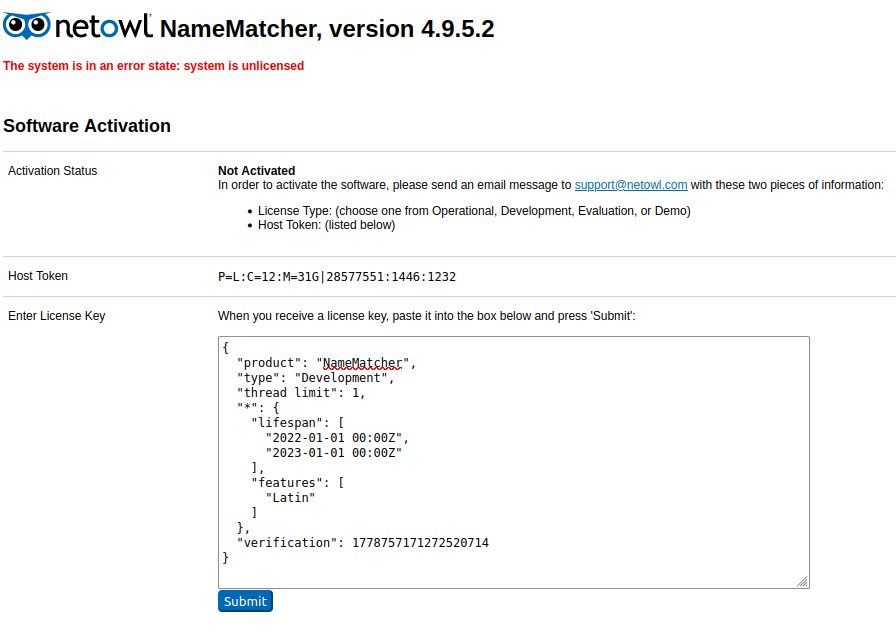
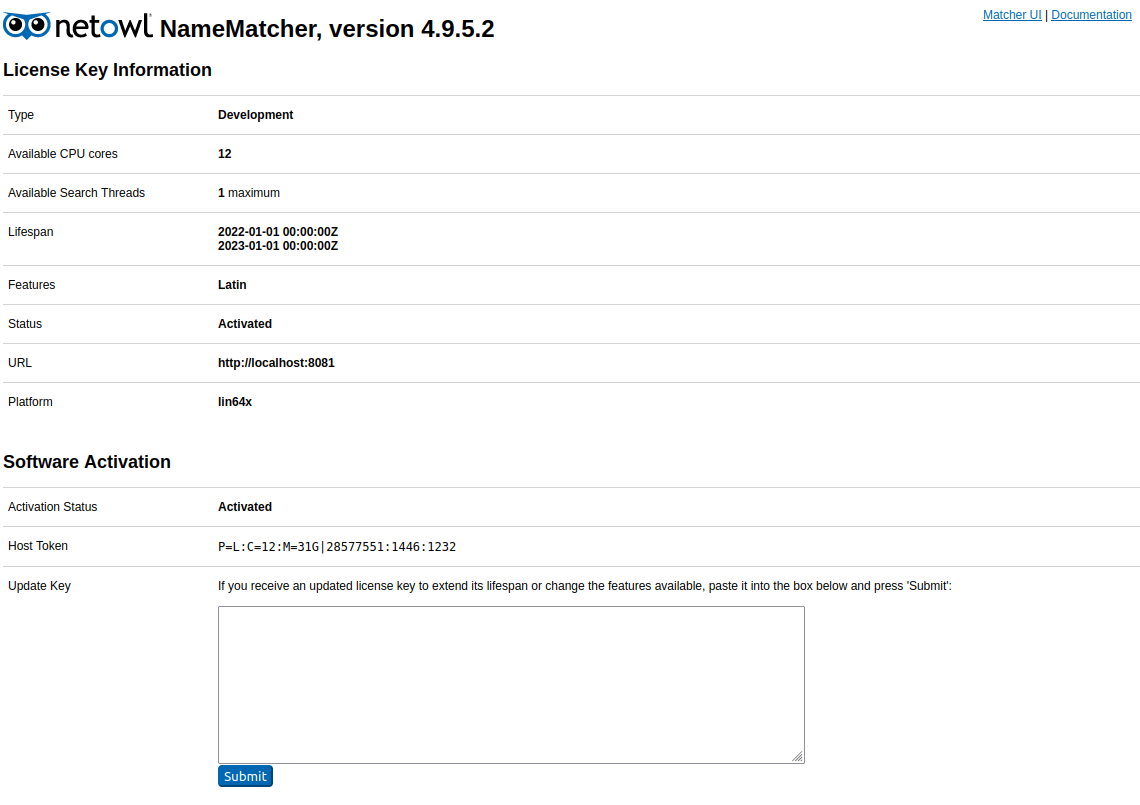
After submitting the license, the UI will change, and also include links to the official documentation.
Updating NetOwl
The NetOwl documentation has an installation guide which includes a section on upgrading from previous versions. There’s also a version history page listing the main changes in each version.
Typical steps for absorbing a new version of NetOwl Namematcher are…
-
NetOwl binaries and licences are obtained from NetOwl, and the binary should be manually uploaded into Nexus.
-
Run the netowl-namematcher Jenkins job, which checks out and runs the netowl-namematcher Jenkins pipeline. This produces a
registry.ipf.iconsolutions.com/netowl-namematcherdocker images tagged withlatestand the version used to run the job.. -
Update the netowl-testcontainer module with the correct version - Integration tests will now use the latest version and can be used to verify Identity Resolution works with the Namematcher update.
-
Update the e2e_functional.yml in local-e2e-test with the correct version, and run the e2e tests to really be sure that everything is working correctly.
| Consider whether we need to support earlier versions of NetOwl Namematcher in addition to the new version. If so, we’ll need a way to run the test suite several times, once for each supported version. |
NetOwl Application TLS
NetOwl Namematcher is an Apache Tomcat based web application, as a result, enabling TLS will either need to be done before building the docker image, or after the fact by replacing the Tomcat server.xml file with one configured correctly for TLS. A keystore will also need to be present under the NetOwl installation directory.
For more information see the official documentation, which has a section on TLS.
| I couldn’t get the below SSL setup working correctly, but it’s likely user error and I ran out of time. Although they are based on NetOwl official documentation, they should be taken with a grain of salt. |
Bundle TLS configuration into the docker image
Before building the NetOwl Namematcher docker image, place a keystore file in the installation directory under /server/. Then edit the Tomcat server.xml in the installation directory, under /server/conf/server.xml You will need the following…
<Connector port="8443" keystoreFile="keystore.jks" keystorePass="password"
           scheme="https" secure="true" clientAuth="false" maxThreads="150"
           SSLEnabled="true" sslProtocol="TLS" protocol="org.apache.coyote.http11.Http11NioProtocol" />
Build the docker image.
Mount TLS configuration into the container
Mount the keystore into the NetOwl Namematcher container under /usr/local/netowl-inst/server. Then mount a server.xml, replacing the one inside the container at /usr/local/netowl-inst/server/conf/server.xml, and containing the following.
| Copy the server.xml from the installation directory for a reference config |
<Connector port="8443" keystoreFile="keystore.jks" keystorePass="password"
           scheme="https" secure="true" clientAuth="false" maxThreads="150"
           SSLEnabled="true" sslProtocol="TLS" protocol="org.apache.coyote.http11.Http11NioProtocol" />
In a docker compose file, this might look like…
  netowl-namematcher:
    image: ${docker.registry}/netowl-namematcher:4.9.5.2
    container_name: netowl-namematcher
    ports:
      - "8081:8080"
      - "8443:8443"
    volumes:
      - ./config/netowl-namematcher/license.key:/var/local/netowl-data/license.key
      - ./config/netowl-namematcher/keystore.jks:/usr/local/netowl-inst/server/keystore.jks
      - ./config/netowl-namematcher/server.xml:/usr/local/netowl-inst/server/conf/server.xml
Identity Resolution Application
Identity Resolution is a Spring Boot based application, and it is intended to be deployed alongside whatever netowl product is being used to satisfy the comparison feature. As it is a spring boot application, all the usual spring application properties are supported.
Hocon is the primary way to configure identity-resolution, although application.properties files are also supported.
For configuration of NetOwl connectivity, see the NetOwl section.
Metrics
Prometheus compatible application metrics are exposed under /actuator/prometheus
Feature and implementation specific metrics (e.g. comparison or netowl) may also be exposed under this endpoint, and are documented in the relevant sections.
Actuator
The health and info endpoints also include the NetOwl dependency. See the NetOwl Actuator section for more information.
Identity Resolution comes with the following default actuator endpoint configuration.
management.endpoints.web.exposure.include = [health, info, prometheus]If you wish to disable health and/or info endpoints, you will need to do so explicitly, by changing the array of includes in an application.conf.
management.endpoints.web.exposure.include = [prometheus] //Look ma, no healthTLS
Identity Resolution is a Spring Boot application, which accepts a set of server.ssl.* properties for configuring TLS.
if server tls is enabled, also configure comparison client tls
Deployment
AWS
The identity-resolution-deployments module contains a nft deployment, which is a kubernetes deployment of identity-resolution and NetOwl Namematcher (both within the same pod), Prometheus, and Grafana. Outside the kubernetes deployment is the comparison-load-generator.
This deployment can be executed by using the environment creation job.
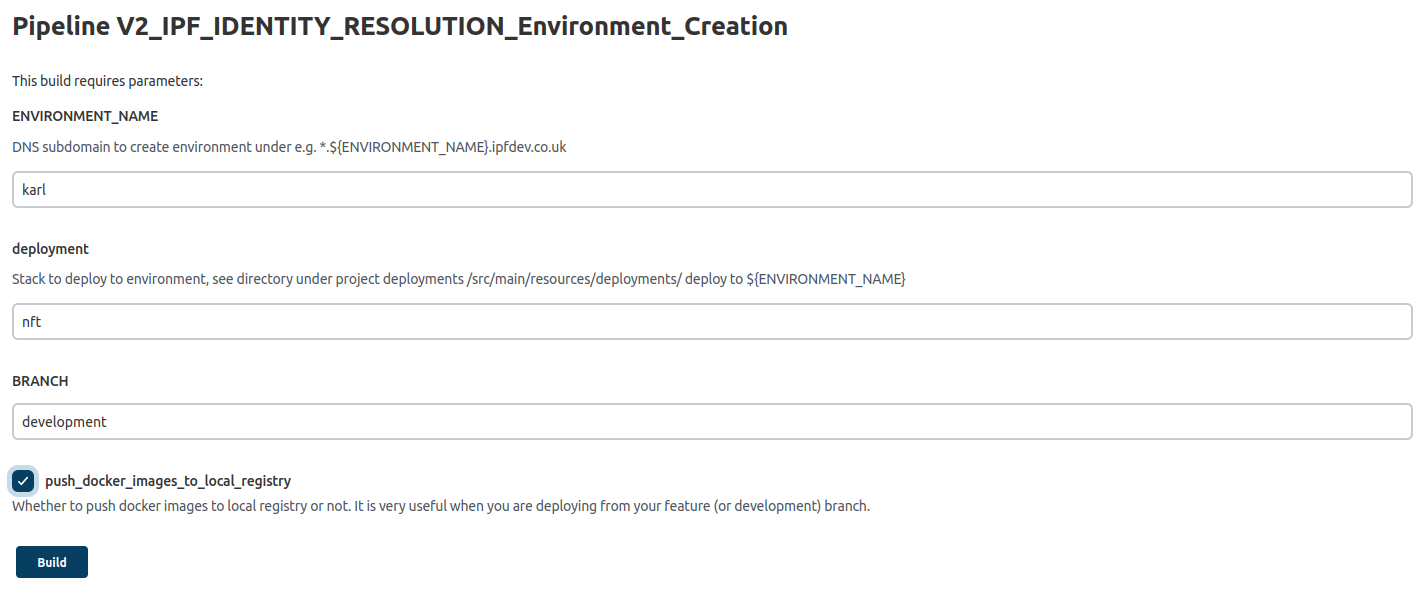
Once deployed you can access the following applications.
| Application | URL | Description |
|---|---|---|
|
Simulator to generate comparison requests against identity-resolution |
|
|
Identity resolution API, and swagger |
|
|
From here you can see the spring boot application metrics for identity-resolution |
Local Docker
The end-to-end tests run against a locally docker-composed deployment, which you can deploy yourself.
mvn clean install -Pcontainer -DskipTests
docker compose -f local-e2e-test/target/test-classes/e2e_functional.yml up -d
docker compose -f local-e2e-test/target/test-classes/e2e_functional.yml down
Testing
E2E
There is a set of end-to-end feature tests that run against a locally-deployed docker-composed identity-resolution and netowl-namematcher.
You can deploy the applications yourself (as shown above) before running the feature tests through the IDE.
Performance Testing
We use a comparison load generator to fire comparison requests at identity-resolution at a set rate.
The comparison load generator makes use of the simulator framework, and as such single requests, and load, can be generated against identity-resolution using the simulator framework api. It also includes a basic UI.
| The comparison load generator attempts to reach a set rate of comparison requests against identity-resolution, but will not exceed what the deployed application is capable of due to back-pressure from the underlying connector. |
mvn clean install -Pcontainer -DskipTests
docker compose -f local-e2e-test/target/test-classes/e2e_functional.yml up -d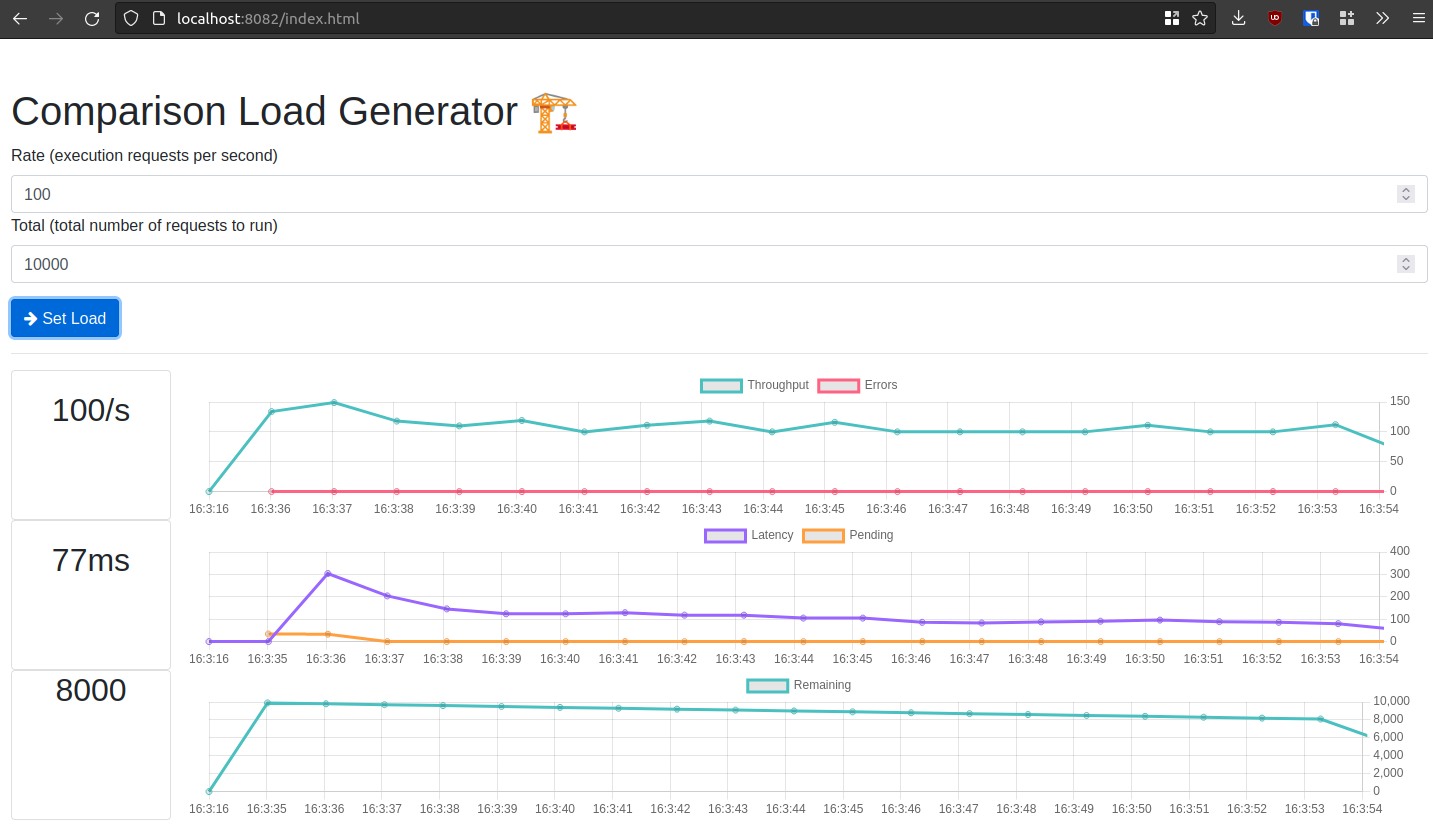
NFT Tests
There is an NFT test that attempts to exceed 500 comparisons per second against a single instance of identity-resolution and NetOwl Namematcher, deployed together in a single kubernetes pod. It uses the comparison-load-generator, which is deployed outside the kubernetes environment, to generate this load.
The NFT test itself lives in the icon-nft-utils repo. This test expects to be given a steady comparison rate, with duration, and a peak comparison rate, with duration.
There are two test configurations, one that runs against the latest released identity-resolution, and one that runs against development, building the latest snapshot. You can see the test configurations in the identity-resolution-deployments module of this project, under the jenkins resource folder.
How-To Guides
Deploy Identity Resolution
The simplest approach is to deploy locally using the same docker compose deployment that the local_e2e_tests run against.
Alternatively you can deploy into AWS.
Deploy Identity Resolution in a client solution
Packages
The client may wish to take the NetOwl binaries themselves, and build their own docker images. See the section on updating NetOwl for more information about the process.
When the Identity Resolution release job runs, it produces an identity-resolution-app docker image, tagged with 'latest` and the version being applied by the release job.
Licencing
See the NetOwl licencing section for more information about applying licences, including updating licences on running NetOwl instances..
Deployment
It is expected that Identity Resolution and NetOwl Namematcher will be deployed together in the same kubernetes pod. Scaling beyond a single instance would therefore scale both applications. See the Identity Resolution deployment section for more information.
The client may prefer to deploy the two applications separately, allowing them to scale NetOwl Namematcher independently of Identity Resolution. For more information, the NetOwl documentation contains a section on "Kubernetes Usage and Best Practice", and the packages they deliver contain example kubernetes manifests that can be used as a template.
See the Smoke test section for instructions on checking that Identity Resolution and NetOwl Namematcher are operating correctly.
Documentation
For Identity Resolution, see the Open API documentation section, or alternatively once Identity Resolution has been deployed you can access the swagger ui and api documentation at localhost:8080/swagger-ui.html, replacing scheme, host, and port, as required.
For NetOwl see the NetOwl documentation section for more info.
Enable TLS
See the comparison flow diagram for more context.
TLS can be enabled between IPF and Identity Resolution, and between Identity Resolution and NetOwl Namematcher
| If Identity Resolution is deployed within the same pod as NetOwl Namematcher, you may wish to only enable TLS between IPF (using the comparison client) and the Identity Resolution application. |
| If Identity Resolution is deployed separately to NetOwl Namematcher, you will likely want to enable TLS between IPF and Identity Resolution, and Identity Resolution and NetOwl Namematcher. |
Manage NetOwl software updates
See the updating NetOwl section for more information.
Obtain NetOwl product documentation
| The NetOwl product instance must be licensed for the documentation to be accessible. |
View hosted documentation
Deploy, and access the hosted NetOwl Namematcher documentation at localhost:8081/docs/index.html.
Download the documentation for offline access
Deploy, and then run the following (changing NETOWL_HOST and NETOWL_PORT as required)…
NETOWL_HOST=localhost
NETOWL_PORT=8081
NETOWL_BASE_URI=${NETOWL_HOST}:${NETOWL_PORT}

# Fetch the netowl product documentation
wget \
    --recursive \
    --page-requisites \
    --html-extension \
    --convert-links \
    --domains $NETOWL_HOST \
    --no-parent \
    http://$NETOWL_BASE_URI/docs/index.html

# If that worked, then zip them up
if [ -d "$NETOWL_BASE_URI" ]; then
    pushd $NETOWL_BASE_URI; zip -r ../netowl-namematacher-docs.zip docs; popd
fi
Perform a smoke test
Are the applications healthy?
You can check the status of Identity Resolution by accessing the actuator endpoints, which also contains the NetOwl product status, including product information.
curl http://localhost:8080/actuator/health | jqIdentity Resolution Health
{
  "status": "UP",
  "components": {
    "connectors": {
      "status": "UP",
      "details": {
        "NetOwlNameComparison": {
          "status": "UP",
          "transportHealthList": [
            {
              "transportType": "HttpConnectorTransport",
              "status": "UP",
              "circuitBreakerState": "CLOSED"
            }
          ]
        }
      }
    },
    "diskSpace": {
      "status": "UP",
      "details": {
        "total": 500609097728,
        "free": 281761144832,
        "threshold": 10485760,
        "exists": true
      }
    },
    "livenessState": {
      "status": "UP"
    },
    "netowl": {
      "status": "UP",
      "details": {
        "product": "NameMatcher",
        "version": "4.9.5.2"
      }
    },
    "ping": {
      "status": "UP"
    },
    "readinessState": {
      "status": "UP"
    }
  },
  "groups": [
    "liveness",
    "readiness"
  ]
}
If the applications are healthy you will see the following…
$ curl http://localhost:8080/actuator/health | jq .status
"UP"

$ curl http://localhost:8080/actuator/health | jq .components.netowl
{
  "status": "UP",
  "details": {
    "product": "NameMatcher",
    "version": "4.9.5.2"
  }
}
When NetOwl Namematcher is unhealthy, if it’s unlicensed for example, you will see something like the following…
$ curl http://localhost:8080/actuator/health | jq .status
"DOWN"

$ curl http://localhost:8080/actuator/health | jq .components.netowl
{
  "status": "DOWN",
  "details": {
    "product": "NameMatcher",
    "version": "4.9.5.2",
    "error": "system is unlicensed"
  }
}
Make a comparison
curl -X POST -H "Content-Type: application/json" -d '{
  "comparisons": [
    {
      "actual": {
        "type": "FULL_NAME",
        "value": "Alexander Boris de Pfeffel Johnson"
      },
      "comparison": "Mr Johnson",
      "minimumScoreToMatch": 0.85
    },
    {
      "actual": {
        "type": "FULL_ADDRESS",
        "value": "10 Downing Street, SW1A 2AA"
      },
      "comparison": "10 Downing Street, SW1A 2AA",
      "minimumScoreToMatch": 0.75
    }
  ]
}' http://localhost:8080/identity/compare | jq
You should see a response along the lines of
Comparison Response
{
  "match": true,
  "hints": [
    "2 of 2 comparisons matched"
  ],
  "results": [
    {
      "type": "FULL_NAME",
      "actual": "Alexander Boris de Pfeffel Johnson",
      "comparison": "Mr Johnson",
      "score": 0.92,
      "match": true,
      "hints": [
        "Comparison value 'Mr Johnson' matches actual value 'Alexander Boris de Pfeffel Johnson' because the score 0.92 meets the minimum score of 0.85"
      ]
    },
    {
      "type": "FULL_ADDRESS",
      "actual": "10 Downing Street, SW1A 2AA",
      "comparison": "10 Downing Street, SW1A 2AA",
      "score": 1,
      "match": true,
      "hints": [
        "Comparison value '10 Downing Street, SW1A 2AA' matches actual value '10 Downing Street, SW1A 2AA' because the score 1.00 meets the minimum score of 0.75"
      ]
    }
  ]
}
Make a table based comparison
curl -X POST -H "Content-Type: application/json" -d '{
  "comparisons": [
    {
      "actual": {
        "type": "FULL_NAME",
        "value": "Alexander Boris de Pfeffel Johnson"
      },
      "comparison": "Mr Johnson",
      "minimumScoreToMatch": 0.85,
      "tableName": "Names",
      "fieldName": "Name"
    },
    {
      "actual": {
        "type": "FULL_ADDRESS",
        "value": "10 Downing Street, SW1A 2AA"
      },
      "comparison": "10 Downing Street, SW1A 2AA",
      "minimumScoreToMatch": 0.75,
      "tableName": "Addresses",
      "fieldName": "Address"
    }
  ]
}' http://localhost:8080/identity/compare | jq
You should see a response along the lines of
Comparison Response
{
  "match": true,
  "hints": [
    "2 of 2 comparisons matched"
  ],
  "results": [
    {
      "type": "FULL_NAME",
      "actual": "Alexander Boris de Pfeffel Johnson",
      "comparison": "Mr Johnson",
      "score": 0.92,
      "match": true,
      "hints": [
        "Comparison value 'Mr Johnson' matches actual value 'Alexander Boris de Pfeffel Johnson' because the score 0.92 meets the minimum score of 0.85"
      ]
    },
    {
      "type": "FULL_ADDRESS",
      "actual": "10 Downing Street, SW1A 2AA",
      "comparison": "10 Downing Street, SW1A 2AA",
      "score": 1,
      "match": true,
      "hints": [
        "Comparison value '10 Downing Street, SW1A 2AA' matches actual value '10 Downing Street, SW1A 2AA' because the score 1.00 meets the minimum score of 0.75"
      ]
    }
  ]
}