Anatomy of a Typical IPF Orchestration Application
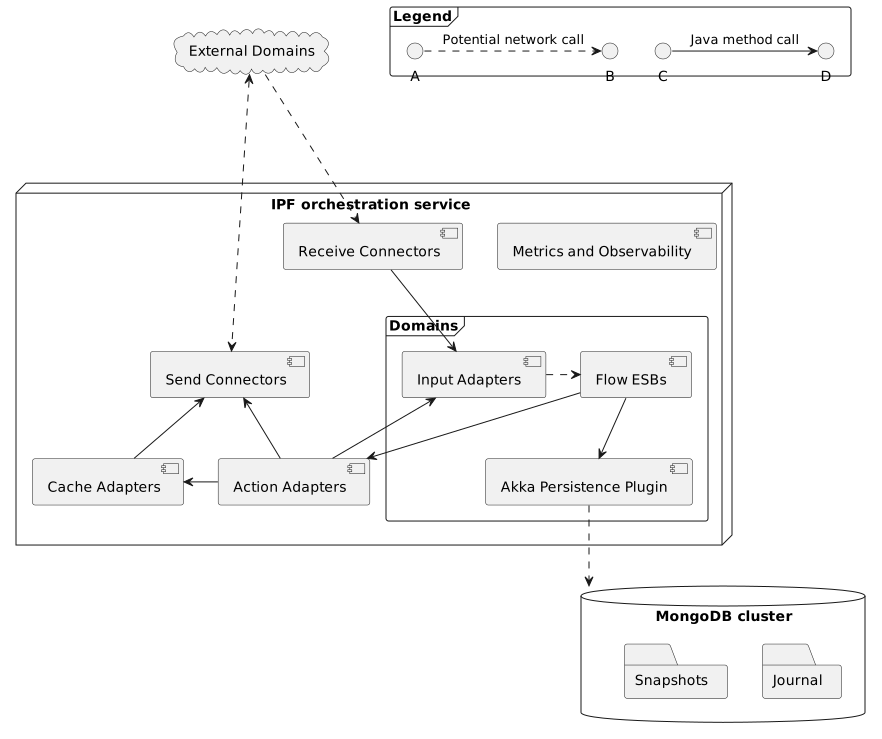
Most of the time, a typical IPF orchestration application will consist of the following components:
-
Domainsrepresent DSL-defined (and MPS-generated) components that provide the orchestration logic:-
Flow Event Sourced Behaviours (ESBs)are the source of truth when it comes to orchestration - they implement the finite state machines that drive the business logic and are fully generated by MPS. Since ESBs rely on event sourcing, they read and persist domain events by calling the appropriateAkka Persistence Plugin -
Input Adaptersare components that are used to send inputs toFlow ESBsand thus trigger transitions between the finite state machine states; the adapters are fully generated by MPS. -
Action Adaptersare components defined by the IPF orchestration service that implement theAction Portsgenerated by MPS and are wired into theDomainsby the service.
-
-
Receive Connectorsare components made available via IPF system connectivity libraries and implemented and configured by the orchestration service to accept appropriate messages from external domains. Most of the time, they will be receiving the message, converting it into an appropriateInputand delegating the handling of said input to anInput Adapter. -
Send Connectors, likeReceive Connectorsare part of the IPF system connectivity libraries and are also implemented and configured by the orchestration service, but in this case for sending messages to appropriate external domains. -
Cache Adaptersare components made available via the IPF Cache libraries and configured for use by the orchestration service. Most of the time they are used in front of aRequest Reply Send Connectors, typically for caching results of HTTP calls; they delegate to the connectors in case of a cache miss but otherwise return cached results.
IPF components do not work in isolation and the way they typically connect with each other is best illustrated by inspecting how a message typically flows through an IPF orchestration service. Coupled to the message flow is the way components apply backpressure to their upstream, which translates to the way backpressure is applied within the service as a whole. Understanding how a message flows through the system and how and where backpressure is applied will prove invaluable in any troubleshooting, capacity planning or performance tuning task.
Message Flow
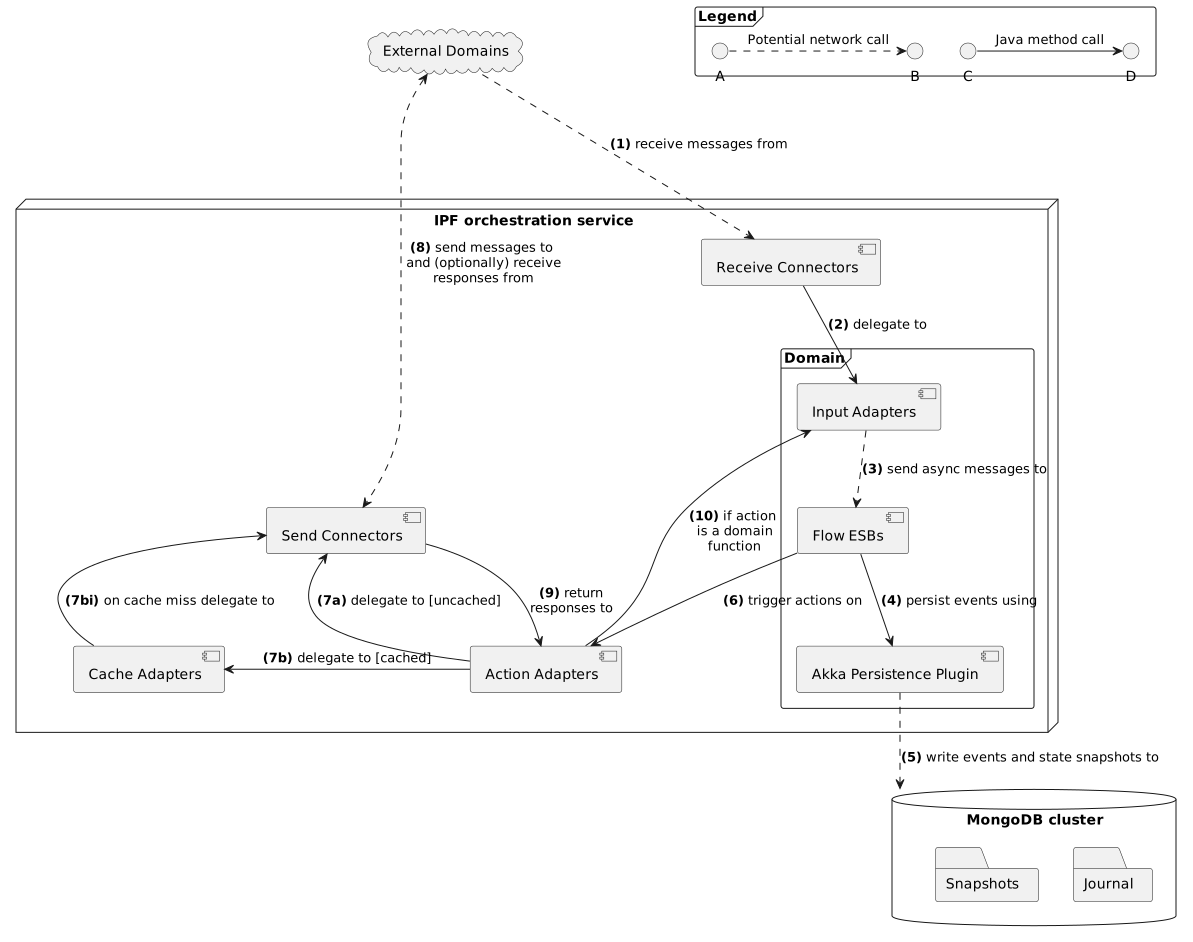
You can find a brief description of each of the steps below. Steps 1-3 and 4-10 are likely to be performed on different IPF orchestration service nodes.
-
Messages usually enter an IPF orchestration service via a
Receive Connector -
The connector transforms the received message into an appropriate
Inputand calls itsInput Adapter -
The sole purpose of the adapter is to convert the input into a command and send it to the appropriate
Flow ESB, which may reside on a different service node -
When it receives the command, the
Flow ESBfirst checks whether the command should be applied and if affirmative, an event is persisted using the persistence plugin. If the command should not be handled, further steps are skipped. -
(Optional)
Akka Persistence Pluginconverts the events into database write commands and communicates with the database -
(Optional) If there are configured actions that are to be triggered,
Flow ESBtriggers them now via the appropriateAction Adapters. If no actions are to be triggered, further steps are skipped. -
(Optional) Depending on the action type, several things might happen:
-
A regular
Send Connectoris called, meaning the action will just be sending a message to the external domain and any potential response to that message from the external domain will be received via aReceive Connector. Alternatively, an uncachedRequest Reply Send Connectormay be called. -
A cached
Request Reply Send Connectoris called, meaning the call is first made to the configuredCache Adapter.-
On a cache miss, the
Request Reply Send Connectoris called and the result of the operation is stored in the cache for future use. -
On a cache hit, we skip to 9.
-
-
The action does not require the use of a connector, and we skip to 10.
-
-
(Optional) The
Send Connectorconverts the action’s data into a format that the external domain expects and sends it using the configured transport. If the connector is not aRequest Reply Send Connector, further steps are skipped. -
(Optional) The
Request Reply Send Connectorreceives the response from the external domain and returns it to theAction Adapter -
(Optional) The
Action Adapterconverts the response into an appropriateInputand calls itsInput Adapter. The flow continues from 3.
Backpressure
Most IPF components are built on top of reactive streams implementations, and one of the features that reactive streams offer is back-pressure - a means of flow-control and a way for consumers of data to notify a producer about their current availability, effectively slowing down the upstream producer to match their consumption speeds.
Seeing how, as explained in the message flow section above, all the IPF components are intricately linked together, their backpressure mechanisms will often combine. What this means in practice is that Receive Connectors are the final target of backpressure for the whole IPF orchestration service, and the backpressure from the orchestration service’s downstream dependencies will translate up to them. This also means that the speed at which the Receive Connector consumes and processes work is determined by the processing speed of the entire message flow and is no faster than its slowest step.
-
Each
Receive Connectorwill have a small buffer of messages that are allowed to be processed in parallel; when the buffer is full, the connector will backpressure but if and how the backpressure is translated to the upstream is dependent entirely on the connector’s transport. Messages are only removed from the buffer when their processing completes (successfully or not). Depending on the connector’s resiliency settings, processing of a failed message can be retried a configurable number of times, meaning that steps 2-10 may be repeated several times on error, until the max number of attempts is reached, or until the configured timeout duration elapses. -
An
Input Adapteroffers no backpressure mechanisms of their own but instead just propagate downstream backpressure by waiting to receive a successful processing outcome message, signaling that steps 3-10 are successfully complete. The adapters come with their ownRetrySupport- a failed call to theFlow ESBwill be retried a configurable number of times before the failure is propagated to the connector. -
Each call to the
Flow ESBfrom anInput Adapterwill use Akka’s support for location-transparent cluster messaging and will wait for a configured amount of time for the processing outcome message to be received before timing out and signaling to the adapter’sRetryStrategythat the attempt has failed. If theFlow ESBdetermines that the command should not be applied (e.g. invalid for current state, a duplicate etc) a processing outcome is sent to theInput Adapterand further steps are skipped. -
The speed at which commands are processed directly depends on the speed at which the
Akka Persistence Pluginis capable of persisting them. Once the event is persisted, theFlow ESBis free to accept new commands. The processing outcome will be sent asynchronously once all the actions are complete (see more in 6). -
If the database client is reactive, it may apply some backpressure mechanisms of its own.
-
All configured actions that the
Flow ESBtriggers are called asynchronously and in parallel with each other. Only once all of them are complete is the processing outcome sent to theInput Adapterfrom step 2. It’s important to mention that action retries scheduled by theFlow ESBare not part of the backpressure flow and do not impact the processing outcome in any way. -
Depending on the action type, different backpressure rules apply:
-
Both the regular
Send Connectorand theRequest Reply Send Connectorprovide a buffer for messages being sent in parallel; once the buffer is full, send connectors backpressure. -
Cache Adapters typically offer no backpressure mechanisms, but in most cases this isn’t an issue since reading the cache is an in-memory operation. The writes will backpressure on the send connector call first, but then if a remote call is needed, the slowness of that call will translate all the way up to the
Receive Connector.
-
-
Both types of
Send Connectorsupport configurable retries and timeouts. Messages are only removed from the connector’s buffer when their processing completes (successfully or not) so depending on the connector’s resiliency settings, this step can be performed multiple times per message. -
Slow responses will cause the
Request Reply Send Connectorto translate the backpressure upstream. -
The flow continues from step 3 and all the backpressure signals will be passed on to the
Receive Connectorfrom step 1.