IPF Simulators
The IPF platform stands in between bank systems and CSMs to provide instant payment services.
As an aid to manual and exploratory testing, as well as for learning and demonstration purposes, simulators for both bank systems and CSMs are available.
Overview
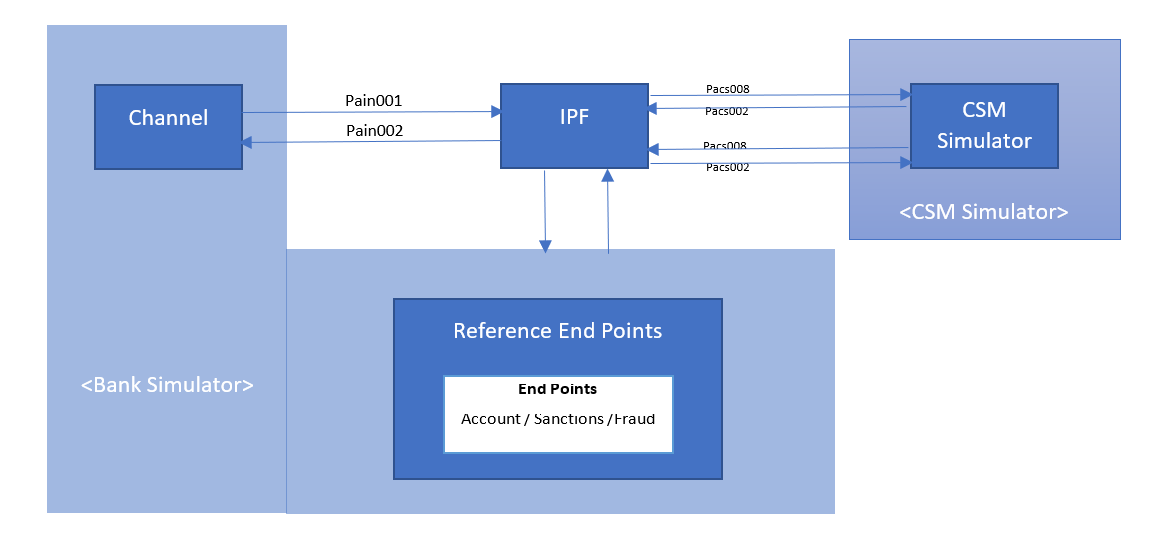
Bank and CSM simulators supply replacement endpoints for those systems. In the figure above, we can see how a bank simulator provides both initiators and responders.
Typical initiators may include the following endpoints:
-
payment initiation (the Channel)
-
payment cancellation, payment return, resolution of investigation
Payment initiators also offer basic real-time request counters, and support additional implementation-specific status counters.
Additionally, the simulator offers automatic request load generation. This can be produced continuously or it can be limited in time and/or total amount of requests.
Responders will mimic the expected behaviour of the bank systems and depend strictly on the bank implementation.
CSM simulators also provide initiators for inbound payments, as well as responders for outbound payments and other messages: cancellations, returns, investigations, etc.
Responders are also known as request handlers and their response latency can be configured. Each responder is identified by a unique handlerId for this purpose, and the list of available responders can also be obtained.
IPF Generic Simulator NG API
Overview
All IPF simulators implement the IPF Generic Simulator API to support a common set of functionalities. This document defines the common elements of the simulation API. Further separate specialised APIs will be defined for specific use cases.
Resources
Request
Generate and send single/load requests
Sends a raw message that simply needs to be forwarded
PUT /sendRawRequest
Description
Usually this represents XML message that we want to pass through. In this case IPF Simulator doesn’t generate nor enrich the request because the request itself is fully contained message.
Parameters
| Type | Name | Description | Schema |
|---|---|---|---|
Body |
fullRequest |
Describes the request to be sent to the system under test. |
string |
Header |
Metadata |
Additional metadata that could be used to give more details about the request |
string |
Responses
| HTTP Code | Description | Schema |
|---|---|---|
200 |
Succesfully sent a single request to the system under test. |
|
400 |
Usually the result of a malformed request. |
No Content |
Sends a single request message to the system under test
PUT /sendRequest
Description
Sends a single request message payload to the system under test, as described by the RequestDetails.
Parameters
| Type | Name | Description | Schema |
|---|---|---|---|
Body |
requestDetails |
Describes the request to be sent to the system under test. This is converted into a specialised format. |
Responses
| HTTP Code | Description | Schema |
|---|---|---|
200 |
Succesfully sent a single request to the system under test. |
|
400 |
Usually the result of a malformed RequestDetails json payload. |
No Content |
Example HTTP request
{
  "transactionId" : "fb495cf0d88a11ea87d00242ac130003",
  "amount" : {
    "amount" : 100,
    "currency" : "EUR"
  },
  "originatorName" : "John Maynard Keynes",
  "originatorAccount" : {
    "iban" : "GB29NWBK60161331926819",
    "bic" : "DEUTDEFF",
    "accountId" : "7928629",
    "ukBankAccount" : "object",
    "proxy" : "object"
  },
  "beneficiaryName" : "Benedetto Cotrugli",
  "beneficiaryAccount" : {
    "iban" : "GB29NWBK60161331926819",
    "bic" : "DEUTDEFF",
    "accountId" : "7928629",
    "ukBankAccount" : "object",
    "proxy" : "object"
  },
  "remittanceInfo" : "Remittance information",
  "additionalInfo" : { }
}Sends one Recall Request message
PUT /bankRecall
Sends one Return Request message
PUT /bankReturn
Sends one Resolution of Investigation Request message
PUT /bankRoi
Retrieves the ongoing request load simulated on the system
GET /requestLoad
Sets the ongoing request load simulated on the system under test
POST /requestLoad
Description
Generates financial transactions at the given rate, continuously or in a limited batch. Size and/or duration can be used for batch mode, omit for continous mode. Set rate to zero to stop.
Responses
| HTTP Code | Description | Schema |
|---|---|---|
200 |
The updated requests per second |
|
400 |
General Error. |
No Content |
Configuration
Configure the simulator
Read all responder configurations
GET /responseConfiguration
Description
Provides response configurations for all responders. Useful to have the complete list of available handlers.
See how a specific responder responds to requests
GET /responseConfiguration/{handlerId}
Description
Provides details of the Reject / Hit rate, the rate of messages not to respond to and so cause to timeout and the latency to apply before responding.
Parameters
| Type | Name | Description | Schema |
|---|---|---|---|
Path |
handlerId |
The identifier of the request handler to get the configuration for. This is defined by the implementation. |
string |
Change how a responder responds to requests
PUT /responseConfiguration/{handlerId}
Description
Sets details of the Reject / Hit rate, the rate of messages not to respond to and so cause to timeout and the latency to apply before responding.
Parameters
| Type | Name | Description | Schema |
|---|---|---|---|
Path |
handlerId |
The identifier of the request handler to configure. This is defined by the implementation. |
string |
Body |
newConfiguration |
The new configuration to use including the ID of the handler. |
Statistics
Query the status of the simulator
SentTransactionSummary
Query the transactions for the simulator
GET /transactions
Example HTTP response
{
  "totalSent" : 1000,
  "averageTransactionTimeMs" : 64,
  "startEventTime" : "2020-10-23T16:30:50.000+0000",
  "lastEventTime" : "2020-10-23T17:30:50.000+0000",
  "transactions" : [ {
    "id" : "TestFlow|nQqyDbhqWrwJysoDVJrRVPTOfPhicTKgkDE",
    "status" : "Completed",
    "startTime" : "020-10-23T17:30:00Z",
    "completedTime" : "2020-10-23T17:30:05.000+0000",
    "timeTakeMs" : 5000
  }, {
    "id" : "TestFlow|nQqyDbhqWrwJysoDVJrRVPTOfPhicTKgkAD",
    "startTime" : "020-10-23T17:30:00Z",
    "status" : "Processing"
  } ]
}
Definitions
Account
A representation of an account
| Name | Description | Schema |
|---|---|---|
iban |
An IBAN identifying the account |
string |
bic |
A BIC identifying the account |
string |
accountId |
A generic identifier for the account |
string |
ukBankAccount |
A representation of a UK bank account |
|
proxy |
A representation of proxy account identification |
ukBankAccount
| Name | Description | Schema |
|---|---|---|
sortcode |
Branch identifier |
string |
accountNumber |
Account identifier |
string |
proxy
| Name | Description | Schema |
|---|---|---|
type |
An indication of the type of this proxy id |
string |
id |
Proxy id |
string |
CurrencyCode
The ISO 4217 currency code
Type : enum (GBP, USD, EUR, CHF, CAD, AUD, NZD, HKD, JPY, CNY)
FinancialAmount
A representation of a financial amount with the currency involved
| Name | Description | Schema |
|---|---|---|
amount |
The amount of money in the lowest denomination not needing fractions e.g. pennies for GBP and cents for USD |
integer (int64) |
currency |
Example : CurrencyCode |
MagicValue
Magic Value for the simulator used to produce the response.
| Name | Description | Schema |
|---|---|---|
description |
Decribe the magic value what the impact |
string |
path |
The path in the request to get the value. |
string |
value |
The value in the request that will be considered magic value. |
string |
RecallRequestInitiator
Recall Request payload
| Name | Description | Schema |
|---|---|---|
transactionId |
A unique identifier for the generated financial transaction |
string |
cancellationId |
A randomly generated value used for test purposes and to match the alternative ids |
string |
cdtrNm |
Creditor name |
string |
RequestDetails
A description of a request to send to the system under test.
| Name | Description | Schema |
|---|---|---|
transactionId |
A unique identifier for the generated financial transaction |
string |
amount |
Amount being transferred |
|
originatorName |
Name of the person sending funds |
string |
originatorAccount |
Debtor account |
|
beneficiaryName |
Name of the person receiving funds |
string |
beneficiaryAccount |
Creditor account |
|
remittanceInfo |
Remittance information |
string |
additionalInfo |
Reserved for extended features of individual simulators |
object |
RequestLoadConfiguration
A request to generate financial transactions at the given rate, continuously or in a limited batch. Size and/or duration can be used for batch mode, omit for continous mode. Set rate to zero to stop.
| Name | Description | Schema |
|---|---|---|
requestsPerSecond |
The number of request messages to send each second. Use 0 to turn load traffic off. |
integer |
size |
The maximum number of requests to produce. Unlimited if not set, must be positive otherwise. |
integer (int64) |
duration |
The maximum amount of time to produce requests for. ISO-8601 duration format PnDTnHnMn.nS with days considered to be exactly 24 hours. Unlimited if not set, must be positive otherwise. |
string (iso8601) |
RequestLoadResponse
A request to generate financial transactions at the given rate, continuously or in a limited batch. Size and/or duration can be used for batch mode, omit for continous mode. Set rate to zero to stop.
| Name | Description | Schema |
|---|---|---|
requestsPerSecond |
The current rate of request messages to send per second. Zero means no traffic is being generated. |
integer |
requestsLeft |
The number of requests to produce before stopping. Not set for unlimited requests. |
integer (int64) |
cutOffTime |
The instant when the simulator will stop producing requests. Not set for unlimited time. |
string (date-time) |
RequestOutcome
Whether this request was accepted or rejected
| Name | Description | Schema |
|---|---|---|
outcome |
ACSP for accepted, RJCT for rejected |
enum (ACSP, RJCT) |
additionalInfo |
implementation-specific extra information |
object |
ResolutionOfInvestigationRequestInitiator
Resolution of Investigation Request payload
| Name | Description | Schema |
|---|---|---|
transactionId |
A unique identifier for the generated financial transaction |
string |
orgtrNm |
Orgtr name |
string |
rsnCd |
reason code |
string |
rsnPrtry |
reason prtry |
string |
addtlInf |
Example : |
< string > array |
ResponseConfiguration
Configuration of how the simulator handles responses.
| Name | Description | Schema |
|---|---|---|
handlerId |
The identifier of the handler |
string |
latency |
How long to wait before responding. Defined in milliseconds. |
integer |
ResponseConfigurations
A list of all the response configurations in the simulator.
Type : < ResponseConfiguration > array
ReturnRequestInitiator
Return Request payload
| Name | Description | Schema |
|---|---|---|
transactionId |
A unique identifier for the generated financial transaction |
string |
cdtrNm |
Creditor name |
string |
amount |
Original bank settlement amount |
integer (int64) |
SentTransactionDetails
Details of all the sent transactions
| Name | Description | Schema |
|---|---|---|
id |
Example : |
string |
status |
Example : |
string |
startTime |
The instant when the simulator issued the request. |
string (date-time) |
completedTime |
The instant when the simulator received the completed response. |
string (date-time) |
timeTakeMs |
time taken for transactions to complete (completedTime - startTime). |
integer |
SentTransactionSummary
Details about transactions
| Name | Description | Schema |
|---|---|---|
totalSent |
Total number of transactions received via outbound payments. |
integer |
averageTransactionTimeMs |
Average time taken for transactions to complete. |
integer |
startEventTime |
The instant when the simulator sent its first request. |
string (date-time) |
lastEventTime |
The instant when the simulator received its last response. |
string (date-time) |
transactions |
Implementation-specific counters, incremented by inspecting the message and deriving a status |
< SentTransactionDetails > array |
Statistics
Statistical information about transaction processing and their outcomes.
| Name | Description | Schema |
|---|---|---|
pending |
Total number of transactions started but with no determined outcome. |
integer |
totalSent |
Total number of transactions received via outbound payments. |
integer |
successful |
Total number of transactions received via outbound payments excluding the ones that failed for non business related reasons. |
integer |
totalReceived |
Total number of transactions received via inbound payments. |
integer |
timedOut |
Total number of transactions for which no timely response was received. |
integer |
failed |
Total number of transactions that failed. |
integer |
recentLatency |
Recent average latency seen for responses to arrive for requests in ms. |
integer |
statusCounters |
Implementation-specific counters, incremented by inspecting the message and deriving a status |
< StatusCounter > array |
Exploring the Simulator API
The simulator api can be explored and triggered using swagger-ui.
It is served by the simulator under the path /apidocs.
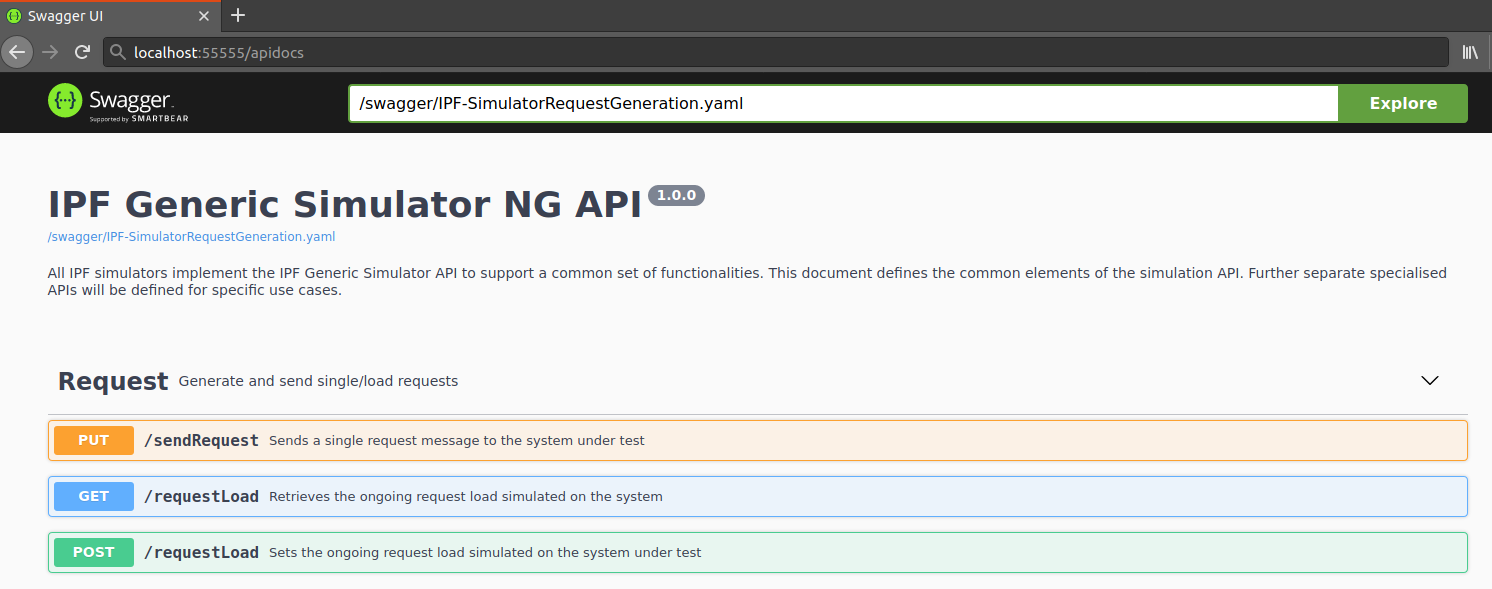
You can trigger the simulator using the swagger ui Try it out buttons.
Implementing a Simulator
As outlined previously we can implement three types of simulators: . Bank simulators . CSM simulators . Responder simulators (i.e. request handlers)
The simulator framework comes as a Spring Boot starter, with an API module.
To implement a simulator, you will need to:
-
Set up project dependencies
-
Create a Spring Boot Simulator application
-
Define how to handle raw requests
-
Have the option to document the simulator magic values
Project dependencies
Use the following maven configuration:
<dependencies>
    <dependency>
       <groupId>com.iconsolutions.test</groupId>
        <artifactId>ipf-simulator-ng-api</artifactId>
        <version>${simulator.version}</version>
    </dependency>
    <dependency>
       <groupId>com.iconsolutions.test</groupId>
        <artifactId>ipf-simulator-ng-core</artifactId>
        <version>${simulator.version}</version>
    </dependency>
</dependencies>
Simulator Application
A Simulator application is just a Spring Boot application that will auto-configure the simulator framework thanks to the dependency declared before.
@SpringBootApplication
class ExampleSimulatorApplication {
    public static void main(final String[] args) {
        final var simulator = new SpringApplication(ExampleSimulatorApplication.class);
        simulator.setWebApplicationType(NONE);
        simulator.run(args);
    }
}
Message definitions
The payment request initiator will generate a request message, enrich it with the payload of the initiation command and finally send it to the target system using the appropriate transport. For this to happen, the simulator needs to know how to generate a template one, how to apply the initiate command to it and where to send it.
Such characteristics are defined using the MessageDefinition feature from the Icon Test Framework.
    @SuppressWarnings("unused")
    enum TestBusinessDomainMessageType implements MessageType {

        MY_REQUEST,
        PAIN001_RAW_REQUEST,

        PACS008_RAW_REQUEST;

        public String getName() {
            return name();
        }

        public Set<String> getAliases() {
            return Set.of();
        }
    }

    @Bean
    MessageDefinition<MyRequest> requestMessageDefinition(final WireMockServer wireMockServer) {
        return new DefaultMessageDefinition.Builder<MyRequest>()
                .withType(MY_REQUEST)  (1)
                .withGenerator(myRequestGenerator()) (2)
                .withDocumentTypeClass(MyRequest.class) (3)
                .withDestination(wireMockServer.url("/endpoint")) (4)
                .withToStringMapper(this::messageAsJson)
                .build();
    }

    private String messageAsJson(Object document) {
        try {
            return objectMapper.writeValueAsString(document);
        } catch (JsonProcessingException e) {
            throw new IconRuntimeException("Could not serialize " + document, e);
        }
    }

    @Bean
    RequestInitiationGenerator<MyRequest> myRequestGenerator() {
        return properties -> new MyRequest();
}| 1 | Symbolic type |
| 2 | Generate a request, maybe populate with random values |
| 3 | Java type of the request |
| 4 | Transport-specific representation of the destination |
| Some transports might not require a destination to be specified on the message definition |
To apply the payment initiation command to the generated request, we also need to define an enricher:
    @Bean
    RequestInitiationEnricher<MyRequest> myRequestEnricher() {
        return (myRequest, parameters) -> {
            Optional.ofNullable(parameters.getTransactionId())
                    .ifPresent(myRequest::setTxnId);

            Optional.ofNullable(parameters.getAmount())
                    .map(RequestAmount::getAmount)
                    .ifPresent(myRequest::setAmount);

            return myRequest;
        };
    }
The enriched request will now be shipped to the destination configured above, with the transport matching MY_REQUEST as a symbolic message type.
Raw Request Wrapper
Raw request wrapper is used for cases when we want simulator simply to pass the message to the destination
rather than generating and enriching the message. For sending raw message /sendRawRequest API is used where the
raw request (full message) needs to be provided. An optional Metadata header can be used for cases where this API is used to
support sending different raw messages to different destinations.
Like for sending a single request with enricher, we need to define a message definition and most importantly raw request wrapper.
For this we will start from implementing raw request wrapper by implementing com.iconsolutions.simulator.core.service.RawRequestWrapper interface.
    @Bean
    RawRequestWrapper<MyRawPain001Request> rawPain001RequestWrapper() {
        return new RawRequestWrapper<MyRawPain001Request>() {
            @Override
            public MyRawPain001Request map(InitiateWithRawRequest initiateWithRawRequest) { (1)
                return MyRawPain001Request.builder()
                        .rawXml(initiateWithRawRequest.getRawRequest())
                        .build();
            }

            @Override
            public boolean supports(InitiateWithRawRequest initiateWithRawRequest) { (2)
                return "this is pain001 message".equalsIgnoreCase(initiateWithRawRequest.getMetadata());
            }
        };
    }
In that example:
| 1 | We are transforming InitiateWithRawRequest that holds rawRequest and header metadata into our custom Java type.
This is simply because we would like to create a separate message definition for this particular raw reqeust. |
| 2 | It checks against metadata header to see if this wrapper can handle this message. This metadata is important in cases where we would like to handle different raw requests. |
After wrapping raw request to our custom Java type we need to define message definition for that type.
An example of defining message definition is:
    @Bean
    MessageDefinition<MyRawPain001Request> rawPain001RequestMessageDefinition(final WireMockServer wireMockServer) {
        return new DefaultMessageDefinition.Builder<MyRawPain001Request>()
                .withType(PAIN001_RAW_REQUEST)  (1)
                .withDocumentTypeClass(MyRawPain001Request.class) (2)
                .withDestination(wireMockServer.url("/pain001")) (3)
                .withToStringMapper(MyRawPain001Request::getRawXml) (4)
                .build();
}| 1 | Symbolic type |
| 2 | Our custom Java type just so we can define different destination and/or differently to handle this particular raw request |
| 3 | Destination where the message should be sent. This can also be handled only by associated message transport. |
| 4 | As this represents raw request we could use string mapper like this and use it later in message transport as is. |
Message transport
To get the message to its destination, we need to define a MessageTransport.
This defines a relationship between a symbolic message type and the means to route it to destination, called a Transporter.
In this example we are configuring an Akka-based HTTP transporter.
    @Bean
    MessageTransport channelMessageTransport() {
        final ActorSystem actorSystem = ActorSystem.create("test-implementation");
        /* This transporter is asynchronous and does not add messages to the message bucket,
         * therefore it is not suitable for use with JBehave feature tests */
        final var transporter = new AkkaHttpMessageTransporter<>(
                Http.get(actorSystem),
                actorSystem
        );

        return MessageTransportImpl.MessageTransportImplBuilder.aMessageTransportImpl()
                .withSendingSupplier(transporter)
                .withSupportedMessageTypes(Set.of(
                        MY_REQUEST,
                        PAIN001_RAW_REQUEST,
                        PACS008_RAW_REQUEST))
                .build();
    }
Looking at the implementation, we can see how we are leveraging the message definitions:
final class AkkaHttpMessageTransporter<T> implements TransporterWithAckSupport<HttpResponse> {

    @Override
    public CompletionStage<HttpResponse> sendMessageWithAck(MessageDefinition messageDefinition, Message message, String destination) {

        HttpRequest request = httpRequestFor(messageDefinition, message, destination);
        LOGGER.debug("Sending request {}", request);

        return akkaHttp.singleRequest(request)
                // Consume response entity
                .thenCompose(httpResponse -> httpResponse
                        .toStrict(TOSTRICT_TIMEOUT_MILLIS, actorSystem.getDispatcher(), materializer)
                        .thenApply(HttpResponse.class::cast));
    }

    private HttpRequest httpRequestFor(
            MessageDefinition<T> messageDefinition, Message<T> message, String destination) {

        return HttpRequest.create(uriFor(destination, messageDefinition))
                .withMethod(httpMethodFor(messageDefinition))
                .withHeaders(headersFor(message))
                .withEntity(HttpEntities.create(
                        ContentTypes.APPLICATION_JSON,
                        messageDefinition.asString(message.getDocument())
                ));
    }

    private String uriFor(String destination, MessageDefinition<T> messageDefinition) {
        return StringUtils.defaultIfBlank(destination, messageDefinition.getDestination()); (1)
    }
    // ...
}| 1 | Retrieve the target URL from the relevant message definition |
Request handler
Request handlers are there to respond on some requests. For example, when our system sends request to bank’s ACCOUNTS endpoint we want to simulate what bank sends back to our system. Some simulators can only have requests handler as these simulators don’t generate any requests.
Each request handler must implement com.iconsolutions.simulator.api.RequestHandler interface. An example of dummy request handler:
final class ExampleSimulatorHandler implements RequestHandler {

    ExampleSimulatorHandler(final WireMockServer wireMockServer) {
        this.wireMockServer = wireMockServer;
        this.latency = 0;

        this.wireMockServer.stubFor(post(urlEqualTo("/endpoint"))
                .withRequestBody(containing("this-is-a-magic-txnId-and-will-cause-a-rejection"))
                .willReturn(aResponse()
                        .withStatus(418)
                        .withBody("FAILED")));

        this.wireMockServer.stubFor(post(urlEqualTo("/endpoint"))
                .withRequestBody(containing("this-is-a-magic-txnId-and-will-be-accepted"))
                .willReturn(aResponse()
                        .withStatus(201)
                        .withBody("SUCCESS")));
    }

}
It handles all request that comes at WireMock "/endpoint" path. Instead of WireMock a real handler would probably listen on some Kafka topic or JMS queue etc.
Next, you will have to register it with Spring.
@SpringBootApplication
class ExampleSimulatorApplication {

    @Bean
    RequestHandler testSimulatorHandler(final WireMockServer wireMockServer) {
        return new ExampleSimulatorHandler(wireMockServer);
    }

}
After that this dummy request handler will simply return some dummy response if you invoke /endpoint path with expected payload.
Configuration
All externalised configuration follows the Spring Boot conventions.
In short, SpringApplication loads properties from application.properties files in the following locations and adds them to the Spring Environment:
-
A
/configsubdirectory of the current directory -
The current directory
-
A classpath
/configpackage -
The classpath root
The list is ordered by precedence (properties defined in locations higher in the list override those defined in lower locations).
| You can also use YAML ('.yml') files as an alternative to '.properties'. |
This is a list of the configuration keys available:
| Key | Default | Description |
|---|---|---|
simulator.http.host |
0.0.0.0 |
Interface to expose the Simulator API on |
simulator.http.port |
55555 |
TCP port to expose the Simulator API on |
Magic values
The Request Handler API exposes a method to retrieve a list of Magic Values for the specific simulator implementation.
This functionality is optional, and the default implementation is returning an empty list.
The list of simulator magic values is purely for documentation purposes. They are not supposed to provide any functionality rather than informative.
Looking at the implementation, we can see how we define magic values:
    @Override
    public List<MagicValue> getMagicValues() {
        return List.of(new MagicValue(
                "Rejects requests with this txnId",
                "txnId",
                "this-is-a-magic-txnId-and-will-cause-a-rejection"));
    }
Metrics
Metrics must be enabled explicitly, to do so there are several things you must do
-
Add a dependency on
ipf-simulator-ng-metrics -
Configure cinnamon prometheus in your
application.conf -
Include the cinnamon java agent when running your simulator:
-javaagent:/path/to/cinnamon-agent.jar
Metrics dependency
<dependency>
   <groupId>com.iconsolutions.test</groupId>
    <artifactId>ipf-simulator-ng-metrics</artifactId>
    <version>${project.version}</version>
</dependency>
Configure Cinnamon Prometheus
See developer.lightbend.com/docs/telemetry/current//plugins/prometheus/prometheus.html for more information
cinnamon.prometheus {
  exporters += http-server
  use-default-registry = on
}
Metrics are exposed in a prometheus friendly format at localhost:9001, unless configured differently in your application.conf.
cinnamon.prometheus {
  ...
  port = 9999
}
There are several metrics provided out of the box, and you can add your own quite easily.
Out of the Box Metrics
| Metric | Description |
|---|---|
application_requests_sent |
A count of the requests sent to the target system (may be successful, pending or failed) |
application_requests_successful |
A count of requests that received a response from from the target system (successfully or not) |
application_requests_failed |
A count of requests that failed to be sent to the target system (Usually a transport failure) |
application_requests_pending |
A count of requests that have yet to receive a response from the target system |
application_response_durations |
A summary of the time taken for the target system to respond to requests |
Custom Metrics
Metrics are provided by an instance of com.lightbend.cinnamon.akka.CinnamonMetrics.
You can declare a bean dependency on this type and do whatever you like.
An example where we may want to count all the request events (requests and responses in this case)
    @Bean
    RequestEventHandler customMetrics(final CinnamonMetrics cinnamonMetrics) {
        final var customCounter = cinnamonMetrics.createCounter(new Descriptor.Builder()
                .withName("this is a demonstration of a custom metric")
                .withKey("my_custom_counter_metric")
                .build());

        return requestEvent -> customCounter.increment();
    }
All metrics will be prefixed with application_, so the output of this would look like
# HELP application_my_custom_counter_metric this is a demonstration of a custom metric
# TYPE application_my_custom_counter_metric gauge
application_my_custom_counter_metric{application="...ExampleSimulatorApplication",host="...",} 60.0