Context-Based Flow Version Selection for Canary Testing
This guide explains how to leverage Context-Based Flow Version Selection to implement canary testing of new flow versions in your services. We’ll cover the fundamental concepts, prerequisites, and a detailed implementation procedure.
Introduction to Version Selection
Version selection enables configuration-driven routing based on message headers.
If your services already use Context-Based Flow Version Selection, you can extend this functionality to support canary testing of new flows.
The service instances utilize the ipf_version_selection header along with customizable routing rules to facilitate controlled testing of new flow versions.
How Version Selection Works
Version selection operates through a three-step process:
-
The system detects message headers at flow initiation entry points (usually receive connectors or Spring controllers)
-
Selected headers are added to the context (primarily
ipf_version_selection, though custom headers are supported) -
Version selection rules evaluate the context to determine the appropriate flow version for message routing
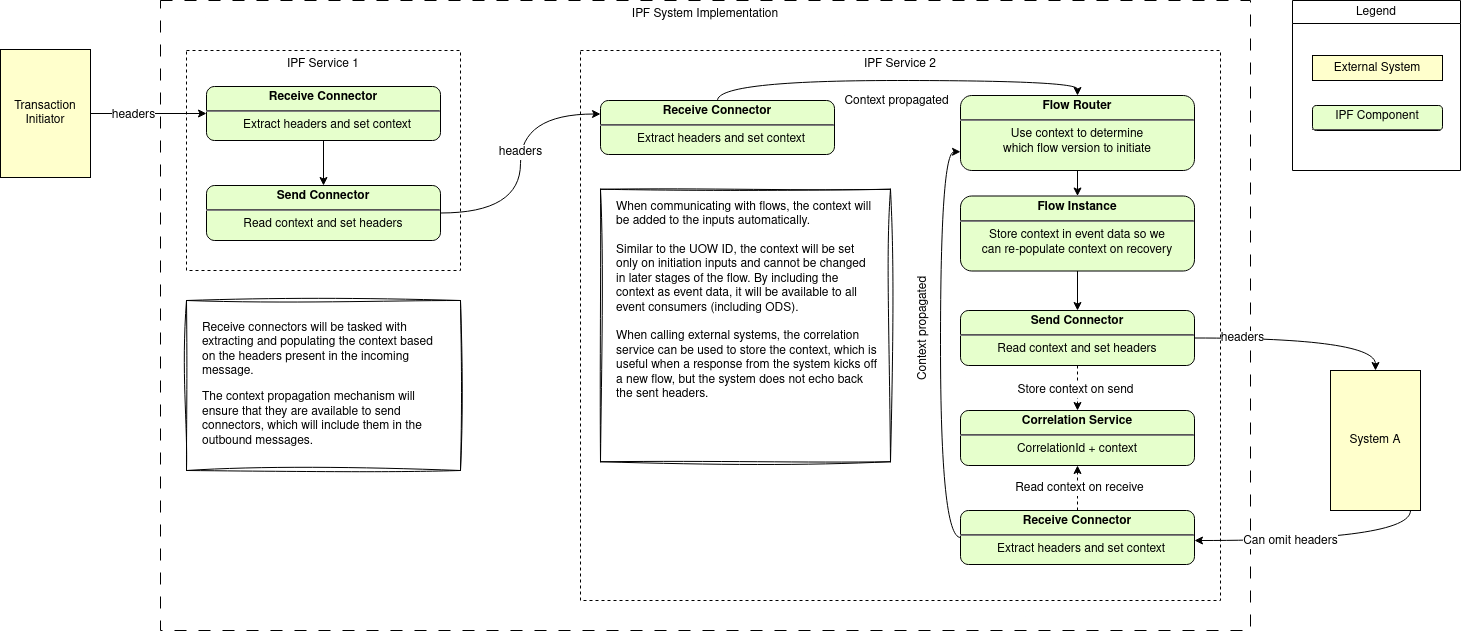
Prerequisites for Implementing Canary Testing
The following requirements must be addressed before canary testing with version selection can be implemented.
-
Transaction Initiator Modifications
-
To be performed on components that send initiation messages to your orchestration services (channels, clearing system gateways, etc)
-
Add logic to include the
ipf_version_selectionheader (or a custom header) in initiation messages-
See how to do this with the help of IPF Connector Framework
-
-
Implement configurable header inclusion based on your canary testing criteria:
-
User subset targeting (based on roles, feature flags, group membership etc)
-
Percentage-based distribution (e.g., 90%
STABLE, 10%CANARY)
-
-
Enable rapid reconfiguration capabilities through:
-
Deployment configuration changes
-
API calls for immediate adjustments
-
-
-
Version Selection Rules
-
To be performed for each of your orchestration services
-
Define rules for mapping header values to specific flow versions
-
Choose a rule deployment strategy:
-
Package rules within application JARs
-
Provide rules solely via deployment configuration management (e.g. Kubernetes ConfigMaps)
-
Refer to the technical documentation for detailed rule specifications
-
-
Step-by-Step Canary Testing Procedure
This section outlines the recommended procedure for implementing canary testing using the ipf_version_selection header with STABLE and CANARY as possible header values.
Phase 1: Initial Setup
-
Synchronize Flow Versions
-
Ensure all service instances use identical versions for both
STABLEandCANARYvalues -
Update version selection rules through:
-
Deployment configuration modifications
-
-
Initially configure both values to route to the current stable version. Routing to stable versions ensures no transactions are routed to new flow versions before you’re ready to start your tests.
-
-
Configure Message Generation
-
Set all initiation message generators to use the
STABLEheader value-
This step maintains clean metrics (
ipf_version_selectionappears as a tag)
-
-
Phase 2: Deployment and Testing
-
Service Deployment
-
Perform a rolling upgrade deployment (e.g. using Kubernetes)
-
Monitor metrics to verify stable flows are still functioning correctly
-
-
Canary Configuration
-
Update version selection rules to map
CANARYheader to new flow versions -
Modify flow initiation generators to include
CANARYheaders for the grouping or stratification relevant for your application. For example:-
Specific user groups and/or
-
Defined percentage of traffic
-
-
-
Monitoring and Validation
-
Create or update your dashboards to be capable of filtering on
ipf_version_selection = CANARYtags -
Monitor metrics to validate the performance of new flow versions
-
If errors occur:
-
Immediately revert to sending only
STABLEheaders (see Prerequisites for Implementing Canary Testing) -
Investigate issues while maintaining service stability
-
-
Phase 3: Progressive Rollout to New Flows
-
Gradual Expansion
-
Incrementally increase the
CANARYmessage percentage -
Monitor system behaviour at each increment
-
Maintain detailed metrics throughout the process
-
-
Completion
-
Continue until reaching 100%
CANARYmessages -
Maintain initiation at 100%
CANARYfor a predetermined observation period -
After the observation period elapses, update both
STABLEandCANARYconfigurations to use the new flow versions
-