DSL 14 - Using shared concepts (Part Two - Across Solutions)
|
Getting Started
The tutorial step uses the "shared_models_one" solution of the project as it’s starting point. If at anytime you want to see the solution to this step, this can be found on the "shared_models_two" solution! |
A Quick Recap
In DSL 13 - Using shared concepts (Part One - Within a Solution) , we extracted our sanctions logic into a separate model. In practice however most projects will be set up as a service providing a single solution. Therefore, we now need to look at being able to import models that are contained in separate reusable solutions.
The Sanctions Solution
For this tutorial we’ll use a pre-existing sanctions module. This sanctions module contains exactly the same logic we built in our earlier sections of this tutorial, it’s just packaged as an independent reusable solution.
The sanctions module was built just the same way as the tutorial itself can be through using the scaffolder.
Importing the Module
The importing of the module is done within the plugin sections of the pom within our application.
Let’s open our main tutorial project in Intellij and then if you open the pom of the mps folder (domain-root/mps/pom.xml) we’ll see there already exists an entry for the maven-dependency plugin as follows:
<build>
  <plugins>
    <plugin>
      <groupId>org.apache.maven.plugins</groupId>
      <artifactId>maven-dependency-plugin</artifactId>
      <version>3.1.2</version>
      <executions>
          <execution>
              <id>copy</id>
....
Now all we need to do is add a section to unpack the sanctions mps module into our application. To do this we add a new execution as follows:
<build>
  <plugins>
    <plugin>
      <groupId>org.apache.maven.plugins</groupId>
      <artifactId>maven-dependency-plugin</artifactId>
      <version>3.1.2</version>
      <executions>
          <execution>
              <id>unpack-sanctions-plugin</id>
              <phase>initialize</phase>
              <goals>
                  <goal>unpack</goal>
              </goals>
              <configuration>
                  <artifactItems>
                      <artifactItem>
                          <groupId>com.iconsolutions.ipf.tutorial.sanctions.domain</groupId>
                          <artifactId>mps</artifactId>
                          <version>${sample-sanctions.version}</version>
                          <type>zip</type>
                          <overWrite>true</overWrite>
                          <outputDirectory>${plugin_home}</outputDirectory>
                      </artifactItem>
                  </artifactItems>
              </configuration>
          </execution>
        <execution>
          <id>copy</id>
The key bits to notice here are the groupId, artifactId and version - it’s just like any other Maven dependency (note that the artifactId here is the solution name).
That’s all we need to add, if we wanted to add more solutions, we’d simply add more execute blocks ensuring that for each one we have entered the correct groupId, artifactId and version just as we would for a normal Maven dependency.
Using the Remote Model
Now that we’ve configured our application to import the model let’s use it. First we’ll rebuild the application to make sure the module is correctly pulled in.
mvn clean installOnce complete, open MPS. The first thing we’ll do is delete the existing sanctions model. To do this, we simply click on it in the explorer and press delete. A delete confirmation box should appear:
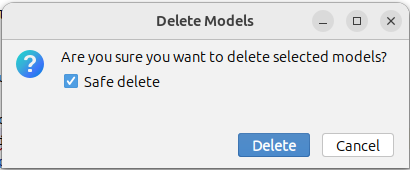
Click the delete files button as we won’t need the underlying files any more and then press "Delete".
If you now look at the flow, you’ll see we have errors where we call the sanctions subflow because it no longer has one to work with.
To resolve this, simple press Ctrl+R twice (or ensure the tick box for ) and then search for and select the Sanctions Subflow. You should see here that it is coming this time from the reuse model:

You should now see the error resolve itself as it starts pulling through the newly imported model. If the errors do not resolve themselves automatically, replace the references to the old model with those from the newly imported model.
Java Implementation
The hard work in this part of our tutorial series was all done above in the MPS dependencies and build set up. From a java implementation viewpoint the only difference at this stage is that the domain code for sanctions has been generated into the pre-existing functions. So here we can just add the dependencies to the ipf-tutorial-app pom.xml for those, just like we did before:
<dependency>
    <groupId>com.iconsolutions.ipf.tutorial.sanctions.domain</groupId>
    <artifactId>domain</artifactId>
    <version>${sample-sanctions.version}</version>
</dependency>
<dependency>
    <groupId>com.iconsolutions.ipf.tutorial.sanctions.domain</groupId>
    <artifactId>sampleapp</artifactId>
   <version>${sample-sanctions.version}</version>
</dependency>|
The new import of the common utility has a slightly different package structure, so you’ll need to reorganise the imports for the SanctionsDomain classes in your tutorial config class. |
|
Here we’ve added in the dependencies for the domain and sample app projects directly themselves. However, we could also have a separate module that includes these AND provides an implementation for them. In fact the tutorial sanctions module does this with it’s ipf-tutorial-sanctions-adapters package. If we imported this we could remove our declaration of the SanctionsDomain bean and just use a completely pre-packaged solution (note to do so here would also require running the Sanctions Simulator that this would depend upon and so it is excluded for now.) |
Checking our Solution
As normal let’s now check out solution works. Start up the application as previously (instructions are available in Reviewing the initial application if you need a refresher!)
And then we could send in a payment:
curl -X POST localhost:8080/submit | jqAnd if we bring up the payment in the Developer GUI and look at the graph of our tutorial flow (search by unit of work id, click view, click ipf tutorial flow, click view graph) then we see:
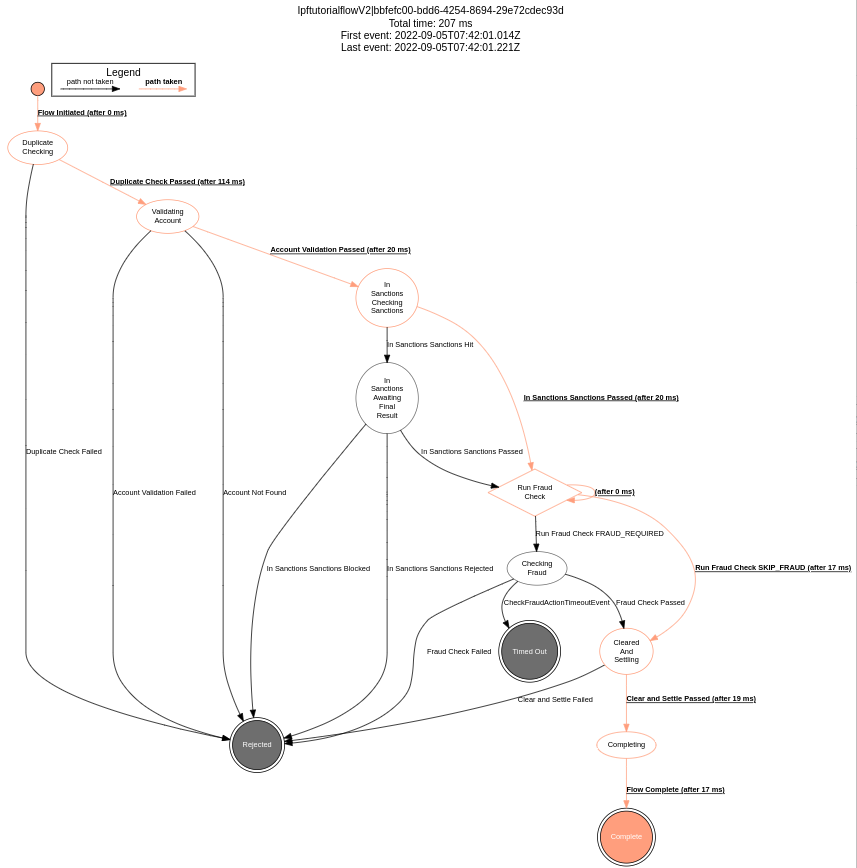
If we compare this to the graph of DSL 9 - Using Subflows, we can see that everything is the same as it was and we have successfully extracted our Sanctions subflow to a different model which is completely stand alone from the Ipftutorialmodel.