Getting Started
Overview
Depending on your message log configuration to use Kafka or Database, the deployment could be slightly different.
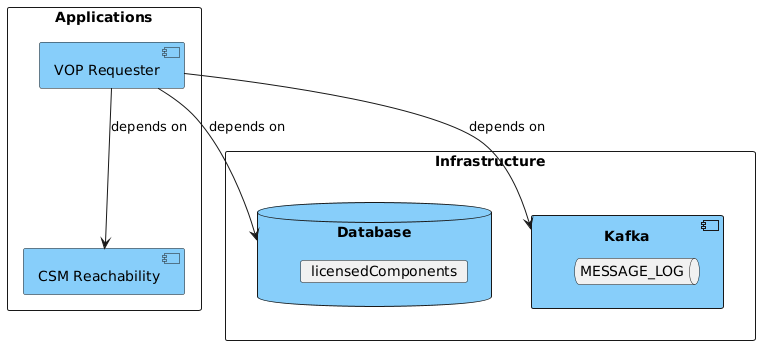
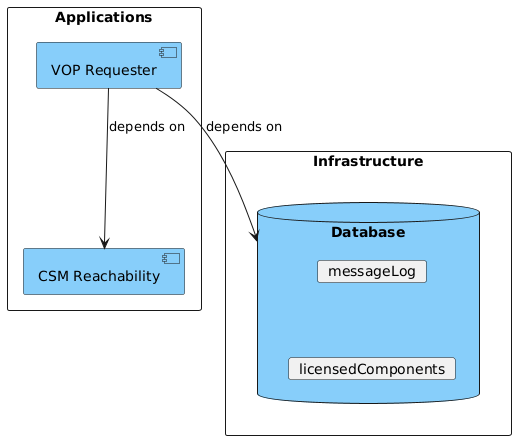
Configuration and Runtime
The Verification of Payee (VoP) Requester is a stand-alone application that can be run as a service much like any other IPF application deployment. The VoP Requester service can be run as a single instance or multiple.
Configuration
The below configuration is the minimum required for the VoP Requester service to run using FPAD as the selected RVM, Kafka for message logging and MongoDB for licensing.
| VoP Requester does not require an Akka Cluster to be configured. |
ipf {
  mongodb.url = "mongodb://ipf-mongo:27017/vop" (1)
}

ipf.csm-reachability-api.http.client {
  host = "http://reachability-app"  (2)
  port = 8080
}

ipf.verification-of-payee.requester {
  responder.fpad.http.client {
    host = "http://fpad-app"  (3)
    port = 8080
  }
    schemes = [ (4)
      {
        name: EPC
        rvm: FPAD
        processing-entities = [
          {processing-entity-code: "default", scheme-membership-id: "ICONUK02XXX"}
        ]
      }
    ]
}

common-kafka-client-settings {
  bootstrap.servers = "kafka:9092"  (5)
}

akka {
  kafka {
    producer {
      kafka-clients = ${common-kafka-client-settings}
    }
    consumer {
      kafka-clients = ${common-kafka-client-settings}
      kafka-clients.group.id = vop-requester-consumer-group
    }
  }
}
Note the following key aspects:
| 1 | Set the MongoDB URL as appropriate for your environment |
| 2 | Set the CSM Reachability hostname and port as appropriate for your environment |
| 3 | Set the FPAD hostname and port as appropriate for your environment |
| 4 | Set the scheme membership ids applicable for the selected scheme/rvm, see Scheme Membership |
| 5 | Set the Kafka URL as appropriate for your environment |
Running
Docker Compose
The following docker compose is a VoP Requester service deployment that contains all the required infrastructure/applications (Kafka, MongoDB, Reachability) needed to run the VoP Requester application. This sample deployment is running with Kafka for message logging and MongoDB for licensing.
| This represents a sample configuration and is not intended to represent performance or resiliency concerns which will be covered in another section in future releases. |
Docker Compose
services:

  # Infrastructure
  ipf-mongo:
    image: ${docker.registry}/ipf-docker-mongodb:latest
    container_name: ipf-mongo
    ports:
      - "27018:27017"
    healthcheck:
      test: echo 'db.runCommand("ping").ok' | mongo localhost:27017/test --quiet

  kafka:
    image: apache/kafka-native:4.0.0
    container_name: kafka
    ports:
      - "9092:9092"
      - "9093:9093"
    environment:
      - KAFKA_NODE_ID=1
      - KAFKA_AUTO_CREATE_TOPICS_ENABLE=true
      - KAFKA_CONTROLLER_QUORUM_VOTERS=1@localhost:9094
      - KAFKA_CONTROLLER_LISTENER_NAMES=CONTROLLER
      - KAFKA_PROCESS_ROLES=broker,controller
      - KAFKA_LOG_RETENTION_MINUTES=10
      - KAFKA_OFFSETS_TOPIC_REPLICATION_FACTOR=1
      - KAFKA_OFFSETS_TOPIC_NUM_PARTITIONS=1
      - KAFKA_LISTENERS=PLAINTEXT://:9092,LOCAL://:9093,CONTROLLER://:9094
      - KAFKA_LISTENER_SECURITY_PROTOCOL_MAP=LOCAL:PLAINTEXT,PLAINTEXT:PLAINTEXT,CONTROLLER:PLAINTEXT
      - KAFKA_ADVERTISED_LISTENERS=PLAINTEXT://kafka:9092,LOCAL://localhost:9093
      - KAFKA_CREATE_TOPICS=MESSAGE_LOG:1:1

  # Apps
  reachability-app:
    image: registry.ipf.iconsolutions.com/csm-reachability-application:${icon-csm-reachability-app.version}
    container_name: reachability-app
    ports:
      - "8083:8080"
      - "5003:5005"
    user: "1000:1000"
    environment:
      - IPF_JAVA_ARGS=-Dma.glasnost.orika.writeClassFiles=false -Dma.glasnost.orika.writeSourceFiles=false
    volumes:
      - ${docker-logs-directory}:/ipf/logs
      - ./config/reachability-app:/csm-reachability-application/conf
      - ./import:/csm-reachability-application/import
    healthcheck:
      test: [ "CMD", "curl", "-f", "http://localhost:8080/actuator/health" ]
    depends_on:
      - ipf-mongo

  vop-requester-app:
    image: ${docker.registry}/verification-of-payee-requester-application:${project.version}
    container_name: vop-requester-app
    ports:
      - "8080:8080"
      - "5005:5005"
    volumes:
      - ${docker-logs-directory}:/ipf/logs
      - ./config/vop-requester-app:/verification-of-payee-requester-application/conf
    user: "1000:1000"
    environment:
      - IPF_JAVA_ARGS=-Dma.glasnost.orika.writeClassFiles=false -Dma.glasnost.orika.writeSourceFiles=false -Dconfig.override_with_env_vars=true
    depends_on:
      - ipf-mongo
    healthcheck:
      test: [ "CMD", "curl", "http://localhost:8080/actuator/health" ]
Note the following key aspects:
-
MongoDB and Kafka containers are third party images and not supplied by Icon Solutions
-
The CSM Reachability image is created by Icon Solutions and hosted in our ipf-releases repository in Nexus.
-
The VoP Requester app is created by Icon Solutions and hosted in our ipf-releases repository in Nexus.
Kubernetes
The following Kubernetes configuration is a VoP Requester service deployment that contains the recommended settings for deploying a VoP Requester application. This sample deployment is running with Kafka for message logging.
| This represents a sample configuration and is not intended to represent performance concerns which will be covered in another section in future releases. |
Configmap
apiVersion: v1
kind: ConfigMap
metadata:
  name: requester-config
  labels:
    app: verification-of-payee-requester
    product: ipfv2
data:
  application.conf: |
    ipf.mongodb.url = "mongodb://mongo:27017/vop"

    ipf.verification-of-payee.requester.scheme-membership-ids {
      schemes = [
        {
          name: EPC
          rvm: FPAD
          processing-entities = [
            {processing-entity-code: "default", scheme-membership-id: "ICONGB01"}
          ]
        }
      ]
    }

    ipf.csm-reachability-api.http.client {
      host = reachability-app
      port = 8080
    }

    common-kafka-client-settings {
      bootstrap.servers = "kafka:9092"
    }
    akka {
      kafka {
        producer {
          kafka-clients = ${common-kafka-client-settings}
        }
        consumer {
          kafka-clients = ${common-kafka-client-settings}
          kafka-clients.group.id = vop-responder-consumer-group
        }
      }
    }
Deployment
apiVersion: apps/v1
kind: Deployment
metadata:
  name: verification-of-payee-requester
  labels:
    app: verification-of-payee-requester
    product: ipfv2
spec:
  replicas: 3
  strategy:
    type: RollingUpdate
    rollingUpdate:
      maxUnavailable: 0
      maxSurge: 1
  selector:
    matchLabels:
      app: verification-of-payee-requester
      product: ipfv2
  template:
    metadata:
      labels:
        app: verification-of-payee-requester
        product: ipfv2
    spec:
      terminationGracePeriodSeconds: 10
      affinity:
        podAntiAffinity:
          preferredDuringSchedulingIgnoredDuringExecution:
            - weight: 100
              podAffinityTerm:
                labelSelector:
                  matchExpressions:
                    - key: app
                      operator: In
                      values:
                        - verification-of-payee-requester
                topologyKey: "kubernetes.io/hostname"

      containers:
        - name: verification-of-payee-requester-application
          image: registry.ipf.iconsolutions.com/verification-of-payee-requester-application:latest
          volumeMounts:
            - name: application-config
              mountPath: /verification-of-payee-requester-application/conf/application.conf
              subPath: application.conf
          env:
            - name: "IPF_JAVA_ARGS"
              value: "-Dma.glasnost.orika.writeClassFiles=false -Dma.glasnost.orika.writeSourceFiles=false"
          ports:
            - containerPort: 8080
              name: actuator
          readinessProbe:
            httpGet:
              path: /actuator/health
              port: actuator
              scheme: HTTP
            initialDelaySeconds: 60
            periodSeconds: 5
            timeoutSeconds: 1
            failureThreshold: 3
            successThreshold: 1
          livenessProbe:
            httpGet:
              path: /actuator/health
              port: actuator
              scheme: HTTP
            initialDelaySeconds: 60
            periodSeconds: 5
            timeoutSeconds: 1
            failureThreshold: 3
            successThreshold: 1
          startupProbe:
            httpGet:
              path: /actuator/health
              port: actuator
              scheme: HTTP
            failureThreshold: 30
            periodSeconds: 10

      imagePullSecrets:
        - name: registry-credentials
      volumes:
        - name: application-config
          configMap:
            name: requester-config
Service
apiVersion: v1
kind: Service
metadata:
  name: verification-of-payee-requester-application
spec:
  selector:
    app: verification-of-payee-requester-application
  ports:
    - protocol: TCP
      port: 8080
      targetPort: 8080
      name: actuator
Note the following key aspects:
-
Infrastructure services like Kafka have not been provided in the above configuration and are not supplied by Icon Solutions.
-
The CSM Reachability image is created by Icon Solutions and hosted in our ipf-releases repository in Nexus.
-
The VoP Requester app is created by Icon Solutions and hosted in our ipf-releases repository in Nexus.
-
The number of replicas has been set to 3 for load balancing concerns
-
Liveness, Readiness and Startup probes have been configured to support node and pod stability, but these can be modified if required.
-
Pod Anti-Affinity has been configured to spread pods across multiple nodes to prevent a single point of failure.
Startup Errors
VoP Requester requires a database connection during application startup, regardless of the configured message logging type, due to IPF Licensing. If the application cannot connect to the database during startup, it will be marked as unhealthy. It will keep attempting to reconnect, and once a connection is successfully established, the application will transition to a healthy state. All connection failures and retry attempts will be logged to the application log at the WARN level.
When kafka is selected as the message logging type, the application will also attempt to connect to Kafka at startup. However, failure to connect to Kafka will be logged but will not affect the application’s health status by default. This is to prevent message logging from stopping VoP requests being processed.
If message logging is considered critical and Kafka connectivity issues should impact the application’s health and core functionality, you can enable this behavior by setting:
message.logger.send-connector.resiliency-settings.enabled = true
| If the database becomes unavailable after the VoP Requester has started, then the VoP Requester service will become unavailable. |