DSL 7 - Handling Timeouts
|
Getting Started
The tutorial step uses the If at any time you want to see the solution to this step, this can be found on the |
Action Timeouts
In this section we’ll look at how we handle action based timeouts. Suppose we have a simple flow that is making a call out to an external domain, the call is successfully made, but then we never receive the allotted response. In that scenario, we may want to perform some form of compensating action.
To illustrate this, we’re going to use our Fraud system and look at how we cope with not getting a response from the downstream domain.
Configuring an Action Timeout (in the DSL)
Configuring action timeouts in the DSL is simple, all we need to do is add a special type of Event Behaviour line to tell the flow what compensating approach to take.
Let’s start therefore by opening MPS and going to our flow. Then let’s add a new Event Behaviour ("Add Event Behaviour").
Let’s add the basics of our event behaviour by saying it’s on the "Checking Fraud" state - that’s the state we would be in had we successfully made our call to the fraud system.
Now from the "For Event", we choose a new type we haven’t used before - the "Action Timeout"

Once selected, we have to choose the action that applies:

The first thing to note here is the default that has been applied "Any action" - this means that a timeout of "any action" on the "checking fraud" state will invoke the behaviour. In our case we only invoke the "Check Fraud" action on checking fraud so it doesn’t make too much difference, but there maybe occasions we are firing multiple actions and want to handle the outcome of any of them timing out.
For our scenario, we will therefore simply select "Check Fraud".
Now we need to enter the "Move To State" and "Perform Actions" as per any other event behaviour. Here we could do anything we would normally like call other actions, decisions etc. However, for simplicity in this tutorial we’ll simply move our flow to a "Timed Out" state.
So let’s add a new state called "Timed Out", we’ll mark is as terminal to treat it as the end of the flow and to let our initiation flow know what’s happening!

and set that to our move to state. We won’t perform further actions.
Our event behaviour will look like:

That’s all our DSL work done, now let’s look at our graph for our flow.
Open the flow by going to . This will open the flow and at first glance, this doesn’t look any different. However, at the top of the panel we’ll see:

So here we now have a new option "Show Timeouts". Let’s click that box and "Apply" the updates (note - if you have Flo Viewer open already, you may have to close and re-open to see "Show Timeouts").
The new graph will show:
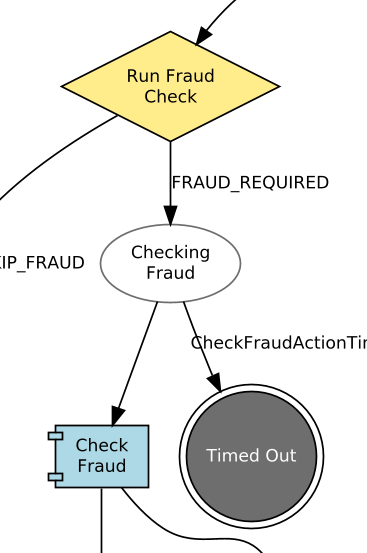
Here we can see that on the timeout from check fraud we’re routing to the new Timed Out state.
Note also that the graph shows that this transition will occur on the "CheckFraudActionTimeoutEvent" event. This event is generated by the application when the fraud call times out.
Java Implementation
As normal, let’s start our implementation by regenerating our code base.
mvn clean installLet’s start by looking a little at how the code works.
You’ll start by opening the "SchedulerPort" interface (part of the IPF Core):
public interface SchedulerPort {

    void schedule(ScheduleItem var1, Function<ScheduleItem, CompletableFuture<Void>> var2);

    void schedule(ScheduleItem var1, Function<ScheduleItem, CompletableFuture<Void>> var2, Duration var3);

    void cancel(ScheduleItem var1);

    void cancelAll(String var1);

    int getRetries(ScheduleItem var1);

}
It is these functions that the generated code will invoke whenever it needs to set a schedule. In our case, whenever an action is called it will invoke the schedule method and provide a Schedule Item which contains the action details and a type of "TIMEOUT".
So if you specify to the scheduler that you want a timeout in 10s on this action, then it will return a failure after 10s if the schedule is still active. However, if in that time a cancel is called then this will close out the scheduler.
The IPF application needs an implementation of the scheduler port to be provided as part of the domain. However, so far we haven’t had to specify one! Why is this? It’s because by default a no-op scheduler is provided. What we need to do now is provide an appropriate implementation for our case.
The Akka Scheduler
You could here use any scheduler that conforms to the interface definition above, for this tutorial we’ll use another one provided by the IPF framework, the AkkaScheduler.
Let’s start by adding a dependency into our ipf-tutorial-app’s pom (ipf-tutorial-app/pom.xml):
<dependency>
    <groupId>com.iconsolutions.ipf.core.platform</groupId>
    <artifactId>ipf-flo-scheduler-akka</artifactId>
</dependency>(note - you may need to reload Maven to pull the dependency down)
By adding the dependency, spring will automatically inject an instance of the scheduler into our application. So all we need to do is configure our domain to use, it for this we simply need to update the domain declaration in IpfTutorialConfig.java to specify the scheduler adapter:
@Bean
public IpftutorialmodelDomain init(ActorSystem actorSystem, SchedulerPort schedulerAdapter) {
    // All adapters should be added to the domain model
    return new IpftutorialmodelDomain.Builder(actorSystem)
            .withTutorialDomainFunctionLibraryAdapter(input -> CompletableFuture.completedStage(new DuplicateCheckResponseInput.Builder(input.getId(), AcceptOrRejectCodes.Accepted).build()))
            .withAccountingSystemActionAdapter(new SampleAccountingSystemActionAdapter())
            .withFraudSystemActionAdapter(new FraudSystemActionAdapter())
            .withDecisionLibraryAdapter(input ->
                    input.getCustomerCreditTransfer().getCdtTrfTxInf().get(0).getIntrBkSttlmAmt().getValue().compareTo(BigDecimal.TEN)>0 ?
                            RunFraudCheckDecisionOutcomes.FRAUDREQUIRED : RunFraudCheckDecisionOutcomes.SKIPFRAUD)
            .withIpftutorialflowAggregateFunctionAdapter(input -> new ExtractCreditorAccountForFlowIpftutorialflowAggregateFunctionOutput(input.getCustomerCreditTransfer().getCdtTrfTxInf().get(0).getCdtrAcct()))
            .withSchedulerAdapter(schedulerAdapter)
            .build();
}
That’s us done from a code perspective.
Configuration
Our final job is to configure our scheduler. Configuration is done by using properties, the property string we require is of the format:
|
ipf.flow.<FLOW_NAME>.<STATE_NAME>.<ACTION_NAME>.timeout-duration=<DURATION> |
The first thing to note here is that we need to provide the values of the three optional parameters - our flow name, state name, action name - and provide the value for the duration.
In our case then our property should look like:
|
ipf.flow.Ipftutorialflow.CheckingFraud.CheckFraud.timeout-duration=2s |
The first thing to note in defining this property is that where we have spaces in any of the components, we simply ignore the space. So for example our action name is actually Check Fraud but we simply use CheckFraud. We’re also specifying a duration here of 2 seconds.
Let’s add this property into the application configuration. To do this open the file docker/config/ipf-tutorial-app/application.conf and add the line above.
Enabling a Test Setup
We’re almost set to test our timeout, the one thing remaining is to actually make the check fraud call have an ability to time out. Let’s update the definition of the fraud check we supplied previously to not use the sample fraud adapter, but to allow an optional time out too. Let’s create a new package in our ipf-tutorial-app project for adapter implementations - com.iconsolutions.ipf.tutorial.app.adapters.
Then in our new package we’ll add an implementation of the FraudActionPort.
You’ll use the idea of "magic values" to say that if a payment of value >= 50 USD is received by the fraud call we’ll time out, otherwise we’ll return successfully. Try and implement this logic yourself (Hint - take a look at the generated class example SampleFraudSystemActionAdapter in domain-root/sampleapp as a starting point). When you’re ready, compare your attempt with the provided solution below:
@Slf4j
public class FraudSystemActionAdapter implements FraudSystemActionPort {

    @Override
    public CompletionStage<Void> execute(final CheckFraudAction action) {
        log.debug("Received an action of type {} for id {}", action.getActionName(), action.getId());
        if (action.getCustomerCreditTransfer().getCdtTrfTxInf().get(0).getIntrBkSttlmAmt().getValue().compareTo(new BigDecimal("50")) >= 0) {
            return CompletableFuture.runAsync(() -> log.debug("Pretending to timeout the fraud call for aggregate {}", action.getProcessingContext().getAssociationId()));
        } else {
            return IpftutorialmodelDomain.fraudSystem().handle(new FraudCheckResponseInput.Builder(action.getId(), AcceptOrRejectCodes.Accepted).build())
                    .thenAccept(done -> log.debug("Sent input of type {} for id {} with result {}", done.getCommandName(), action.getId(), done.getResult().name()));
        }
    }
}
|
Finally, we then need to add our new adapter into our config as normal (we are changing the .withFraudSystemActionAdapter to use our newly created Adapter FraudSystemActionAdapter):
@Bean
public IpftutorialmodelDomain init(ActorSystem actorSystem, SchedulerPort schedulerAdapter) {
    // All adapters should be added to the domain model
    return new IpftutorialmodelDomain.Builder(actorSystem)
            .withDomainFunctionAdapter(input -> CompletableFuture.completedStage(new DuplicateCheckResponseInput.Builder(input.getId(), AcceptOrRejectCodes.Accepted).build()))
            .withAccountingSystemActionAdapter(new SampleAccountingSystemActionAdapter())
            .withFraudSystemActionAdapter(new FraudSystemActionAdapter())
            .withDecisionAdapter(input ->
                    input.getCustomerCreditTransfer().getCdtTrfTxInf().get(0).getIntrBkSttlmAmt().getValue().compareTo(BigDecimal.TEN)>0 ?
                            RunFraudCheckDecisionOutcomes.FRAUDREQUIRED : RunFraudCheckDecisionOutcomes.SKIPFRAUD)
            .withIpftutorialflowAggregateFunctionAdapter(input -> new ExtractCreditorAccountForFlowIpftutorialflowAggregateFunctionOutput(input.getCustomerCreditTransfer().getCdtTrfTxInf().get(0).getCdtrAcct()))
            .withSchedulerAdapter(schedulerAdapter)
            .build();
}
That’s everything complete, time to build and spin up the container environment to check it all works:
Checking our Solution
As normal let’s now check that the solution works. Start up the application as previously (instructions are available in Reviewing the initial application if you need a refresher!)
For payments, we need to reconsider our logic we’ve built:
-
If a payment is over $50 (but over 10 to make sure the fraud check is required!) then we time out, if it’s not we proceed as before.
So let’s try both scenarios starting with a payment over $50:
curl -X POST localhost:8080/submit -H 'Content-Type: application/json' -d '{"value": "150"}' | jqLet’s bring up the payment in the Developer GUI and bring up the domain events view (search by unit of work id, click view, click domain events):

Here we can see that this time we’ve successfully got the timeout event coming through. For confirmation, if we now repeat the process with a value of say $25 we’ll see that the fraud check has happily processed successfully and not timed out so our flow has proceeded onto completion.
Persistent Scheduling
IPF provides another scheduling interface by default. This is the persistent scheduler. It is quartz backed and the major difference is that is backed by a persistence layer and as such should the application fail, the schedules will be available post jvm shutdown.
To apply the persistent scheduler we simply need to replace the akka scheduler dependency with the one for our persistent scheduler:
<dependency>
    <groupId>com.iconsolutions.ipf.core.platform</groupId>
    <artifactId>ipf-flo-scheduler-persistent</artifactId>
</dependency>
If you want, go ahead and try this change, you can repeat the testing we did above to prove that our new scheduler is working.