An Introduction to IPF
IPF, the Icon Payments Framework is a toolkit or framework that allows organisations to build payment processing solutions faster than an in house build and with much greater flexibility than off the shelf payment engines. This article gives a quick overview of IPF without assuming the reader has any knowledge of Java development.
Payments Orchestration & DSL Flows
The Payments DSL (Domain Specific Language) is how payment flows/orchestrations are defined in the Icon Payment Framework (IPF) using a tool called MPS which, when combined with our language and custom GUI elements, is branded as the Flow Designer part of IPF Studio. Payment flows are defined as state machines and several can be combined to process a payment to completion.
| MPS is actually JetBrains MPS, a tool which enables clients to use our DSLs with ease. |
As part of the IPF build process, documentation relating to the defined flow(s) is generated.
Where is the Data?
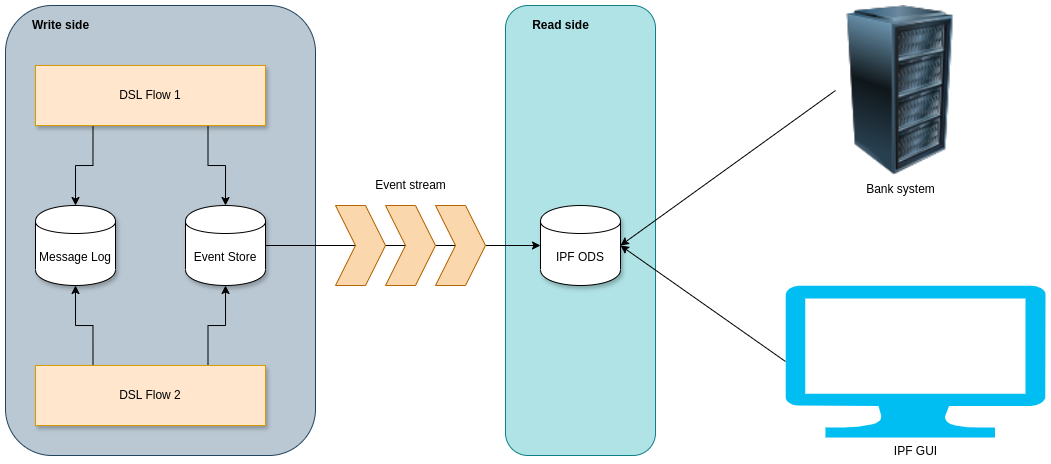
IPF uses Event Sourcing and Command Query Responsibility Segregation (CQRS) patterns. This means it stores a series of events, or facts, that have occurred during the lifecycle of the transaction. Events could be 'PaymentValidated', 'PaymentBooked', 'PaymentSettled' etc.
CQRS & Event Sourcing means there is an append only log for each transaction. This log records all the facts and ONLY records the facts. There are no updates to facts or removal of facts - just new facts. This collection of facts is called the event store and is the 'write side' or 'event source' of IPF. The write side is separated as a solution to a lot of IPF’s NFRs.
The events/facts are streamed over to the ODS database which is used for all queries and is referred to as the 'read side' which is eventually consistent with the write side (after say, a few 100ms). The read side view can be generated in various forms based on the events, so you can see a normal transaction view which shows how a payment looks the current state of processing, but you can also see a full audit log of what happened. Clients can have as many read sides as they like, each building their own view out of the event stream.
For more background on event sourcing, please read Akka Persistence.
The message log is used to store all messages sent and received by IPF to CSMs, bank systems, etc. These are referred to as External Messages.
Flow Data Model
Fundamentally IPF has three different concepts in its flow data model.
Message Data Structure (MDS)
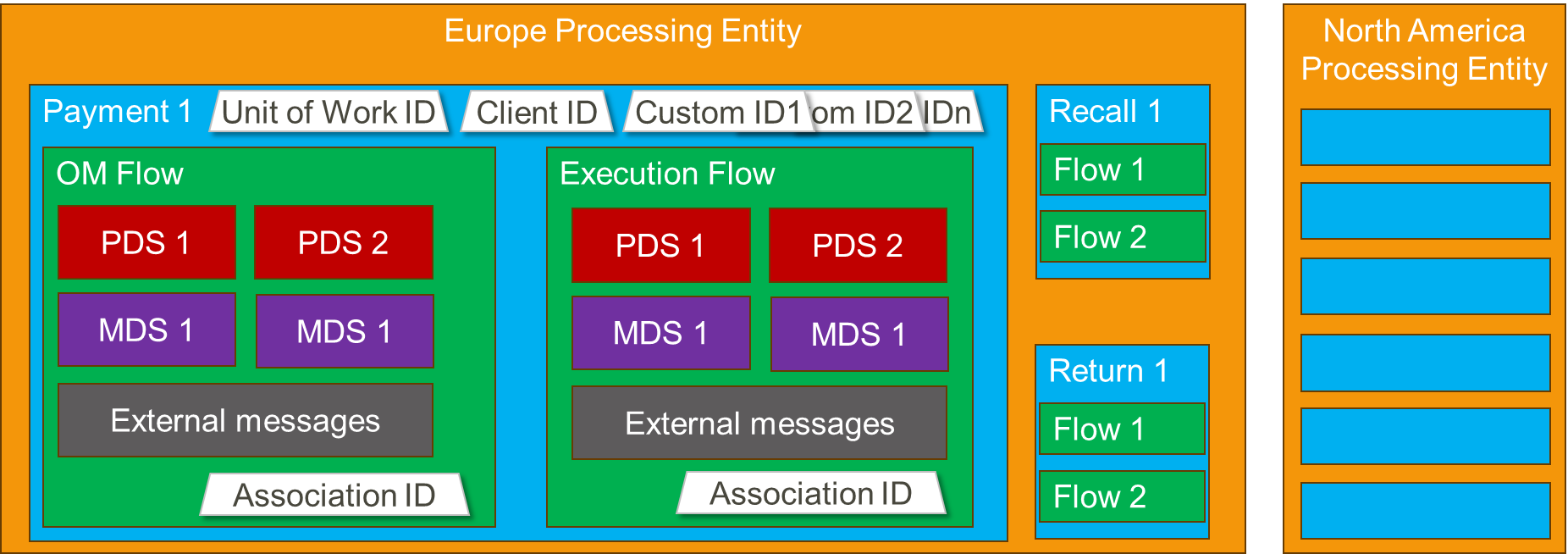
Message Data Structure objects are those that originate from ISO20022 objects - for example a pain.001 instruction contains a group header, one or more instructions, and within each instruction, one or more credit transfer transactions. Each is considered a distinct MDS object, that belongs to the original payment or unit of work. They are typically used in flows to model the payment message that started a flow and any payment messages generated and received by a flow. MDSs are always in JSON format.
Processing Data Structure (PDS)
Processing Data Structures (PDS) objects are those that have been defined by a user of IPF. They can contain ISO2022 elements and types as well as any arbitrary structure a client wishes to have. PDSs are always in JSON format.
External Messages
These are the actual messages sent and received by the flow. They are in whatever format they need to be in, e.g. XML, proprietary flat file, JSON, BSON etc.
Processing Entities
All data processed by an IPF flow must belong to a processing entity, as shown on the below diagram.
Exchanging Data With External Systems
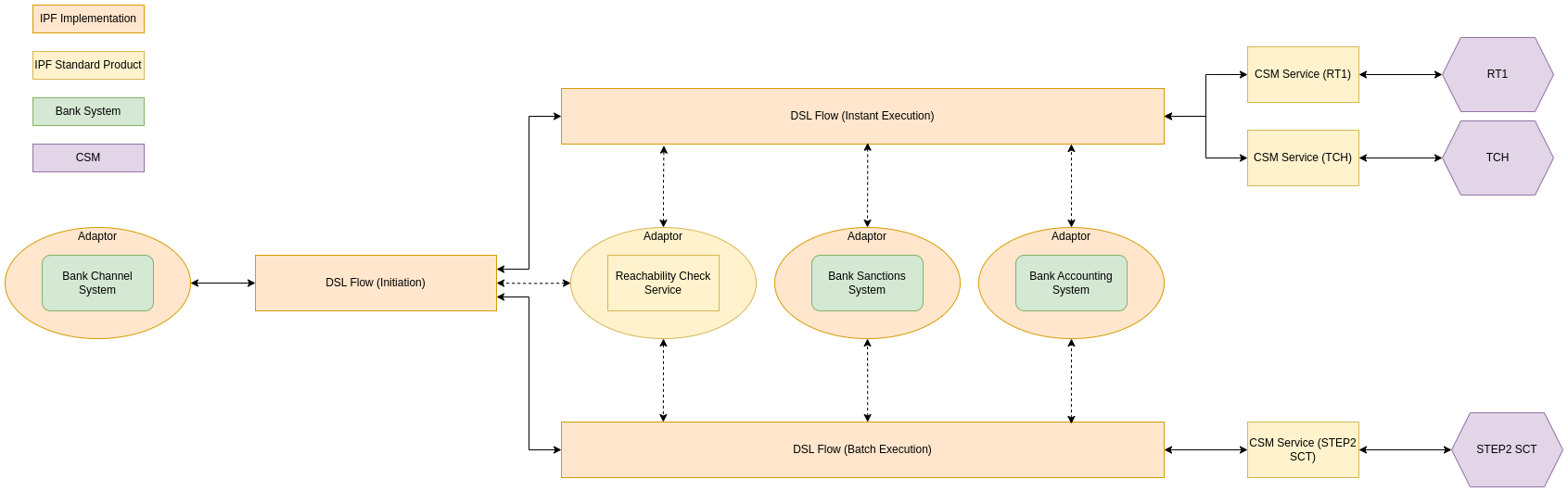
IPF has a mapping framework which, from a non developer perspective we can think of as adaptors converting an action in the DSL, to something tangible in code. For example external domain actions make a request to something external to an IPF implementation and the adaptor converts this to a request the external system/API/interface understands and sends it via a transport it can handle.
Using a real world example, the 'screen payment' action in the DSL uses an adapter to call a particular API on that particular Sanctions system via HTTP, or perhaps 'check balance' on the accounting system via MQ.
If you hear people talking about mappers, bridges or connectors, these are different technical components that form what a non developer can think of as an adaptor. As well as allowing actions to be sent from the flow, adaptors can perform the same tasks for receiving input (e.g. the result of a sanctions check) or a message that initiates a flow, e.g. a payment initiation from a channel. Adaptors can be around bank systems or IPF business services (e.g. Reachability in the above diagram).
Additional Optional Modules (AOMs)
IPF is licensed in two different ways. The core license includes things every client would need to build a sensible payment processing solution. Additional Optional Modules (AOMs) are things only some clients will need, with each module being licensed separately. Examples of additional optional modules include all Scheme packs, the Business Rules Framework, the ODS and Identity Resolution.
Scheme Packs
IPF has a concept of Scheme packs (technically known as CSM Services, see above diagram) which hide the complexities of different CSMs from DSL flows. For example, if CSM 'A' sends a positive answer to a recall using a Pacs004, whereas CSM 'B' sends a positive answer to a recall using a Camt029 and a Pacs008, these are standardised in such a way that the DSL flow for processing positive answers doesn’t need to know how different CSMs implement positive answers. IPF has several CSM packs available as additional optional modules and client can also create their own for any desired ACH or bilateral relationship they wish to exchange payment messages with.
Settings and Configuration
IPF offers two approaches for configuration:
Static Configuration
-
These are configurations that are not likely to be updated frequently and/or in real time.
-
Static configurations are part of the version-controlled codebase and any changes need the service to be re-deployed for them to take effect.
-
Examples include Kafka connectivity parameters, database URLs etc.
-
Also useful for settings that require a high level of control and testing.
Dynamic Configuration
-
Configurations that are likely to be updated frequently and/or where the changes need to take effect in real time without service re-deployment.
-
Dynamic configurations use an IPF proprietary design pattern called "Dynamic Processing Settings" (DPS).
-
Examples include bilateral clearing limits, extensions to CSM operating hours, CSM selection configuration etc.
For more information, look here.
Human Task Manager
Human Task Manager (often referred to as HTM) provides flows the ability to create tasks for human operators as well as optionally returning the results of tasks to the flow. Examples of the sort of things Human Task Manager can be used for include:
-
Handle Unmatched Return
-
Handle No Response from Scheme
-
Inform Customer
-
Handle Booking Failure
-
Manually Enrich BIC
Functionality for finding and managing tasks is part of IPF, whilst every task itself is defined by IPF clients, including a custom screen for the task.
Business Functions
A business function is a discrete piece of core business logic that can be used by flows. Examples of business functions include Validate BIC, Duplicate Check and Desconstruct IBAN.
Bulker and Debulker
IPF comes with two features for handling bulk transaction files. Bulker, which batches transactions into bulk files based on configuration and Debulker which breaks received bulked files into individual components based on configuration.
Bulker
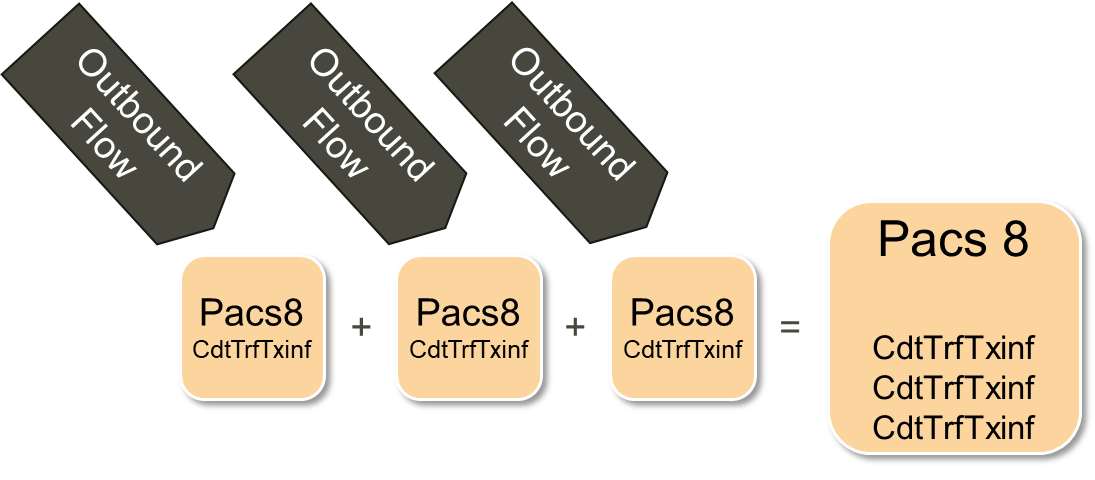
You can think of Bulker as providing various bulking buckets. Flows create transactions and put them in the correct bucket. Then at a configured volume waiting to be bulked or when a configured point in time is reached the transactions are bulked and a bulk file produced for sending.
Debulker
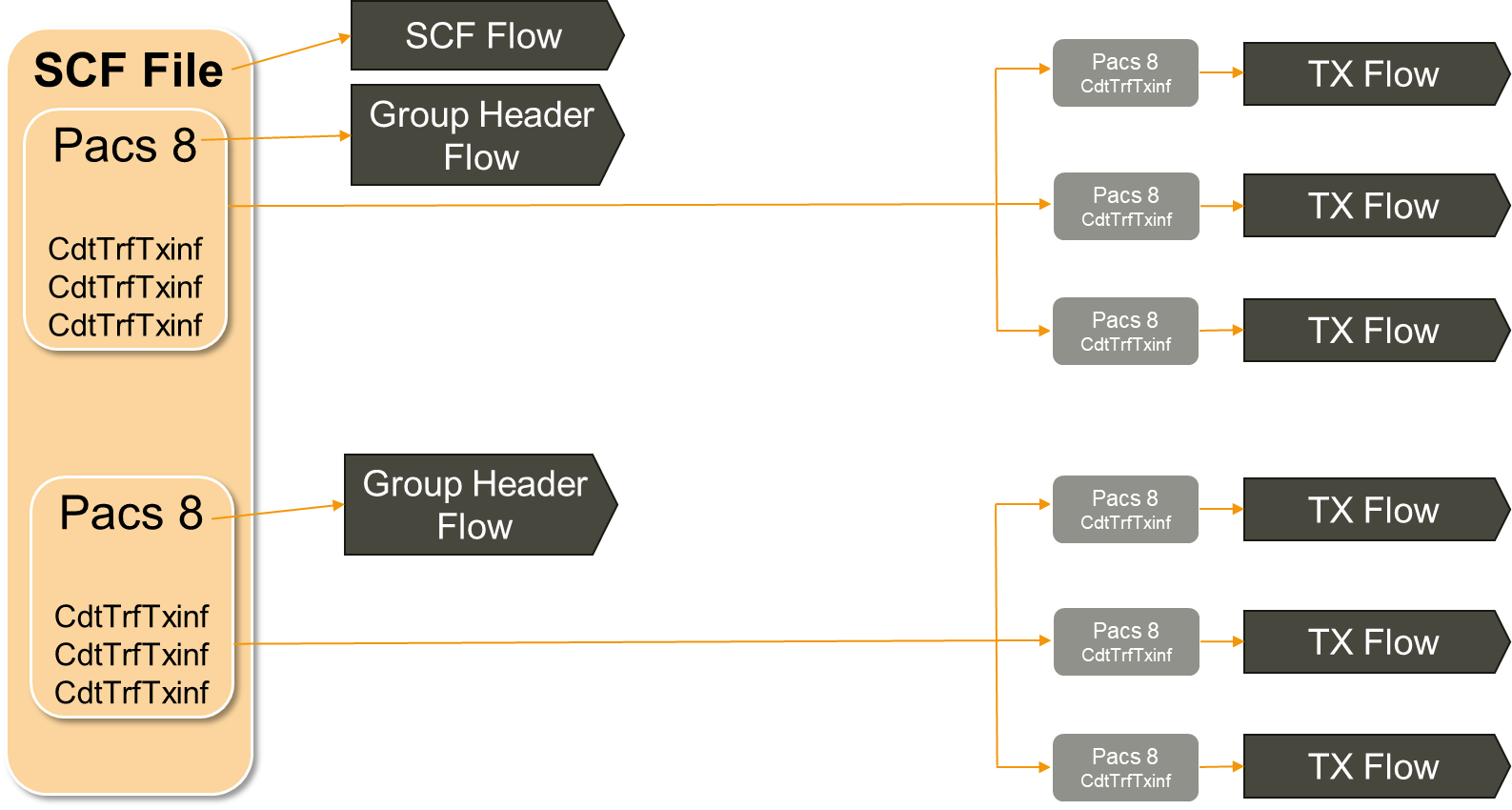
Based on configuration, the incoming SCF file (effectively an envelope for bundling PACS 8s) is debulked into a data object for each PACS 8 received (based on the group header) and a data object for each transaction contained within the PACS 8s. Flows can optionally be triggered for each data object produced by debulker, including one representing the SCF envelope.
Business Activity Monitoring
IPF comes with a capability that allows the creation of various business metrics and technical dashboards that show how solutions built with IPF are performing.
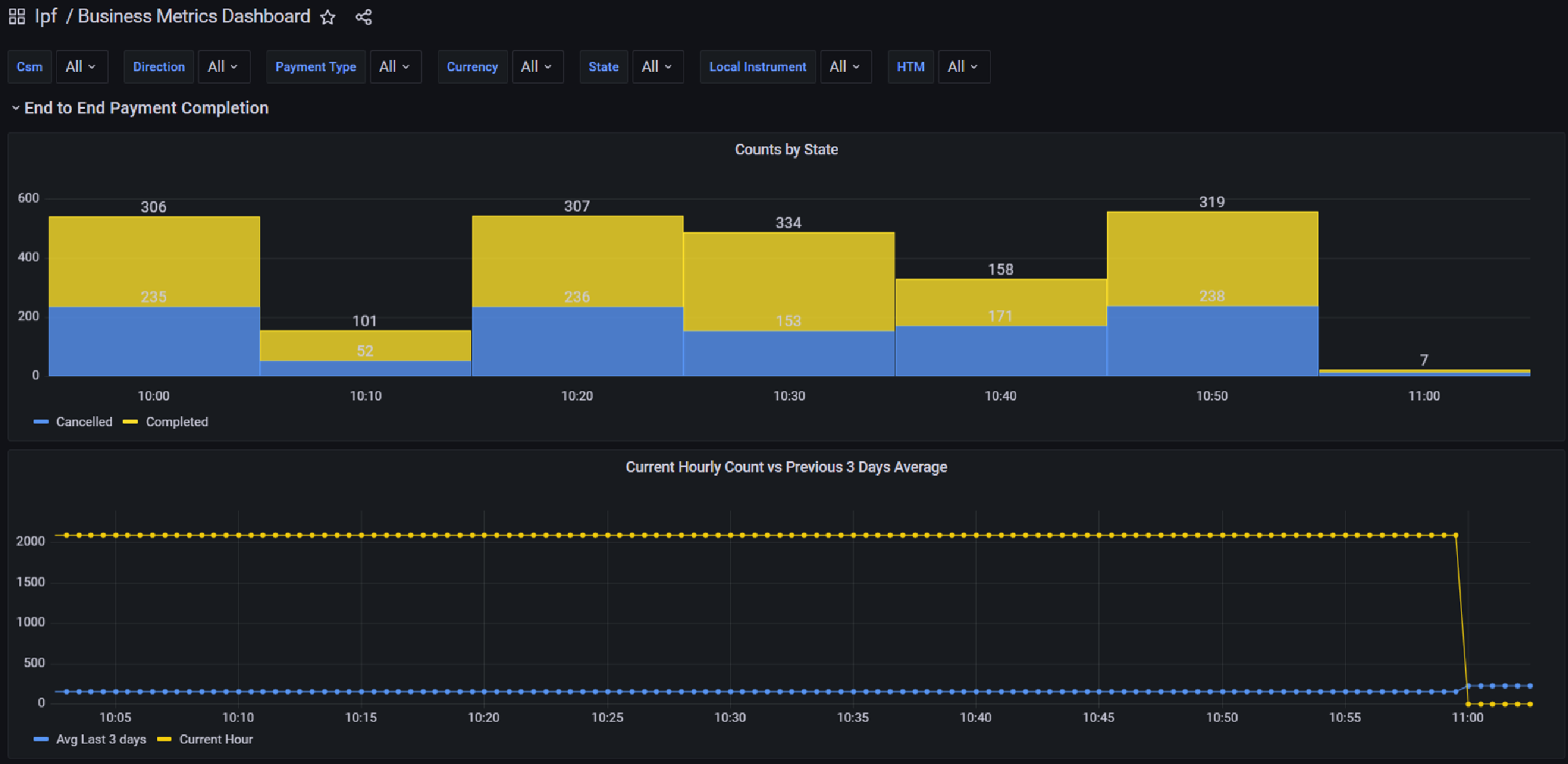
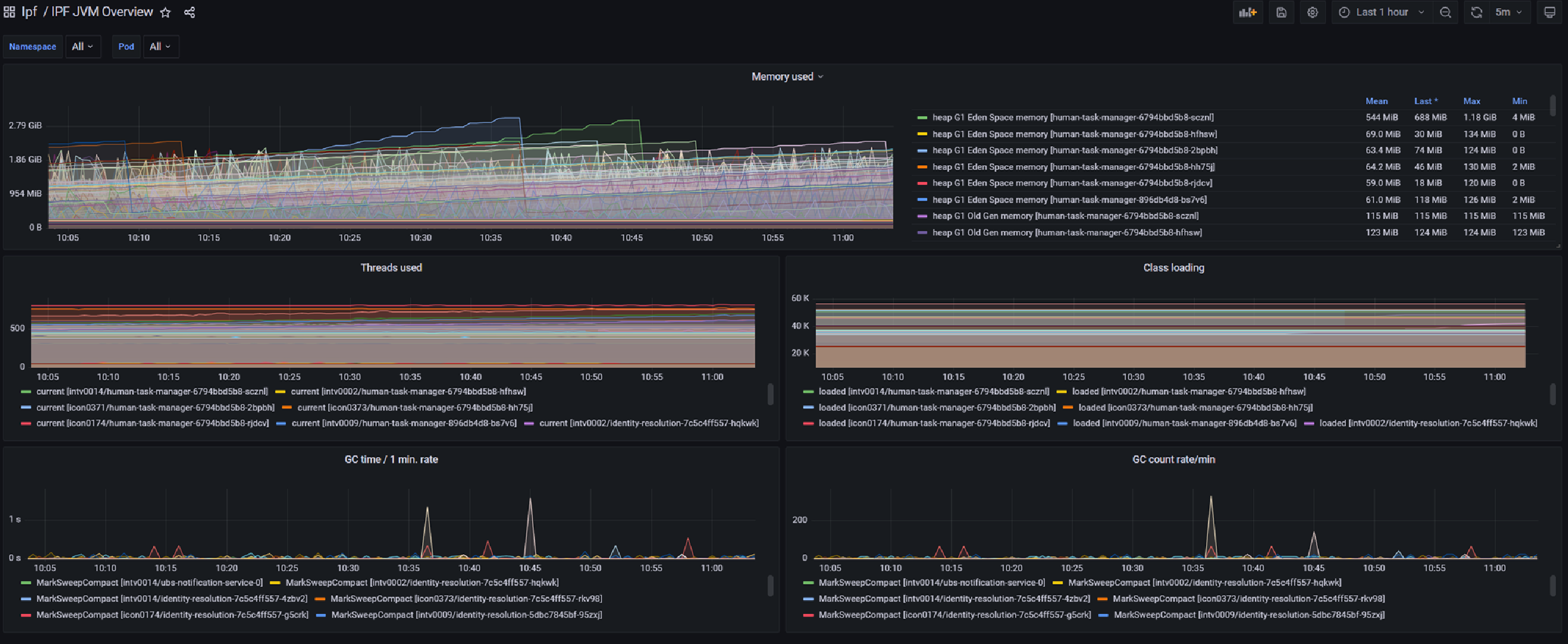
Operational Dashboard
IPF comes with an Operational Dashboard that we recommend using for interacting with ODS and your IPF implementation; you can use whatever front end you like though. The Operational Dashboard is heavily customisable, out of the box GUI components can be removed, client specific components can be added and also mappings to standard screens can be specified by clients to fit their flow data model. In addition to this, the look and feel is under the control of clients.
The Operational Dashboard uses the clients authentication and authorisation mechanism, it doesn’t manage users itself.
Reachability Service
The reachability service is a dedicated service for managing reachability related information and making routing decisions based on that data. It loads data from industry sources such as ACH's (Either as part of an optional IPF scheme pack or by a loader created by clients) and SWIFT as well as bank sourced data.
The data covers areas including CSM participation, party details, limits etc. Examples of the kind of functionality provided by the reachabilty service are Select CSM Agent and Validate Intra Entity Reachability.
System Events
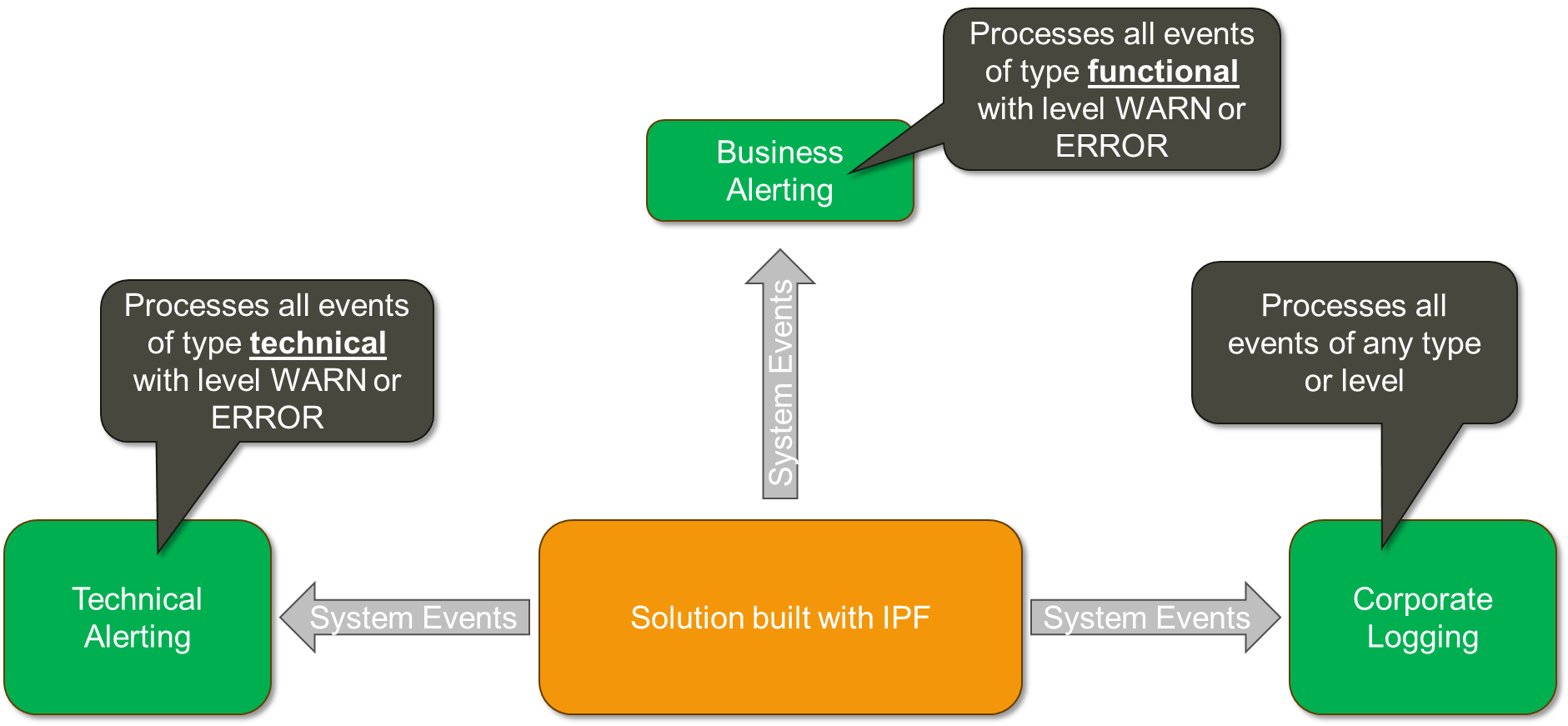
System events can be thought of like a traditional application log. Like traditional logs, they have a level (INFO, DEBUG, ERROR or WARN) and a type (Functional or Technical). There is a catalogue of events included with IPF but clients can also create their own bespoke system events. Solutions built with IPF publish system events based on configuration and any interested systems can listen to events.