DSL 8 - Versioning
|
Getting Started
The tutorial step uses the "handling_timeouts" solution of the project as it’s starting point. If at anytime you want to see the solution to this step, this can be found on the "add_version" solution! |
Versioning
Suppose that we have a flow running in production. A requirement then comes in to add a new step to the flow - so we want the in-flight transactions to stay on the current flow but all new transactions to start processing on the new updated flow. We can achieve this by versioning. For the purpose of this tutorial we’re going to insert a step to call out to a CSM service, but we also want to preserve the original flow. We’re going to do this by creating a new version of our execution flow and add the extra step only in that version.
|
A comprehensive overview of flow versioning is available in our Flow versioning guide. |
Versioning the Flow
Time to set up our versioning, if we look at our current flow we’ll see:
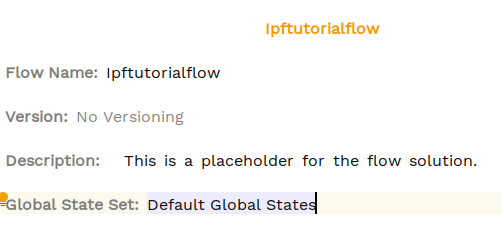
Here we can see it says "No Versioning". Let’s go ahead and add versioning.
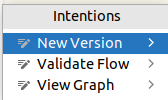
We’ll start by setting the current version to 1 and then will press ALT + ENTER on the flow and then select "New Version" from the drop down:
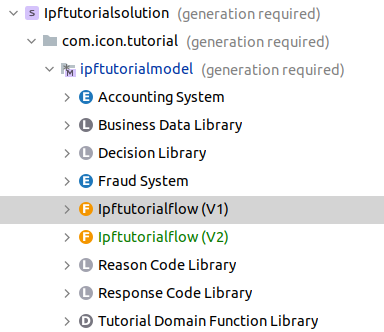
If you look in our navigator, we’ll now see:
|
Here we chose to change the version of the original flow to 1 at this point. We could have left it unversioned too in which case our new version would be defined as V1. Generally, if you know a flow is likely to be versioned it may be better to call it version 1 immediately as there are a couple of minor code changes required as we’ll see in the implementation section. |
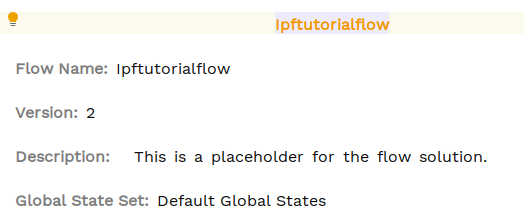
Let’s open "Ipftutorialflow (V2)", what we’ll find is an exact clone of our original flow, except it now has the versioned specified as V2 (note - the original flow has Version now specified).
|
You can also see here that a new set of mapping functions have been created on the new flow. This is because we defined these at the flow level. It’s also possible to define them outside of a flow via a 'Mapping Library' in which case the same mapping would be used in both flows. |
Now we’re ready to edit our version two flow. However, before we do that, we need to create the CSM service that will be used in V2.
Defining the CSM Service
The first thing we need to do is to call our CSM service. We will:
-
Send the CSM a pacs.008
-
Receive a pacs002 from the CSM - this can either contain an accepted or rejected code.
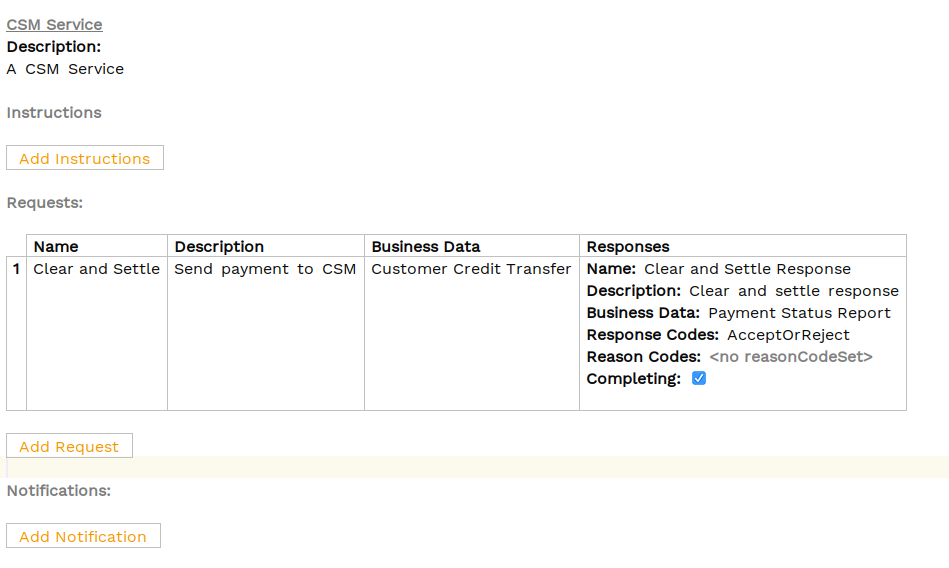
For this we’ll need a new external domain and a request defined on it. It’s very similar to what we did in DSL 4 - Using an external domain. You’ll call our request "Clear and settle".
See if you can set it up yourself, and the solution is below:
Updating the V2 Flow
So whereas previously we had the following "Event Behaviour":

You’ll change this so that instead of moving to "Complete" and raising our additional event, we will move to a new status "Clear And Settling" and then call our Clear and Settle request (defined on the CSM Service).
If the clear and settle request is successful, we’ll move to completing and raise our event. If the clear and settle fails, we’ll move to Rejected.
Try and add those conditions now and the solution is below, remember we’ll need to add the appropriate States, Event definitions, Input Behaviour and lastly Event behaviour!
(If you need a recap, review: DSL 4 - Using an external domain)
First of here’s the state definition:

Then we’ll need an event for both positive and negative CSM response:

Don’t forget when setting up these events, that the CSM service is sending us back the pacs002 and we want to store that as business data!
Next up is our input behaviour, it’s very standard:

And finally our event behaviour!

Note here that we’ve applied the clear and settling logic to both the "Skip Fraud" and "Fraud Required" cases!
That’s everything we need to do, we’ve now successfully created a new flow version and updated it to use our CSM Service. If we look at the flow for version 2 we’ll see:
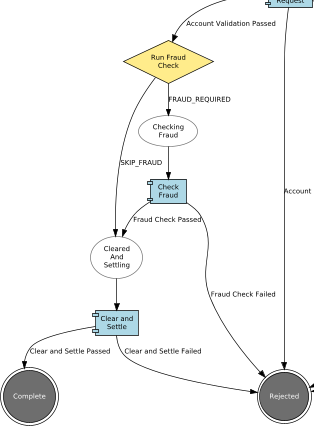
Whereas the flow for version 1 remains without this step.
That’s all our DSL work done, so let’s now move onto the implementation side.
Java Implementation
As normal, let’s start our implementation by regenerating our code base.
mvn clean installIn this case the build should fail:

If we check the IfpTutorialConfig.java we see:

This is failing because the aggregate function is unique to a flow, and now that we’ve created our new version we need to tell the application how to apply the aggregate function for each flow - as it’s perfectly possible the implementation logic may change. However, in our case we just need to do the same thing, so we’ll simply define the new functions in the same way. Note that the new versions will be named V1 and V2 respectively.
We’ve also added the new CSM Service, so we need to remember to include that in our domain configuration. For this we’ll just use the sample one provided.
Have a go at updating and the solution is below:
@Bean
public IpftutorialmodelDomain ipftutorialmodelDomain(ActorSystem actorSystem, SchedulerPort schedulerAdapter) {
    // All adapters should be added to the domain model
    return new IpftutorialmodelDomain.Builder(actorSystem)
            .withTutorialDomainFunctionLibraryAdapter(input -> CompletableFuture.completedStage(new DuplicateCheckResponseInput.Builder(input.getId(), AcceptOrRejectCodes.Accepted).build()))
            .withAccountingSystemActionAdapter(new SampleAccountingSystemActionAdapter())
            .withFraudSystemActionAdapter(new FraudSystemActionAdapter())
            .withDecisionLibraryAdapter(input ->
                    input.getCustomerCreditTransfer().getCdtTrfTxInf().get(0).getIntrBkSttlmAmt().getValue().compareTo(BigDecimal.TEN)>0 ?
                            RunFraudCheckDecisionOutcomes.FRAUDREQUIRED : RunFraudCheckDecisionOutcomes.SKIPFRAUD)
            .withIpftutorialflowV1MappingAdapter(input -> new ExtractCreditorAccountForFlowIpftutorialflowV1MappingOutput(input.getCustomerCreditTransfer().getCdtTrfTxInf().get(0).getCdtrAcct()))
            .withIpftutorialflowV2MappingAdapter(input -> new ExtractCreditorAccountForFlowIpftutorialflowV2MappingOutput(input.getCustomerCreditTransfer().getCdtTrfTxInf().get(0).getCdtrAcct()))
            .withSchedulerAdapter(schedulerAdapter)
            .withCSMServiceActionAdapter(new SampleCSMServiceActionAdapter())
            .build();
}|
If you check domain-root/domain/target/classes/com/iconsolutions/ipf/tutorial/ipftutorialmodel/domain/IpftutorialmodelDomain.class, you can see V1 and V2 versions to be called). |
That’s everything we have to do to make our code now work, but before continuing let’s go back to our initiation controller (ipf-tutorial-app/src/main/java/com/iconsolutions/ipf/tutorial/app/controller/InitiationController.java) and consider how it’s working:
return Mono.fromCompletionStage(IpftutorialmodelDomain.initiation()
        .handle(new InitiateIpftutorialflowInput.Builder(entityId)
                .withProcessingContext(ProcessingContext.builder()
                        .unitOfWorkId(unitOfWorkId)
                        .clientRequestId(clientRequestId)
                        .build())
                .withCustomerCreditTransfer(dummyPacs008)
                .build())
        .thenApply(done -> InitiationResponse.builder()
                .requestId(clientRequestId)
                .uowId(unitOfWorkId)
                .aggregateId(done.getAggregateId())
                .build()));
So we’re sending it here just a common "InitiateIpftutorialflowInput" - how does the application know which flow to use? The answer is that by default it will always route "New" work to the latest (V2 in our case) flow. However, we can also choose which flow to send data to.
Now, for testing purposes let’s recall that we have a version fields on our InitiationRequest object, let’s use that to be able to pick and choose which flow to send to. So let’s update our initiation logic to be like the below:
return Mono.fromCompletionStage(IpftutorialmodelDomain.initiation()
        .handle(new InitiateIpftutorialflowInput.Builder(entityId)
                .withProcessingContext(ProcessingContext.builder()
                        .unitOfWorkId(unitOfWorkId)
                        .clientRequestId(clientRequestId)
                        .build())
                .withCustomerCreditTransfer(samplePacs008)
                .withVersion(Objects.isNull(request) || Objects.isNull(request.getVersion())
                        ? null
                        : "V1".equals(request.getVersion()) ? IpftutorialflowFlowVersions.V1 : IpftutorialflowFlowVersions.V2)
                .build())
        .thenApply(done -> InitiationResponse.builder()
                .requestId(clientRequestId)
                .uowId(unitOfWorkId)
                .aggregateId(done.getAggregateId())
                .build()));
Here we can see we’ve added a line to set the version on the request based off the version property we’ve supplied (note - the use of the IpftutorialflowFlowVersions enum which contains "V1" and "V2").
|
In addition to specifying the version as we did above, there are explicit input’s (ipftutorialmodel/inputs) you can use too. So instead of |
In the previous tutorial we configured ActionTimeouts with the following configuration;
ipf.flow.Ipftutorialflow.CheckingFraud.CheckFraud.timeout-duration=2sHere we used the flow name, Ipftutorialflow, and it worked just fine. However with the versioning of our flows this has actually created 2 flows of different names (with different behaviours) and this needs to be reflected in the config. For each flow you wish to retain this configuration, you should set it as follows (note the addition of V1 and V2 to the names):
ipf.flow.IpftutorialflowV1.CheckingFraud.CheckFraud.timeout-duration=2s
ipf.flow.IpftutorialflowV2.CheckingFraud.CheckFraud.timeout-duration=2s
You can thus have different configurations per flow.
Or if you wish to have the same for all flows you can use the 'Any' wildcard (which will apply the configuration for ALL flows for this CheckFraud action);
ipf.flow.Any.CheckingFraud.CheckFraud.timeout-duration=2sChecking Our Solution
As normal let’s now check out solution works. Start up the application as previously (instructions are available in Reviewing the initial application if you need a refresher!)
You’ll start by sending in a payment without specifying a version
curl -X POST localhost:8080/submit | jqNow the first thing to note is the response:
{
  "requestId": "c16a5c43-1038-4311-9d3f-8bf34efa0c81",
  "uowId": "0945fe73-521c-478e-9f62-df4ac6393091",
  "aggregateId": "IpftutorialflowV2|239f3e48-8d26-4a2f-8241-0997dc25f1c2"
}
So here we can see that we’ve hit our V2 flow from the aggregate id "IpftutorialflowV2|….". If we now double check the events (remember to update the aggregate id to match yours!):
Let’s bring up the payment in the Developer GUI and bring up the flow events view (search by unit of work id, click view) and we should see:

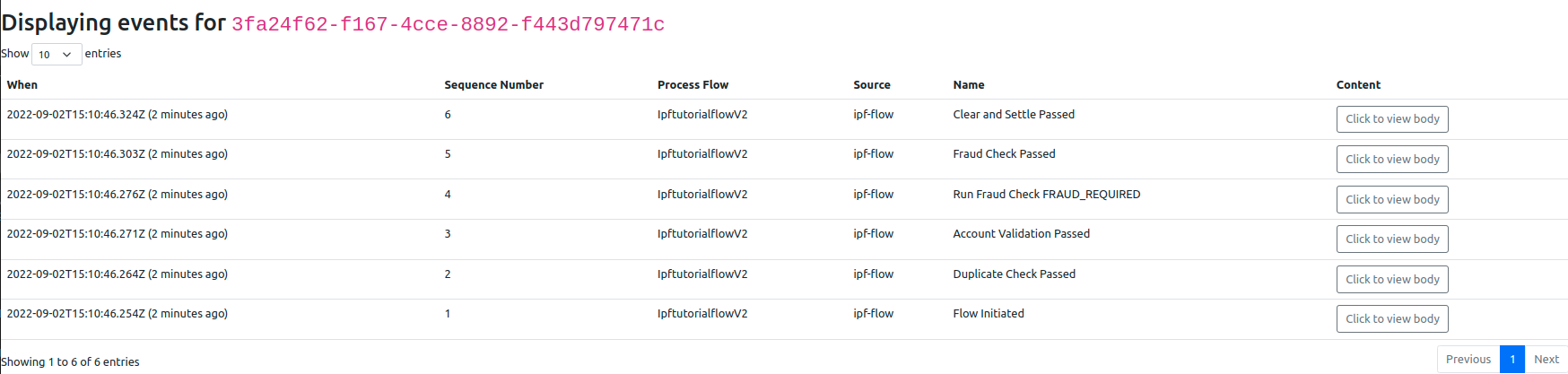
Here we can see that the process flow being executed is indeed our V2 flow, and looking at the events view shows the same (click domain events):
Now let’s try hitting our V1 version:
curl -X POST localhost:8080/submit -H 'Content-Type: application/json' -d '{"version": "V1"}' | jqAnd again, looking at the response:
{ "requestId": "492a0177-d9c3-4845-bc81-f54c9aae917d", "uowId": "d8cf8b99-448b-44e7-8207-a015dc41623a", "aggregateId": "IpftutorialflowV1|b0e19b4a-34f6-4584-8109-eef311fd2a13" }So here we can see that we’ve hit our V1 flow from the aggregate id "IpftutorialflowV1|….". If we now bring up the payment in the Developer GUI and bring up the flow view (search by unit of work id, click view) and we should see:

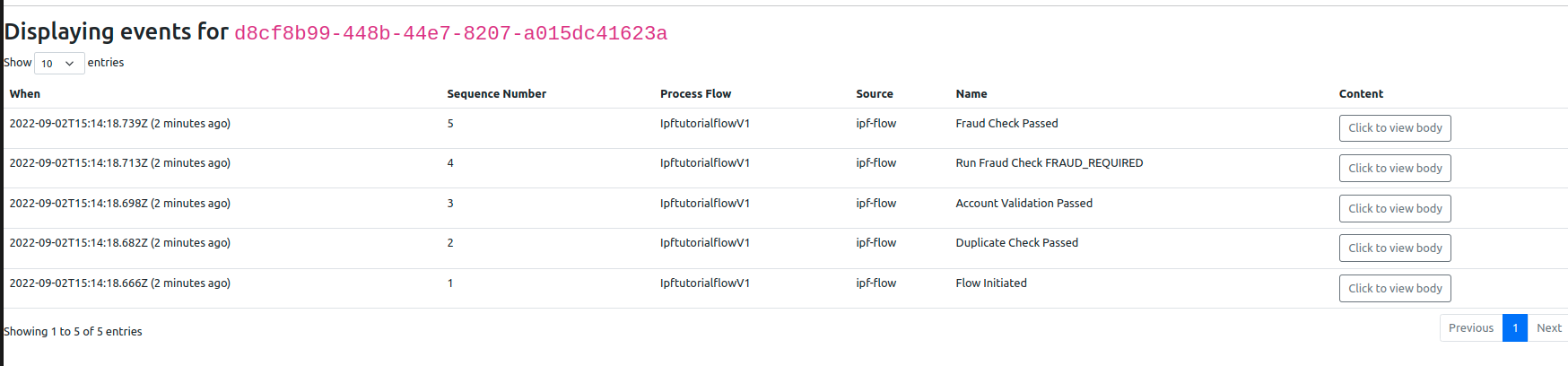
Showing us again we’re hitting the right process flow. If we check the domain events tab (click domain events) then we see there’s no CSM Service invocation:
If you want, you could now send in a V2 flow request specifically and see that working as well.
Handling In-Flight Transactions
There could be cases where a transaction was started on V1 of the flow but is paused waiting on a response/instruction to a long-running process external to the flow. During this time you have deployed V2 of the flow but the in-flight transactions are still not in a terminal state.
This scenario is perfectly valid and when the old transactions on V1 flow resume they will continue on the flow which they started on, in this case the V1 flow. Any new transactions that have been initiated since the upgrade would run on the V2 flow.
| It’s not possible for a transaction initiated using one version of a flow (e.g. V1) to be resumed using another (e.g. V2). You either need to resume the flow on the original (V1) flow or initiate a new flow on the new version (V2). |
Versioning and Rolling Upgrades
IPF and Flo Lang already come with basic support for rolling upgrades. By leveraging Akka Cluster’s node roles under the hood, flows are guaranteed to be started only on nodes that support them and when sending an input to a flow, Akka will take care of all the necessary routing that needs to be applied.In-flight transactions — a regular occurrence when performing rolling upgrades — will be handled the same way as described in Handling In-Flight Transactions, resulting in your application processing both versions of the flow for a while, before settling on a new version.
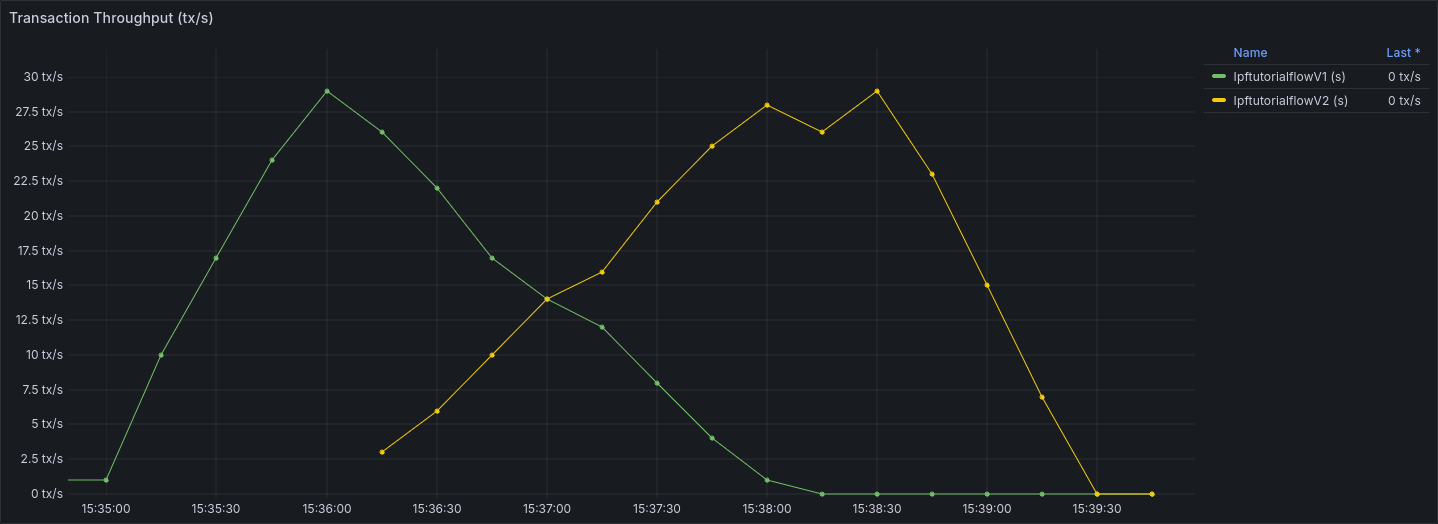
(Figure: Rolling upgrade starting at 15:36:00 and finishing at 15:37:30)
However, there are still scenarios that need developer attention, and we cover them in the following sections.
Reprocessing Messages
Exactly once delivery is very hard to accomplish in distributed systems and even when it can be achieved, it comes with a performance penalty that is often too costly to pay. The alternative approach is to adopt at least once delivery semantics and ensure the message processing logic is idempotent.
While reprocessing of messages can cause issues even when versioning is not involved — e.g. when a flow ID (entityId in our solution examples) is a pseudorandom unique ID — issues caused by lack of idempotency are more likely to pop up when you’re doing rolling upgrades with multiple versions present.
By default, if an initiating message gets reprocessed during rolling upgrades, even when it uses a message-derived value as its entityId it can cause duplicate flows to be initiated — the first time for flow version Vx and flow version Vy upon reprocessing of the message.
To protect against this scenario, you can opt in and use the idempotency guards that come out of the box with Flo Lang and that leverage a CorrelationService implementation under the hood.
Making Use of Built-in Idempotency Guards
First, we need to add a dependency to a CorrelationService implementation. If you decide to use your own implementation, please ensure that data in the service’s backing store survives a node restart. To use a MongoDB-backed implementation that comes with IPF, dd this to the ipf-tutorial-app 's pom.xml:
<dependency>
    <groupId>com.iconsolutions.ipf.core.connector</groupId>
    <artifactId>connector-correlation-starter-mongodb</artifactId>
</dependency>
Next, we need to wire in this implementation into your domain:
@Bean
public IpftutorialmodelDomain init(ActorSystem<?> actorSystem,
                                   SchedulerPort schedulerAdapter,
                                   CorrelationService correlationService) {
    return new IpftutorialmodelDomain.Builder(actorSystem)
            .withTutorialDomainFunctionLibraryAdapter(input -> CompletableFuture.completedStage(new DuplicateCheckResponseInput.Builder(input.getId(), AcceptOrRejectCodes.Accepted).build()))
            .withAccountingSystemActionAdapter(new SampleAccountingSystemActionAdapter())
            .withFraudSystemActionAdapter(new FraudSystemActionAdapter())
            .withDecisionLibraryAdapter(input ->
                    input.getCustomerCreditTransfer().getCdtTrfTxInf().get(0).getIntrBkSttlmAmt().getValue().compareTo(BigDecimal.TEN) > 0 ?
                            RunFraudCheckDecisionOutcomes.FRAUDREQUIRED : RunFraudCheckDecisionOutcomes.SKIPFRAUD)
            .withIpftutorialflowV1MappingAdapter(input -> new ExtractCreditorAccountForFlowIpftutorialflowV1MappingOutput(input.getCustomerCreditTransfer().getCdtTrfTxInf().get(0).getCdtrAcct()))
            .withIpftutorialflowV2MappingAdapter(input -> new ExtractCreditorAccountForFlowIpftutorialflowV2MappingOutput(input.getCustomerCreditTransfer().getCdtTrfTxInf().get(0).getCdtrAcct()))
            .withSchedulerAdapter(schedulerAdapter)
            .withCSMServiceActionAdapter(new SampleCSMServiceActionAdapter())
            // idempotency guards will be applied against this correlation service
            .withCorrelationService(correlationService)
            .build();
}
The built-in idempotency guards on initiation inputs work in a similar, but slightly different way to the idempotency guards for other inputs. Unlike the general input idempotency, which needs to be able to distinguish between duplicate submissions and message reprocessing (to which purpose it uses the (inputId, physicalMessageId) tuple), initiation input idempotency will inspect several fields — physicalMessageId, inputId, processingContext.unitOfWorkId, in that order — pick the first one that has a value and use that value to determine duplicates.
If physicalMessageId on the input is populated from the ReceivingContext, it will guard against message reprocessing on transports that allow a single physical message to be consumed twice (Kafka, JMS or other messaging middleware). In case of HTTP, a single message cannot be reprocessed and messages are usually re-sent. To protect against message duplicates — regardless of the underlying transport — populating the inputId with a message-derived value is advised.
|
| Once you have chosen a value to populate your idempotency field with, you can no longer change it in future versions without either compromising the idempotency guards and accepting potential duplicates, or giving up on a rolling upgrade deployment for that version. |
As a final step, we populate one of the idempotency-enabled fields on the input:
return Mono.fromCompletionStage(IpftutorialmodelDomain.initiation()
        .handle(new InitiateIpftutorialflowInput.Builder(entityId)
                .withProcessingContext(ProcessingContext.builder()
                        .unitOfWorkId(unitOfWorkId)
                        .clientRequestId(clientRequestId)
                        .build())
                .withCustomerCreditTransfer(samplePacs008)
                // use clientRequestId for idempotency guards
                .withInputId(clientRequestId)
                .withVersion(Objects.isNull(request) || Objects.isNull(request.getVersion())
                        ? null
                        : "V1".equals(request.getVersion()) ? IpftutorialflowFlowVersions.V1 : IpftutorialflowFlowVersions.V2)
                .build())
        .thenApply(done -> InitiationResponse.builder()
                .requestId(clientRequestId)
                .uowId(unitOfWorkId)
                .aggregateId(done.getAggregateId())
                .build()));
It is advisable to use unversioned initiation inputs when relying on built-in idempotency guarantees as they will allow you to initiate the version that was used on the original request. If using versioned inputs and the subsequent attempts do not match the version on the original attempt — e.g. original attempt was for V1, whereas the subsequent ones are V2 — all the subsequent events will fail with an IllegalStateException.
|
Restrictions Caused by External Response Handling
When handling external responses — either by consuming messages from message brokers or by receiving HTTP requests — the restrictions imposed by rolling upgrades are the same:
-
inputs created as a result of handling must not change between versions — when doing rolling upgrades, both versions of your application will be responsible for processing responses from external systems and, upon receiving a response intended for the new version, the old version of the application must be capable of sending an input that V2 version of the flow will understand
-
if inputs have to change, it is up to you as developer to ensure that the old version of the application will not be handling responses intended for new versions of the flow — achievable by using receive connector’s filtering capability, dedicating different topics/queues to responses intended for different versions of the flow, configuring routing rules on the load balancer to ensure HTTP requests are routed to proper versions of the service etc.