Sending Connector
Sending connectors are responsible for taking messages supplied by a client and sending it over the configured transport mechanism.
All sending connectors implement the SendingConnector interface, which itself extends OperableConnector.
public interface SendingConnector<D, R> extends OperableConnector {

    /**
     * Send a request via the connector without a supporting context
     */
    default CompletionStage<R> send(@NotNull ProcessingContext processingContext,
                                    D domainMessage) {
        return send(processingContext, domainMessage, SupportingContext.empty());
    }

    /**
     * Send a request via the connector with a full sending context
     * that allows users to supply a supporting context as well
     */
    CompletionStage<R> send(@NotNull ProcessingContext processingContext,
                            D domainMessage,
                            @NotNull SupportingContext supportingContext);

    /**
     * Allows setting of the meterRegistry implementation for a connector
     * after connector build
     * This allows implementations to set the registry for all SendingConnector instances
     * at once instead of having to set them at a per connector bases at build time
     */
    void setMeterRegistry(MeterRegistry meterRegistry);

    SendingConnectorConfig getConfig();
}

public interface OperableConnector {

    /**
     * Retrieve name of the connector.
     */
    String getName();

    /**
     * Starts the connector.
     */
    void start();

    /**
     * Starts the connector's health check procedure.
     */
    void startHealthCheck();

    ConnectorHealth getHealth();

    /**
     * Shuts down the connector.
     *
     * @param reason the reason for shutdown
     */
    CompletionStage<Void> shutdown(ShutdownReason reason);

    /**
     * Returns the connectors running status
     */
    boolean isRunning();

    /**
     * Returns the connector's configuration.
     */
    ConnectorConfig getConfig();

    /**
     * Returns all the connector's transports.
     */
    List<? extends OperableConnectorTransport> getTransports();

    /**
     * Abstraction of a connector's configuration.
     */
    interface ConnectorConfig {

        String getConfigRoot();
    }
}
Generic Types D and T
Let’s first start by describing what the D and T generic mean.
-
Dis the Domain type. This is a message in our "internal" canonical data model -
Tis the Target type. This is a message converted to the "external" data model with which we’re integrating.
Stages
The connector implementation uses Akka Streams. Connectors are comprised of a number of configurable stages that are executed asynchronously, where each stage performs some transformation or checks to ensure the messages are valid before sending it to the transport mechanism. The image below roughly describes the stage-based approach when sending messages. Note that some stages are optional and will be skipped if they are not configured when connector is built.
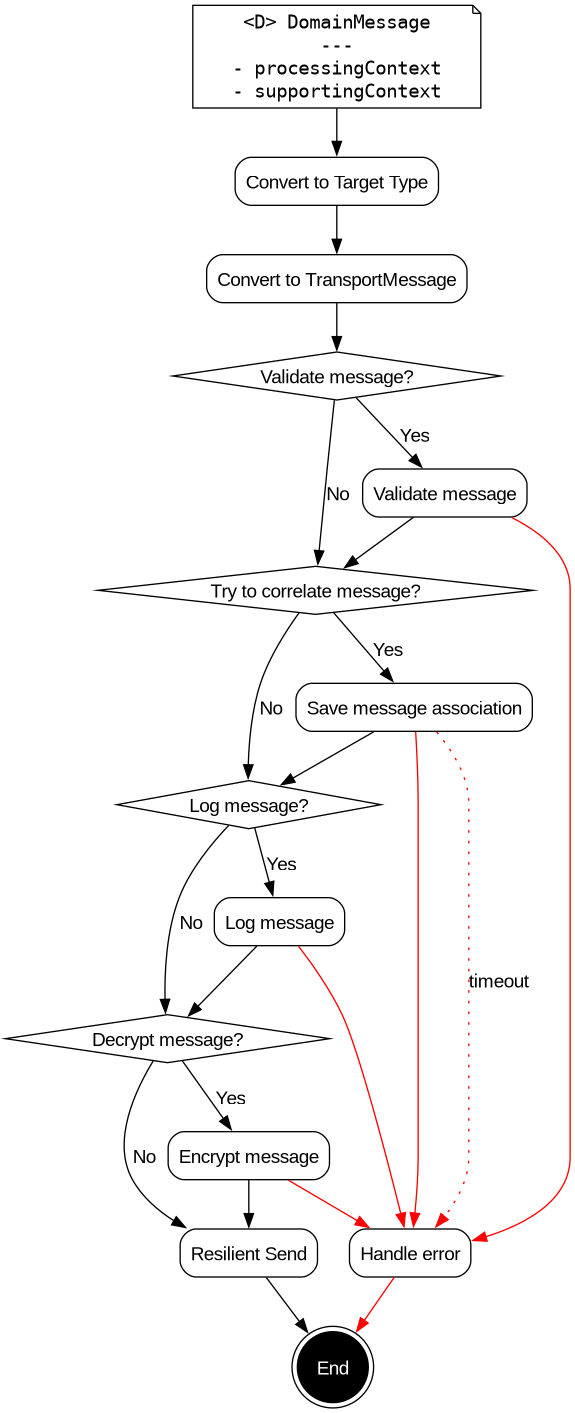
The following sections will briefly cover each stage.
Message Validation
When sending messages, we may need to check the validity of the payload, especially if any of it is user generated since this could contain errors.
Connectors can optionally be configured to validate message by providing an implementation of the Validator interface.
To learn more about message validation, see the Message Validation documentation.
Message Correlation
One of the limitations around sending and receiving message asynchronously is that responses to messages need to be correlated with one another.
This can be achieved by providing an implementation of the CorrelationService interface when building a sending connector.
The correlation details will be persisted before sending the message and then can be retrieved later when the response is received in a separate receiving connector.
To learn more about message correlation, see the Message Association documentation.
Message Logging
Message logging is a common requirement when building integrations across multiple systems, as it can aid in debugging or provide a comprehensive audit of all messaging.
Connectors can optionally be configured to log messages by providing an implementation of the MessageLogger interface.
Message logging can behave in three different ways:
-
Backpressured, ignores failures (default)
-
Backpressured, fails the stage if logging fails
-
Fire-and-forget (does not respect backpressure)
You can change the default behaviour when creating a SendConnector by using withMessageLoggingBehaviour.
To learn more about message logging, see the Message Logging documentation.
Payload Encryption
Sometimes transport encryption protocols, such as TLS are not sufficient. In these cases application level encryption can be applied to the messages themselves. When sending a message, its payload can optionally be encrypted before it is sent over the transport.
To learn how to configure encryption, see the Encryption documentation.
Resilient Send
The final and only mandatory stage in the sending connector flow is the resilient sending stage. This is where we can configure how to handle failure scenarios typically encountered when sending messages over networks, by utilising resiliency strategies, such as retries, circuit breaking and re-routing.
To learn how to configure resilience settings, see the Resilience documentation.
As the messages flow into the resilient send stage, they are partitioned according to their UnitOfWorkId. Up to parallelism partitions are allowed to be processed in parallel, with each partition allowing up to parallelism-per-partition messages to be handled in parallel. By default, no per-partition parallelism is allowed, thus ensuring the proper message order per UnitOfWorkId. If the target destination does not need to receive messages in the original order but the sender needs the additional throughput, parallelism-per-partition can be safely increased to any value less than parallelism.
Multiple Connector Transports
Some systems represented by a connector can be reached over multiple transports. Example of this could be a series of non-clustered MQ queue managers or Kafka brokers. To cater to this use-case, it is possible to pass a list of connector transports when building a sending connector.
        SendConnector<ExampleType, ExampleType> connector = SendConnector
                .<ExampleType, ExampleType>builder("ExampleSystem")
                .withConnectorTransports(List.of(transport1, transport2)) (1)
                .withRoutingLogic(routingLogic) (2)
                .withQueueSize(0)
                .withMaxConcurrentOffers(1)
                .withSendTransportMessageConverter(converter)
                .withCorrelationIdExtractor(correlationIdExtractor)
                .withActorSystem(actorSystem)
.build();| 1 | Passes transport1 and transport2 to the connector. |
| 2 | Configures the routing strategy. |
The combination of withRoutingLogic and withConnectorTransports allows for load-balancing of requests over a connector across multiple transports, using various implementations of routing logic.
The default routing logic is round-robin.
For further details around this topic, see the Routing Logic section in the Resilience documentation.
Exactly one of the builder methods withConnectorTransports or withConnectorTransport should be called.
If both are used then an IllegalArgumentException will be thrown when calling the build method.
Backpressure
| Backpressure is discussed in the Backpressure documentation page, check it out for more details on this topic. |
Streams are started (materialised) with a queue. This means that it is possible to configure the amount of work that a connector, and by association the system with which it is communicating, can handle at a time. This is useful for backpressure situations where there is a fast producer which is producing at a rate much faster than what the downstream system (represented by this connector) can handle.
The queue size is configurable using the withQueueSize builder method.
SendConnector<ExampleType, ExampleType> sendConnector;
sendConnector = new SendConnector
        .Builder<ExampleType, ExampleType>(connectorName)
        .withQueueSize(1) (1)
        .withConnectorTransport(transport)
        .withSendTransportMessageConverter(messageConverter)
        .withCorrelationIdExtractor(correlationIdExtractor)
        .withActorSystem(actorSystem)
.build();-
The queue size argument.
It is possible to source this value from a placeholder, for example, to enable replacing this value from a configuration file.
If no queue size is provided, then the default queue size is defined by the DEFAULT_BUFFER_SIZE which can be found on the SendingConnector interface.
int DEFAULT_BUFFER_SIZE = 50;
int DEFAULT_MAX_CONCURRENT_OFFERS = 500;