Getting Started
Overview
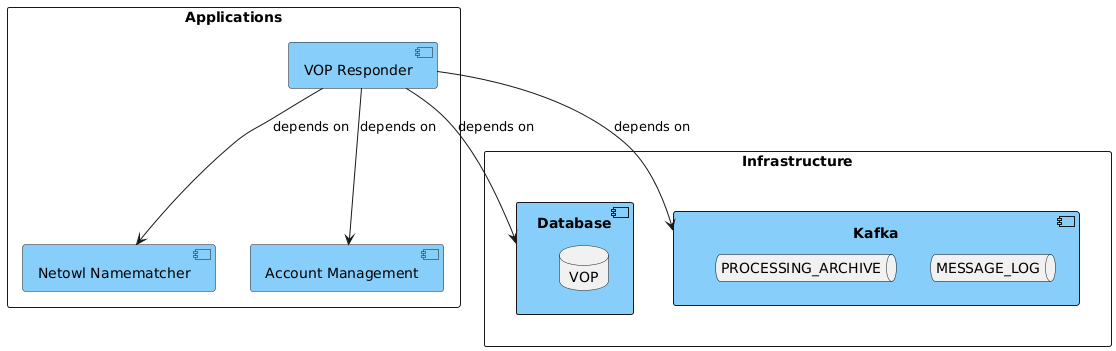
-
Netowl Namematcher - Used by VoP via Identity Resolution (embedded) as the third party provider for name matching.
-
Account Management - Used by VoP for looking up the account details used in matching
-
Database - MonogoDB/Cosmos used for licensing and optionally message logging
-
Kafka - Used by VoP for message logging and storing the processing archive
Configuration and Runtime
The Verification of Payee (VoP) is a stand-alone application that can be run as a service much like any other IPF application deployment. The VoP Responder service can be run as a single instance or multiple. (Further details on performance tuning will be delivered in future releases).
Configuration
The below docker compose configuration is the minimum required for the VoP Responder service to run.
| VoP Responder does not require an Akka Cluster to be configured. |
ipf {
  mongodb.url = "mongodb://ipf-mongo:27017/vop"  (1)
}

common-kafka-client-settings {
  bootstrap.servers = "kafka:9092" (2)
}
akka {
  kafka {
    producer {
      kafka-clients = ${common-kafka-client-settings}
    }
    consumer {
      kafka-clients = ${common-kafka-client-settings}
      kafka-clients.group.id = vop-responder-consumer-group
    }
  }
}

ipf.verification-of-payee.responder.account-management.http.client {
  host = account-management-sim (3)
  port = 8080
}

identity-resolution.comparison.netowl {
  default {
    http.client {
      host = netowl-namematcher (4)
      port = 8080
    }
  }
  table {
    http.client {
      host = netowl-namematcher (4)
      port = 8080
    }
  }
}
Note the following key aspects:
| 1 | Set the MongoDB URL as appropriate for your environment |
| 2 | Set the Kafka URL as appropriate for your environment |
| 3 | Set the Account Management hostname and port as appropriate for your environment |
| 4 | Set the Identity Resolution Netowl hostname and port as appropriate for your environment |
Running
The following docker compose is a VoP Responder service deployment that contains all the required infrastructure/applications (Kafka, MongoDB, Netowl) needed to run the VoP Responder application.
| This represents a sample configuration and is not intended to represent performance concerns which will be covered in another section in future releases. |
services:

  # Infrastructure
  ipf-mongo:
    image: ${docker.registry}/ipf-docker-mongodb:latest
    container_name: ipf-mongo
    ports:
      - "27018:27017"
    healthcheck:
      test: echo 'db.runCommand("ping").ok' | mongo localhost:27017/test --quiet

  kafka:
    image: apache/kafka-native:4.0.0
    container_name: kafka
    ports:
      - "9092:9092"
      - "9093:9093"
    environment:
      - KAFKA_NODE_ID=1
      - KAFKA_AUTO_CREATE_TOPICS_ENABLE=true
      - KAFKA_CONTROLLER_QUORUM_VOTERS=1@localhost:9094
      - KAFKA_CONTROLLER_LISTENER_NAMES=CONTROLLER
      - KAFKA_PROCESS_ROLES=broker,controller
      - KAFKA_LOG_RETENTION_MINUTES=10
      - KAFKA_OFFSETS_TOPIC_REPLICATION_FACTOR=1
      - KAFKA_OFFSETS_TOPIC_NUM_PARTITIONS=1
      - KAFKA_LISTENERS=PLAINTEXT://:9092,LOCAL://:9093,CONTROLLER://:9094
      - KAFKA_LISTENER_SECURITY_PROTOCOL_MAP=LOCAL:PLAINTEXT,PLAINTEXT:PLAINTEXT,CONTROLLER:PLAINTEXT
      - KAFKA_ADVERTISED_LISTENERS=PLAINTEXT://kafka:9092,LOCAL://localhost:9093
      - KAFKA_CREATE_TOPICS=MESSAGE_LOG:1:1,PROCESSING_ARCHIVE:1:1

  # Apps
  account-management-sim:
    image: ${docker.registry}/account-management-simulator:${project.version}
    container_name: account-management-sim
    ports:
      - "8082:8080"
      - "55555:55555"
      - "5006:5005"
    volumes:
      - ${docker-logs-directory}:/ipf/logs
      - ./config/account-management-sim:/account-management-simulator/conf
    user: "1000:1000"
    healthcheck:
      test: [ "CMD", "curl", "-f", "http://localhost:55555/statistics" ]
      interval: 1s
      timeout: 1s
      retries: 90

  netowl-namematcher:
    image: ${docker.registry}/netowl-namematcher:4.9.5.2
    container_name: netowl-namematcher
    ports:
      - "8081:8080"
    volumes:
      - ./config/netowl-namematcher:/var/local/netowl-data/
    healthcheck:
      test: [ "CMD", "curl", "-f", "http://localhost:8080/api/v2" ]
      interval: 1s
      timeout: 1s
      retries: 90

  vop-responder-app:
    image: ${docker.registry}/verification-of-payee-responder-application:${project.version}
    container_name: vop-responder-app
    ports:
      - "8080:8080"
      - "5005:5005"
    volumes:
      - ${docker-logs-directory}:/ipf/logs
      - ./config/vop-responder-app:/verification-of-payee-responder-application/conf
    user: "1000:1000"
    environment:
      - IPF_JAVA_ARGS=-Dma.glasnost.orika.writeClassFiles=false -Dma.glasnost.orika.writeSourceFiles=false -Dconfig.override_with_env_vars=true
    depends_on:
      - ipf-mongo
      - kafka
    healthcheck:
      test: [ "CMD", "curl", "http://localhost:8080/actuator/health" ]
Note the following key aspects:
-
Mongo and Kafka containers are third party images and not supplied by Icon Solutions
-
Account Management Simulator is added for illustration purposes and is not supplied by Icon Solutions but should be a customer implementation conforming to the Account Management API
-
The Netowl image above is a third party container not supplied by ICON and is currently being used by Identity Resolution Service, which is running embedded in the VoP Responder app. For more details on this, please review the Identity Resolution documentation. If a separate instance already exists in the customer environment, any customisations should be re-applied here if using a new image.
-
The VoP Responder app is created by Icon Solutions and hosted in our ipf-releases repository in Nexus.