Determining Applied Limits
Limit check criteria is applied based on different limits that are configured for a given Agent, Participant or country.
As part of limit criteria evaluation, configured values are taken into account to determine "Applied Limit Category" and "Applied Limit Value". The transfer amount on the reachability request is compared with the "Applied Limit Value" and limit criteria is marked as "Met" when Transfer Amount is less than or equal to "Applied Limit Value". Limits can be specified at below levels:
| Limit Category | Configured on Dynamic Configuration | Source of Limits Data | Description |
|---|---|---|---|
Agent Limits |
Agent Settlement Settings |
Agents, Processing Entity Policy |
1) Limits defined at Agent level when the Agents enforce these limits (e.g. Limits enforced by the schemes). 2) In the scenarios where the agents do not enforce the limits but the processing entity wants to set limits themselves as a policy, or if the processing entity wants to specify different limits for the Agent than those enforced by the agents themselves (ideally lower than limits enforced by the agent), these limits can be configured here. |
Agent Supplied Participant Limits |
CSM Participants |
Agents (through membership data loaded to "CSM Participant" dynamic configuration) |
Limits that participants have conveyed to the CSM Agents on the amounts they are willing to accept on individual inbound transactions by them. These are loaded on CSM Participants as part of Industry data load. The processing entity should consider these limits when supplied to ensure the transactions are not rejected by participants through specified CSM Agent. |
Custom Participant Limits |
Agent Settlement Settings |
Processing Entity Policy |
Custom limits set by Processing Entity against specific participants of the CSM Agents. These are set up by the clients implementations on Agent Settlement Settings. |
Custom Country Limits |
Agent Settlement Settings |
Processing Entity Policy |
Custom limits that the Processing Entity wants to apply to all the participants of the agents in a given country. These are part of the Processing entity policy usually so transfer amounts can be controlled to a country as a risk control measure. |
Limits Configuration - Key considerations
Limits are an important factor in determining the reachability check is done in line with the limits set by Agents, participants as well as those defined by the Processing Entity as a policy against agents, participants or countries.
Few important points should be considered for limit configuration and determination of applied limit value.
-
Limit criteria check is only performed when the reachability request includes a transfer amount. If the reachability check is required without limit criteria check being done, then the requests should be made without transfer amounts where only Settlement and participation criteria are applied.
-
The limit criteria check is possible only when the transfer currency is same as that of the settlement account currency for given CSM Agent. If transfer currency and settlement currency are different, limit criteria will be marked "Unknown" and overall reachability result will be marked "Unknown" with relevant reason code returned. Limit checks in this scenario can be supported in future IPF releases.
-
When multiple settlement accounts are configured for settling a currency with an Agent (with transfer direction as "Outbound" or "Bidirectional"), then the limit checks for a payment in said transfer currency will be marked as "Unknown" resulting in overall reachability result being marked "Unknown".
-
As part of reachability check, only limits with "Outbound" direction are applied when configured and applicable. Inbound limits, even if configured are not included for reachability check as this operation has an "outbound" context from processing entity’s point of view and "Inbound" limits do not apply for this operation.
| If a country code is not provided with an industry identifier of type NCC, then any country specific limits will not be taken into account when determining applied limits to a transaction. This is because country limits are applicable for the country where an entity is located and without country code, the ISO20022 sub-type value for NCCs do not provide reliable information about the country of the entity. |
Determination of applied limit category
The limits set from reachability point of view can be broadly grouped under two categories:
-
Policy limits
-
Policy limtis are the limits set by the Processing Entity as part of the policy and not enforced externally by the CSM Agents or other participants
-
Custom Participant Limits and Custom Country limits fall into this category.
-
When both Custom Participant limits and Custom country limits are configured for the counterparty in question, Custom participant limit is always chosen as preferred policy limit and custom country limits are not applied.
-
-
External Enforced Limtis
-
These limits are enforced by entities external to processing Entity and the payments will be rejected by these entities if the payment amounts exceed specified amounts.
-
Agent Limit and Agent Supplied Participant limit fall into this category.
-
An important aspect in limit determination is the flag HigherParticipantLimits allowed for the CSM Agents, which states if the agents allow participants to set higher limits than the limits enforced by themselves.
-
During limit determination, when both Policy limits and external enforced limits are encountered then policy limits are applied as long as they do not exceed the external enforced limits to ensure the payments are not rejected by external entities.
Below workflow shows how the limits are applied by the CSM Reachability Service. The request parameters represent different configurable limits as explained before.
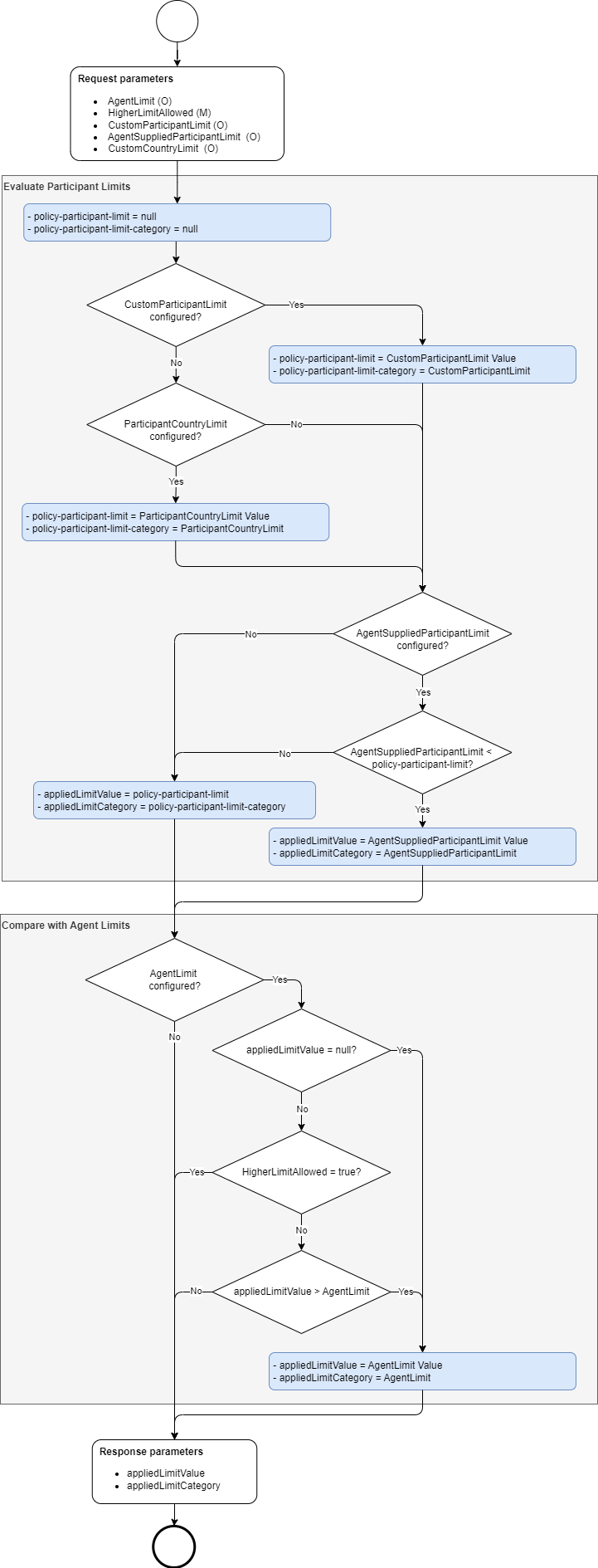
Limit Calculation example
Below are representative examples of how 'Applied Limit Category' and 'Applied Limit Value' are determined.
A few important points to note:
-
The values "--" in the table below represents that the limit is not configured.
-
A value of '0' is considered as configured and will be applied in the scenario where corresponding limit category takes priority. An applied limit value of '0' would mean limit check criteria will fail for any valid amount greater than '0', if corresponding limit category is applied for the request.
| No | Custom Participant Limit | Custom Country Limit | Agent Supplied Participant Limit | Agent Limit | Higher Participant Limit Allowed | Applied Limit Value | Applied Limit Category | Comments |
|---|---|---|---|---|---|---|---|---|
1 |
— |
— |
— |
— |
TRUE|FALSE |
— |
— |
No limits configured, limit criteria check passes. |
2 |
— |
— |
— |
100,000.00 |
TRUE|FALSE |
100,000.00 |
AgentLimit |
Agent limit is the only limit configured. |
3 |
— |
— |
100,000.00 |
— |
TRUE|FALSE |
100,000.00 |
AgentSuppliedParticipantLimit |
Agent Supplied Participant Limit is the only one configured. |
4 |
— |
100,000.00 |
— |
— |
TRUE|FALSE |
100,000.00 |
ParticipantCountryLimit |
Custom Country Limit is the only limit configured. |
5 |
100,000.00 |
— |
— |
— |
TRUE|FALSE |
100,000.00 |
CustomParticipantLimit |
Custom Participant Limit is the only one configured. |
6 |
100,000.00 |
100,000.00 |
— |
— |
TRUE|FALSE |
100,000.00 |
CustomParticipantLimit |
Custom Participant Limit is higher priority than Custom Country Limit. |
7 |
100,000.00 |
100,000.01 |
— |
— |
TRUE|FALSE |
100,000.00 |
CustomParticipantLimit |
Custom Participant Limit is higher priority than Custom Country Limit. |
8 |
100,000.00 |
99,999.99 |
— |
— |
TRUE|FALSE |
100,000.00 |
CustomParticipantLimit |
Custom Participant Limit is higher priority than Custom Country Limit. |
9 |
100,000.00 |
100,000.00 |
100,000.00 |
— |
TRUE|FALSE |
100,000.00 |
CustomParticipantLimit |
Custom Participant Limit is higher priority than Custom Country Limit and not greater than Agent Supplied Participant Limit. |
10 |
100,000.00 |
100,000.00 |
100,000.01 |
— |
TRUE|FALSE |
100,000.00 |
CustomParticipantLimit |
Custom Participant Limit is higher priority than Custom Country Limit and not greater than Agent Supplied Participant Limit. |
11 |
100,000.00 |
100,000.00 |
99,999.99 |
— |
TRUE|FALSE |
99,999.99 |
AgentSuppliedParticipantLimit |
Agent Supplied Participant Limit is lower than Custom Participant Limit. |
12 |
— |
— |
100,000.00 |
100,000.00 |
TRUE |
100,000.00 |
AgentSuppliedParticipantLimit |
Agent Supplied Participant Limit takes priority, higher participant limit allowed. |
13 |
— |
— |
100,000.01 |
100,000.00 |
TRUE |
100,000.01 |
AgentSuppliedParticipantLimit |
Agent Supplied Participant Limit takes priority, higher participant limit allowed. |
14 |
— |
— |
99,999.99 |
100,000.00 |
TRUE |
99,999.99 |
AgentSuppliedParticipantLimit |
Agent Supplied Participant Limit takes priority, higher participant limit allowed. |
15 |
100,000.00 |
100,000.00 |
— |
100,000.00 |
TRUE |
100,000.00 |
CustomParticipantLimit |
Custom Participant Limit takes priority, higher participant limit allowed. |
16 |
100,000.01 |
100,000.00 |
— |
100,000.00 |
TRUE |
100,000.01 |
CustomParticipantLimit |
Custom Participant Limit takes priority, higher participant limit allowed. |
17 |
99,999.99 |
100,000.00 |
— |
100,000.00 |
TRUE |
99,999.99 |
CustomParticipantLimit |
Custom Participant Limit takes priority, higher participant limit allowed. |
18 |
— |
100,000.00 |
— |
100,000.00 |
TRUE |
100,000.00 |
ParticipantCountryLimit |
Custom Country Limit takes priority, higher participant limit allowed. |
19 |
— |
100,000.01 |
— |
100,000.00 |
TRUE |
100,000.01 |
ParticipantCountryLimit |
Custom Country Limit takes priority, higher participant limit allowed. |
20 |
— |
99,999.99 |
— |
100,000.00 |
TRUE |
99,999.99 |
ParticipantCountryLimit |
Custom Country Limit takes priority, higher participant limit allowed. |
21 |
100,000.00 |
100,000.00 |
100,000.00 |
100,000.00 |
TRUE |
100,000.00 |
CustomParticipantLimit |
Custom Participant Limit takes priority, higher participant limit allowed. |
22 |
100,000.00 |
100,000.00 |
100,000.01 |
100,000.00 |
TRUE |
100,000.00 |
CustomParticipantLimit |
Custom Participant Limit takes priority, higher participant limit allowed. |
23 |
100,000.00 |
100,000.00 |
99,999.99 |
100,000.00 |
TRUE |
99,999.99 |
AgentSuppliedParticipantLimit |
Agent Supplied Participant Limit is lower than Custom Participant Limit. |
24 |
100,000.01 |
100,000.00 |
100,000.00 |
100,000.00 |
TRUE |
100,000.00 |
AgentSuppliedParticipantLimit |
Agent Supplied Participant Limit is lower than Custom Participant Limit. |
25 |
100,000.02 |
100,000.00 |
100,000.01 |
100,000.00 |
TRUE |
100,000.01 |
AgentSuppliedParticipantLimit |
Agent Supplied Participant Limit is lower than Custom Participant Limit. |
26 |
100,000.01 |
100,000.00 |
100,000.02 |
100,000.00 |
TRUE |
100,000.01 |
CustomParticipantLimit |
Custom Participant Limit takes priority, higher participant limit allowed. |
27 |
99,999.99 |
100,000.00 |
99,999.99 |
100,000.00 |
TRUE |
99,999.99 |
CustomParticipantLimit |
Custom Participant Limit takes priority, higher participant limit allowed. |
28 |
99,999.99 |
100,000.00 |
100,000.00 |
100,000.01 |
TRUE |
99,999.99 |
CustomParticipantLimit |
Custom Participant Limit takes priority, higher participant limit allowed. |
29 |
99,999.99 |
100,000.00 |
99,999.98 |
100,000.00 |
TRUE |
99,999.98 |
AgentSuppliedParticipantLimit |
Agent Supplied Participant Limit is lower than Custom Participant Limit. |
30 |
— |
100,000.00 |
100,000.00 |
100,000.00 |
TRUE |
100,000.00 |
ParticipantCountryLimit |
Custom Country Limit takes priority, higher participant limit allowed. |
31 |
— |
100,000.00 |
100,000.01 |
100,000.00 |
TRUE |
100,000.00 |
ParticipantCountryLimit |
Custom Country Limit takes priority, higher participant limit allowed. |
32 |
— |
100,000.00 |
99,999.99 |
100,000.00 |
TRUE |
99,999.99 |
AgentSuppliedParticipantLimit |
Agent Supplied Participant Limit is lower than Custom Country Limit. |
33 |
— |
— |
100,000.00 |
100,000.00 |
FALSE |
100,000.00 |
AgentSuppliedParticipantLimit |
Agent Supplied Participant Limit is not lower than Agent limit. |
34 |
— |
— |
100,000.01 |
100,000.00 |
FALSE |
100,000.00 |
AgentLimit |
Agent Supplied Participant Limit is lower than Agent limit. |
35 |
— |
— |
99,999.99 |
100,000.00 |
FALSE |
99,999.99 |
AgentSuppliedParticipantLimit |
Agent Supplied Participant Limit is not lower than Agent limit. |
36 |
100,000.00 |
100,000.00 |
— |
100,000.00 |
FALSE |
100,000.00 |
CustomParticipantLimit |
Custom Participant Limit takes priority. |
37 |
100,000.01 |
100,000.00 |
— |
100,000.00 |
FALSE |
100,000.00 |
AgentLimit |
Agent Limit less than Custom Participant Limit. |
38 |
99,999.99 |
100,000.00 |
— |
100,000.00 |
FALSE |
99,999.99 |
CustomParticipantLimit |
Custom Participant Limit takes priority. |
39 |
— |
100,000.00 |
— |
100,000.00 |
FALSE |
100,000.00 |
ParticipantCountryLimit |
Custom Country Limit takes priority. |
40 |
— |
100,000.01 |
— |
100,000.00 |
FALSE |
100,000.00 |
AgentLimit |
Agent Limit less than Custom Country Limit. |
41 |
— |
99,999.99 |
— |
100,000.00 |
FALSE |
99,999.99 |
ParticipantCountryLimit |
Custom Country Limit takes priority. |
42 |
100,000.00 |
100,000.00 |
100,000.00 |
100,000.00 |
FALSE |
100,000.00 |
CustomParticipantLimit |
Custom Participant Limit takes priority. |
43 |
100,000.00 |
100,000.00 |
100,000.01 |
100,000.00 |
FALSE |
100,000.00 |
CustomParticipantLimit |
Custom Participant Limit takes priority. |
44 |
100,000.00 |
100,000.00 |
99,999.99 |
100,000.00 |
FALSE |
99,999.99 |
AgentSuppliedParticipantLimit |
Agent Supplied Participant Limit less than Custom Participant Limit. |
45 |
100,000.01 |
100,000.00 |
100,000.00 |
100,000.00 |
FALSE |
100,000.00 |
AgentSuppliedParticipantLimit |
Agent Supplied Participant Limit less than Custom Participant Limit. |
46 |
100,000.02 |
100,000.00 |
100,000.01 |
100,000.00 |
FALSE |
100,000.00 |
AgentLimit |
Agent Limit less than Agent Supplied Participant Limit. |
47 |
100,000.01 |
100,000.00 |
100,000.02 |
100,000.00 |
FALSE |
100,000.00 |
AgentLimit |
Agent Limit less than Custom Participant Limit. |
48 |
99,999.99 |
100,000.00 |
99,999.99 |
100,000.00 |
FALSE |
99,999.99 |
CustomParticipantLimit |
Custom Participant Limit takes priority. |
49 |
99,999.99 |
100,000.00 |
100,000.00 |
100,000.01 |
FALSE |
99,999.99 |
CustomParticipantLimit |
Custom Participant Limit takes priority. |
50 |
99,999.99 |
100,000.00 |
99,999.98 |
100,000.01 |
FALSE |
99,999.98 |
AgentSuppliedParticipantLimit |
Agent Supplied Participant Limit less than Custom Participant Limit. |
51 |
— |
100,000.00 |
100,000.00 |
100,000.00 |
FALSE |
100,000.00 |
ParticipantCountryLimit |
Custom Country Limit takes priority. |
52 |
— |
100,000.01 |
100,000.01 |
100,000.00 |
FALSE |
100,000.00 |
AgentLimit |
Agent Limit less than Agent Supplied Participant Limit. |
53 |
— |
100,000.00 |
99,999.99 |
100,000.01 |
FALSE |
99,999.99 |
AgentSuppliedParticipantLimit |
Agent Supplied Participant Limit less than Custom Country Limit. |
54 |
0.00 |
100,000.00 |
100,000.00 |
100,000.00 |
TRUE|FALSE |
0.00 |
CustomParticipantLimit |
Custom Participant Limit takes priority. |
55 |
— |
0.00 |
100,000.00 |
100,000.00 |
TRUE|FALSE |
0.00 |
ParticipantCountryLimit |
Custom Country Limit takes priority. |
56 |
— |
100,000.00 |
0.00 |
100,000.00 |
TRUE|FALSE |
0.00 |
AgentSuppliedParticipantLimit |
Agent Supplied Participant Limit takes priority. |
57 |
— |
— |
100,000.00 |
0.00 |
TRUE |
100,000.00 |
AgentSuppliedParticipantLimit |
Agent Supplied Participant Limit takes priority. |
58 |
— |
— |
100,000.00 |
0.00 |
FALSE |
0.00 |
AgentLimit |
Agent Limit less than Agent Supplied Participant Limit. |
59 |
— |
— |
— |
0.00 |
TRUE|FALSE |
0.00 |
AgentLimit |
Agent Limit is the only one configured. |
Reachability Reason Codes
If transfer amount is greater than applied limit value, limit criteria check is deemed as "Not Met" and overall reachability request in turn is marked as "No" even if Settlement and Participation criteria checks have passed. This is because configured limits will prevent the payment from proceeding.
When Limit check criteria fails, the Reachability response will be provided with below Reason Code and Reason Code description. - Reason code: IPFRCH008 - Reason code description: Transfer amount is greater than allowed limits.