Archiving
Archiving bundles and exports unit of work data in a standard IPF Processing Data envelope. Only unit of works that have reached a terminal state will be "archived".
Overview
Archiving behaviour is outlined in the following sequence diagram.
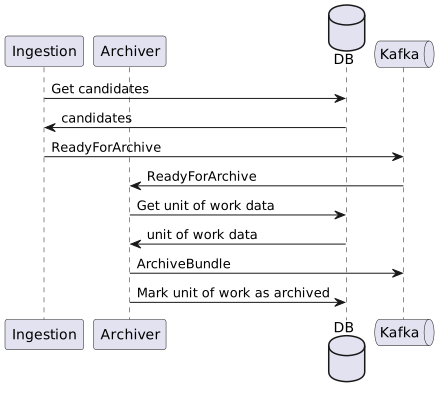
ODS Ingestion performs candidate selection, and publishes those candidates in a ReadyForArchive notification to a Kafka topic.
IPF Archiver consumes the notifications, and for each candidate within, it fetches all its data and produces an archive bundle, which is published to Kafka.
Candidate Selection
Candidate selection is where unit of works are identified as ready for archive. It is performed by ODS Ingestion, and is disabled by default.
Candidates are selected when they have reached a terminal state, e.g. they have a finishedAt timestamp, and that timestamp is within the current one-hour selection window.
Selection Window
The selection window is a one-hour period of time.
Queries are made for unit of works that have finished within that window.
The selection window is always a date, and an hour, e.g. {2023-12-18, 7} is a window on the 18 December 2023 with a time range of [07:00..08:00).
The finishedAt timestamp of a unit of work must satisfy {finishedAt | lowerBound ⇐ finishedAt < upperBound} to be eligible for candidate selection.
When all candidates have been selected from a window, it moves to the next window, e.g. {2023-12-18, 8}, then {2023-12-18, 9}, and so on.
At the end of the day, e.g. {2023-12-18, 23}, the next window is {2023-12-19, 0}.
The finishedAt timestamp and the selection window queries are always in UTC, e.g. a selection window of {2023-12-18, 9} has a lower bound of 2023-12-18T09:00:00Z, and an upper bound of 2023-12-18T09:59:59.999999999Z.
Grace Period
The grace period, is a period of time that candidate selection will wait until a unit of work is eligible for archive. It must be expressed in either hours or days, and the smallest grace period is 1 hour.
The start of the grace period is calculated by subtracting the grace period from the current hour.
e.g. it is currently 2023-12-18T13:49:21Z, and the grace period is one-hour.
The lower bound of the grace period is the current hour of 13, minus the grace period of 1 hour, resulting in 2023-12-18T12:00:00Z.
Because the minutes and seconds are ignored, the grace period is usually larger than the configured period, up to 00:59:59.999999 more.
Initial Selection Behaviour
When candidate selection runs for the very first time, you must tell it where to start from, e.g. the first window. If this is not configured explicitly, a warning will be logged, and candidate selection will fail.
Once candidate selection has run successfully at-least once, this configuration has no effect.
Date
The initial window can be a configured start date, which is always at the start of that day, e.g. a date of 2023-12-01 results in an initial window of {2023-12-01, 0}.
Latest
Takes the current date and hour, subtracts the grace period, and starts at the hour before that.
If it is currently 2023-12-18T13:49:21Z, the current hour is 13. Subtract the grace period, e.g. 1 hour, resulting in 12, and start from the hour before that, 11. The initial window is {2023-12-18, 11}.
Visualisation
Given the current time is 15:15, the grace period is 4-hours, or [11:00..15:15], and the current selection window is [9..10).
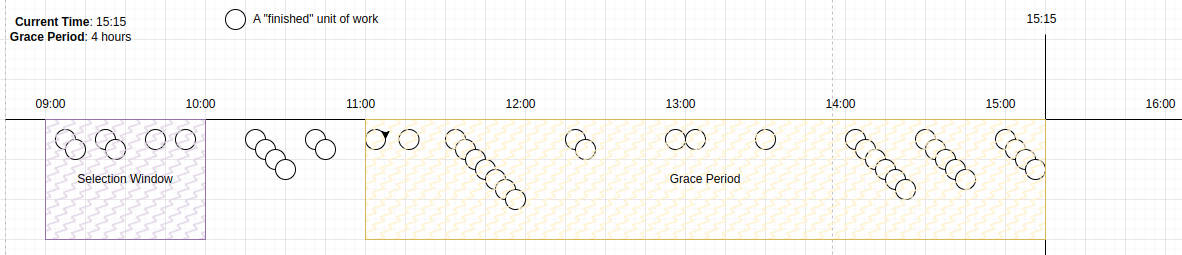
Once all candidates in the selection window have been selected, which may be in a single query, or many smaller queries, the window moves to [10..11).
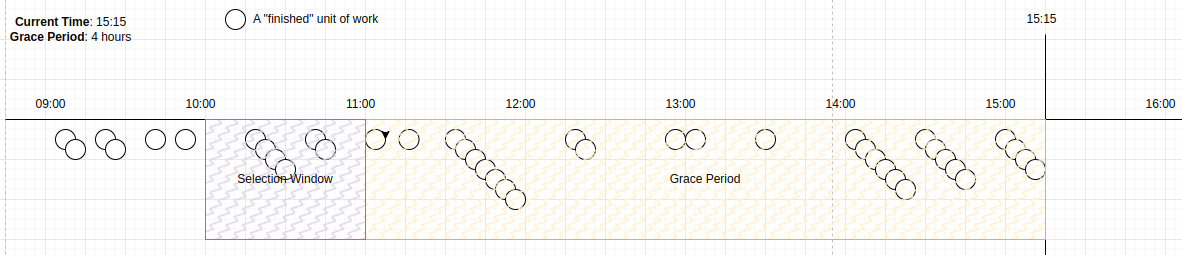
Once all candidates in the selection window have been selected, the window moves to [11..12).
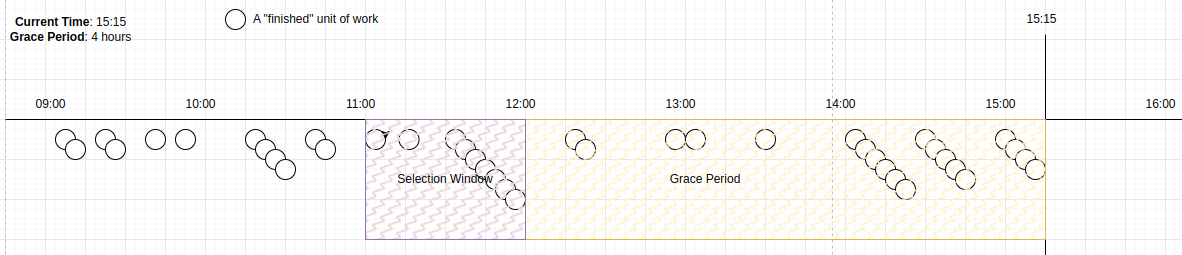
This selection window is now within the grace period. No candidates are selected until time progresses, such that the selection window is outside the grace period.
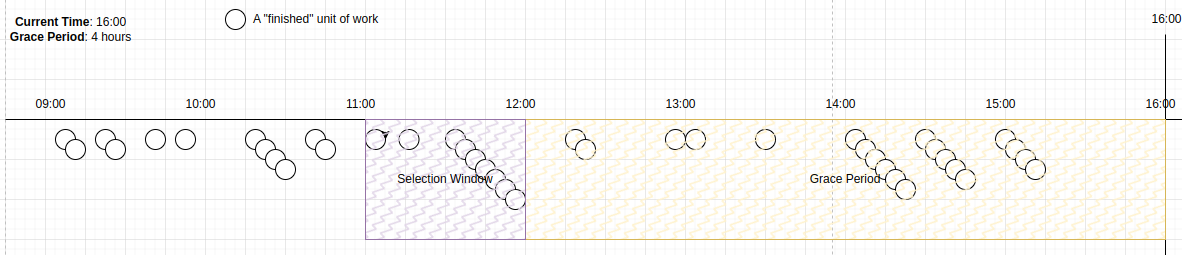
When the current time reaches 16:00, the grace period becomes [12:00..16:00], and the selection window [11:00..12:00) becomes eligible.
Candidates within this window will now be selected.
Ready For Archive Notifications
Candidates that are selected for archive are published in a ReadyForArchive notification, which contains the candidates selected, the window they were selected within, and its sequence number within the current selection window.
Each notification will indicate if it is the last notification for the current window.
Examples
If there are three candidates for the hour 12, and the fetch size is 2, the following notifications might be sent.
{
  "candidates": ["unit-of-work-1", "unit-of-work-2"],
  "window": {
    "date": "2023-12-18",
    "hour": 12,
    "notificationSequence": 1
  },
  "lastNotificationInWindow": false
}
{
"candidates": ["unit-of-work-3"],
"window": {
"date": "2023-12-18",
"hour": 12,
"notificationSequence": 2
},
"lastNotificationInWindow": true
}If there are no candidates for the hour 13, the following notification would be sent.
{
  "candidates": [],
  "window": {
    "date": "2023-12-18",
    "hour": 13,
    "notificationSequence": 1
  },
  "lastNotificationInWindow": true
}
State
Candidate selection state is created on first execution, and updated on each subsequent execution.
The initial state might look something like…
{
  "date": "2023-12-18",
  "hour": "12",
  "checkpoint": null,
  "notificationSequence": 1
}
The date and hour represent the current selection window.
The checkpoint is the last candidate we saw within the window.
The notification sequence is a number that increments on each execution until the window is progressed, when it becomes 1 again.
When candidates are selected for this state, it is updated.
{
  "date": "2023-12-18",
  "hour": "12",
  "checkpoint": "unit-of-work-6",
  "notificationSequence": 2
}
If there are no more candidates in the window, we move to the next window.
{
  "date": "2023-12-18",
  "hour": "13",
  "checkpoint": null,
  "notificationSequence": 1
}
Configuration
Candidate selection executes frequently, and selects a maximum number of candidates on each execution. You can control the candidate selection throughput by configuring both the frequency of execution, and the fetch-size for each execution.
All configuration properties are prefixed with ipf.archiver.candidate-selection.
Default Candidate Selection Configuration
ipf {
  archiver {
    candidate-selection {
      enabled = false

      # Define what should happen when candidate selection is executed for the first time
      initial-execution-behaviour {
        # Define the initial window for candidate selection, e.g. the time period in which to search for finished unit of works.
        # LATEST    = The latest window given the current datetime and the grace period
        # DATE      = Define a specific date with a `start-date` property, e.g. `start-date = 2023-11-01`
        # UNDEFINED = The default. Candidate selection will fail if this property is used on the first execution
        window = UNDEFINED

        # An example start-date when a specific date is used (window = DATE) for the initial window
        # start-date = 2023-11-01
      }

      # Minimum time to wait before selecting a candidate unit of work once it has reached a terminal state
      grace-period = 2H

      # How many archive candidates to fetch on each invocation of the scheduler (see scheduler config below)
      fetch-size = 1000

      # Journey types to select for archive. If null or empty, then any journey type will be archived
      eligible-journey-types = []

      scheduler {
        # How long to wait once ODS has started before checking for archive candidates
        initial-delay = 1M

        # How often to check for archive candidates, fetching `fetch-size` candidates each time. See `fetch-size` above.
        frequency = 10s

        restart-settings {
          min-backoff = 1s
          max-backoff = 1s
          jitter-factor = 0.2
        }
      }
    }
  }
}| Property | Default | Description |
|---|---|---|
|
|
Enables candidate selection, which is disabled by default. |
|
|
A period of time expressed in either hours, e.g. |
|
|
The maximum number of candidates to select each time candidate selection is executed. |
|
|
Defines the unit or work types that are eligible for archive. By default, all unit of work types will be archived. Configuring with |
Initial Execution Behaviour
All configuration properties are prefixed with ipf.archiver.candidate-selection.initial-execution-behaviour.
| Property | Default | Description |
|---|---|---|
|
|
Either |
|
The initial execution window start date, e.g. |
Scheduler
All configuration properties are prefixed with ipf.archiver.candidate-selection.scheduler.
| Property | Default | Description |
|---|---|---|
|
|
The period of time to wait once the application has started before starting to look for archive candidates. By default, it waits 1 minute. |
|
|
How often the candidate selection is executed. By default, it is every 10 seconds. |
Scheduler error handing supervisor settings are configured under ipf.archiver.candidate-selection.scheduler.restart-settings.
| Property | Default | Description |
|---|---|---|
|
|
|
|
|
|
|
|
Archive Bundling
Archive bundles are produced as IPF Processing Data envelopes containing data for a single unit of work. The data is built by querying the ODS database directly.
ODS consumes IPF Processing Data envelopes, and transforms and persists in its own data model. Archiving takes the ODS model and transforms back into the IPF Processing Data model.
The archive bundles are produced in IPF Processing Data schema V2 by default.
The archive bundles are also produced without a summary view related to the unit of work by default. This can be changed by setting ipf.archiver.bundle.includes-summary = true this will include the summary view in a custom object representation.
Below is an example representation of the custom object containing the summary view. While the summary view is a string it can be deserialized into an object from the ODS Inquiry API specification. The exact ODS Inquiry schema object will be defined in the key field. In the example below the ODS Inquiry schema object used is the SummaryView.
Example Summary Custom Object
{
"key" : "SummaryView",
"value" : "{\"class\":\"SummaryView\",\"createdAt\":\"2023-12-04T11:00:00Z\",\"unitOfWorkId\":\"unit-of-work-3\",\"terminal\":false,\"failure\":false,\"clientRequestId\":\"KNOWN\",\"processingEntity\":\"processing-entity-3\"}",
"uniqueId" : "a91e3f60-0da6-49e8-bdec-958c51218bb9",
"createdAt" : "2025-03-14T15:08:31.440Z"
}
Data
Not all data received by ODS makes it into the archive bundle. In some cases the data is ignored completely, in other cases only the latest version of a particular object is included. Data that does not belong to a unit of work is ignored.
| ODS Data | Included in Bundle? | Notes |
|---|---|---|
Message Log |
yes |
|
Process Flow Event |
yes |
|
MDS |
yes |
All versions of all MDS objects are included |
PDS |
yes |
All versions of all PDS objects are included |
Custom Object |
yes |
All custom objects are included, as well as a custom object representation of the summary view related to the unit of work, if enabled. |
System Event |
no |
System events for a unit of work are ignored. |
Process Flow Definition |
no |
Process Flow Definitions do not belong to a unit of work |
Export
Bundles are exported to Kafka.
Configuration
Default ReadyForArchive Notification Exporter Configuration
ipf.archiver.candidate-selection {
  # Archiver connectors disabled by default
  enabled = false
  exporter {
    # Default resiliency settings applied to the exporter SendConnector
    max-attempts = 5
    minimum-number-of-calls = 10
    initial-retry-wait-duration = 1s

    kafka {
      # Kafka producer config specifying topic, client id and restart-settings for the exporter KafkaConnectorTransport
      producer {
        topic = IPF_ARCHIVER_CANDIDATES
        restart-settings = {
          min-backoff = 1s
          max-backoff = 5s
          random-factor = 0.25
          max-restarts = 5
          max-restarts-within = 10m
        }
        kafka-clients {
          client.id = ipf-achiver-candidate-exporter-client
        }
      }
    }
  }
}
# Configure to false if summaries are not being used in ODS Ingestion
ods.summary.enabled = true| Disable ods.summary.enabled if ODS Ingestion instance does not produce any summary documents. |
IPF Archiver
IPF Archiver is a runnable application that consumes ReadyForArchive notifications, and builds and exports archive bundles for each candidate it contains.
IPF Archiver must be deployed alongside an ODS Ingestion instance. ODS Ingestion will perform candidate selection and send notifications.
Both IPF Archiver and ODS Ingestion will share a database instance.
Consuming Ipf Archiver Bundles
To consume the archive bundles, you will need to implement com.iconsolutions.ipf.archiver.bundle.IpfArchiverBundleHandler and register it as a spring bean. Additionally, you will need to depend on 'ipf-archiver-bundle-consumer' module which instantiates a receive connector for the IPF_ARCHIVER_BUNDLES kafka topic.
ipf-archiver-bundler-api provides the IpfArchiverBundleHandler interface:
<dependency>
    <groupId>com.iconsolutions.ipf.archiver</groupId>
    <artifactId>ipf-archiver-bundler-api</artifactId>
</dependency>
ipf-archiver-bundler-consumer provides a pre-built receive connector for the IPF_ARCHIVER_BUNDLES kafka topic. This connector uses IpfArchiverBundleHandler to handle the received bundles:
This dependency will also pull in ipf-archiver-bundler-api as a transitive dependency
|
<dependency>
    <groupId>com.iconsolutions.ipf.archiver</groupId>
    <artifactId>ipf-archiver-bundler-consumer</artifactId>
</dependency>
Configuration
Default Bundle Consumer Configuration
ipf.archiver.bundle.consumer {
  resiliency {
    max-attempts = 30
  }
  kafka {
    # Kafka consumer config specifying topic, group id and restart-settings for the consumer KafkaReceiveConnectorTransport
    consumer {
      topic = IPF_ARCHIVER_BUNDLES
      restart-settings = {
        min-backoff = 1s
        max-backoff = 5s
        random-factor = 0.25
        max-restarts = 5
        max-restarts-within = 10m
      }
      kafka-clients {
        group.id = ipf-achiver-bundle-consumer-group
      }
    }
  }
}