Getting Started
Prerequisites
This starter guide assumes you have access to the following:
-
A flow which is preloaded with the IPF Business Functions.
It demonstrates adding a Single Duplicate Check to a flow, you can also/alternatively add a Multiple Duplicate Check to a flow.
Integrating with a flow
1. Add The duplicate check solution and model to your MPS solution and model
From within the flow you want to add the duplicate check to, press Ctrl+R twice. Search for and select the IPF Duplicate Check model from the search bar that opens.

Select OK in the pop up window asking if you would like to import the modules automatically.
The checkSingleDuplicate domain function will now be available to use within your flow.
2. Use the check duplicate function within your flow
Use the checkSingleDuplicate function within your flow in the same way as you would for a domain function you have defined yourself.

You will need to define the input behaviour for all checkSingleDuplicateResponse response codes and map to your chosen event selection.
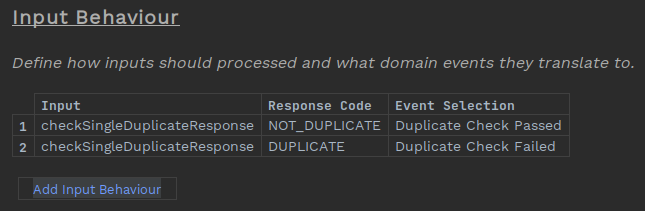
You can find more details on using domain functions at DSL 3 - Using a Domain Function. This shows all the associated MPS based changes to fully use a function within your flow.
3. Add the ipf-duplicate-check-floclient-service dependency
Add the ipf-duplicate-check-floclient-service as a dependency to the module that includes the bean for your domain declaration. If you generated your project from the icon archetype this will be named <your-project-name>-service
    <dependency>
        <groupId>com.iconsolutions.ipf.businessfunctions.duplicatecheck</groupId>
        <artifactId>ipf-duplicate-check-floclient-service</artifactId>
    </dependency>
Providing Custom Purging Configuration
The Duplicate Check Floclient uses a TransactionCachePurgingScheduler with the following default configuration for single duplicate checks:
ipf.duplicate-check-floclient.single.purging {
  scheduling-specification = "0 0 0 ? * *"
  retain-from-time = "00:00:00"
  retain-from-offset = "0 days"
}
Default configuration for multiple duplicate checks:
ipf.duplicate-check-floclient.multiple.purging {
  scheduling-specification = "0 15 0 ? * *"
  retain-from-time = "00:00:00"
  retain-from-offset = "0 days"
}
Provide your own values in your ipf-impl.conf or application.conf in order to customise the schedule to your needs. From the above, purging for single transaction cache entries will be done at 12:00 AM each day, and multiple transaction cache entries will be performed at 12:15 AM each day.
You can find more details on providing configuration values for the TransactionCachePurgingScheduler in the transaction cache documentation.
Automated Retries
If the MongoDB instance providing the transaction cache fails to respond, or responds with a failure, no response to the checkSingleDuplicate function call will be received by your flow.
You can implement Action Retries within your flow to manage such circumstances. DSL 7 - Handling Timeouts provides an example of their use.