Migration Steps for IPF-2024.4.0
Migration Steps for CSM Reachability
Limit Directions on Agent Settlement Settings
| This migration script is optional, however, it is highly recommended to run the following to ensure compatibility with future changes. This is because limit direction has been added as an option on Agent Settlement settings. |
If the script is run, the limitDirection field will be assigned a default value of OUTBOUND. If the script is not run, limitDirection will remain unset in the database, but will still be treated as OUTBOUND in the code.
db.getCollection("settings-agent-settlement-settings")
    .updateMany(
        { "payload.agentLimits.limitValue": {$exists: true} },
        { $set: { "payload.agentLimits.$[elem].limitDirection" : "OUTBOUND"}},
        { arrayFilters: [ { "elem.limitDirection": { $exists: false} } ] }
    )

db.getCollection("settings-agent-settlement-settings")
    .updateMany(
        { "payload.customParticipantLimits.limitValue": {$exists: true} },
        { $set: { "payload.customParticipantLimits.$[elem].limitDirection" : "OUTBOUND"}},
        { arrayFilters: [ { "elem.limitDirection": { $exists: false} } ] }
    )

db.getCollection("settings-agent-settlement-settings")
    .updateMany(
        { "payload.participantCountryLimits.limitValue": {$exists: true} },
        { $set: { "payload.participantCountryLimits.$[elem].limitDirection" : "OUTBOUND"}},
        { arrayFilters: [ { "elem.limitDirection": { $exists: false} } ] }
    )
Migration Steps for the Metrics Processor
Elements of the IPF Metrics Processor configuration have been decoupled from release-specific MPS flow versions and names.
Previously, when payment flows get a version bump or names of events or (global) states change, the configuration of the metrics processor would need to be updated in line with these changes, otherwise payments metrics would not be labeled correctly in Prometheus.
Three of Metrics Processor configurations that were based on flow versions and state names have been removed, with the specification of these being moved to the MPS Flow Definition.
These three config values require:
-
critical-path-duration- requires the configuration of global state names per payment type -
waiting-duration.waiting-states- used indicate where the payment flows had to wait for external responses -
tagged-with-htm-on-any-of- used to indicate that a payment went into HTM
Migration is currently optional, with the Metrics Processor still supporting the above Hocon configuration keys. However, it is recommended to update your MPS Payment Flows with the appropriate labels to indicate critical path and waiting states, then remove the existing Metrics Processor configuration.
Migration requires using MPS Flow Labels as a replacement for the HOCON configuration, see the Flow Orchestration documentation for more information about Labels.
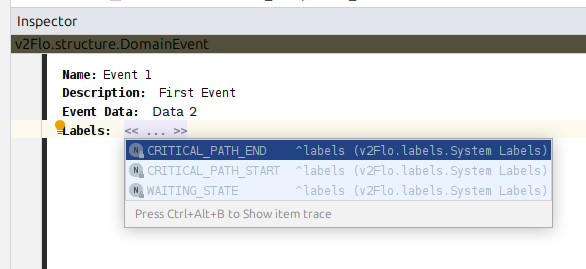
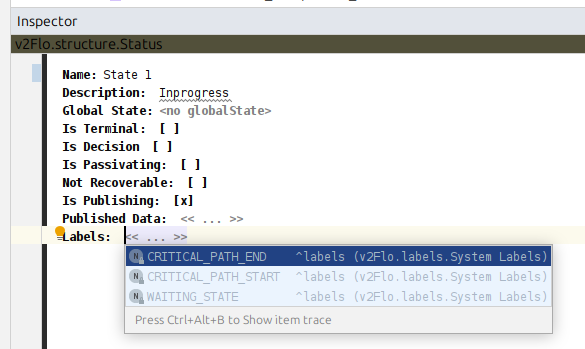
Labels can be added to both State Definitions and Event Definitions using the MPS Inspector window like so:
-
Inspector Window for Event Definitions
-
Inspector Window for State Definitions
Example Migration
The following steps will reference flow names and states from the below example Metrics Processor HOCON configuration as a guide to migrating your MPS Flow definitions. These flow names and states are purely an example, your existing implementation will be different.
ipf.business-metrics-processor.payment-metrics {
  htm {
    events = ["Manual Intervention", "Registered Task" ]
  }

  payment-duration {
    critical-path {
      critical-path-states-by-payment-type = [
        {
          payment-type = "InstantPayment"
          start-state = "Validating"
          end-state = "Instructing"
        }
      ]
    }

    waiting {
      waiting-states-by-flow = [
        {
          flow-name = "DebtorCT"
          states = ["Checking Bank System A", "Checking Bank System B", "Waiting for Response"]
        }
      ]
    }
  }
}
Critical Path Duration
To migrate the critical path configuration for the above example, MPS flows that comprise the InstantPayment payment type need to be updated.
Within these MPS Flows, the flow states that line up with the global states Validating, and Instructing should be updated with the labels CRITICAL_PATH_START and CRITICAL_PATH_END respectively.
Once this change has propagated to downstream applications, it is safe to delete the Metrics Processor critical-path configuration block.
Waiting Duration
To migrate the waiting configuration for the above example, the DebtorCT MPS Flow needs to be updated.
The WAITING_STATE label should be added to the Checking Bank System A, Checking Bank System B and Waiting for Response states within the DebtorCT MPS Flow.
Once this change has propagated to downstream applications, it is safe to delete the Metrics Processor waiting configuration block.
HTM metric label
The HTM label is only available when using the Human Task Manager Flo Client to integrate with the Human Task Manager application.
To migrate the HTM configuration for the above example, the Manual Intervention and Registered Task events within all MPS Flows should be updated with the HTM label.
Once this change has propagated to downstream applications, it is safe to delete the Metrics Processor htm configuration block.
Migration Steps for File Poller
File poller has been updated to cleanup and recreate file poller scheduler jobs on application startup. As part of this change, the values for jobRequestor and jobSpecificationId fields have been updated. New and previous values are listed below.
| Field | Previous | New |
|---|---|---|
|
|
|
|
Prefixed with |
Prefixed with |
Since the cleanup logic implemented is based on the new values above, existing jobs in the jobSpecification and jobExecutionStatus collections in mongo will need to be manually removed from these collections.
Migration Steps for Egress Processing Data
The default configuration for IPF Processing Data plugins for System Event Exporter, Direct Data Exporter and Message Logger for propagate-transport-errors has been changed to false.
If you wish to continue to propagate transport errors you must update your configuration to set propagate-transport-errors to true for each buffered exporter.
ipf.processing-data.egress{
  system-events {
    buffered-exporter {
      propagate-transport-errors = true
    }
  }
  message-logger {
    buffered-exporter {
      propagate-transport-errors = true
    }
  }
  direct-exporter {
    buffered-exporter {
      propagate-transport-errors = true
    }
  }
}
Migration Steps for SerializationHelper
All calls to SerializationHelper.objectMapper() where the ObjectMapper instance it returns is customised, e.g. by calling setSerializationInclusion(), must be replaced with ObjectMapperFactory.createObjectMapper() which returns a new instance.
See Serialization documentation for more information