Migration Steps for IPF-2023.4.0
Version Updates
DSL Migration
| You will need to migrate to the new version of the DSL before being able to use the new release in your application. |
To migrate from 2023.3.0, please perform the following steps:
-
Update your BOM version to the new release version
2023.4.0:
<parent>
    <groupId>com.iconsolutions.ipf</groupId>
    <artifactId>ipf-release-core-bom</artifactId>
    <version>2023.4.0</version>
</parent>-
Update all the flo versions within the domain folders to
2.2.23. Namely, in "docs", "domain", "external-libraries", "mps", "sampleapp" and "test" modules, update to look like:
<parent>
    <groupId>com.iconsolutions.ipf.core.flow</groupId>
    <artifactId>flo-starter-<modulename></artifactId>
    <version>2.2.23</version>
    <relativePath></relativePath>
</parent>
If using any of the icon AOM’s (see AOM Details) then you need to add the new aom bom as a dependency:
<dependency>
    <groupId>com.iconsolutions.ipf</groupId>
    <artifactId>ipf-release-aom-bom</artifactId>
    <version>2023.4.0</version>
    <type>pom</type>
    <scope>import</scope>
</dependency>-
Run a Maven build to retrieve all the latest dependencies. This maven build is expected to fail because the test model domain will not exist. You should get an error similar to:
package your.package.structure.testfw does not exist-
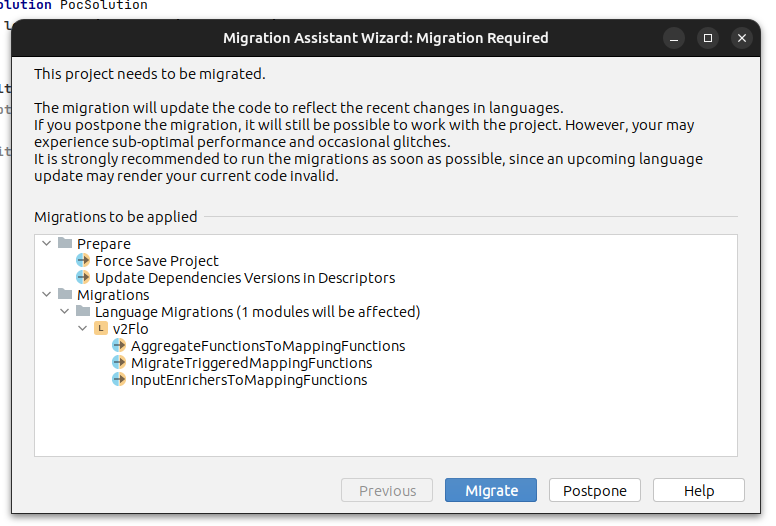
Open your project in MPS and you should be prompted to migrate your solution, click
Migrate.
-
Next if you open your build solution in the YourApplication.build project you should see the
de.itemis.mps.extensionsentry in red. Simply remove this line.

-
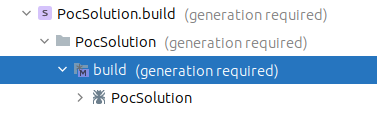
Now in the navigator panel you should see that regeneration of the build script is required:
-
Right click and select
Rebuild Model 'Your Model Name' -
Now rebuild using maven and your project should correctly build.
Generated Code Migration
Input Initiation Port
The DSL now makes reference to the model in which the generated input initiation port exists.
Therefore, the migration utility run in the DSL section will have converted the InputInitiationPort to YourModelNameInitiationPort.
Aggregate Functions & Input Enrichers
The enhanced capabilities as described in the overview section for mapping capabilities have led to some changes in the naming of the generated code.
The migration utility run in the DSL section will have converted all aggregate functions and input enrichers to the new style Mapping Functions. The following table defines the expected changes:
Class Description |
Old Name |
New Name |
Aggregate Function’s Port |
YourFlowAggregateFunctionPort |
YourFlowMappingPort |
Aggregate Function Parameters |
YourAggregateFunctionNameForFlowYourFlowAggregateFunctionParameters |
YourAggregateFunctionNameForFlowYourFlowMappingParameters |
Aggregate Function Output |
YourAggregateFunctionNameForFlowYourFlowAggregateFunctionOutput |
YourAggregateFunctionNameForFlowYourFlowMappingOutput |
Input Enricher’s Port |
YourFlowInputEnricherPort |
YourFlowMappingPort |
Input Enricher Parameters |
YourInputEnricherNameForFlowYourFlowInputEnricherParameters |
YourInputEnricherNameForFlowYourFlowMappingParameters |
Input Enricher Output |
YourInputEnricherNameForFlowYourFlowInputEnricherOutput |
YourInputEnricherNameForFlowYourFlowMappingOutput |
In addition, the migration to the new style Mapping Functions will also change the package names in which the above classes now reside. For example:
-
com.your.project.model_name.flow_name.aggregatefunction.YourAggregateFunctionNameForFlowYourFlowAggregateFunctionOutput;
becomes
-
com.your.project.model_name.mapping.YourAggregateFunctionNameForFlowYourFlowMappingOutput;
|
There is no distinction now between an aggregate function and an input enricher from the generated code viewpoint. Therefore, if your flow had both an aggregate function and an input enricher, previously you would have defined a port for both whereas now a single port will be generated containing all your methods. The |
Remote Models
An important change is now present when using remote models in MPS, so for example if you define your flows in one model and your external domains in a separate model.
Previously all generated code would be generated from the viewpoint of the flow based model. This meant that the implementation of the external domain logic would have to be performed in the flow implementation.
Now however, code is generated according to the model it has been defined in. Imagine you have two models, Model A containing an external domain called 'EXTERNAL_DOMAIN' and Model B containing a flow that uses the external domain.
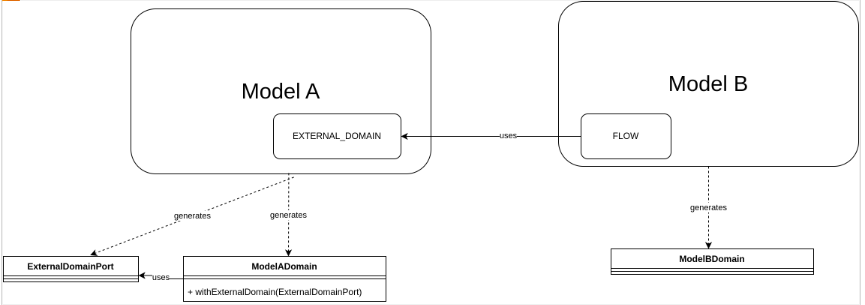
Here the key thing to understand is that the elements in ModelA are generated within the scope of model A and similarly for ModelB. This means that there will now be the two separate model domain classes and BOTH are needed to be implemented in order for the flow to work.
The major benefit of this change is that we can now package and reuse remote models together with their implementations.