Migration Steps for IPF-2024.1.0
Pre-requisites
The 2024.1.0 release has upgraded to Java 17 and MPS v2022.3.1. You’ll need to ensure you have these versions available and installed before upgrading.
Before you start
Tiles preparation
As part of the upgrade, we recommend that you adopt the new tiles approach to DSL configuration. To do this, you’ll need to be able to provide the model and solution names for your project. These can be found by looking in your MPS project:
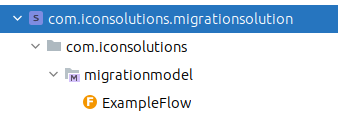
In the screenshot above, the solution name is com.iconsolutions.migrationsolution and the model name is com.iconsolutions.migrationmodel. Make sure to remember to include a package name if defined (like the com.iconsolutions here), and note that case sensitivity is important.
| You can directly copy the solution and model names by right-clicking on them in MPS. |
Java 11 references removal
Any hardcoded Java 11 references in the pom need to be removed before starting the migration process, e.g.:
<properties>
    <maven.compiler.source>11</maven.compiler.source>
    <maven.compiler.target>11</maven.compiler.target>
    <maven.compiler.release>11</maven.compiler.release>
</properties>Migrate to the new ipf-bom
As part of the 2024.1.0 release, we have deployed a new ipf-bom, which provides access to all IPF utilities in a single place. We recommend you switch to using this BOM as part of the migration process. For example, if the current parent of your project is ipf-release-core-bom, you should now use:
<parent>
    <groupId>com.iconsolutions.ipf</groupId>
    <artifactId>ipf-bom</artifactId>
    <version>2024.1.0</version>
</parent>|
The new |
Update the pom configuration for DSL projects
As mentioned above, the structure of the DSL projects has been changed. This provides a number of benefits going forward in regard to simplifying the integration of DSL projects within your application. To migrate, the following steps need to be performed:
-
In your root pom, add the following properties:
<properties>
    <solution.name>com.iconsolutions.migrationsolution</solution.name>
    <model.name>com.iconsolutions.migrationmodel</model.name>
</properties>
Where the <solution.name> and <model.name> values are those described in the Before you start section above.
Update the parent of the domain submodules
The parent of the submodules from the [name of app]-domain module no longer needs to be a special reference to the respective flo-starter-xxx artifacts, and should now just be the 'natural' parent of the module. For example, if your MPS artifacts all live under a module "migration-example-domain" like this:
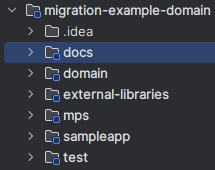
Then the parent for each of the submodules should now look like this:
<parent>
    <groupId>com.iconsolutions.com.iconsolutions.migrationsolution.domain</groupId>
    <artifactId>migration-example-domain</artifactId>
    <version>0.0.1-SNAPSHOT</version>
</parent>
After this change, you no longer need the additional <groupId>…</groupId> tag outside the parent, and so it can be removed.
You can confirm the parent has been updated correctly in each of the submodules by comparing them against the parent in the existing external-libraries submodule.
|
Update dependency version references
Any dependency versions in the submodules that refer to the property flo.version need to be updated to icon-flo.version:
<dependency>
    <groupId>com.iconsolutions.ipf.core.flow</groupId>
    <artifactId>library-dependencies</artifactId>
    <version>${icon-flo.version}</version>
</dependency>
Also, in the test submodule, the flo-test-common dependency version should be changed from project.parent.version to icon-flo.version:
<dependency>
    <groupId>com.iconsolutions.ipf.core.flow</groupId>
    <artifactId>flo-test-common</artifactId>
    <version>${icon-flo.version}</version>
    <type>test-jar</type>
    <scope>test</scope>
</dependency>
Add the relevant tile(s) to the build section of the pom
Next, in each of the submodule poms, we need to add the relevant tile to tell them what to build. To do this we add the following section to the pom:
<build>
    <plugins>
        <plugin>
            <groupId>io.repaint.maven</groupId>
            <artifactId>tiles-maven-plugin</artifactId>
            <version>${tiles-maven-plugin.version}</version>
            <extensions>true</extensions>
            <configuration>
                <tiles>
                    <tile>com.iconsolutions.ipf.core.flow:flo-tilename-tile:${icon-flo.version}</tile>
                </tiles>
            </configuration>
        </plugin>
    </plugins>
</build>
Where we replace the 'tilename' with the appropriate tilename for each of the submodules as defined in the list below:
-
docsusesdocs -
domainusesdomain -
mpsusesmps-plugin -
testusestest -
sampleapp(if applicable) usessampleapp
So, for example, the <tile> tag for the mps submodule should be:
<tile>com.iconsolutions.ipf.core.flow:flo-mps-plugin-tile:${icon-flo.version}</tile>
If your submodule already has a <build> section in the pom.xml (such as the mps submodule), then the tile will need to be added as an additional plugin in this section.
|
|
The above definitions assume that your project is not going to be used as a dependency of another MPS project. If it is, we need to change the instead of just the one defined above. |
Add the required dependencies
Finally, we need to add some additional depedencies to the modules:
The domain submodule requires the following two additions:
<dependency>
    <groupId>com.iconsolutions.ipf.core.flow</groupId>
    <artifactId>flo-starter-domain</artifactId>
</dependency>
<dependency>
    <groupId>com.iconsolutions.ipf.core.flow</groupId>
    <artifactId>flo-starter-domain-test</artifactId>
    <scope>test</scope>
</dependency>
The mps submodule needs this dependency added:
<dependency>
    <groupId>com.iconsolutions.ipf.core.flow</groupId>
    <artifactId>flo-starter-mps</artifactId>
</dependency>
The sampleapp submodule needs this dependency added:
<dependency>
    <groupId>com.iconsolutions.ipf.core.flow</groupId>
    <artifactId>flo-starter-sampleapp</artifactId>
</dependency>
The test submodule needs this dependency added:
<dependency>
    <groupId>com.iconsolutions.ipf.core.flow</groupId>
    <artifactId>flo-starter-test</artifactId>
    <scope>test</scope>
</dependency>
Migration and Updates within MPS
With the changes above completed, you are now ready to perform a standard maven build against your project. This build may fail because the model has not yet been migrated. You may get a build failure such as this:
[ERROR] Failed to execute goal com.iconsolutions.plugins:icon-mps-runner:3.0.4:modelcheck (com.iconsolutions.ipf.core.flow_flo-mps-plugin-base-tile_3.17.0__modelcheck) on project mps: Command execution failed.: Process exited with an error: 255 (Exit value: 255) -> [Help 1]Or a compilation error similar to:
[INFO] --- compiler:3.12.1:testCompile (default-testCompile) @ domain ---
[INFO] Recompiling the module because of changed dependency.
[INFO] Compiling 1 source file with javac [debug parameters release 17] to target/test-classes
[INFO] -------------------------------------------------------------
[ERROR] COMPILATION ERROR :
[INFO] -------------------------------------------------------------
[ERROR] /path/to/domain/src/test/java/com/mycorp/ipf/payments/debtor/debtor_ct/behaviour/DebtorCtBehaviourTest.java:[21,53] package com.mycorp.ipf.payments.debtor.execution.testfw does not exist
To resolve this, open your project in MPS (remembering to now use 2022.3.1) and you should be prompted to migrate your solution, click Migrate.
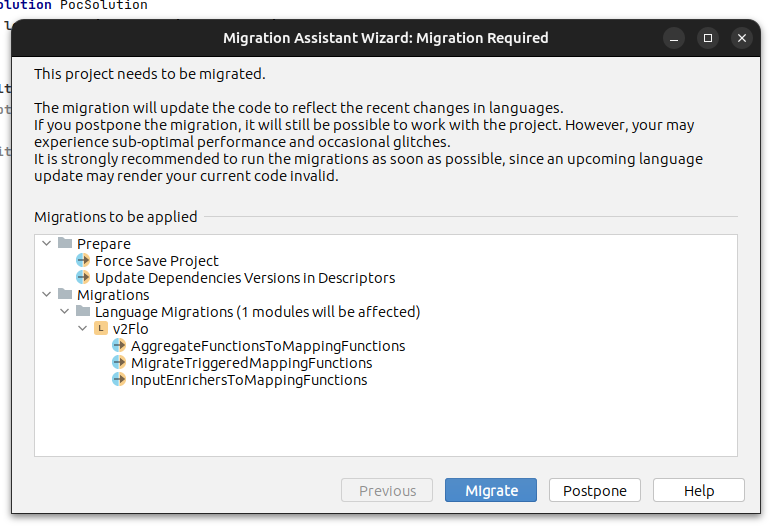
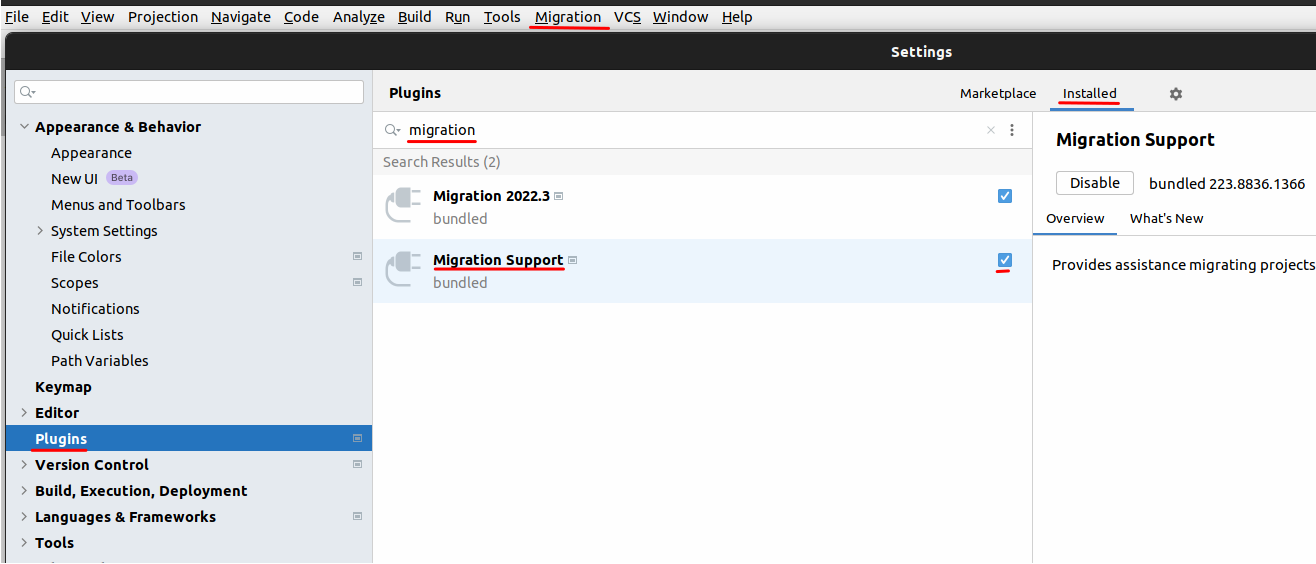
If the Migration Assistant Wizard pop-up doesn’t appear, it’s likely that you don’t have the Migration Support plugin enabled in MPS. This will be apparent if you don’t see Migration in the toolbar. For guidance on how enable this plugin, see the Enable Migration Support plugin in MPS section.
|
In the navigator panel, you should see that regeneration of the build script is required:
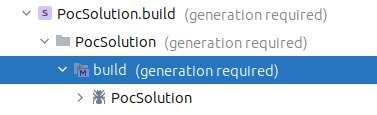
Right click and select Rebuild Model [Your Model Name]. Now rebuild using Maven and your project should correctly build.
| If your domain model is large, the domain build may fail with a Stack Overflow exception. For guidance on how to fix this issue, see the Fix Stack Overflow build exception section. |
|
Build scripts are now only required for projects that are required to be themselves used as dependencies in other MPS projects. If this is not the case for your project, you can simply delete the build solution from your MPS project. |
Java17 Updates
Removal of JUnitReportingRunner
The Test Framework has been upgraded to use a newer version of JBehave, and this has allowed for the removal of
com.github.valfirst.jbehave.junit.monitoring.JUnitReportingRunner.
When compiling against the new 2024.1.0 BOM, your Test Framework runners might fail to compile if they are annotated with:
@RunWith(JUnitReportingRunner.class)This annotation is no longer required and can be removed.
Changes as a result of Spring 6/Spring Boot 3 upgrade
One of the main goals of the IPF Java 17 upgrade was to be able to migrate to Spring 6 and Spring Boot 3 to benefit from faster vulnerability and CVE fixes. Spring projects have made a number of breaking changes that are unrelated to IPF, but which you may encounter as part of any such Spring upgrade:
-
Moving from Java EE (
javax.*) to Jakarta EE (jakarta.*) internally. Here’s a table that may be helpful:Component Package was Package now Jakarta Servlet
javax.servlet.*jakarta.servlet.*Jakarta Validation
javax.validation.*jakarta.validation.*Jakarta Annotations
javax.annotation.*jakarta.annotation.*Jakarta Messaging
javax.jms.*jakarta.jms.* -
Spring Web: Changing the default trailing slash matching behaviour to not be enabled by default (link)
-
MongoDB Client 4.11.x: this allows using features introduced up to and including MongoDB 7.0 (and is backward compatible to 3.6)
-
Spring has removed the
LocalVariableTableParameterNameDiscovererin 6.1. This means that Spring will no longer look into theLocalVariableTableas a hint. This might result in the SpringApplicationContextnow failing to start with errors similar to:Caused by: org.springframework.beans.factory.NoUniqueBeanDefinitionException: No qualifying bean of type 'com.myorg.MyBean' available: expected single matching bean but found 2: myBean1,myBean2To overcome this, you will need to add this to your root POM to generate method parameter metadata for reflection:
<plugin>
    <groupId>org.apache.maven.plugins</groupId>
    <artifactId>maven-compiler-plugin</artifactId>
    <configuration>
        <parameters>true</parameters>
    </configuration>
</plugin>
See Parameter Name Retention for more information on this topic.
-
Spring has also removed support for registering auto-configurations in
spring.factoriesusing theorg.springframework.boot.autoconfigure.EnableAutoConfigurationkey, in favour of using theMETA-INF/spring/org.springframework.boot.autoconfigure.AutoConfiguration.importsfile introduced in Spring Boot 2.7.
For more information on Spring 6+/Spring Boot 3+, consult the Spring Boot 3.0 Release Notes and Spring Boot 3.0 Migration Guide.
Appendix
Enable Migration Support plugin in MPS
To enable the Migration Support plugin in MPS, go to File > Settings > Plugins and search for migration in your list of Installed plugins. Tick the Migration Support plugin to enable it.
Fix Stack Overflow build exception
If your domain module build fails due to a Stack Overflow exception, add the following plugin to the <build> section of the mps submodule pom.xml:
<plugin>
    <groupId>com.iconsolutions.plugins</groupId>
    <artifactId>icon-mps-runner</artifactId>
    <version>3.0.4</version>
    <configuration>
        <vmArgs>
            <vmArg>-Xss256m</vmArg>
        </vmArgs>
    </configuration>
</plugin>