Getting Started with IPF CSM Reachability
Pre-Requisites
This starter guide to using CSM Reachability assumes you have access to the following:
-
An CSM Reachability Server - For server setup - check CSM reachability deployment documentation
-
A flow which is preloaded with the IPF Business Functions. You can find more details about how to add business functions to your flow here.
|
Requires V2 of CSM Reachability. |
|
IPF Reachability floclient supports a subset of CSM Reachability features at the moment. Check this page for a full list of currently supported business functions. |
Integrating with a flow
The IPF reachability business function is designed to allow easy interaction between an IPF process flow and the IPF CSM reachability application.
Using a business function within your flow
If using an existing project that has not been configured to use the ipf reachability business functions, then it is simple to import them.
1. Add The ipf reachability solution and model to your MPS solution and model
From within the flow you want to add the ipf reachability to, press Ctrl+R twice. Search for and select the IPF Reachability model from the search bar that opens.

Select OK in the pop up window asking if you would like to import the modules automatically.
2. Use the validate intra entity reachability function within your flow
Use the Validate Intra Entity Reachability function within your flow in the same way as you would for a domain function you have defined yourself.

You will need to define the input behaviour for all Validate Intra Entity Reachability response codes and map to your chosen event selection.
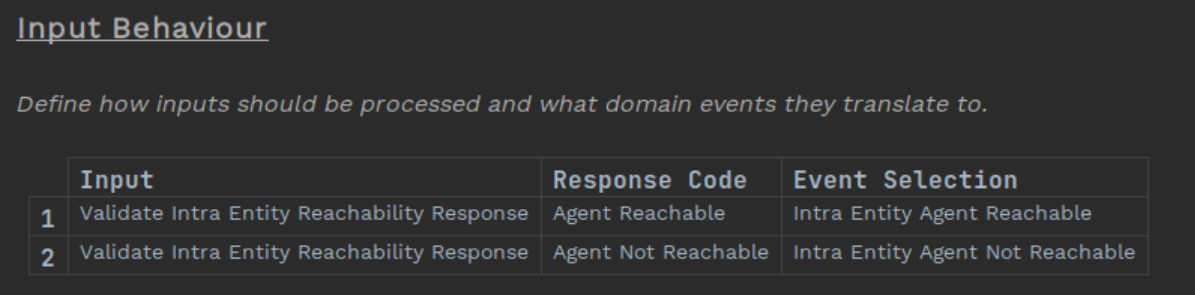
You can find more details on using domain functions at DSL 3 - Using a Domain Function. This shows all the associated MPS based changes to fully use a function within your flow.
3. Add the ipf-reachability-floclient-service dependency
Add the ipf-reachability-floclient-service as a dependency to the module that includes the bean for your domain declaration. If you generated your project from the icon archetype this will be named <your-project-name>-service
<dependency>
    <groupId>com.iconsolutions.ipf.businessfunctions.reachability</groupId>
    <artifactId>ipf-reachability-floclient-service</artifactId>
</dependency>
From a configuration standpoint, we simply need to specify where our CSM reachability server implementation is running. This is done by setting the following properties:
ipf.csm-reachability-api.http.client {
  port = <your-port
  host = "<your-host>"
}| More information on IPF CSM Reachability configuration can be found here. |