Getting Started with HTM
Pre-Requisites
This starter guide assumes you have access to the following:
-
An HTM Server - this is available as a docker image from Icon. Details are <here>
-
The Operational Dashboard - this is available as a docker image from Icon. Details on how to download and use the operational dashboard are <here>
-
A flow which is pre-loaded with the IPF Business Functions. You can find more details about how to add business functions to your flow <here>.
Integrating with a flow
The HTM business function is designed to allow easy interaction between an IPF process flow and the HTM application. It provides the capability to define the core characteristics of a task within the DSL such that tasks can be created and bespoke response codes returned from any point in your flow.
Defining an HTM Task
To define a task for HTM, we need to define a 'HTM Request' within our flow. To do this we use the bespoke HTM language. This is available in any model that has been provided access to the business functions aggregator.
To use this, we start by creating a new 'HTM Request Library' like other DSL components except that it will come from the htm.lang folder. When created we should see:
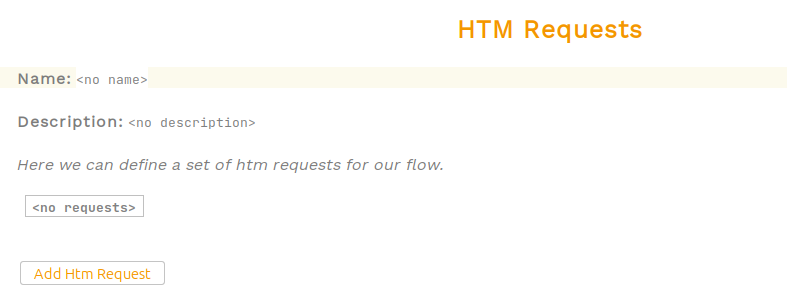
Now we can define the name and give a description to our library. Then we can add a new HTM Request - each HTM request represents a different task type that we want to send to the HTM Server. There are a number of properties to provide in defining the request:
-
Name - this will be provided to HTM as the 'task type'.
-
Description - informational only.
-
Priority - this will be provided to HTM as the 'task priority'. It is an integer value.
-
Required Approvals - this will be provided to HTM as the |required approvals for the task|.
-
Ignore Tech Response - this allows the flow to hook into the HTTP response of the initial task creation request. If this is not required, it can be ignored and only the final completion result will be returned to the flow.
-
Response Codes - this is the result outcome that will be available within the HTM application.
-
Business Data - this is the business data that will be packaged and sent to HTM.

Using an HTM Task
An HTM Task is used exactly as a more traditional external domain request / response pair. The task is created simply by calling the HTM Request as an action at any point in the flow.

Then we can just use the resulting matching input.

Providing an implementation
Dependencies
Once we’ve set up our flow integration, we need to provide the implementation. We do this simply by adding the following dependency:
<dependency>
  <groupId>com.iconsolutions.ipf.businessfunctions.htm</groupId>
  <artifactId>ipf-human-task-manager-floclient-service</artifactId>
</dependency>
Configuration
From a configuration standpoint, we simply need to specify where our HTM server implementation is running. This is done by setting the following properties:
ipf.htm.request-reply.starter {
  http.client {
    host = "localhost"
    port = 8083
  }
  register-task.enabled = true
  cancel-task.enabled = false
}
This assumes the following key default properties, which can also be changed:
| Property Name | Default Value |
|---|---|
ipf.htm.request-reply.starter.approve-task.enabled |
false |
ipf.htm.request-reply.starter.assign-task.enabled |
false |
ipf.htm.request-reply.starter.call-timeout |
2s |
ipf.htm.request-reply.starter.execute-task.enabled |
false |
ipf.htm.request-reply.starter.http.client.endpoint-url |
/tasks |
ipf.htm.request-reply.starter.reject-task.enabled |
false |
ipf.htm.request-reply.starter.resiliency-settings.backoff-multiplier |
2 |
ipf.htm.request-reply.starter.resiliency-settings.enabled |
true |
ipf.htm.request-reply.starter.resiliency-settings.initial-retry-wait-duration |
1s |
ipf.htm.request-reply.starter.resiliency-settings.max-attempts |
5 |
ipf.htm.request-reply.starter.resiliency-settings.minimum-number-of-calls |
50 |
ipf.htm.request-reply.starter.resiliency-settings.reset-timeout |
1s |
ipf.htm.request-reply.starter.resiliency-settings.retry-on-failure-when |
true |
ipf.htm.request-reply.starter.resiliency-settings.retry-on-result-when |
false |
ipf.htm.request-reply.starter.resiliency-settings.retryable-status-codes |
[500, 502, 503, 504] |
ipf.htm.request-reply.starter.task-details.enabled |
false |
ipf.htm.request-reply.starter.task-history.enabled |
false |
ipf.htm.request-reply.starter.task-summaries.enabled |
false |
htm.kafka.consumer.kafka-clients.group.id |
htm-task-closed-notification-group |
htm.kafka.consumer.restart-settings.max-backoff |
5s |
htm.kafka.consumer.restart-settings.max-restarts |
5 |
htm.kafka.consumer.restart-settings.max-restarts-within |
10m |
htm.kafka.consumer.restart-settings.min-backoff |
1s |
htm.kafka.consumer.restart-settings.random-factor |
0.25 |
htm.kafka.consumer.topic |
HTM_TASK_CLOSED_NOTIFICATION |
Server Setup
To setup the HTM Server, we supply the following docker setup.
human-task-manager-app:
image: registry.ipf.iconsolutions.com/human-task-manager-app:<version>
container_name: human-task-manager-app
ports:
  - "8083:8080"
volumes:
  - ./config/human-task-manager-app:/human-task-manager-app/conf
  - ./logs:/ipf/logs
user: "1000:1000"
environment:
  - IPF_JAVA_ARGS=-Dma.glasnost.orika.writeClassFiles=false -Dma.glasnost.orika.writeSourceFiles=false -Dconfig.override_with_env_vars=true
depends_on:
  - ipf-mongo
  - kafka
healthcheck:
test: [ "CMD" "curl" "http://localhost:8080/actuator/health" ]
This setup requires a matching configuration file:
flow-restart-settings {
  min-backoff = 1s
  max-backoff = 5s
  random-factor = 0.25
  max-restarts = 5
  max-restarts-within = 10m
}

ipf.mongodb.url = "mongodb://ipf-mongo:27017/ipf-htm"

event-processor {
  restart-settings {
    min-backoff = 500 millis
    max-backoff = 1 seconds
  }
}

akka.actor.serialize-messages = on
This assumes the following default properties:
| Property Name | Default Value |
|---|---|
ipf.application.name |
ipf-flow |
ipf.behaviour.retries.initial-timeout |
1s |
ipf.connector.default-receive-connector.manual-start |
true |
ipf.connector.default-receive-connector.receiver-parallelism-per-partition |
1 |
ipf.connector.default-receive-connector.receiver-parallelism-type |
ORDERED_PARTITIONED |
ipf.connector.default-receive-connector.resiliency-settings.attempt-timeout |
30s |
ipf.connector.default-receive-connector.resiliency-settings.backoff-multiplier |
2 |
ipf.connector.default-receive-connector.resiliency-settings.enabled |
true |
ipf.connector.default-receive-connector.resiliency-settings.initial-retry-wait-duration |
1s |
ipf.connector.default-receive-connector.resiliency-settings.max-attempts |
1 |
ipf.connector.default-receive-connector.resiliency-settings.minimum-number-of-calls |
1 |
ipf.connector.default-receive-connector.resiliency-settings.reset-timeout |
1s |
ipf.connector.default-receive-connector.resiliency-settings.retry-on-failure-when |
true |
ipf.connector.default-receive-connector.resiliency-settings.retry-on-result-when |
false |
ipf.connector.default-resiliency-settings.attempt-timeout |
30s |
ipf.connector.default-resiliency-settings.backoff-multiplier |
2 |
ipf.connector.default-resiliency-settings.enabled |
true |
ipf.connector.default-resiliency-settings.initial-retry-wait-duration |
1s |
ipf.connector.default-resiliency-settings.max-attempts |
1 |
ipf.connector.default-resiliency-settings.minimum-number-of-calls |
1 |
ipf.connector.default-resiliency-settings.reset-timeout |
1s |
ipf.connector.default-resiliency-settings.retry-on-failure-when |
true |
ipf.connector.default-resiliency-settings.retry-on-result-when |
false |
ipf.connector.default-send-connector.call-timeout |
30s |
ipf.connector.default-send-connector.manual-start |
false |
ipf.connector.default-send-connector.max-concurrent-offers |
500 |
ipf.connector.default-send-connector.parallelism |
500 |
ipf.connector.default-send-connector.parallelism-per-partition |
1 |
ipf.connector.default-send-connector.queue-size |
50 |
ipf.connector.default-send-connector.resiliency-settings.attempt-timeout |
30s |
ipf.connector.default-send-connector.resiliency-settings.backoff-multiplier |
2 |
ipf.connector.default-send-connector.resiliency-settings.enabled |
true |
ipf.connector.default-send-connector.resiliency-settings.initial-retry-wait-duration |
1s |
ipf.connector.default-send-connector.resiliency-settings.max-attempts |
1 |
ipf.connector.default-send-connector.resiliency-settings.minimum-number-of-calls |
1 |
ipf.connector.default-send-connector.resiliency-settings.reset-timeout |
1s |
ipf.connector.default-send-connector.resiliency-settings.retry-on-failure-when |
true |
ipf.connector.default-send-connector.resiliency-settings.retry-on-result-when |
false |
ipf.connector.default-send-connector.send-message-association |
true |
ipf.connector.event-bus-sender-dispatcher.executor |
thread-pool-executor |
ipf.connector.event-bus-sender-dispatcher.thread-pool-executor.fixed-pool-size |
4 |
ipf.connector.event-bus-sender-dispatcher.type |
Dispatcher |
ipf.connector.mapping-dispatcher.executor |
fork-join-executor |
ipf.connector.mapping-dispatcher.fork-join-executor.parallelism-factor |
1 |
ipf.connector.mapping-dispatcher.fork-join-executor.parallelism-max |
16 |
ipf.connector.mapping-dispatcher.fork-join-executor.parallelism-min |
4 |
ipf.connector.mapping-dispatcher.throughput |
10 |
ipf.connector.mapping-dispatcher.type |
Dispatcher |
ipf.htm.bulk.aggregate.request-timeout |
PT5S |
ipf.htm.bulk.max-size |
1000 |
ipf.htm.bulk.tag-configuration.parallelism |
4 |
ipf.htm.bulk.tag-configuration.tag-prefix |
[tag] |
ipf.metrics.histogram.buckets |
[50ms, 100ms, 1s, 2s, 3s, 5s, 8s, 13s] |
ipf.metrics.histogram.max-duration |
30s |
ipf.metrics.histogram.min-duration |
1s |
ipf.mongodb.url |
mongodb://ipf-mongo:27017/ipf-htm |
ipf.read-side.enabled |
true |
ipf.system-events.source |
127.0.0.1 |
htm.kafka.producer.kafka-clients.client.id |
htm-task-closed-notification-client |
htm.kafka.producer.restart-settings.max-backoff |
5s |
htm.kafka.producer.restart-settings.max-restarts |
5 |
htm.kafka.producer.restart-settings.max-restarts-within |
10m |
htm.kafka.producer.restart-settings.min-backoff |
1s |
htm.kafka.producer.restart-settings.random-factor |
0.25 |
htm.kafka.producer.topic |
HTM_TASK_CLOSED_NOTIFICATION |
htm.task-idempotency-cache.expiry |
1d |