RES1 - Resiliency and Retry Settings (HTTP)
|
Getting Started
The tutorial step uses the If at anytime you want to see the solution to this step, this can be found on the |
In CON3 - Writing your own connector (HTTP), we connected our application with an external test fraud systems. This gave us an synchronous connection to an external system which is inherently less stable than using Kafka or JMS. And our landscape at this point in the tutorials looks like;
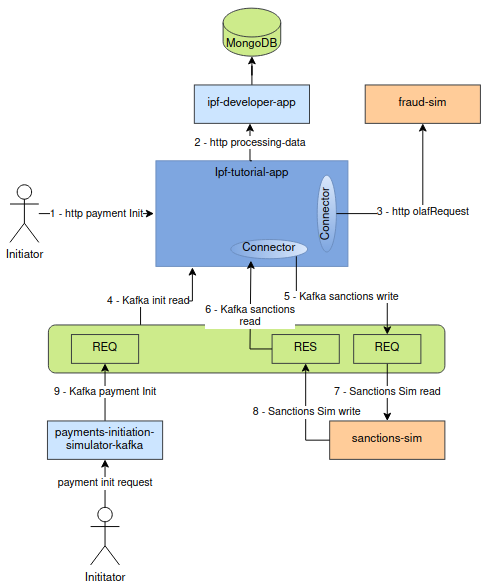
In this tutorial we are going to look at how we can control the resiliency and retry settings in a best effort to allow the HTTP call to be successful. We will do this by simulating failures of the fraud-sim such that HTTP calls to that service will fail.
Starting the Application
If the environment is not running, we need to start up our docker environment. Start up the application as previously (instructions are available in Reviewing the initial application if you need a refresher!)
This should start all applications and simulators. We can check whether the containers are started and healthy using the command:
docker ps -aValidate BAU Processing
Lets check everything is working BAU first will all simulator end points up and functioning, send in a payment:
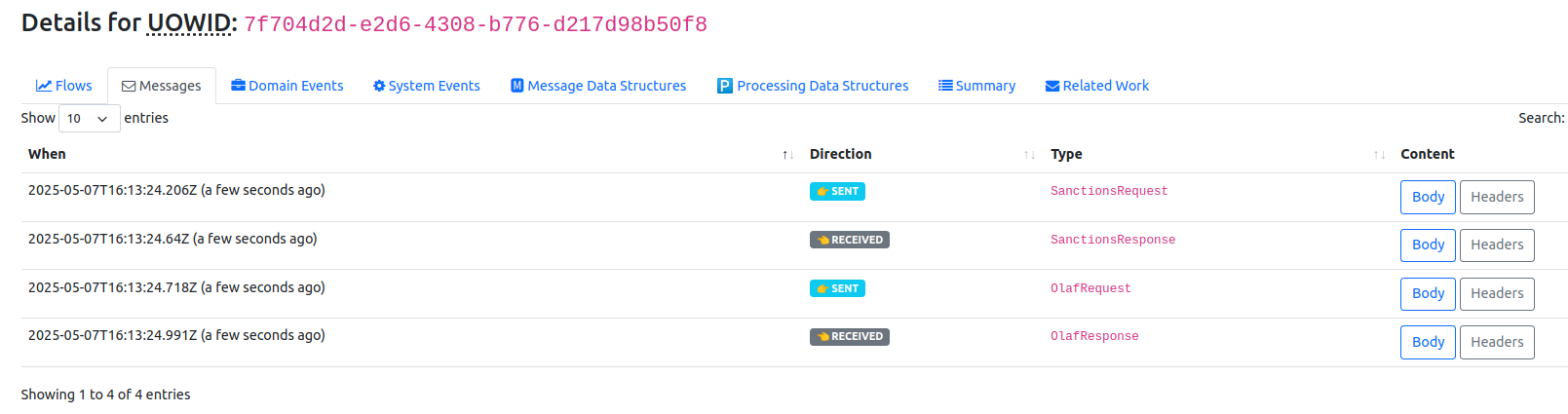
curl -X POST localhost:8080/submit -H 'Content-Type: application/json' -d '{"value": "25"}' | jqChecking the payment in the Developer App we can see the messages being sent and spot the OlafRequest & OlafResponse messages to the fraud-sim (search by unit of work id, click view, click ipf tutorial flow, click messages) then we see:
Failure Scenario Test
Assuming all is well with the BAU processing, lets test the scenario where the fraud-sim is down and OlafResponses are not coming back. The easiest way to do this is to stop the fraud-sim container:
docker stop fraud-simOnce the container is down we can send in another payment request:
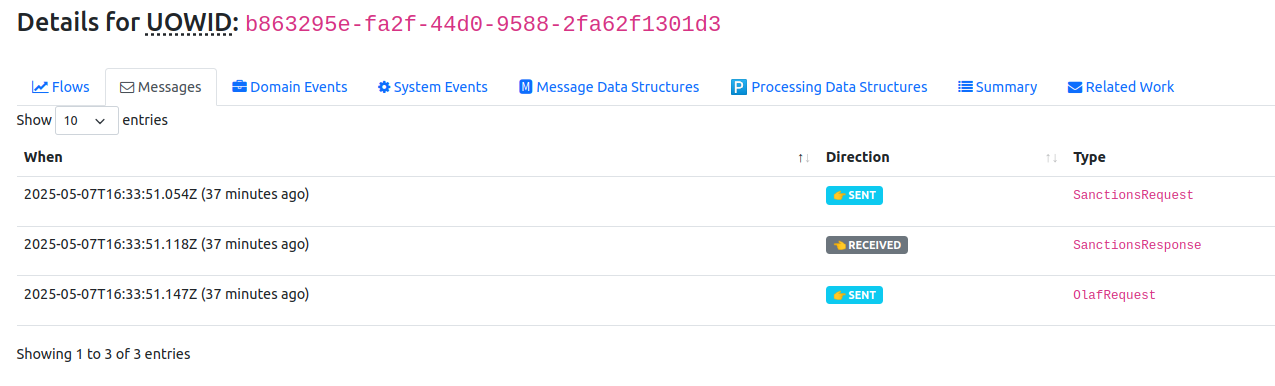
curl -X POST localhost:8080/submit -H 'Content-Type: application/json' -d '{"value": "24"}' | jqChecking the payment in Developer App again you should see the OlafRequest being sent but not OlafResponse coming back and the status of the transaction itself shows as REJECTED (this is because the request has timed out and been moved to a rejected state):

Finally from the Developer App we can see the system event which has been generated for this failure:
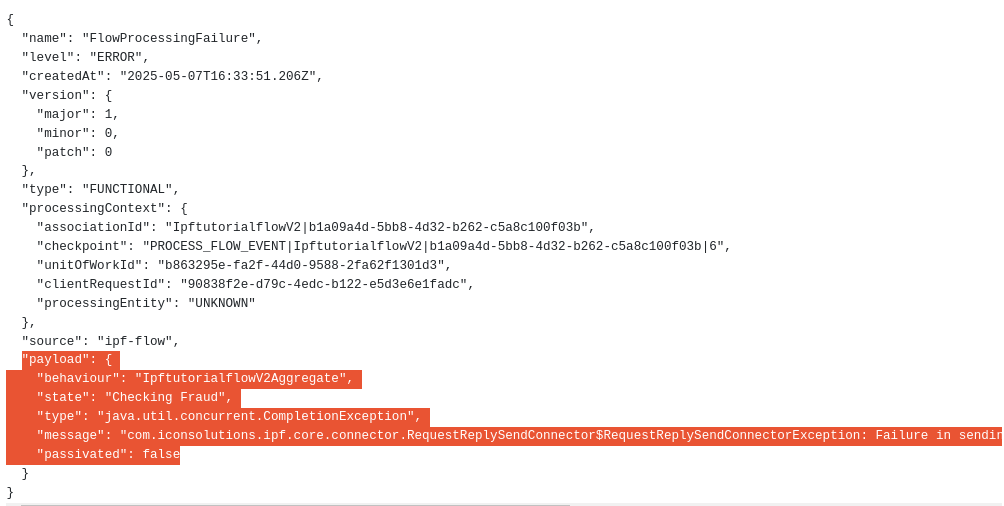
Its also worth checking the container logs to see the exception and the specific errors (this will become important as we configure the service to retry the HTTP call). You will note there are no more errors, processing is effectively stopped with our current configuration:
07-05-2025 17:33:51.180 [ipf-flow-akka.actor.default-dispatcher-58] ERROR c.i.ipf.core.connector.SendConnector.lambda$send$12 - Sending via Fraud completed exceptionally for ProcessingContext(associationId=AssociationId(value=IpftutorialflowV2|b1a09a4d-5bb8-4d32-b262-c5a8c100f03b), checkpoint=Checkpoint(value=PROCESS_FLOW_EVENT|IpftutorialflowV2|b1a09a4d-5bb8-4d32-b262-c5a8c100f03b|6), unitOfWorkId=UnitOfWorkId(value=b863295e-fa2f-44d0-9588-2fa62f1301d3), clientRequestId=ClientRequestId(value=90838f2e-d79c-4edc-b122-e5d3e6e1fadc), processingEntity=ProcessingEntity(value=UNKNOWN))
java.util.concurrent.CompletionException: java.lang.IllegalStateException: No closed routees for connector: Fraud. Calls are failing fast
...
..
.
Caused by: java.lang.IllegalStateException: No closed routees for connector: Fraud. Calls are failing fast
	at com.iconsolutions.ipf.core.connector.resiliency.ResiliencyPassthrough.sendResiliently(ResiliencyPassthrough.java:125)
	... 40 common frames omitted
Caused by: akka.stream.StreamTcpException: Tcp command [Connect(localhost/<unresolved>:8089,None,List(),Some(10 seconds),true)] failed because of java.net.ConnectException: Connection refused
Caused by: java.net.ConnectException: Connection refused
Configure Timeout and Resiliency Settings
As things stand with the tutorial application it is not proactively configured for retry and has not set the resiliency settings to protect against intermittent errors on the HTTP synchronous connection.
Action Timeout considerations
As will have noted the Fraud Request timed out and the flow progressed to a terminal state of Rejected. In DSL 7 - Handling Timeouts we configured the Action Timeout to be 2 seconds.
For the purposes of this tutorial we want to give that action a little longer to complete normally (enough time for us to simulate an intermittent failure and allow resiliency settings to retry the requests). To do this we must increase the setting in our resources/application.conf file:
flow.IpftutorialflowV2.CheckingFraud.CheckFraud.timeout-duration=60sConfigure Resiliency Setting for Retry
It is possible to define resiliency settings to retry the HTTP call within a defined period and at configurable intervals. The default configuration is shown below, including both the connector settings and the resiliency settings.
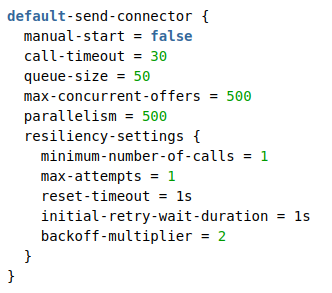
Now we’ll update the Connectors resiliency max-attempts to be 6 which is intended to give sufficient retries of the HTTP call to allow the fraud-sim service to recover (attempts of 6, together with the backoff-multiplier of 2 seconds should give 5 attempts before the call-timeout of 30 seconds)
You’ll add our configuration into our application configuration file (resources/application.conf):
fraud {
  transport = http
  http {
    client {
      host = "fraud-sim"
      port = "8080"
      endpoint-url = "/v1"
    }
  }
  connector {
    resiliency-settings {
      max-attempts = 6
    }
  }
}
Failure Scenario Test 2
Now we can apply this configuration by rebuilding the ipf-tutorial-app container (mvn clean install -rf :ipf-tutorial-app) and starting it, then running through the following test steps:
GIVEN the fraud-sim is stopped && ipf-tutorial-app has resiliency settings to retry HTTP calls
WHEN a payment is initiated && the fraud-sim recovered within the 30 second connector timeout
THEN we the payment will complete processing with delay and retries evident in the logs
docker stop fraud-sim

curl -X POST localhost:8080/submit -H 'Content-Type: application/json' -d '{"value": "23"}' | jq
Wait 5 seconds (this will allow the Connector to retry).
docker start fraud-simIf you are observing the ipf-tutorial-app logs (change the resources/logback.xml for ipf-tutorial-app to have <logger name="com.iconsolutions.ipf" level="DEBUG"/> ) and you should see retry entries like (note - this is the decision to retry the actual retry happens once the backoff period has expired):
07-05-2025 17:57:51.784 [ipf-flow-akka.actor.default-dispatcher-35] WARN  c.i.i.c.c.t.HttpConnectorTransport.lambda$processReceivedResponse$da95b82c$1 - Failure reply for association ID [UnitOfWorkId(value=07650576-8664-422b-a7d1-98635c767865)] with exception [OutgoingConnectionBlueprint.UnexpectedConnectionClosureException: The http server closed the connection unexpectedly before delivering responses for 1 outstanding requests] and message [TransportMessage(, httpStatusCode -> 500 Internal Server Error)]

07-05-2025 17:57:51.790 [ipf-flow-akka.actor.default-dispatcher-35] DEBUG c.i.i.c.c.r.ResiliencySettings.lambda$resolveRetryOnSendResultsWhen$6 - retryOnResult decided to retry this attempt since it was a failure: DeliveryReport(outcome=FAILURE, deliveryException=akka.http.impl.engine.client.OutgoingConnectionBlueprint$UnexpectedConnectionClosureException: The http server closed the connection unexpectedly before delivering responses for 1 outstanding requests)
Once the backoff period has passed the actual retry will take place:
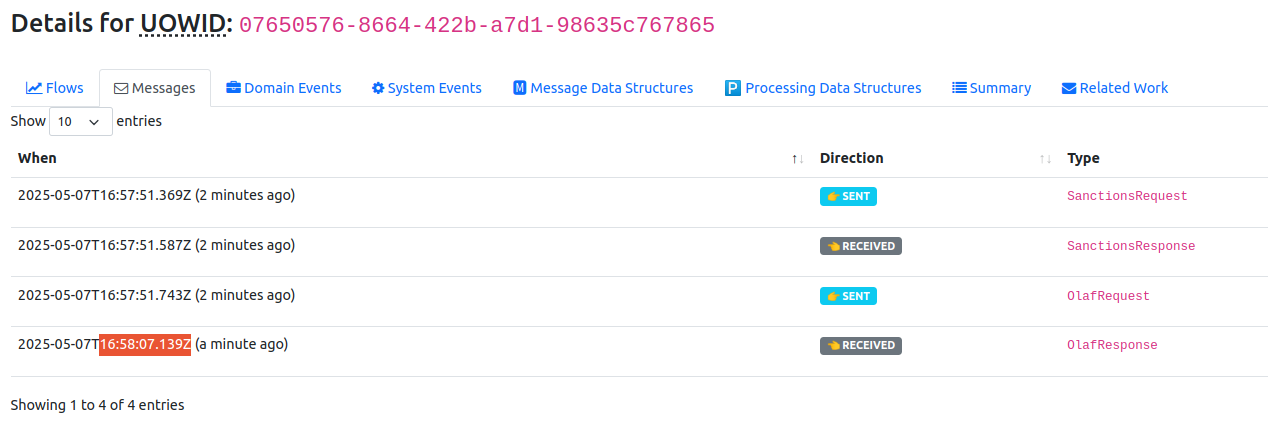
07-05-2025 17:57:54.803 [pool-5-thread-1] DEBUG c.i.i.c.c.r.ResiliencyPassthrough.sendViaTransport - Calling 07650576-8664-422b-a7d1-98635c767865 : using OlafRequestReplyHttpConnectorTransportChecking the payment in Developer App again you should see the OlafRequest being sent, but the success response in the Messages tab appears after the delay (approximately 15 seconds).
-
You can flexibly configure the retries by thinking about the backoff-multiplier & the initial-retry-wait-duration. For example
| initialRetryWaitDuration | backoffMultiplier | First 5 attempt intervals |
|---|---|---|
1 |
2 |
1, 2, 4, 8, 16 |
5 |
2 |
5, 10, 20, 40, 80 |
1 |
5 |
1, 5, 25, 125, 625 |
-
This retry happened within the 30 seconds connector timeout. Thus you should also be considering the call-timeout in conjunction with the resiliency settings.
-
As the tutorial is currently written, if the retry is not a success within that 60 seconds this will return to the flow and the fraud check won’t have been completed.
-
This is a good example of something which is short term transient and resolves itself quickly. Where that is not the case we have a number of options to configure additional transport end points, to "retry" from the flow by defining appropriate business logic in the IPF DSL.
-
We also have the options to react differently to actual business responses (using retryOnResultWhen), to retry on certain business error codes returned from the called application. But this should be balanced with how much logic you want at the connector level versus within the flow logic.
-
The resiliency component is implemented with resilience4j. See docs on the Resilience4j framework for more information on these settings and behaviours.